-
Daz Studio 4.20[.0.x] Pro, General Release! (*UPDATED*)
Zarquen said:
is there any way to download the update without the daz content central? i'm the only one who manage the files in my pc, i don't let any machine do such things :-)
@Zarquen Besides Daz Central, you can also download DS manually by typing Daz Studio 4.X Pro into your Product Library on Daz3D.com and downloading from there:
https://www.daz3d.com/downloader/customer/files#prod_13176Or you can download DS from the Daz Install Manager (DIM):
https://www.daz3d.com/install-manager-info -or- https://www.daz3d.com/get_install_managerDaz Studio 4.20[.0.x] Pro, General Release! (*UPDATED*)is there any way to download the update without the daz content central? i'm the only one who manage the files in my pc, i don't let any machine do such things :-)
UltraScenery - new territory [Commercial]pighelmet said:
How did you install Daz Studio - with DIM or Daz Central?
I used Daz Central at first, but quickly realized that it was hopeless for installing a large amount of content. I have relogged into DIM using my name (with the same email address), and it no longer says DazCentral. I'm not sure why it ever did. The available content seems not to have changed. Could installation with Daz Central be to blame?
I've never used Daz Central, but I doubt that it is the cause of the problem. It is basically just DIM dumbed down, as I understand it.
Did you restart Daz Studio after disabling the plugins? I don't know if that is necessary or not, but it is worth a try. Daz Studio might keep them in memory until you restart it. I don't know.
Let me know what happens when you uninstall all of those plugins that you only disabled in the recent test. I'd recommend that you:
- shut down Daz Studio,
- wait for the Windows Task Manager to say that the process is no longer running,
- uninstall the plugins,
- start Daz Studio.
- check the About Installed Plugins and be sure none of them are listed (just in case there is a second installation, like Daz Connect that you are unaware of).
- Run UltraSceneCreator and see what happens
UltraScenery - new territory [Commercial]How did you install Daz Studio - with DIM or Daz Central?
I used Daz Central at first, but quickly realized that it was hopeless for installing a large amount of content. I have relogged into DIM using my name (with the same email address), and it no longer says DazCentral. I'm not sure why it ever did. The available content seems not to have changed. Could installation with Daz Central be to blame?
AIUTO...CHI CONOSCE L’ITALIANO? PARTE TREDICIAnfy said:
Ma sì, anch'io uso DIM a volte, e anche Connect. Dipende dal contesto, Central è utile per una panoramica della propria libreria senza pretesa - qui Imago ha ragione - di esaustività.
***
conviene scaricare sempre gli eseguibili di GOZ e DS dal sito e metterli in un posto sicuro, quindi fallo perchè un giorno ci sarà una .21 o che altro :)
Ottimo consiglio, però temo che ci metterei settimane e mesi (non ho capito il riferimento a una ".21"
 ). Magari un po' alla volta.
Domanda spero non stupida: ma non basta fare il backup della cartellona My DAZ3D Library?
intendevo una eventuale nuova versione :)
i contenuti, cioè il Library è indipendente dalla versione quindi il backup non è obbligatorio (ma sempre una buona cosa)
io ho separato la mia roba da quella comprata e da quella di default(c'è uno zip nella pagina di download di daz stduio,(default content o roba cosi) 3 cartelle praticamente e le modifiche al comprato le tengo nel mio
cosi puoi sempre resettare tutto e in casi estremi puoi sempre riscaricare tutto il comprato (non oso pensare ad una eventualità del genere lol)
e il backup lo faccio solo della mia roba
 Ghost Lights - What's happening, and what's next.
Leana said:
UHF said:
Leana said:
Aldor64 said:
Even if NVidia decided to make significant Iray changes it was up to DAZ to make an ahead announcement in timeThere was an announcement ahead in time. Daz released several betas using a version of Iray where ghost lights didn't work. The problem was discussed at length in the 3 months since the first of those betas was introduced. There was also an announcement recently that the latest of those betas would soon turn into a general release and people should backup their previous versions installers.
Obviously, people don't read those.
That's really not nice for anyone official at Daz to say. Daz has been pushing its auto install whatever.. forever. (DazConnect?) It auto magically installs everything for better or for worse (there are complain threads).
I'm unusual in that I manually download and backup and install all products as that has always been the way with Daz Studio. (This usually gets like a blank response from Daz who seem to forget that this is how large swaths of the customer base do, and always have, used Daz.)
So.. Now people need to manually backup some products (list please.. this affects more than just Ghost Lights) set them aside, and now wait for solutions. Or take a step back, and learn how to do things manually?
Nice...
Older versions of DS are not available anymore once a new version is released and the only way to rollback is to backup your installers. That might not be what people would like but that has been the case since the first version of DS and I doubt it will change.
Giving a heads up that a new version was coming so people could backup the old one if they had not done so already was actually rather nice, there usually isn't any notice.And nothing installs updates to Daz Studio automatically without your consent.
Both DIM and Central will list the new version as an update. This is the time to make copies of the currently installed version before downloading the updates. The file names are IM000<sku>; you can find the SKU by hovering the mouse pointer over the product entry in DIM - where it is called Product ID.
AIUTO...CHI CONOSCE L’ITALIANO? PARTE TREDICIMa sì, anch'io uso DIM a volte, e anche Connect. Dipende dal contesto, Central è utile per una panoramica della propria libreria senza pretesa - qui Imago ha ragione - di esaustività.
***
conviene scaricare sempre gli eseguibili di GOZ e DS dal sito e metterli in un posto sicuro, quindi fallo perchè un giorno ci sarà una .21 o che altro :)
Ottimo consiglio, però temo che ci metterei settimane e mesi (non ho capito il riferimento a una ".21"
). Magari un po' alla volta.Domanda spero non stupida: ma non basta fare il backup della cartellona My DAZ3D Library?
AIUTO...CHI CONOSCE L’ITALIANO? PARTE TREDICIPer il momento mi sa che resto con la versione attuale, per la faccenda del volumetrico in realtà ho giàù diversi prodotti che funzionano più che bene per cui se è solo quella la novità faccio tranquillamente a meno.
Io uso entrambi, sia DIM che DAZ Central. Sarà che DIM lo uso da sempre ma lo trovo molto comodo, invece l'altro lo uso per scorrere nella libreria della roba che ho acquistato perché spesso trovo roba che avevo dimenticato di avere
 UltraScenery - new territory [Commercial]
@pighelmet I haven't reviewed the plugin lists yet, but what is that DazCentral account name in your DIM screen? Have you been using Daz Central as well as DIM? Normally what appears in that space is your Daz account name. For example, mine says barbult.
How did you install Daz Studio - with DIM or Daz Central?
Noir Alley won't install?I'm new to DAZ and bought some stuff on the president's day sale, and most of it installs just fine from Daz Central. However, one architectural file, Noir Alley, won't install, even though it appears like the others in DAZ Central. It begins to install, then snaps back to the uninstalled status. Any ideas on what to do about this?
Never mind... I tried again and this time it worked... I tried the same button a dozen times before, but as soon as I post a question, it works...
Can not uninstall Daz 3D! It's A Complete Mess.In Daz Central setting it shows my base path location as C:/
Daz Studio install location shows as C:/Daz 3D/Applications/64-bit/DAZStudio4
All installed items have been going to C:/Daz 3D/Applications/Data/Daz 3D/My DAZ #D Library
Are those the paths you are asking about?
4.20 is the third release I have had. When I updated to 4.16 from the previous version, as far as I know, it simply updated and did not install a second version. Is there a way to get rid of the 4.16 install so that I only have the 4.20 on my machine?
AIUTO...CHI CONOSCE L’ITALIANO? PARTE TREDICIImago said:
DireWorks said:
ps ok central e comodoCome fai a trovare comodo Central?
 Non da la possibilità di gestire nulla nè di risalire ai percorsi di installazione. E non mostra nemmeno tutti i prodotti che hai acquistato, da quel che so molti Connect Only non li individua mentre il DIM te li segnala.
beh eccoooo ehm...io non uso ne uno ne l'altro, beh dim per le beta :D ma suppongo siano comodi se ci prendi la mano
AIUTO...CHI CONOSCE L’ITALIANO? PARTE TREDICIDireWorks said:
ps ok central e comodoCome fai a trovare comodo Central?
Non da la possibilità di gestire nulla nè di risalire ai percorsi di installazione. E non mostra nemmeno tutti i prodotti che hai acquistato, da quel che so molti Connect Only non li individua mentre il DIM te li segnala.AIUTO...CHI CONOSCE L’ITALIANO? PARTE TREDICIAnfy said:
Io pure ho aggiornato, anzi sono stato "obbligato" a farlo, visto che uso l'orrido - per alcuni - Central che prima di caricare l'interfaccia col catalogo forza a far l'upgrade.
Naturalmente Iray non funzionava (dopo 0 secondi di rendering dava gli stessi per terminati); aggiornati i driver Nvidia all'ultima versione è tornato tutto a posto.
Sinora, e tocco tutto lo scaramenticamente toccabile, non ho avuto particolari problemi, forse un crash su una ventina d'ore di utilizzo.
Macchina più vecchia di una buona bottiglia di sherry, Windows 7 64-bit, 8 GByte RAM, 4 GByte VRAM.
più che render neri quindi driver vecchi
e rimasto il problema delle ghost light che però non è un bug ma un cambiamento dei settaggi, quindi se si carica una scena o dei settaggi di rendering completi fatti con versioni precedenti il risultato cambia
e siccome non siamo vulcaniani ci lasciamo prendere dalle emozioni e subito parte il post incacchiato
e parlo senza escludermi :)
poi c'è il problema delle informazioni ma si sà che siamo solo consumati con'zumatori come direbbe il buon alan friedman :D
ps ok central e comodo, ma conviene scaricare sempre gli eseguibili di GOZ e DS dal sito e metterli in un posto sicuro, quindi fallo perchè un giorno ci sarà una .21 o che altro :)
Can not uninstall Daz 3D! It's A Complete Mess.This sounds like a pathing issue that has been compounded by later changes. Items isntalled through daz Central or Install Manager don't appear in the add/remove apps list by design, so that is correct, but what are your current setings for installation locations and content directories?
Can not uninstall Daz 3D! It's A Complete Mess.So I recently updated to Daz 3D 4.20. I purchased some items from the shop today and installed them via Daz Central app. When I opend the 3D software all my new items showed as missing files when I clicked the icon in the tool palette. I checked the settings on Daz Central and it had added one of my external harddrives to the install location. Looked as if it put the installs in the drive. I deleted that path so that only the C drive option showed. Unistalled all the new items in Daz Central and reinstalled them. No different. The base path in Daz Central did not show a mapped path so I pointed it to my Daz 3D Library. After that everything went gray in the 3D program including all the installed items. I thought I would just unistall Daz 3D and reinstall. When I went to check on that I discovered that version 4.16 never went away so there are two seperate versions installed. The only Daz products that show up in the control panel unistall tool is Daz Central and Daz Install Manager. Neither 4.16 or 4.20 are visible. If I go to the start menu and right click the Daz 3D icons it gives me an unistall option but does nothing. So figures, hair, wardrobe, utilities are all grayed out. Getting more frustraded by the second. I'm really starting to not like this software. What to do? Please help.
AIUTO...CHI CONOSCE L’ITALIANO? PARTE TREDICIIo pure ho aggiornato, anzi sono stato "obbligato" a farlo, visto che uso l'orrido - per alcuni - Central che prima di caricare l'interfaccia col catalogo forza a far l'upgrade.
Naturalmente Iray non funzionava (dopo 0 secondi di rendering dava gli stessi per terminati); aggiornati i driver Nvidia all'ultima versione è tornato tutto a posto.
Sinora, e tocco tutto lo scaramenticamente toccabile, non ho avuto particolari problemi, forse un crash su una ventina d'ore di utilizzo.
Macchina più vecchia di una buona bottiglia di sherry, Windows 7 64-bit, 8 GByte RAM, 4 GByte VRAM.
going back to 4.16function said:
cridgit said:
Any back up of installers must include the plug-ins as well as the main application.
Thank you that is a VERY helpful reminder. I hadn't even considered I'd need to back those up too. You may have just saved me another bout of cursing :-)
Now could you please provide a detailed list and method on this backup? For example, from where to copy which files/folders? and how to step back after upgrade?
If you install through Daz Install Manager, open advanced settings (from the cog at the top-right) and this is where you can see where the files are downloaded to:
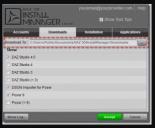 (Sorry this is so tiny, I lifted it from the documentation centre for DIM)
I think settings for Daz Central have something similar, but I've never used it so can't say.
ETA: these are the files I'm aware of that you need to backup:
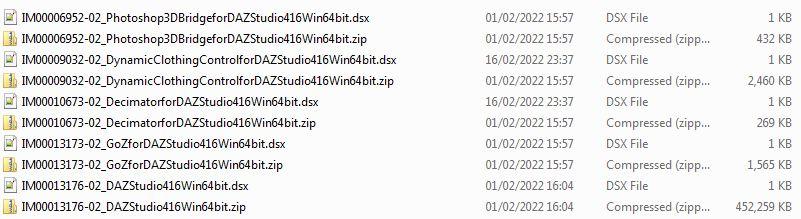
You may not have the DynamicClothingControl not the Decimator if you've never owned those products.
NB: This assumes it's the General Release you want to save the installers for - the Beta filenames are similar but say "PublicBuild" in their filenames. ETA: And the main software installer for the Beta starts IM00012000 not 13176.
If you then install the latest version and decide you want to go back, then for DIM you can simply copy those backed up installers back to where you found them and run DIM to reinstall the older version. I'm sorry but I really don't know how/whether you can do that in Daz Central.
Unable to find texturesdecimalpoint999 said:
This are screen shots of my settings.
I also just tried Resetting the content DB and reimporting the meta data. Same issue.
Ok, so you are logging in to DS... Remove the checkmark from "Automatically login with remembered credentials".
Logging in to DS is only needed for installing content within DS, with DAZ Connect and if that is what the user wants, then it is useless to use the other installation methods as DAZ Connect installations are overriding all other installation methods - DAZ Connect also uses a completely different location for installing content, which means the content is installed twice, taking twice the space (if also installed with DIM, DAZ Central or manually)
Unable to find texturesHow do you install content, using DAZ Install Manager (DIM), DAZ Central, manual installation or do you log in to DS and let DAZ Connect install content?
Daz 3D is part of

Connect
DAZ Productions, Inc.
7533 S Center View Ct #4664
West Jordan, UT 84084Licensing Agreement | Terms of Service | Privacy Policy | EULA
© 2026 Daz Productions Inc. All Rights Reserved.