-
Intersecting lash planes - any solution?
Given what you've explained, it's likely that fibermesh lashes would also intersect. Possibly it would not be as noticable. Another option would be making your own custom JCM for the eylids, or maybe you have a character that already has eyelid JCM that would work. It's also possible, if you've dial spun your custom charcter, that you could dissable one of the JCM that are already in use and that could fix your problem.
Edit: I've come back to add that you could potentially also fix this with a curve morph for the eyelashes themselves. You likely already have one of those as well.
Intersecting lash planes - any solution?Please post some close up screenshots of the eyes, one with eyelashes and one without. It seems that it might be the eyelids are intersecting each other too much in the eyes closed position and will likely require a correction morph.
Morph Dial Suddenly Defaults to 100%PerttiA said:
To fix any ill-behaving (non-zero default value) morphs, do as follows;
1. Open DS and load "Genesis 8 Basic Female" (to an empty scene)
2. Help->Troubleshooting->View Log File (clear the log, close it and select "Save" when asked)
3. Left Click at "Active Pane Options" tab->Preferences->Choose "Show Hidden Properties" (part 4 zeroes only 'visible' dials)
4. Right Click at Parameters Tab->Zero->Zero Figure (Zeroes the value of all the 'visible' dials)
5. Right Click at Parameters Tab->Memorize->Memorize Figure (Sets the current value of all the dials as their default value)
6. Edit->Save As->Support Asset->Save Modified Assets (Writes the changed default value to the morph files that were changed)When saving "Modified Assets" DS shows a dialog and asks for confirmation;
"The following file(s) will be permanently modified:" - "Accept/Cancel" - Choose "Accept"Close DS and wait -> Open DS again and load "Genesis 8 Basic Female"
Help->Troubleshooting->View Log File (Save the logfile somewhere you can easily find it)
If the above procedure didn't fix the problem, attach the saved logfile to your post.
Ditto that! Thanks a lot PerttiA! This is the best advise for fixing wrong default values I have seen. Its perfect!
Never have I been so happy to be able to render that bland default face :DThe We Will Miss You, Chohole Complaint ThreadLeatherGryphon said:
Non-complaint: Family portrait time. Having recently finished upgrading baby-bear, the following images are the current state of my workbench area.
1st photo: It's a "U" shaped area with baby-bear("Mimas") in the foreground in the 1st photo. Momma-bear("Janus") just behind baby-bear on the left-hand stem of the "U". Then the secondary 1080-HD monitor & keyboard(s) for (Mimas, Janus, and Nox), then the bank of external 3.5" hard drives. Between the two banks of external drives is the 4-port KVM switch for the big monitor. The white platform with 5 buttons on it, under three of the hard drives, is a power panel for some of the hard drives that don't have a power switch. Baby-bear has only just graduated and is still looking for a job.
Momma-bear and baby-bear now have their RGB lights trained to present a static field of blue with the two memory chip's RGB lights displaying a simple pulse of blue flowing down on one, and simple pulse of green flowing up on the other. Momma-bear has a GTX-1660 graphics card. I use momma-bear for photoshop & what simple video work I do. The RAM memories are Corsair VengeancePro and I use the Corsair "iCUE" control software for all the lighting in the case.
Note: underneath baby-bear is "George". George is currently on sabatical and unconnected (baby-bear took some of his connections). I only engage with "George" when it's time for a Win10 upgrade, he's kinda slow. The other members of the family not in these photos are "Atlas" (even slower than "George") upstairs in my bedroom, and two unnamed nearly 20 year old Dell Dimension desktops that run XP, stacked in a corner, which I pull out and use for playing old games if necessary.
4th photo: At the head of the "U" is Grampa-bear("Nox") and the 27 inch 1440-2K monitor. Grampa-bear "Nox" is retired but has retained all his skills and some of his stored information. I only wake him up to ask him questions about the old days.
7th photo: And in the last couple of photos looking at the right-hand stem of the "U", is finally papa-bear("Saturn") under the desk and his secondary 1080-HD monitor and direct keyboard & mouse on top. Also, under the top shelf is "Epimethius" my 12 year old laptop. Papa-bear has ARGB lights for the fans, but no window to see the lighted logo on the RTX-3060 graphics card. (*Sigh, wasted photons.
 *) I use papa-bear for DAZing and complex video stuff.
And finally, at the right end of the last photo is the black backside of my TV, video recorder, Blu-ray player, and media cabinet.
...nice setup.
I only have two desktops: Big Sister and Little Sister (named more for the physical size of the case and age) as well as two functional notebooks (Little One #1 [my soon to be 14 year old Toshiba that I first started Dazzing on in 2008] and Little One #2 [a W7 Pro notebook I picked up for my role play game sessions that has an SSD instead of HDD and 8 GB memory]).
Also have a couple dead notebooks One is an old XP Pro Dell Latitude that suffered a full drive failure, and an other a WIN 98 Toshiba Techron (that during one role play game session accidentally had a taste of a fine Fume Blanc). The drive on the latter one (a whopping 2 GB) is still intact as it was modular (it contains early manuscript drafts for a couple stories and my European cyber world role play campaign). Tehcron's were pretty rugged and that one was the heaviest of all four. Need to figure out how to connect it up so I can transfer the data off it.
Generation 3 Aiko and Hiro Appreciation ThreadJOdel said:
Are you using CDI's morph set for the male version of Aiko?
Yes, I used D|S "Transfer Active Morphs" to copy them from Kioki to Melody, spent hours cleaning up the mess it made of the property sliders, but it worked. If there's an easier way (like a morph inject preset I overlooked), I'll feel stupid but be glad to hear it.
Generation 3 Aiko and Hiro Appreciation ThreadAre you using CDI's morph set for the male version of Aiko?
The Process is Back to Square OneOk. It looks like the plugin is working now. It's still hit and miss depending on whether I use my previous creations (Genesis 8 figures altered in Zbrush) or a clean unclothed G8 figure. The morph targets are back with the organization set up in order. I keep the figures in A pose and FK mode. That seems to be less problematic for my workflow.
Have to ask as new here and learningRichard Haseltine said:
The anatomical elements for a given figure and sex are included in most of the old Pro Bundles for named adult characters (like Victoria 8 and Michael 8) and in most of the new themed bundles for adult characters (like the Zale 8.1 Sea King Bundle or Coral 8.1 sand Between Your Toes Bundle). There are also third-party sets available from other stores, such as Renderotica, though you do need to be careful that you are looking at full products rather than morph sets.
first thank you for prompt response;
When i buy those pro bundles is there one for 8.1.. also can they be used to all other female gen8 models or they ONLY apply to for example Vicotria 8 model... Also for third party i guess it cant say its a morph correct?
Have to ask as new here and learningThe anatomical elements for a given figure and sex are included in most of the old Pro Bundles for named adult characters (like Victoria 8 and Michael 8) and in most of the new themed bundles for adult characters (like the Zale 8.1 Sea King Bundle or Coral 8.1 sand Between Your Toes Bundle). There are also third-party sets available from other stores, such as Renderotica, though you do need to be careful that you are looking at full products rather than morph sets.
Carrara challenge #59 ANNWFN - In honour of Chohole.I am trying to find time to get an entry in. School Holidays+August=Grandchildren (almost daily!) But I just got news that my first cataract op is on 23rd August. Going to the eye hospital, so it's not a quickie job. I don't know if my other eye will be good enough to carry on with this, but here goes. My husband is Welsh and we've been married for 30 years and I've been to most corners of beautiful Wales. And Pam was a lovely helpful person that I wish I had known myself. I think she only lived an hour from me. After helping me with my new machine build, I should have made more of an effort since I think we were from the same generation.
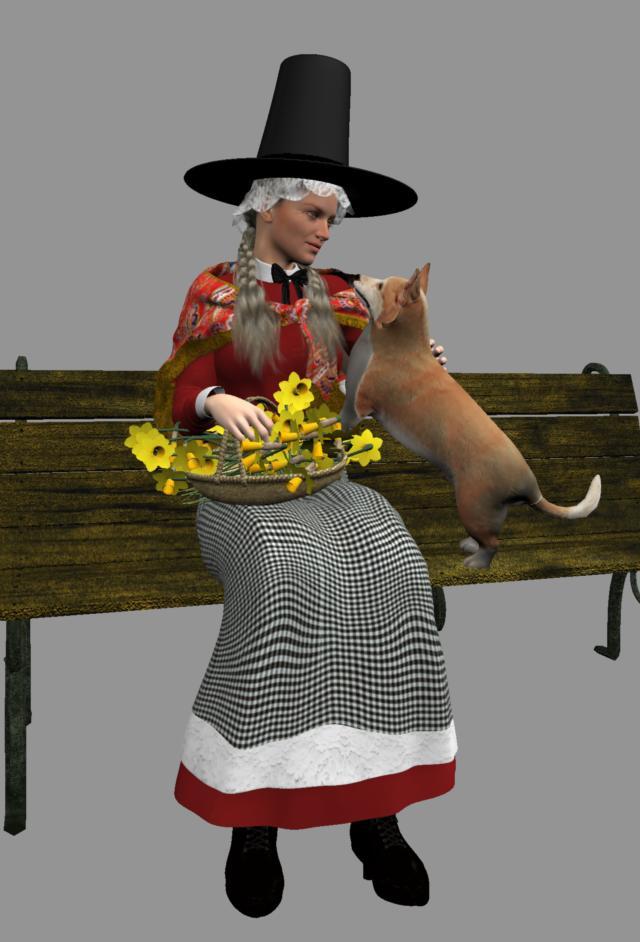
So.....first I have made a woman dressed in traditional Welsh costume (Bedgown & Stovepipe Hat). The dress is DAZ Victorian Maid for G2F and shoes re-texted, and from Wilmap's Pilgrim costume for G2M, I re-formed the hat into the one that Welsh ladies used to wear. There is a controversial history about that fashion. See link below. I have also put an image showing what makes up most of the costume I was able to reproduce. The shawl is the DAZ Romi for G3F hip scarf retexted with a traditional red Welsh paisley pattern. Had fun making a bowl into a bonnet for under the hat. I am not very good at creating clothing. Then applied a lace texture with alpha. The daffodils were extracted from Tango Alpha's Country Ford, the Pembrokeshire Corgi (like the Queen has/had) came from CGT. Basket is DAZ Marrakesh Souk Basket. For now she and her puppy are just sitting on a bench from Victorian Street Props. I don't know if Pam had a dog, but I am sure she had a kind face and loved nature.
Next will be a few outdoor Welsh landscape scenes of the Brecon Beacons that I hope will reflect some of the real locations that I think Pam would have known, and perhaps visited. I have to pose her manually, as the dress just does not want to follow her arms, but got there in the end. There are lots of variations on traditional dress, and you can read more at the other link below. I didn't use my trusty Misty G3F as I could not get the Vic Maid dress to behave, so I used G2F. Unlike G3... I cannot get the exact facial expressions that they give, so have to make do with combining a few of G2 facial expressions. I am grateful to Alvin for his Morph Eraser. Saved me a lot of bloat!
More to come, but I am going to just kitbash DAZ materials but plan to use Carrara PA as much as possible, totally if I can manage it!
 Silene
About the hat: https://welshhat.wordpress.com/the-welsh-hat/theories-on-the-origin-of-the-welsh-hat/
About the costume: https://welshhat.wordpress.com/elements-of-welsh-costumes/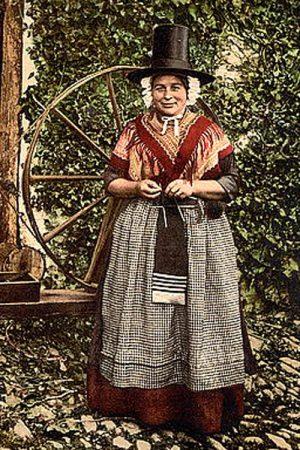
 XTransfer Module 1- Genesis 3 to Genesis 8 Morph Converter (Commercial)Hi. This happens only with certain morphs transferred from G3 over to G8 where the G8 version of that morph already exists. Technically duplicate id's shouldn't happen because the morphs are named differently after transfer but sometimes the vertice info or morph linking is identical to something already present on G8. Send me a log file and i'll try and see what morph is causing the conflict that you can remove from the XTransfer data folder.all g8.1f model doesn't load correctly, help please
Meraki said:
PerttiA said:
Meraki said:
Richard Haseltine said:
That looks like a non-zero default value for a morph. Check that you aren't missing an update (the Daz install methods can all show updates thata re available; for manual you are going to need to check the zips). If updates don't help then there is a way to fix the issue:
How do you install your content? If it's not through Daz Studio itself you can probably fix this by loading the Dev Build version of the figure, then Edit>Figure>Zero>Zero Figure Shape, then File>Save As>Support Assets>Save Modified Assets.
do i need to do that for every model that i have?
You have only one "Genesis 8.1 Female Dev Load" and it can be found in "...\People\Genesis 8 Female\Developer Kit\".
When you zero her (and memorize figure) and "save modified assets", it will fix the non-zero default value for whatever character that's causing the problem.
Okay so i tried that, and it fixed the dev model which is great, but then i save it and reload the model to see if it fixed it and it just load the model back with the problem
That means you didn't save like Richard adviced, or that you have previously saved some character as "Asset" before.
Zeroing the figure, memorizing it and saving Modified Assets fixes the very problem you describe and it only needs to be done with the base G8F/Developer version as every other "character" you have is just a morph, not a real figure.
all g8.1f model doesn't load correctly, help pleasePerttiA said:
Meraki said:
Richard Haseltine said:
That looks like a non-zero default value for a morph. Check that you aren't missing an update (the Daz install methods can all show updates thata re available; for manual you are going to need to check the zips). If updates don't help then there is a way to fix the issue:
How do you install your content? If it's not through Daz Studio itself you can probably fix this by loading the Dev Build version of the figure, then Edit>Figure>Zero>Zero Figure Shape, then File>Save As>Support Assets>Save Modified Assets.
do i need to do that for every model that i have?
You have only one "Genesis 8.1 Female Dev Load" and it can be found in "...\People\Genesis 8 Female\Developer Kit\".
When you zero her (and memorize figure) and "save modified assets", it will fix the non-zero default value for whatever character that's causing the problem.
Okay so i tried that, and it fixed the dev model which is great, but then i save it and reload the model to see if it fixed it and it just load the model back with the problem
all g8.1f model doesn't load correctly, help pleaseMeraki said:
Richard Haseltine said:
That looks like a non-zero default value for a morph. Check that you aren't missing an update (the Daz install methods can all show updates thata re available; for manual you are going to need to check the zips). If updates don't help then there is a way to fix the issue:
How do you install your content? If it's not through Daz Studio itself you can probably fix this by loading the Dev Build version of the figure, then Edit>Figure>Zero>Zero Figure Shape, then File>Save As>Support Assets>Save Modified Assets.
do i need to do that for every model that i have?
You have only one "Genesis 8.1 Female Dev Load" and it can be found in "...\People\Genesis 8 Female\Developer Kit\".
When you zero her (and memorize figure) and "save modified assets", it will fix the non-zero default value for whatever character that's causing the problem.
all g8.1f model doesn't load correctly, help pleaseRichard Haseltine said:
That looks like a non-zero default value for a morph. Check that you aren't missing an update (the Daz install methods can all show updates thata re available; for manual you are going to need to check the zips). If updates don't help then there is a way to fix the issue:
How do you install your content? If it's not through Daz Studio itself you can probably fix this by loading the Dev Build version of the figure, then Edit>Figure>Zero>Zero Figure Shape, then File>Save As>Support Assets>Save Modified Assets.
do i need to do that for every model that i have?
all g8.1f model doesn't load correctly, help pleaseThat looks like a non-zero default value for a morph. Check that you aren't missing an update (the Daz install methods can all show updates thata re available; for manual you are going to need to check the zips). If updates don't help then there is a way to fix the issue:
How do you install your content? If it's not through Daz Studio itself you can probably fix this by loading the Dev Build version of the figure, then Edit>Figure>Zero>Zero Figure Shape, then File>Save As>Support Assets>Save Modified Assets.
Need a G8/8.1 version of Lilah!RiverSoft Art's character transfer script can pop it onto G8 without noticeable change.Iray settingsOkay the book has a few controls and morphs, the front & back covers can be opened, the left & Right Pages can be opened and the two centre pages can be bent in three sections both ways so the pages curve, the centre pages also have some morphs to bend the corners, two bends per corner either way and each of the centre pages also has a page length morph so they can be adjust to match the other pages as they bend, see the render attached for a quick sample of all of these,
Resolving missing files without losing morphed presets etcMorning all
So, I've seen advice on resolving the much-discussed missing files issue: something along the lines of 'empty the cache and reload everything' (bit vague on the exact details of how that goes, I'll try to refind it) My question is, however: won't that wipe all my saved scenes, character morph and prop presets as well? That stuff represents the majority of my workflow - and months of work.
Erm... eek!
Thanks
John
V4/A4 Pose Transfer to G8Frichardandtracy said:
My pleasure. Just hope it's useful.
@takezo_3001: Sorry but I am so rudimentary in my scripting knowledge that I don't even know where to begin with animations at the moment.
I have installed Aiko 4 on my machine, and found the script works in the same way as with V4, so can use that to.
I am going to see about the male figures now and see how that goes, but it's possible I may divert myself into a G8F to V4 pose transfer at some point too.
Regards,
Richard
Thanks for sharing your awesome script, i made a few modifications and created a DIM installation file with Smart content access. here is some of the code added so the help file will not be needed. I didn't change the dialog spelling, I left it to match yours.
// Create an informational dialogue about the scripts intention var appName = "Apply V4 Pose to G8F";// define script name var msg = "This Script Transfers a V4 Pose to a G8F Figure.\n\n" +"To use this script with your scene please \n" +"1. Choose V4 Figure\n2. Choose G8F's Figure.\n3.Press 'Accept' Button \n"; MessageBox.information( msg, appName, "&Next" );Daz 3D is part of

Connect
DAZ Productions, Inc.
7533 S Center View Ct #4664
West Jordan, UT 84084Licensing Agreement | Terms of Service | Privacy Policy | EULA
© 2026 Daz Productions Inc. All Rights Reserved.