-
Transfer G8F Morphs to G8M
It is been a while since I used this script, but you have to favorite the morphs you want to move. This thread has more info https://www.daz3d.com/forums/discussion/176271/morphs-from-g3-to-g8/p1, look at the last 10 pages or so for info on this script.
BTW you might not be able to fully transfer Sasuke, as I was under the impression that the eyes are a geograft, not just a morph (I maybe wrong as I do not own that figure). This script will transfer the morph, but not the geograft, so will not be the same.
I need a lot of help converting custom G3M morph to G8MI have a character I have created back when K4 came out. It is a combination of K4, M4. Thereare some G1, G2M morphs in there as well, but it has been so long, that I don't remember how many, or which ones.. I have converted this character to the newest figure to come out. First to G1, then from G1 to G2M, and finally from G2M to G3M. I have tweeked it between each conversion. Now, whenever I try to convert it to G8M, something always goes wrong. I have tried every way to convert it with no success at all. When I use Xtransfer, I get an error that then clears my scene and closes Xtransfer. I was wondering, if it doesn't violate any rules or the EULA, could someone convert it for me if I send them the morph, and paid them? Again, I don't want to do anything that is agaist the rules here.
Transfer G8F Morphs to G8MHavos said:
This free script will transfer morphs between G8F and G8M (and vice versa). https://github.com/TugLLC/GenNext
It works pretty well, but will struggle with some extreme morphs (eg highly stylised or monsters)
When I want to transfer the morphs, there's nothing in the window list, so I can't transfer anything. What am I doing wrong?
Transfer G8F Morphs to G8MCatherine3678ab said:
Is there a way? Yes. Long route though.
So the short route is dial the morphs into G8F, and dial in the hidden G8M shape [or if you have the free transgender shape, dial that it as it's rig was likely adjusted].
And then you'll tell us no no it 'must be' ... and like the long route is to make clothing shape of each figure, dialing in various morphs and exporting out .obj files and using Morph Loader Pro to bring them back into a figure as a morph.
And then eventually you'll probably come back with but the such and such doesn't fit, and like yeah no kidding. That's what 8.1 was invented for to take care of ;-)
It's rather hot and humid over here, don't mind me.
There may be a product but I don't recall if or where it is. Are you wanting the entire Gigabites collection transferred to him, or just a particular character?
I want to transfer Sasuke Morph for Genesis 8 Female to Genesis 8 Male. What is the easiest way?
Uniboob Morph? (making more pleasing clothes' lines)Hello all. I've tried some chest morphs but still have clothes shrink wrapping to the chest area for female characters. Is there an easy morph I can just slide to make the chest area more like a barbie so that there is a little cleavage but clothes treat the boobs as one? Thanks in advance!
Edit: Looking for Gen 8 specific morphs
Transfer G8F Morphs to G8MThis free script will transfer morphs between G8F and G8M (and vice versa). https://github.com/TugLLC/GenNext
It works pretty well, but will struggle with some extreme morphs (eg highly stylised or monsters)
How to edit a file to change a SubDivision setting ... and other ideas here for October projectsSome products such as https://www.daz3d.com/ab-delpyune-hd-for-genesis-81-female are loading with their subdivision settings too high which guarantees a crashing come render time. Dear PAs please do NOT do that. We can dial the settings up, thank you.
As I couldn't find a way to make a preset I edited the character file which of course I cannot share. But for others working on anything less than a monster-sized computer set-up, here's how.
First, zip up the original for backup and/or the day you do have a monster-sized computer set-up. Unzip the original using 7zip to decompress the info. Unzip to 'here' ... name the extension .txt ...
Then search for 2 specific settings and change their numbers to "1" ... when done, rename the extension to .duf replacing the original one [might have to delete that one first].
Open in Notepad or similiar;
Find:
SubDIALevel
and change the current value to 1 ... "current_value" : 1
SubDRenderLevel
and change the current value to 1 ... "current_value" : 1The above setting will have the Character displaying with
SubDivision Level 1
Render SubD Level 2Of course one can adjust the settings for whatever their computer/videocard can handle.
And now I can render in Iray.
Alternatively one can remake the mats to 3Delight and render in 3Delight ... the trickier part is remembering to reset the Render Engine "everytime" one opens D/S [esp. this beta] ....
..................................
Also, there's a nice product for getting a newer looking scary scarecrow figure - on sale today :-)
https://www.daz3d.com/dforce-wraith-for-genesis-8-male
Don't forget to download the free for awhile grave keeper and working graveyard, and some other pink items available over in the freebie thread.
....................................
Very helpful videos for making head - body separate morphs - so one can mix 'n match some figures is here:

Be sure to nab the free D-Former morph he supplies. If your 8.1 is reading 8's morphs, fine. If it isn't, simply copy the morphs also into the appropriate morph folders for 8.1 and they will work :-)
Transfer G8F Morphs to G8MIs there a way? Yes. Long route though.
So the short route is dial the morphs into G8F, and dial in the hidden G8M shape [or if you have the free transgender shape, dial that it as it's rig was likely adjusted].
And then you'll tell us no no it 'must be' ... and like the long route is to make clothing shape of each figure, dialing in various morphs and exporting out .obj files and using Morph Loader Pro to bring them back into a figure as a morph.
And then eventually you'll probably come back with but the such and such doesn't fit, and like yeah no kidding. That's what 8.1 was invented for to take care of ;-)
It's rather hot and humid over here, don't mind me.
There may be a product but I don't recall if or where it is. Are you wanting the entire Gigabites collection transferred to him, or just a particular character?
Catty 8.1 Gender Fluid Bundlerickrocker00 said:
I'm going to pass on this bundle.
One question I have is what do DAZ customers do with the content they purchase? My guess is people use the content for: (a) a personal library, (b) commercial products like book covers, or (c) content for games. I know I must be missing something so please feel free to share. I'm not against gender fluid characters, but none of the categories I listed have a huge demand for them.
I know lots of LGBTQIA people that would be interested in Caty as is. I love Caty's face, her body, and her sense of style. She seems like someone I might actually meet (and she is). Her face is interesting and seems very real. Even as a mix, I bet she could add depth to scenes. And like others have said, you don't have to use any of this as it is marketed. You can put the club outfit on a victoria's angel and so on.
As far as all this inclusive content being released lately goes: lots of straight people that just want to see beautiful people would be interested in someone like Rio, who is trans and gorgeous. Peopling your scenes with diversity can make them more interesting- stand out from all the hot white chicks. Want to show a really cool bar scene with interesting characters that come from all walks of life? This kind of content can help with that. Another use for the trans morphs, for example, is to make a feminine version of any male character you have who happens to have a face you really like, or vice versa going from female to male. Or that monster character that only comes for men or women (not both) as is fairly common? You can now make both genders out of that one monster morph. One more: You want to show a family resemblance across sexes/genders? Now you can pretty easily. I'm pretty stoked about all of this.
And last but certainly not least, economically speaking, you have to consider pron. Gender bending, swapped parts, and all sorts of stuff you might not think is popular, is actually pretty huge in some circles, with lots of people both making thier own fantasy content and doing commissions for others.
Transfer G8F Morphs to G8MIs there a product or a way for transferring Genesis 8 Females Morphs to Genesis 8 Males?
Recreating a character - any ideas on used presets, character or hair based on photo?There are several hundreds, possibly thousands, of morph dials that can be used if you own all the PA morph packs in addition to the Daz ones. The lips can be achieved with the bee bite morph from one of EmmaandJordi’s packs. If the artist owns as many morphs as I do, it could be literally anything.
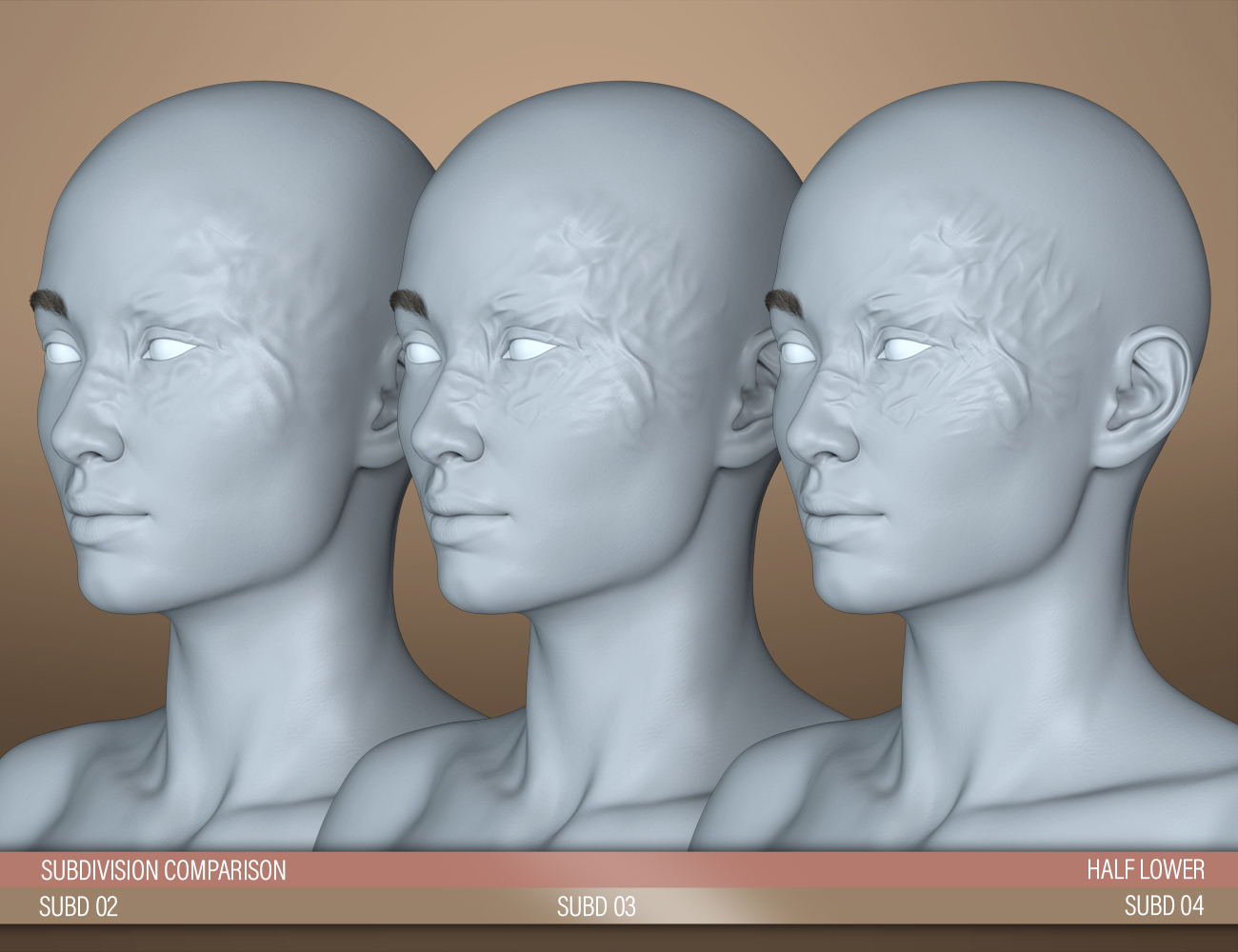
[Released! HD Face Burns for G8F + Add-On] FenixPhoenix's Commercial Products@kiloechonov3337, I'm glad to hear the issue has been resolved the with fix, I was worried about that. In regards to how to make the skin "bumpier" that comes from the HD Morph. So there's two things you can do:
- Ensure you are using a subdivision of 4. The read-me explains how to manually change the subdivision in case the scripts didn't yield the result you wanted. The following promo shows the difference.
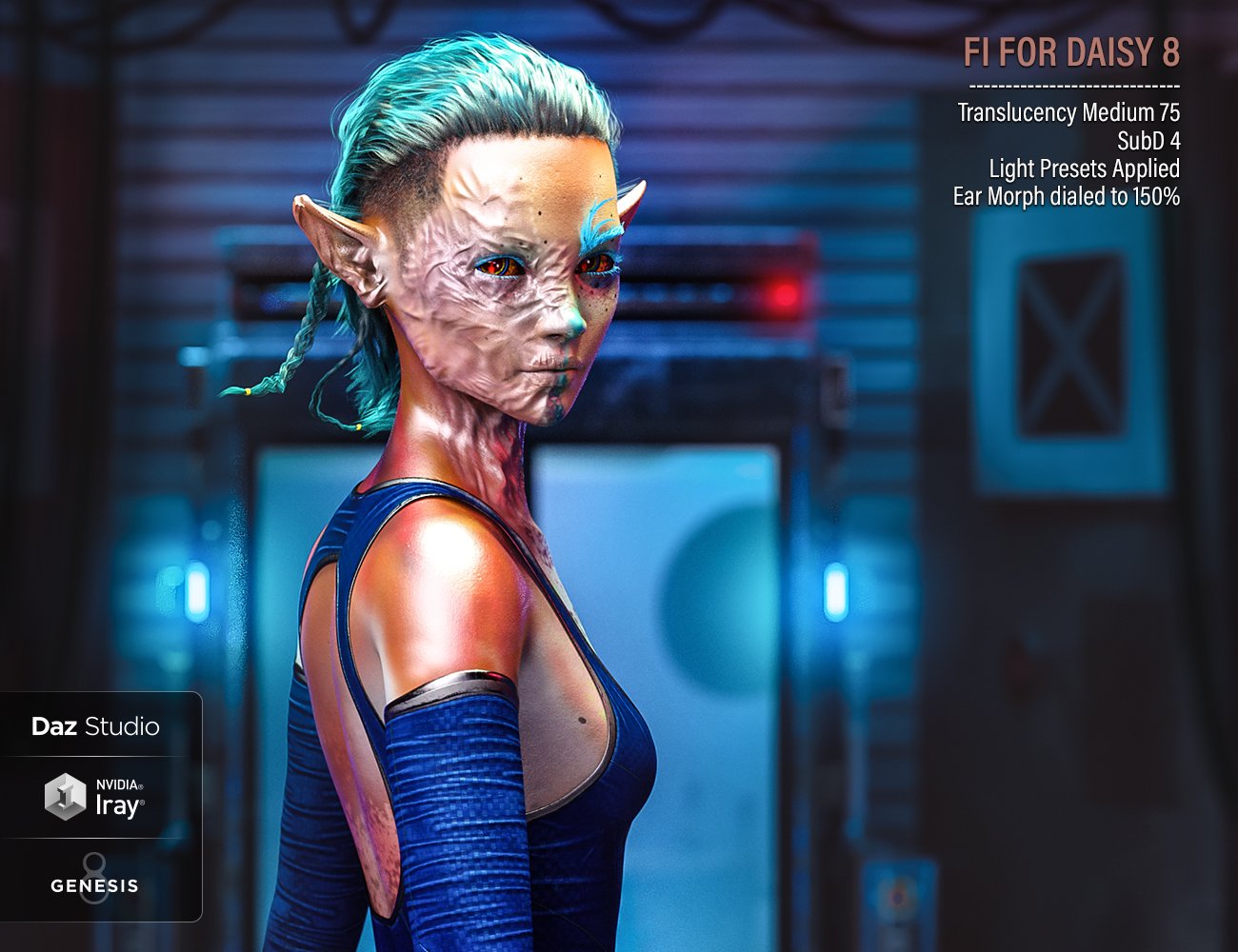
2. This is how the burn was designed, however, if you wanted to push it, you could always break the limits of the morph and dial in a higher percentage. To do that:
- Navigate to the parameters tab (window > pane > parameters) and locate the morph you want to accentuate.
- In the upper corner of the dial (above the percentage) you'll see a small gear icon. Click on it > Parameter Settings...
- That will open up a window, wherein you'll see "Use Limits" with a checkmark. Click on the box to get rid of the checkmark and that will disable the limits.
- Or, you can also increase the "Max" percentage from 100 to maybe 150-160% and hit accept.
- Now you'll be able to dial in the morph at a bigger amount. Just keep in mind that dialing it too much may result in skin pokethrough.
Notice in this promo example how I broke the limit of the ear morph to dial the burn up to 150%:
---
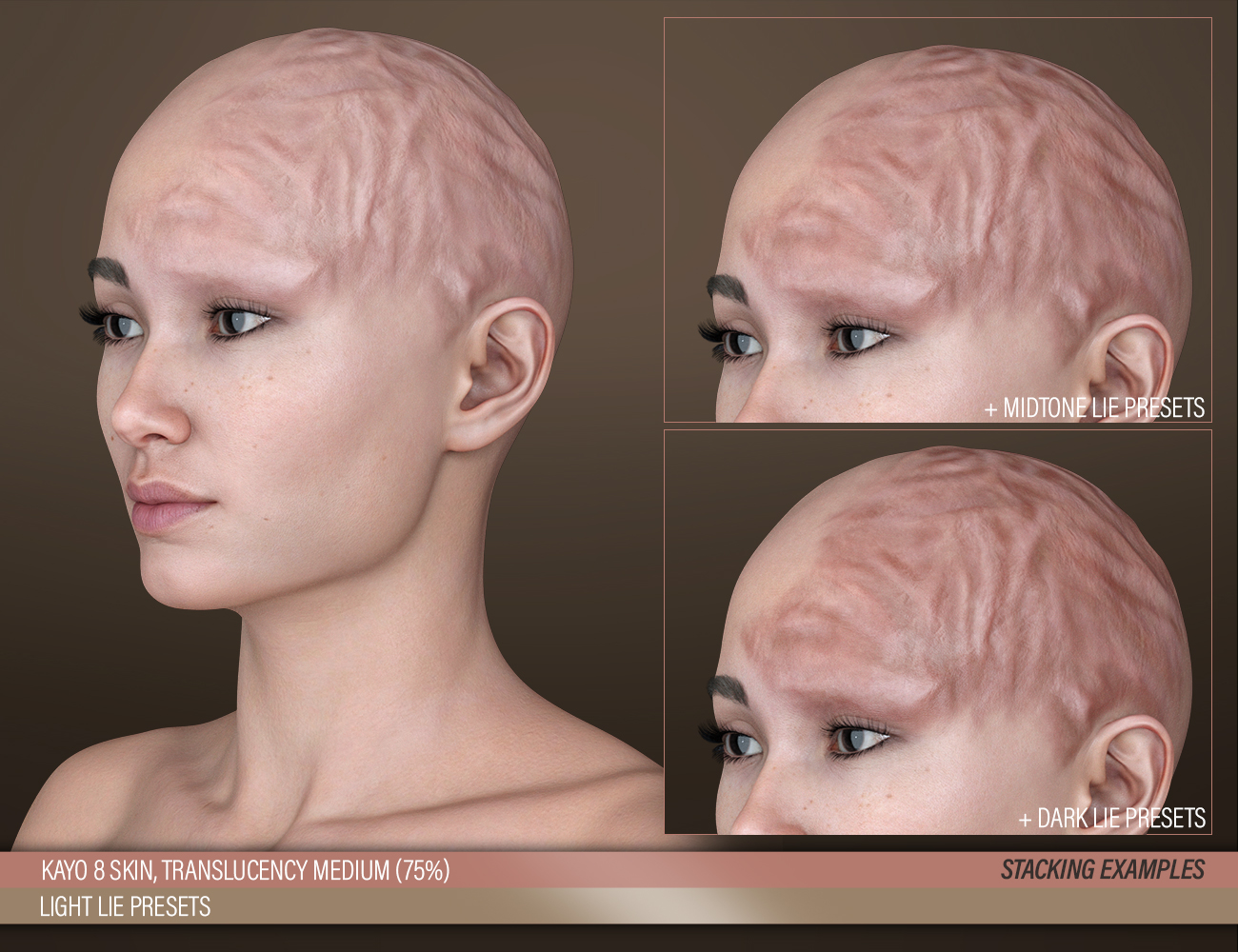
A third way to accentuate the burn would be to stack presets. Meaning, you apply the same preset twice. However, that will only darken the coloring of the burn, not necessarily add to the "bumpiness" of it, as shown in the following promo:
 How Can I Save Morph Limit Properties With The Morph?
Catherine3678ab said:
If you made the prop, saved the prop, then made the morph and saved the morph ... then you should have in the data folders the prop data as well as one morph data.
If you made the prop, made the morph, saved the prop; then maybe changed the morph but whatever, saved the morph ... unless you saved it back to EXACTLY the same place the first morph landed, the old one works and the new one is ignored. Solution is simple, delete the old morph. [Close D/S before editing anything in the data folders]It's the first time I've seen somebody using commas to make folders, we've been using slanted lines. Also, like, if this has been working for you fine, but normally morphs are placed elsewhere on the Parameters Tab - like under Morphs. For some types of morphs it really does matter where you put them - for example if one wants them appearing also on the Shaping Tab, they must be somewhere under Actor.
If you want the morph to load "fixed" to one particular setting, the min and max values need to be the same. Then a little above on the right-side of that Parameters Tab dialogue is a square to check to "lock" the settings.
Thanks so much, Catherine.
Yes, the data folder path for my revised morphs somehow became different from the data path for the original set, and thus my revisions to the morphs were ending up in a different place in my file structure, rather than replacing the original morphs. I just deleted my entire data folder (it was at a special path just for this model, so it was not the data folder for the general asset library) and started over. This fixed it.
I don't know what it would mean to make folders using commas. I don't try to make folders by using commas. I have not seen any folders being created from my use of commas. The commas are just characters inside the folder names.
Clothing acting in strange waysYour obsevation that it looks like it's removing and then adding the smoothing modifier is exactly correct. DAZ suspends those operations as you're changing your viewport orientation. It's standard behavior that it sounds like you've just never noticed. Possibly it's also suspending the "Fit Morph" as well, and that's why it's so noticable now. I don't have any experience with "Fit Morph", but if it's adding any kind of morph or adjustment to make clothing fit better it would definitely add to the overall size of the scene.
EVERYDAY 2 SERIES: explanation of every product + FAQsmikeh64_8a4c605250 said:
I bought "Everyday 2 Daily Poses and Clothes Vol.3" and "Customize vol 2 for Everyday 2" and am confused about using/accessing them and also getting many missing textures warnings. I bought them from Daz3D.com, and installed using both DazCentral and I also tried manually installing so I do think I have them correctly installed.
The first odd thing is that to load the shirt or pants I need to go to the poses folder to find them (seems like they should be in the clothing folder?). Then attempting to load any textures or presets I get a bunch of missing texture warnings (see an example below).
My guess is that I am missing a prodcust that is required, but it seems like the description of these products is that nothing is required for the for the poses and clothing product (obviously the customize package requires a clothing package).
And with the base shirt/pants loaded (again, from the poses folder?), most poses and pose dials create crazy intersections and poor fit - not even close to fitting.
Are we required to have other products for these to work?
I have watched your Youtube videos and they didn't help much - it seems you need to make a very basic step-by-step instruction video, not just go over all the poses.
Here is an exanmples of the missing textures error:
runtime/textures/aeonsoul/everyday2/ed2classic/evrdayclsc_basecolor.jpg
...Hi, so let's see:
1. the clothes included in the poses+clothes packages (which are all standalone and do not require additional purchases) are found in the poses folder because they are optimized to be used with the poses.
Also because the original G8 female is found under clothing and we wanted to make sure these were in different places evenYou should have a read-me file in that same folder that explains what to do to use them as regular clothing garments, but essentially to use them as regular clothes, you have to activate the "JCMs controller" button included under parameters, for both garments.
That option is off by default because it would otherwise distort the clothing from the intended pose-matching morph.
2. we meant to go through all the everyday 2 products and see if there was some compatibility issues + update the requirements for products and compatibility, but haven't done it yet.
As they are now, the two customize packages are only fully compatible with the original Everyday 2 clothes G8 female and/or male, however we decided we can update them to be fully compatible with everything else that released later (that is the various poses+clothes packages), which we had not planned yet when we first released the clothes and customize add-on.
This kind of update usually takes a while to go through Daz, but we can arrange something for you in the meanwhile if you'd like.
3. The crazy intersections and poor fit you mention, do these happen with G8 base or with custom characters only?Thanks,
ASWant to load 8.1 without "all" of 8's morphs? minitutMaking the G8 base expressions (and any expressions that are using them) work on G8.1 requires removing dummy/placeholder expressions that are installed to G8.1 morph folders - These dummy/placeholder expression files have no other function than to prevent the base G8 expressions from loading.
The dummy/placeholder files are located in;
...\Data\DAZ 3D\Genesis 8\Female 8_1\Morphs\Daz 3D\Base Pose Head\ (255 files)
...\Data\DAZ 3D\Genesis 8\Female 8_1\Morphs\Daz 3D\Expressions\ (24 files)
...\Data\DAZ 3D\Genesis 8\Male 8_1\Morphs\Daz 3D\Base Pose Head\ (255 files)
...\Data\DAZ 3D\Genesis 8\Male 8_1\Morphs\Daz 3D\Expressions\ (24 files)Please make sure you are removing the files from G8.1 morph folders and not G8 morph folders.
Poke-Away or similar for Genesis 8? **Answered**Cora Regina said:
Hm, if dForce is involved then a projection morph might be more helpful. May be worth giving SY's Clothing Fit Helpers a look. It looks like those products use a combination of projection morphs on the figure, that then transfer to the garments so they can also be adjusted independently? I don't own them yet (wishlisted) so I'm not entirely certain how it would work with a simulation, and it's a bit difficult to tell from the description.
I will say that I've simulated things that I've used the Fit Control morphs on without issue, but while I own Wise Wizard, I've ironically used all the pieces together very rarely. You'd think that they'd have the collision order and offsets specifically set up for it. Is one body part passing through another during the animation and dragging the clothing with it, something you could pin down in the timeline and make some positioning adjustments to avoid? I'm forever having to do that with long garments, feet, and floors. Also hands that want to take the shortest route from Point A to Point B, which happens to be through the torso, which collides with the gown, which...
Thanks again for the valuable input, food for thought. I have run this simulation many times now, I am not a stranger to timeline simulations, but this set is proving very difficult in the poses I have tried (typical wizard legs apart, arms up casting poses). I am about to rerun it and see if I can get Fit Control to help, turns out I have it installed and forgot all about it.
 Poke-Away or similar for Genesis 8? **Answered**
Hm, if dForce is involved then a projection morph might be more helpful. May be worth giving SY's Clothing Fit Helpers a look. It looks like those products use a combination of projection morphs on the figure, that then transfer to the garments so they can also be adjusted independently? I don't own them yet (wishlisted) so I'm not entirely certain how it would work with a simulation, and it's a bit difficult to tell from the description.
I will say that I've simulated things that I've used the Fit Control morphs on without issue, but while I own Wise Wizard, I've ironically used all the pieces together very rarely. You'd think that they'd have the collision order and offsets specifically set up for it. Is one body part passing through another during the animation and dragging the clothing with it, something you could pin down in the timeline and make some positioning adjustments to avoid? I'm forever having to do that with long garments, feet, and floors. Also hands that want to take the shortest route from Point A to Point B, which happens to be through the torso, which collides with the gown, which...
A lot of times I end up having to tweak poses to allow for a little more space between body parts than was originally intended, to give the simulation breathing room. Some simulations run smoothly, and then there are the ones with multiple layers and major position changes that are a fiddly mess.
Poke-Away or similar for Genesis 8? **Answered**Fit Control + the add-ons are my favorite for making those adjustments, and also counteracting the shrink wrapped look (with some help from DeCrackifier ofc). They're not projection morphs but rather morphs that the utility loads on demand into clothing items fit to the figure in question, so that each individual item can be adjusted independently (for layering) rather than pushed outward all in one bunch. Plus you don't end up slowing load times for figures by having a slew of morphs you may not need.
https://www.daz3d.com/fit-control-bundle-for-genesis-8-females-and-males
https://www.daz3d.com/fit-control-add-on-for-genesis-3-and-8-bundle
You could also try something like the RSSY Ultimate Clothing Fixer (which allows you to pick adjustments you want and saves them as morph assets for you), or Sickleyield's Clothing Fit Helpers (G8M here: https://www.daz3d.com/sy-clothing-fit-helper-genesis-8-male).
I do kinda miss the simplicity of Poke-Away, but Fit Control offers really specific fine tuning areas. Great for tugging things out of the nooks and crannies lol.
Catty 8.1 Gender Fluid Bundlelilweep said:
i love the morph. more PAs need to make realistic morphs.
the textures could be improved a lot...
I agree! Love the body and face sculpt. So glad Daz is making more realistic morphs! Hope more PA's will follow.
Daz 3D is part of

Connect
DAZ Productions, Inc.
7533 S Center View Ct #4664
West Jordan, UT 84084Licensing Agreement | Terms of Service | Privacy Policy | EULA
© 2026 Daz Productions Inc. All Rights Reserved.