-
Installing, activating, and accessing Daz Studio Premier features
Eve said:
Richard Haseltine said:
The plug-ins provided as part of Daz Studio Premier need to be installed, like any plug-in, through Install Manager with Daz Studio closed. In DIM pasting
rx::ci::^Premier -
into the filter box at top-right should show the Premier add-ons and allow them to be installed, assuming that you have the Download Filters set to include plug-ins.
Once installed, open Daz Studio and log in to your account (Connect>Login..., for the plug-in/feature activation you do not need to update metadata though you do if you also wish to download the content that is tied to your membership; that does not include the free bundles, which are not tied to remaining a member). You should then be prompted to restart Daz Studio.
Once DS is running you can find the new add-ons in the following locations:
- Geometry Sculptor shows up in the Tools menu (remember that, like other content creation tools, it disables any GeoGraft's mesh hiding and won't show interpolated hairs for dForce/Strand Based Hair)
- Pose Converter shows up in Edit>Figure>Pose
- Shape Transfer shows up in Edit>Figure>Shape
- DForce Manager shows up in Simulation Settings pane / Manage
- Render Queue shows up on Render Settings pane / Queue
Good morning,
I've done this in every way and shape possible. I started with a fresh install on a new computer because it arrived just in time for the launch of Premier. Followed these directions to no avail. I've tried rebooting. Uninstalling Daz Studio /the plugins, reinstalling them, rebooting both the app and the machine. The Premier plugins are installed and loading, but Pose Converter and Shape Transfer don't show up under Edit>Figure, and I can't find them anywhere (the others are right where you said they'd be). Not certain it's related, but it also doesn't recognize that the default resources are installed on the new machine. The installation path for those and the Premier plugins are vastly different from my former system (which successfully shows both pose and shape down at the bottom of the figure menu), but I'm not certain if that's an installation difference between Windows 10 and 11. Any idea if I may have overlooked something?
What are the paths? Do the plug-ins appear in Help>About Installed Plug-ins? There do seem to be some oddities with the items thats hould appwear in the Edit>Figure menu (I am missing one of them in one release channel, General reelase I think, but have them both in the other - I have reported this to daz, one suggestion was to save the layout then do an Update and merge Menus (Edit>Workspace).
Fixing pokethrough on dForce strand-based hairAndrewJJP said:
It strikes me from what you've said that it might be to export to Blender possible to export to Blender with geomerty for the hair, then edit there, then import it back as an OBJ and copy across the materials. I don't do animations, so that would be a workaround for now. I've used the same workaround for the lack of HD morph support when I can be bothered...
Yes, Daz SBH can be imported to Blender and adjusted there, then brought back into DAz Studio. You can export as obj and then in Blender convert to Blender's Hair Curves by right clicking: Convert to... Curves. Then you should be able to use the Hair Curves tools to manipulate the hair. To export, you will need to do another conversion back to an exportable format.
You can use omnihair shader etc on imported hair, but copying over the materials presets from another hair won't always work because:
A) Daz dForce SBH has the option use the Scalp UV to map the hair color, which many vendor's utilise, and which you as a non-vendor cant do after importing hair into Daz from Blender. You can still color strands individually with a noise color map or some other texture map, but it wont follow the scalp UV. In my opinion this is a non-issue. For animal fur with specific color patterns like leopard spots or something, then obviously becomes an issue if you cant map hair color. But for human hair, a noise map to color the hair is fine.
B) If you export out of Blender as obj, the vertices of the polylines arent written as a single line. They are written as vertex pairs. This is a problem in Daz Studio when it comes to setting Line Start Width and Line End Width. And you will see why... If you need a workaround for point B you can go here. Another workaround is to export from blender as tubes and do the 'convert tubes to lines' conversion from tubes within Daz Studio itself, as that will write a contiguous curve. I wrote a post about this method here.
C) This point should be obvious, but be aware that copying/pasting surfaces only works if the surface already has same shader applied. So you will need to apply the same shader before you can copy over materials from the hair.
Fixing pokethrough on dForce strand-based haircrosswind said:
If you do need to deform an SBH in 4.22, use D-Former... however, whether that'll be cumbersome or not depends on the case you have and how you want the shape deformed...
I've found dFormers difficult. I've always found the Blender brushes, and in some cases edit mode easier and more flexible, but maybe I could give them another try, it's been a long time...
It strikes me from what you've said that it might be to export to Blender possible to export to Blender with geomerty for the hair, then edit there, then import it back as an OBJ and copy across the materials. I don't do animations, so that would be a workaround for now. I've used the same workaround for the lack of HD morph support when I can be bothered...
Maybe they will fix MeshGrabber at some point. Hopefully keeping an eye on the release notes might tell me...
Thanks both very much!
Installing, activating, and accessing Daz Studio Premier featuresRichard Haseltine said:
The plug-ins provided as part of Daz Studio Premier need to be installed, like any plug-in, through Install Manager with Daz Studio closed. In DIM pasting
rx::ci::^Premier -
into the filter box at top-right should show the Premier add-ons and allow them to be installed, assuming that you have the Download Filters set to include plug-ins.
Once installed, open Daz Studio and log in to your account (Connect>Login..., for the plug-in/feature activation you do not need to update metadata though you do if you also wish to download the content that is tied to your membership; that does not include the free bundles, which are not tied to remaining a member). You should then be prompted to restart Daz Studio.
Once DS is running you can find the new add-ons in the following locations:
- Geometry Sculptor shows up in the Tools menu (remember that, like other content creation tools, it disables any GeoGraft's mesh hiding and won't show interpolated hairs for dForce/Strand Based Hair)
- Pose Converter shows up in Edit>Figure>Pose
- Shape Transfer shows up in Edit>Figure>Shape
- DForce Manager shows up in Simulation Settings pane / Manage
- Render Queue shows up on Render Settings pane / Queue
Good morning,
I've done this in every way and shape possible. I started with a fresh install on a new computer because it arrived just in time for the launch of Premier. Followed these directions to no avail. I've tried rebooting. Uninstalling Daz Studio /the plugins, reinstalling them, rebooting both the app and the machine. The Premier plugins are installed and loading, but Pose Converter and Shape Transfer don't show up under Edit>Figure, and I can't find them anywhere (the others are right where you said they'd be). Not certain it's related, but it also doesn't recognize that the default resources are installed on the new machine. The installation path for those and the Premier plugins are vastly different from my former system (which successfully shows both pose and shape down at the bottom of the figure menu), but I'm not certain if that's an installation difference between Windows 10 and 11. Any idea if I may have overlooked something?
When morph loader pro imports the morph of sub-d 0, the figure shrinks.kypss951353 said:
crosswind said:
kypss951353 said:
crosswind said:
To clarify: Morph Subdivision settings comes from Morph Loader Pro SubD resolution plugin which only PAs can have and use. There's ever been a version of this plugin leaked in public by whoever a PA for DS 4.6 ...
So, some people use DS 4.6 just for using this plugin to import morph with SubD, for instance, making VAM character... yada yada ~ And of course, older exporter / importer as well as the "HD plugin" have bugs ~
I think this is not the main reason. In fact even if you use the latest version of daz you will lose high resolution morph data.
You misunderstood what I meant... Again, no users can import OBJ files as morphs with Subdivision unless they have the SubD resolution plugin that only DAZ PAs own. In your case, you just installed a leaked version for DS 4.6. That's it.
OK, thanks for the reminder. Except when I have to use DAZ, I don't use it at all to create my models. Just imagine putting the DAZ label on your work. This will easily make people think you are amateur. Even though this is a bias, I still don't like using DAZ as a software to create anything. So whether it's a leaked version doesn't actually have any impact on me, and I don't care.
Funny thing is that those who think they're professionals but folks who use Daz are not, from time to time, "steal" assets from Daz3D for whatever purposes ... Anyway, if you don't like DAZ / Daz3D / DS or whatever, and you also don't care as you said, you can just easily let go all these as well as "issues".
4.23.0.1 the good Bad and Weirdness.ArtAngel said:
crosswind said:
ArtAngel said:
There's good and not a lot bad about 4.23.0.1 with Filatoon but there is one bad thing and some weirdness. I am going to do 3 posts for the sake of clarity. Here's the bad
- The bad is that when I DIM downloaded 4.23.0.1 along with 2 updated G9 Essentials and 1 new G9 Essentials product, it obliterated G8 Starter Essentials and G9 Starter Essentials Expansion resulting in G9 Essentials consisting of only toon characters.
- This behavior affects all Pro and Beta versions 4.12, 4.15, 4.21, 4.22. This appears to be a direct result of the essential installs, not the version 4.23.0.1. This only affects machines with existing content.
- I did not buy any additonal toon products , this was just non Premier free for all versions of product.
The issue has nothing to do with Daz Studio per se other than content installation glitch as well as metadata. Pls check this post to fix it: https://www.daz3d.com/forums/discussion/comment/8905896/#Comment_8905896
Thank you. I appreciate the response. It's 2.18 am here in California so maybe I'm over-tired but the icons look dark grey to me.Right ~ even though it's dark grey, you still have to re-import the metadata... DIM has various glitches ~

BTW, going to bed is much more important than playing with DS, good night !
 4.23.0.1 the good Bad and Weirdness.
crosswind said:
ArtAngel said:
There's good and not a lot bad about 4.23.0.1 with Filatoon but there is one bad thing and some weirdness. I am going to do 3 posts for the sake of clarity. Here's the bad
- The bad is that when I DIM downloaded 4.23.0.1 along with 2 updated G9 Essentials and 1 new G9 Essentials product, it obliterated G8 Starter Essentials and G9 Starter Essentials Expansion resulting in G9 Essentials consisting of only toon characters.
- This behavior affects all Pro and Beta versions 4.12, 4.15, 4.21, 4.22. This appears to be a direct result of the essential installs, not the version 4.23.0.1. This only affects machines with existing content.
- I did not buy any additonal toon products , this was just non Premier free for all versions of product.
The issue has nothing to do with Daz Studio per se other than content installation glitch as well as metadata. Pls check this post to fix it: https://www.daz3d.com/forums/discussion/comment/8905896/#Comment_8905896
Thank you. I appreciate the response. It's 2.18 am here in California so maybe I'm over-tired but the icons look dark grey to me.
Edit; Heading to get a few hours of sleep. I'll check in tomorrow. Thanks again.
4.23.0.1 the good Bad and Weirdness.ArtAngel said:
The really good surprising news is this: I downloaded it onto an older custom build that has an old Kepler card. A GTX760. This machine never had DAZ installed on it. I DIM downloaded it and installed it the exact same way I did on the dual 1080ti machine. It was the best install. It did not obliterate any files. Everything related to Genesis 9 and Genesis 8 works as it should and so do the toons.. It rendered in a flash. I'll go back and attach screenshots for each post. The problem for me is I need my dev packages, because I won't do much if anything on the 760 it was just a test.
Also I was so impressed with the whole filatoon thing, and because I'm trying to use up my store credit, I went back on the 12th and bought the three bundles and every toon offering they had and the otter and a few other things. Today I bought nothing but stll have a decent store credit left. So I am not complaining about the product.
Yes, because it was a neat installation with metadata successfully imported. And filament supports OpenGL, so it also works well with your Kepler card. Congrats !
4.23.0.1 the good Bad and Weirdness.ArtAngel said:
The Good which is sort of weird and unexpected.
1. I installed 4.23.0.1 on my offline main rig by grabbing the Studio folder only, from a different machine and tossed it on my dual RTX2080ti rig (left the program files in tact). I do not think I installed any essentials or any other files. Did not use DIM. 4.23.0.1. It left all existing G9 and G8 Essentials intact and works and of course has no toons installed. I won't install any toons or updates on the main rig until I finish my current project which relies on pre 4.23 G8 and G9 Essentials. So in short the library 4.23.0.1 is using is my old library. Have not tested it hardly, but the point is the fault lies with library files.
Just because the latest metadata of essentials (incl. new toon assets..) was not imported there...
4.23.0.1 the good Bad and Weirdness.ArtAngel said:
There's good and not a lot bad about 4.23.0.1 with Filatoon but there is one bad thing and some weirdness. I am going to do 3 posts for the sake of clarity. Here's the bad
- The bad is that when I DIM downloaded 4.23.0.1 along with 2 updated G9 Essentials and 1 new G9 Essentials product, it obliterated G8 Starter Essentials and G9 Starter Essentials Expansion resulting in G9 Essentials consisting of only toon characters.
- This behavior affects all Pro and Beta versions 4.12, 4.15, 4.21, 4.22. This appears to be a direct result of the essential installs, not the version 4.23.0.1. This only affects machines with existing content.
- I did not buy any additonal toon products , this was just non Premier free for all versions of product.
The issue has nothing to do with Daz Studio per se other than content installation glitch as well as metadata. Pls check this post to fix it: https://www.daz3d.com/forums/discussion/comment/8905896/#Comment_8905896
New Toon G9 in Hexagon Acting Up [Sorted]Tried to make some changes to the teeth of the new Toon Genesis 9, I can import the teeth into Hexagon fine with the Daz Studio to Hexagon bridge. But when I make changes and send back to Daz Studio, when I apply the morph the the teeth and inner mouth move from where they should be and not sure why. Any help would be greatly appreciated, thank you.
Update: Got the issue sorted.
When morph loader pro imports the morph of sub-d 0, the figure shrinks.crosswind said:
kypss951353 said:
crosswind said:
To clarify: Morph Subdivision settings comes from Morph Loader Pro SubD resolution plugin which only PAs can have and use. There's ever been a version of this plugin leaked in public by whoever a PA for DS 4.6 ...
So, some people use DS 4.6 just for using this plugin to import morph with SubD, for instance, making VAM character... yada yada ~ And of course, older exporter / importer as well as the "HD plugin" have bugs ~
I think this is not the main reason. In fact even if you use the latest version of daz you will lose high resolution morph data.
You misunderstood what I meant... Again, no users can import OBJ files as morphs with Subdivision unless they have the SubD resolution plugin that only DAZ PAs own. In your case, you just installed a leaked version for DS 4.6. That's it.
OK, thanks for the reminder. Except when I have to use DAZ, I don't use it at all to create my models. Just imagine putting the DAZ label on your work. This will easily make people think you are amateur. Even though this is a bias, I still don't like using DAZ as a software to create anything. So whether it's a leaked version doesn't actually have any impact on me, and I don't care.
Premier Questionskpr said:
crosswind said:
kpr said:
@crosswind I was interested in MeshGraber 4 (I wasn't so interested that I immediately upgraded to Premier!)
Could you tell me if you can "add" geometery to a model with the "Premier Hijacked Version" of MG4? Like add a pair of horns to a human head.
You can sort of do this in Hexagon (and Daz Bridge), by extending existing polys, but you can't add new polys (if you do, the Daz Bridge won't import it - Maybe you can do the same in Blender, and import it with MorphLoaderPro?)
If/when you've a little while, be great if you'd check on the functionality in Premier
Oh, no, you cannot "add geometry" but just "deform the geometry", as you said: extend existing polygons by grab (select) them first then drag or push. Now MG 4.0 (Geometry Sculptor) provides a Draw Brush, you can also deform the mesh with Draw Brush... but as usual, you still can do these on Base Mesh, i.e. no SubD manipulation.
I'm also a Blender user, so yes, most of the time it's easy to sculpt complex shape in Blender and import the shape back to DS as a morph by using MLP.
Well, Mesh Grabber 4.0 is better than 3.0, you can check this video https://www.youtube.com/watch?v=Lr5uEgesPnc No big change. But there's still limitations and some bugs. You can check this post:
https://www.daz3d.com/forums/discussion/comment/8903241/#Comment_8903241
@crosswind Thanks very much for the testing and info/links - very kind of you to do and post these

Is it worth $19 a month to me?... Not sure given I can get a similar result in Hexagon and I can use Blender well enough if I want too (has been quite some time, but even so) and would figure MLP if I need to - but would have been great to do all in one "environment"
You're welcome ! Then, TBH, if only for using this plugin, personally I don't think it's worth $19 a month... unless you're a routine buyer as well as use other tools frequently.
I'm a tech-driven guy first of all, and want to know how DS de-activates Premier exclusive content when the subscription expires... so I just paid one month, haha ~
Anime Toons and Filatoon Shader Q&ADartanbeck said:
rokkr said:
There seems to be some erratic behavior with this shader... I was (and still am) converting an old filament scene I did to an all-FilaToon-shaded scene and I couldn't make my character cast shadows not in a million years... Then, I decided to import it to an all-FilaToon scene I made yesterday from scratch (I did it by saving the character as a subset). When I imported, the shadows were there, but the skin was completely different (for instance, I couldn't activate glossiness in my old scene, but, when I imported the character, the glossiness showed up; also, the colors were totally different). Some things could be due to the lighting of the old scene (e.g., the colors) but some things, like the glossiness, I doubt it. Nothing too dramatic, since I'll redo the work in a new scene, but, if someone has experienced this and knows some workaround, I'd like to know.
I've also noticed some weird behaviors between the old filament and the new FilaToon. For instance, in my old scene, I was using an environment (HDRI) for lighting (draw dome off, with a skydome for the sky), but there was also a distant light to cast shadows. If I turned the environment light off, everything that had the old shader would go dark, but the surface I've already applied the toon shader would be lightened by the distant light...
EDIT: another weird thing... In the old scene, I've used the FilaToon - Constant shader for the eyelashes, as Dartanbeck taught us. When I imported my character to the new scene, the eyelashes were gone! The trick I used to make it show up was to set the Cutout Opacity to 2. I don't think this has anything to do with lighting...
Were all those weird behavior caused because the old scene had written in it some configuration that were affecting the FilaToon shading?
Well, when coverting older scenes, many things that are even a little bit different will make a big difference in Filament. The shader is the tool, but not the culprit here. There's something else going on that is so easy to overlook it wasn't caught (yet).
Shadows - makes sure you have lights in the scene with Deep Shadows enabled. I'm sure you've checked this, but... well... I don't know. I caught that one myself yesterday. It was a simple scene so it was easier for me to actually find and fix.
Sometimes one light (Distant?) can be a bit too strong which makes the shadows disappear. I caught that one myself yesterday. It was a simple scene so it was easier for me to actually find and fix.
Filament setting possibilities have changed Dramatically with this release. So some subtle (or major) differences in how those are set up can make all the difference in the world too.
It's very difficult to pinpoint without having the two scenes to compare on screen. Just comb through with open eyes and a patient mind - you'll discover the issue.
One thing that kept getting me is that I was making changes when I wasn't on frame 0, so my lights were all buggered up. It was a silly thing, but it had me scratching my head for an embarrassingly long time! :)
Thanks for answering again. Indeed, many things could be happening. The old Filament Draw Options were there, and though it was updated, some old configurations may be written under the covers that I'm unaware of. And, to be honest, I was having problems with shadows in this scene even before the update. I had this idea to convert everything to FilaToon to try to solve it, so, since it was already kinda broken, I think it's better to import the parts into a new scene and convert it from there. I just wanted to share my experience because other people may have not so nice surprises when converting old filament scenes to FilaToon, so I'm leaving the warning.
Buy Something That Doesn't Work in Carrara? Post your Questions and Workarounds here. (please)Ok, back to the wonderful Noname Doll!
https://sharecg.com/v/94144/browse/11/Poser/Noname-Doll-by-GlidmanI was planning to experiment for a while, but since Bunyip02 seems to be a Noname Doll fan like me, I'll share what I understood until now as a draft that hopefully will become a "Definitive Noname Doll in Carrara guide" :-)
Let's start!
I installed all the Noname Doll related files (NND from now): base doll,
update 2
https://sharecg.com/v/96844/related/11/Poser/Noname-Doll-by-Glidman-Update-2
and update 3
https://sharecg.com/v/97405/gallery/11/Poser/Noname-Doll-by-Glidman-Update-3
(you'll probably always find the updates links among the related stuff in the main Doll page).
(Update 13 december 2024: there is also another update for the clothes by Glidman: https://sharecg.com/v/97439/view/11/Poser/Noname-Doll-by-Glidman-Clothes-update)
Then I also installed the "Suit for NonameGirl by Glidman", which is a suit and the doll with some Daz Studio compatibility added (by sasmson1111).
https://sharecg.com/v/94331/related/21/DAZ-Studio/Suit-for-NonameGirl-by-Glidman
(in fact, the comment in its page on ShareCG about this working in DS and Carrara is me again as cunningham)Anyway, I did not get the chance to play with it a lot.
But recently I got Poser 12 in a Humble Bundle deal and so decided to load her in her natural environment -Poser- for a comparison.What's my opinion? I think this DS version by sasmson1111 (NNG from now) works, but to a certain extent.
It takes clothes, mats and even some poses properly. You can move her by rotating joints, but pulling hands and feet around often breaks the mesh. NNG also has less morphs than the original NND has, in both body and head (even though it adds a new "Alita body" morph).So I decided to try the original NND: it does not work directly in Carrara.
Enter good old Carrara plugin called Daz Studio!
In DS (my version is currently 4.22) load her from the !Noname Doll 1.3 thumbnail (the updated one).
Now, with the NND 1.3 selected, go to
- Edit >> Figure >> Rigging >> Convert figure to weight mapping >> Triax
(I tried other conversion types but you get issues like losing movement of the body, eyes and others)
- Save as Scene Subset.
- Import in Carrara.Now, what you get is far from perfect, but works decently.
She has the advantages/disadvantages of NNG (apart from Alita Body). But also has much more: all the body and head morphs seen in Poser are retained (some of them do not work, though); clothes conform and follow better; applying something occurs at normal speed (when I apply something to NNG, instead, my Carrara 8.5 Pro takes several seconds in which it seems to freeze).Unluckily, in all versions, NND and NNG, some poses make the mesh "explode". Sometimes the model adds distortion after distortion to the mesh and becomes unusable. In such cases, you can delete the broken NND/NNG and load a new instance of her which should work correctly, even in the same file.
A lot of Parameters, as well, make the mesh explode (as they have enormous -10.000/10.000 limits). But here we can move them more gradually by the up/down arrows or, better, "Enable range check" by clicking the gear to the left of the parameter and set the limits to small figures.
Eye parameters do not move the eyes, but you can rotate them with the normal tools.
Hand poses, no matter which you choose, just apply to the right hand.
Odango Buns hair work in NNG version. They also work in the Poser version, but load with wrong size: in the "Motion" tab just set x and overall to 100.So, I have more luck with the NND version, but in some cases the NNG could be useful.
Well, nothing prevents us from importing the Daz Studio converted NND and mounting the runtime in both Poser and DS formats, so we can use both dolls and their related stuff in Carrara.
After all, great characters often have a body double to help them :-)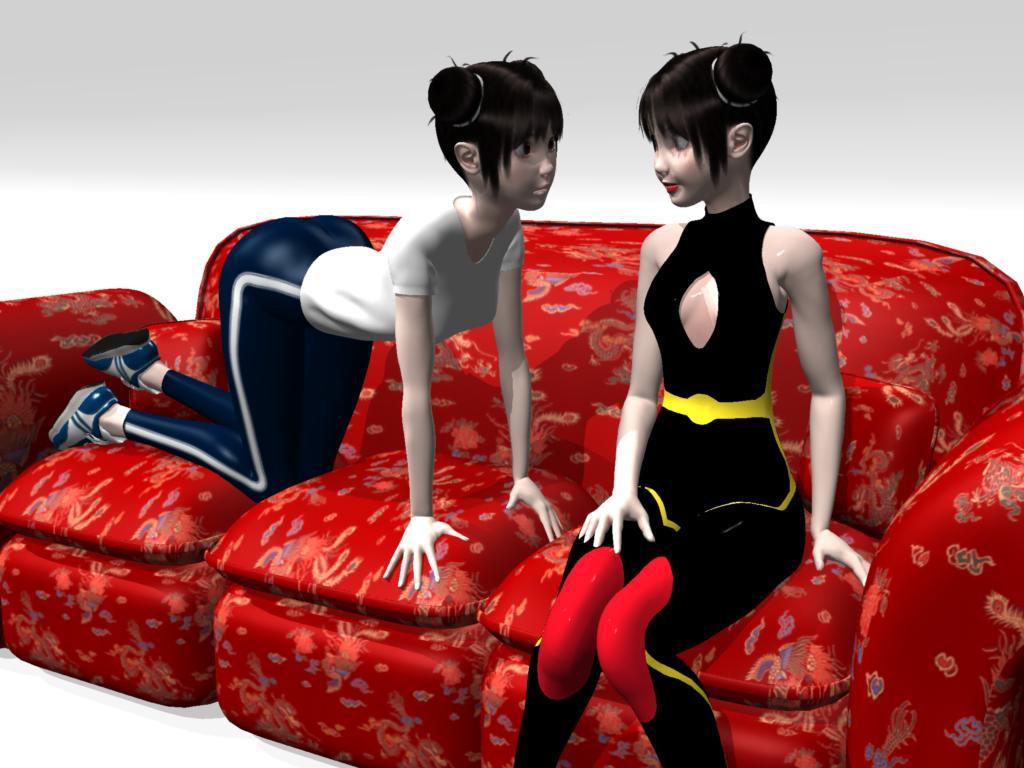
Noname Doll NND (to the left) studying her body double NNG (to the right)(couch courtesy of Carrara tutorials by PhilW)
Premier Questionscrosswind said:
kpr said:
@crosswind I was interested in MeshGraber 4 (I wasn't so interested that I immediately upgraded to Premier!)
Could you tell me if you can "add" geometery to a model with the "Premier Hijacked Version" of MG4? Like add a pair of horns to a human head.
You can sort of do this in Hexagon (and Daz Bridge), by extending existing polys, but you can't add new polys (if you do, the Daz Bridge won't import it - Maybe you can do the same in Blender, and import it with MorphLoaderPro?)
If/when you've a little while, be great if you'd check on the functionality in Premier
Oh, no, you cannot "add geometry" but just "deform the geometry", as you said: extend existing polygons by grab (select) them first then drag or push. Now MG 4.0 (Geometry Sculptor) provides a Draw Brush, you can also deform the mesh with Draw Brush... but as usual, you still can do these on Base Mesh, i.e. no SubD manipulation.
I'm also a Blender user, so yes, most of the time it's easy to sculpt complex shape in Blender and import the shape back to DS as a morph by using MLP.
Well, Mesh Grabber 4.0 is better than 3.0, you can check this video https://www.youtube.com/watch?v=Lr5uEgesPnc No big change. But there's still limitations and some bugs. You can check this post:
https://www.daz3d.com/forums/discussion/comment/8903241/#Comment_8903241
@crosswind Thanks very much for the testing and info/links - very kind of you to do and post these
Is it worth $19 a month to me?... Not sure given I can get a similar result in Hexagon and I can use Blender well enough if I want too (has been quite some time, but even so) and would figure MLP if I need to - but would have been great to do all in one "environment"
Anime Toons and Filatoon Shader Q&Arokkr said:
There seems to be some erratic behavior with this shader... I was (and still am) converting an old filament scene I did to an all-FilaToon-shaded scene and I couldn't make my character cast shadows not in a million years... Then, I decided to import it to an all-FilaToon scene I made yesterday from scratch (I did it by saving the character as a subset). When I imported, the shadows were there, but the skin was completely different (for instance, I couldn't activate glossiness in my old scene, but, when I imported the character, the glossiness showed up; also, the colors were totally different). Some things could be due to the lighting of the old scene (e.g., the colors) but some things, like the glossiness, I doubt it. Nothing too dramatic, since I'll redo the work in a new scene, but, if someone has experienced this and knows some workaround, I'd like to know.
I've also noticed some weird behaviors between the old filament and the new FilaToon. For instance, in my old scene, I was using an environment (HDRI) for lighting (draw dome off, with a skydome for the sky), but there was also a distant light to cast shadows. If I turned the environment light off, everything that had the old shader would go dark, but the surface I've already applied the toon shader would be lightened by the distant light...
EDIT: another weird thing... In the old scene, I've used the FilaToon - Constant shader for the eyelashes, as Dartanbeck taught us. When I imported my character to the new scene, the eyelashes were gone! The trick I used to make it show up was to set the Cutout Opacity to 2. I don't think this has anything to do with lighting...
Were all those weird behavior caused because the old scene had written in it some configuration that were affecting the FilaToon shading?
Well, when coverting older scenes, many things that are even a little bit different will make a big difference in Filament. The shader is the tool, but not the culprit here. There's something else going on that is so easy to overlook it wasn't caught (yet).
Shadows - makes sure you have lights in the scene with Deep Shadows enabled. I'm sure you've checked this, but... well... I don't know. I caught that one myself yesterday. It was a simple scene so it was easier for me to actually find and fix.
Sometimes one light (Distant?) can be a bit too strong which makes the shadows disappear. I caught that one myself yesterday. It was a simple scene so it was easier for me to actually find and fix.
Filament setting possibilities have changed Dramatically with this release. So some subtle (or major) differences in how those are set up can make all the difference in the world too.
It's very difficult to pinpoint without having the two scenes to compare on screen. Just comb through with open eyes and a patient mind - you'll discover the issue.
One thing that kept getting me is that I was making changes when I wasn't on frame 0, so my lights were all buggered up. It was a silly thing, but it had me scratching my head for an embarrassingly long time! :)
Anime Toons and Filatoon Shader Q&AThere seems to be some erratic behavior with this shader... I was (and still am) converting an old filament scene I did to an all-FilaToon-shaded scene and I couldn't make my character cast shadows not in a million years... Then, I decided to import it to an all-FilaToon scene I made yesterday from scratch (I did it by saving the character as a subset). When I imported, the shadows were there, but the skin was completely different (for instance, I couldn't activate glossiness in my old scene, but, when I imported the character, the glossiness showed up; also, the colors were totally different). Some things could be due to the lighting of the old scene (e.g., the colors) but some things, like the glossiness, I doubt it. Nothing too dramatic, since I'll redo the work in a new scene, but, if someone has experienced this and knows some workaround, I'd like to know.
I've also noticed some weird behaviors between the old filament and the new FilaToon. For instance, in my old scene, I was using an environment (HDRI) for lighting (draw dome off, with a skydome for the sky), but there was also a distant light to cast shadows. If I turned the environment light off, everything that had the old shader would go dark, but the surface I've already applied the toon shader would be lightened by the distant light...
EDIT: another weird thing... In the old scene, I've used the FilaToon - Constant shader for the eyelashes, as Dartanbeck taught us. When I imported my character to the new scene, the eyelashes were gone! The trick I used to make it show up was to set the Cutout Opacity to 2. I don't think this has anything to do with lighting...
Were all those weird behavior caused because the old scene had written in it some configuration that were affecting the FilaToon shading?
Exporting Facial MorphsThe export rules seems correct. I tried exporting and importing to Blender as I don't use iClone, the expressions are all there and work. If iClone well supports FBX import, you could've found the morphs somewhere in there.
Premier QuestionsRod Wise Driggo said:
...Then something must have gone wrong with my installation.
I've installed 4.23 beta (Mac) which is now additional on my system so I can run both 4.23 beta and 4.22 now.
With both versions products I recently purchased and installed via DIM (e.g. Vicky 9 or that Asymmetrical Cut Swimsuit) are shown in Smart Content with B/W image and the Connect-Icon plus Install-Option altough those products are accessible from the Content Library.Don't know if related but in DIM listings these products have the database icon greyed out indicating that they don't come with additional meta-data?
Any idea what I could do?
Ah... I just knew that you're a Mac user, however, I almost know nothing about Mac system. I did see some Mac user ever reported similar issues before and I used to be confused as even if systems are different (Win / Mac) but the design, development and logics of cms database as well as metadata should be same... But I really have no chance to experiment on a Mac system. I'm really sorry for that !'
But still I can give you some suggestion:
1) Dark grey database Icon in DIM means metadata have been successfully imported into cms database, but light grey means not... You can re-install the products to see if it'll fix the issue.
2) Or, re-import metadata. Just try with one product first, for instance, 102742 Vicky 9 If it works with this one, it'll work for other products. Then re-import others... if re-installation in DIM won't work for you...
For the above points, check this post : https://www.daz3d.com/forums/discussion/comment/8905896/#Comment_8905896
Daz 3D is part of

Connect
DAZ Productions, Inc.
7533 S Center View Ct #4664
West Jordan, UT 84084Licensing Agreement | Terms of Service | Privacy Policy | EULA
© 2026 Daz Productions Inc. All Rights Reserved.