-
NVIDIA RTX for DAZ Studio
the only thing I can use if I can ever get my hands on one, is a card with 2 slots not 3, otherwise I might as well buy a whole new computer.
That will not be happening for a few years.
A few people here have had 2080Ti's they no longer needed I would have bought but alas the UPS is not shipping to Australia so no point even trying.
So at this point I needn't bother, I may try buying a better CPU though.
Wish DAZ would implement Filament better as that is what I am mostly using.
NVIDIA RTX for DAZ StudioPerttiA said:
NotAnArtist said:
Thanks tj_1ca9500b,
These are good points about the 3060, which I've tried following in these threads. But I still can't justify the 3584 CUDAs, even if I were to double that with another RTX 3060 or similar later.
I'm thinking of render time. None of my ideas would require large scenes. All are simple & even fit in my GTX 1060 with 6 GB! I've tried some of them, loaded but not fully rendered. Any more than that and my machine will go boom:-)
My goal is render speed and image quality.
The render quality does not change, no matter what you use.
The benchmark thread can give you an idea, how the different GPU's compare against each other.
https://www.daz3d.com/forums/discussion/341041/daz-studio-iray-rendering-hardware-benchmarking/p1
The 3060 results are starting around here;
https://www.daz3d.com/forums/discussion/comment/6830466/#Comment_6830466
The 3060 does 8.1-8.3 iterations per second. There were no 1060's, but 1050Ti does one iteration per second and 1070 does 2.5 iterations per second, so in theory the 3060 should be about four times faster than your current card and the 3060Ti with 10.5 iterations per second would be about five times faster than your current one.
-By render quality, I just meant I don't ever want to go back to 3DL, and especially not Filament in its current state.
-The Benchmark main chart: Yes. I check it often for inspiration:-)But here's something I didn't notice until now because my Firefox doesn't show section "3. Benchmark Results", which is just under the main chart. The data is missing. Only the headers for each card show. Am I alone in this? Just checked Chromium - It has the same problem.
So I saved the page to edit it in Kompozer. Cleaning it up revealed the missing data. Could this be correct?:
-RTX 3060Ti: Its 10.648 iteration rate took 2 minutes 53.70 seconds
-RTX 3080: Its 12.062 iteration rate took 2 minutes 38.53 secondsThe 3060 Ti has 4864 CUDAs. The 3080 has 8960 CUDAs. How can a difference of 4096 CUDAs between the two cards result in only 15.17 seconds difference in render times?? I'm sorry if I've messed up something here. My mind is a bit swirling from a day of research. Not used to that!
If those statistics above are correct, tho, I'll go for the 3060 Ti, maybe two! ... Both underclocked :-)Daz Studio and LinuxLoaded 5 characters in a scene, some which had body hair. Mem usage - 10.9GB. Loaded property hiearchy pane, did not experience any issues with that particularly (not really sure how to use it tho.. as i am a newbie when it comes to DAZ).
I use "Texture Shaded" for my viewport when posing tho. Posing with IRAY is certainly very slow and awkward imo, and i have had huge issues with Filament(PBR) in case that is what you use @endlessloving.
Using IRAY on the viewport made my system use 15.6GB ram, and is not useful for posing.
Render the scene used 17.2GB (1440p image). Clearing the scene, and everything back to normal again. If you are into compiling wine/kernel yourself, i can provide you with my custom winesource on github? Depending on distro and whatnot, it is NOT for the beginner to do that tho
 Realistic (as in photorealism) hair?
Random said:
Maybe the most realistic hairs are by OOT. dForce hair just doesn't lool like real hair, rather instead fine strands of filament..
I have a few from OOT (apart from some others in my wishlist) and they are high-quality assets, for sure. Still, they have that "too shiny, too tidy" look under most lights that make them look less realistic.
Maybe I'm looking for the Holy Grail :-) and there's just no way (with iRay and all) to provide it, but the fact is that that one Kool hair I mentioned did it (yes, ONE hair and with ONE color), so it's possible at least in some hair styles and colors. Maybe this is the problem: achieving that with a more stylish hair is impossible with the current resources (renderer, etc).
In other news, I still didn't find a blonde-colored hair I like (including Kool's hair in blonde). :-) The darker colors always look better.Realistic (as in photorealism) hair?Maybe the most realistic hairs are by OOT. dForce hair just doesn't lool like real hair, rather instead fine strands of filament..
Can Filament Render 360/Spherical Images? If so, how?I would honestly settle for Filament native shaders to solve issues like cutout opacity culling and lack of ambient emission
sadly nobody seems to know how to/or seems to be interested in adding the Filiment shaders to the API
I dare say camera functions are related to that too
Can Filament Render 360/Spherical Images? If so, how?WendyLuvsCatz said:
well no because it is no longer available
I certainly used it to create spherical images from rotating videos
(which is what one can do with Filament, rotate the camera up and down on X axis and progressively rotate the Y axis after each sweep, definitely easier than doing it with my Nikon on unsteady feet getting dizzy)
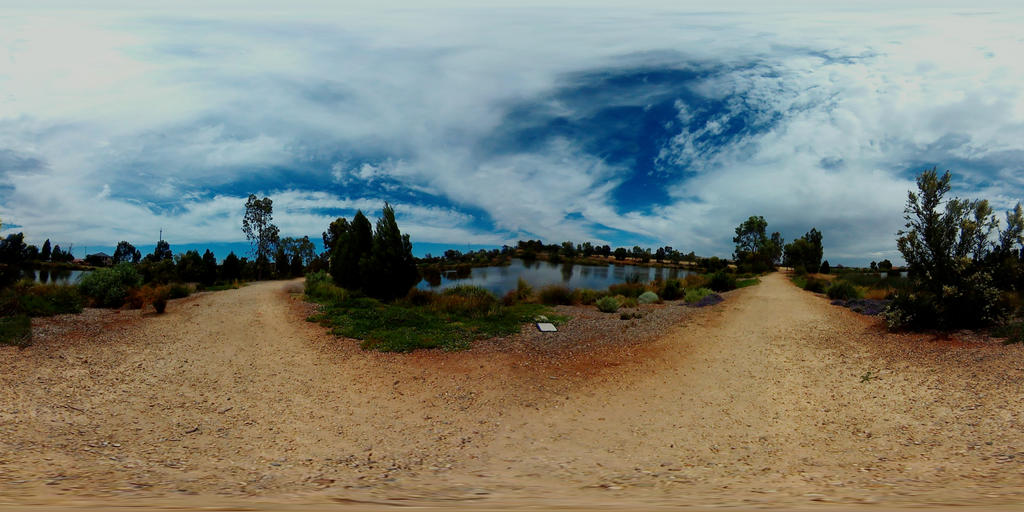
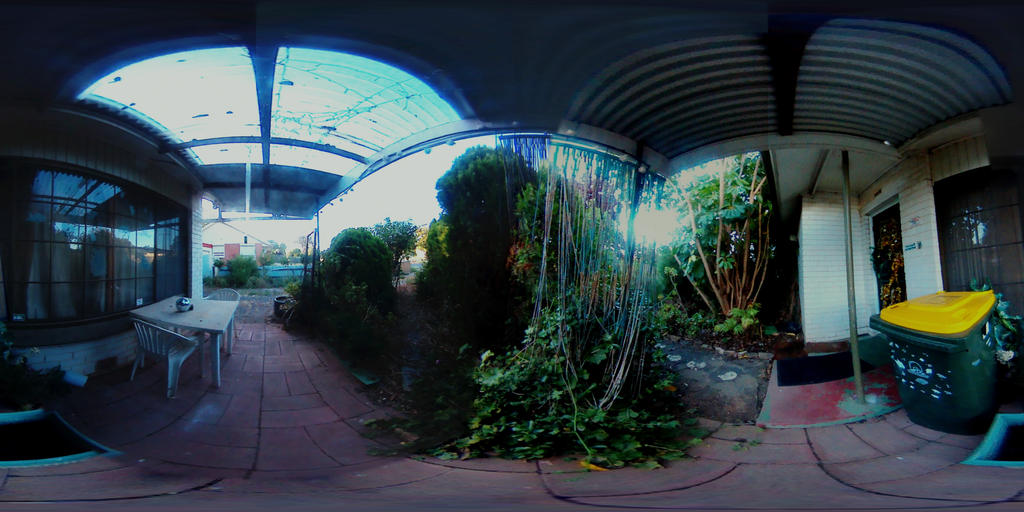
you may be able to find another panorama stitcher, Google Streetview has one I believe for making VR balls
I can find 2 paid options
ptgui and Panoweaver
there is another way using a mirror sphere, I think casual has a script with one
Yes, there are a few ways to go about creating the desired effect using software. Unfortunately, that route is time-consuming and the results may not always be perfect. I came across the thread from mCasual about creating spherical renders from a series of viewport images (someone give that guy a pay rise):
https://www.daz3d.com/forums/discussion/57539/ready-rendering-daz-studio-scenes-as-skyballs-equirectangular-spherical-images/p1A central reason I'm asking about native spherical camera support via Filament is because Filament is extremely fast compared to Iray. Filament renders can also look decent!
To be able to rapidly create spherical images via Filament would make it trivially easy to check whether a scene has been set up properly before starting multi-hour Iray renders. Thus far, I have been rendering a low resolution version with as few iterations as possible. This is okay for catching the more obvious problems with a render, but Filament would save the day.
Furthermore, if Filament could render spherical images, it would be possible to create 3D VR-360 animations that can be viewed with a VR headset. Sadly, I feel that 3D VR animations with Iray (at 6K+ resolution) are perhaps a decade away from being practical.
I have seen your animations, and I think you could do some impressive and immersive VR animations using Filament - if only it were possible!
So, if someone out there knows whether Filament is capable of spherical rendering, but hasn't been implemented yet, please speak up!
Can Filament Render 360/Spherical Images? If so, how?well no because it is no longer available
I certainly used it to create spherical images from rotating videos
(which is what one can do with Filament, rotate the camera up and down on X axis and progressively rotate the Y axis after each sweep, definitely easier than doing it with my Nikon on unsteady feet getting dizzy)
you may be able to find another panorama stitcher, Google Streetview has one I believe for making VR balls
I can find 2 paid options
ptgui and Panoweaver
there is another way using a mirror sphere, I think casual has a script with one
Can Filament Render 360/Spherical Images? If so, how?WendyLuvsCatz said:
not from my experience sadly but you could stitch a panorama with Microsoft ICE or something I guess
if you have it
they discontinued it, I have it
Unfortunately, I don't think that utility can produce the kind of image I would like to create. Attached/below is an image of what I have in mind. If Filament cannot presently do this, I wonder if it would be possible to implement the use of spherical cameras in a future update/version. If so, I'll submit a feature request, but it may not be technically possible. It sure would be useful, though!
 Can Filament Render 360/Spherical Images? If so, how?
Hylas said:
I don't use Filament but I don't see why it wouldn't work?
You have to set your camera distortion to spherical, I think. Haven't done it in a while.
It definitely had to do with camera settings, not IRAY render settings.
Alas, that does not work - at least not for me in Daz 4.20.0.11. Setting the camera's "lens distortion type" to "spherical" has no effect on either the viewport image, or the actual rendered image. It does with Iray, but not with Filament. If a spherical/360-degree render can be done with Filament, it must require something additional. If anyone knows anything about this, please chime in!
Render Restarting from BeginningSpacious said:
There seems to be an issue in the new version of Iray that is included in DAZ 4.20. When the scene being rendered is very near the vRam limit of the GPU it want's to switch back and forth between GPU and CPU causing it to restart each time that happens. I think it's a byproduct of a change meant to help clear vRAM between renders and likely will be fixed in the next version of Iray that we get.
From your screenshots it looks like that is what is happening to you. I have "solved" this problem for myself by disabling GPU and enabling CPU for these specific renders. It takes a lot longer, you may want to change the Time Limit for your render, but at least it gets the scene rendered eventually.
You could likely reduce a texture or two and get the scene rendering on GPU only, which would obviously be much faster. Maybe even try using a viewport style that uses less GPU resources than Filament.
Well, that makes sense. The scene rendering takes about the VRAM 11.6 of the 12 GBs I don't know exactly how much Win 10 takes off 12 GBs. I do know that at 11.8 GBs the Graphics on my machine drops to the CPU.
Can Filament Render 360/Spherical Images? If so, how?I don't use Filament but I don't see why it wouldn't work?
You have to set your camera distortion to spherical, I think. Haven't done it in a while.
It definitely had to do with camera settings, not IRAY render settings.
Can Filament Render 360/Spherical Images? If so, how?And if not, would it be possible for this feature to be implemented at some point - or is it technically impossible? If it is possible, it would be extremely useful for those of us who render 3D VR images/animations. Thanks in advance for any information on this matter.
Render Restarting from BeginningThere seems to be an issue in the new version of Iray that is included in DAZ 4.20. When the scene being rendered is very near the vRam limit of the GPU it want's to switch back and forth between GPU and CPU causing it to restart each time that happens. I think it's a byproduct of a change meant to help clear vRAM between renders and likely will be fixed in the next version of Iray that we get.
From your screenshots it looks like that is what is happening to you. I have "solved" this problem for myself by disabling GPU and enabling CPU for these specific renders. It takes a lot longer, you may want to change the Time Limit for your render, but at least it gets the scene rendered eventually.
You could likely reduce a texture or two and get the scene rendering on GPU only, which would obviously be much faster. Maybe even try using a viewport style that uses less GPU resources than Filament.
No April Fool's Item This Year?Roobarb said:I got really excited about the Invisible Chair, but the polygon count is a bit low. On the other hand the textures hold up well in close up.
I failed on my effort getting an invisible chair in my freebies on Renderosity, I ended up with 14 polygons in the chair. Catastrophic in comparison. I take my hat off to the DAZ modeller who managed zero. And mine was only invisible in Filament mode. It was hard to see, but possible in other preview modes, loosing its invisibly entirely in iRay. https://www.renderosity.com/freestuff/items/87801/basic-garden-furniture (please use adblocker, I thought I had a download on the forum, but can't find it.)
Viewport Engine?It's also very useful for Filament renders.
Cast shadows on viewport, is it possible?I currently only render my animations on viewport and I noticed that I can only see cast shadows when I render with Nvidia. Is there a way to see these shadows like in the picture below?
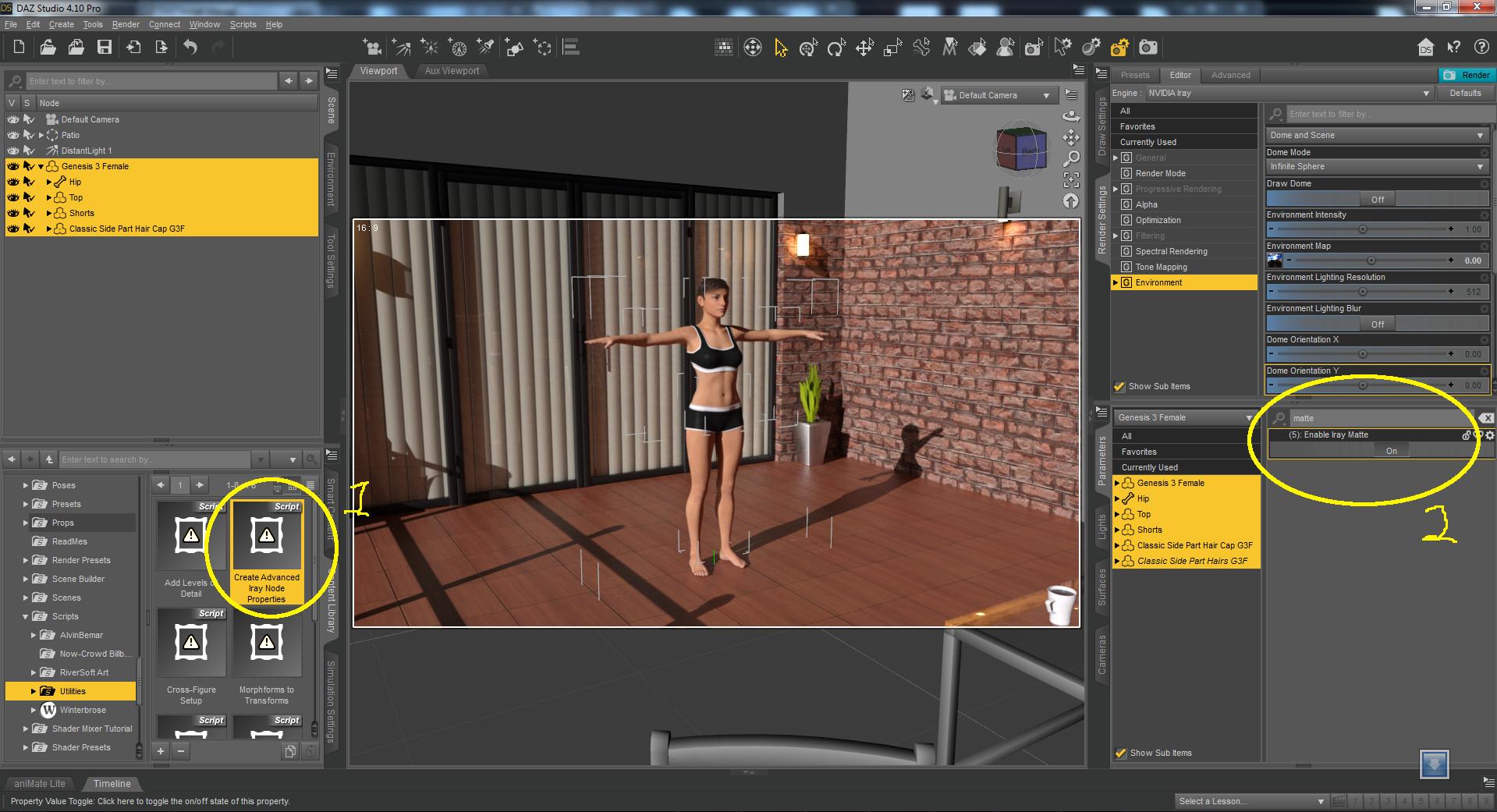
My DAZ 3D is currently like in the left image, I want something like in the image on the right:
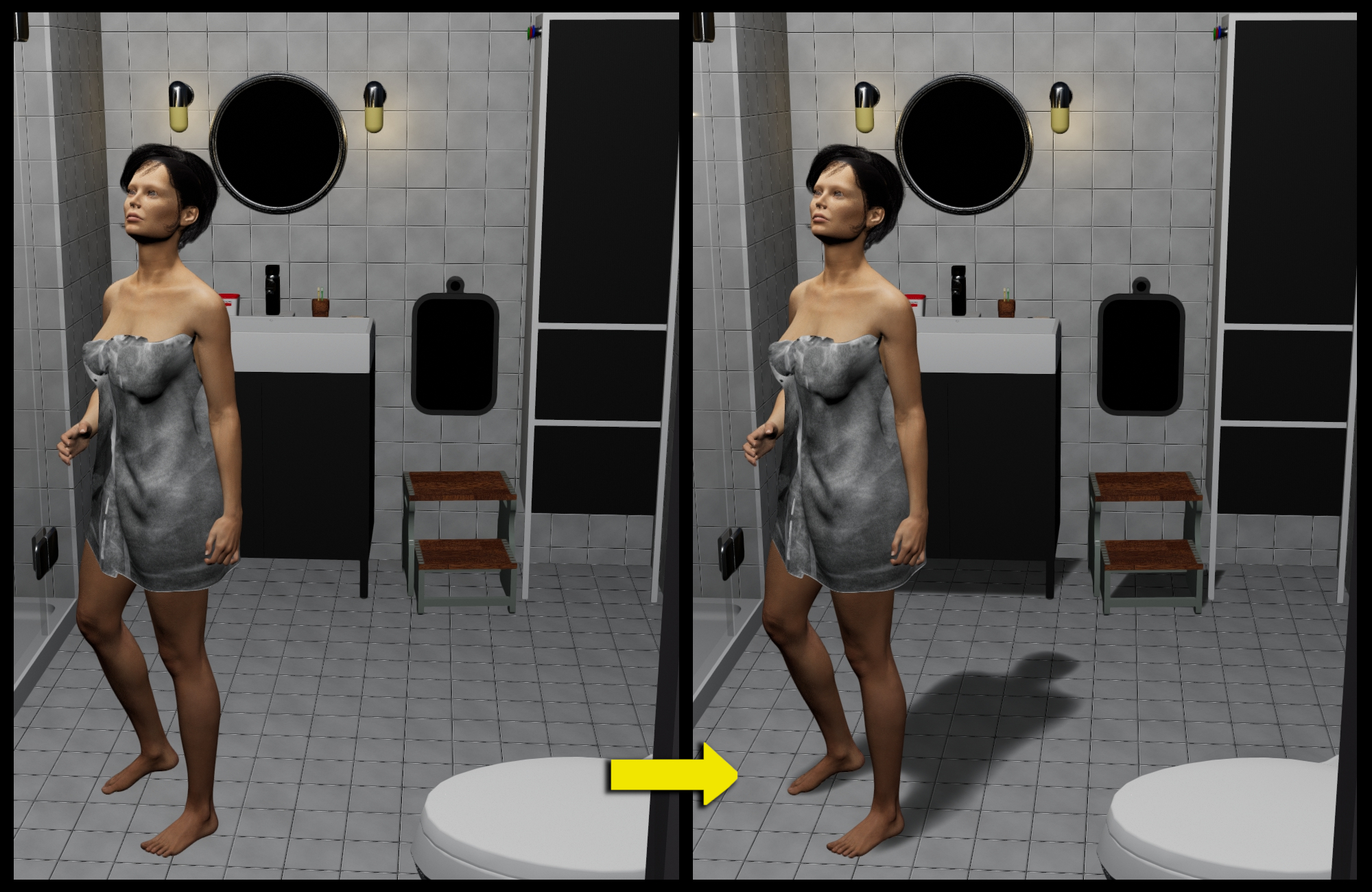 I found a plugin for it, the image above uses this plugin (dForce SY Rigged Shadows Filament | Daz 3D) but the first image of the post seems to be using a different way.
Any free solution for this? Shadows are good for realism.
Lots of stuff now brokenI'm not particularly technically minded with the IRAY/Filament discussion. However with the LI Incandescent Render Lights it seems bizarre as when I load as a Scene it works fine but as a light I get the same error.
Do we have a Mac (M1) version of DAZ Studio yet?memcneil70 said:
I have a MacBook Pro M1, 16 GB, 1TB with one external HD for Daz's content, and that is now almost full. I have had to remove UltraScenery XT until it can be updated for the latest MacOS Monterey update that was released a few days before USXT was released for sale in the store. I have two other computers with Win 10 that can do it. I can run the original UltraScenery on it.
I find some things work really fast, others not so much. Render times are actually not that bad. I would love to have Filament on it though.
As menteind above, it's not super great for iRay; I'm using an m1 iMac with 16 GB and I find it renders iRay about 3-4 times faster than my two Intel Macs, an i7 and an i9, and everything other than iRay much better than the Intels. DAZ has said that they are working on making DAZ native, but who knows when that my happen. I've dialed back my purchases and am spending less time until DAZ 5, for I'm also looking foward to Filament (I've used it on the Intels with VM Fusion and it mostly works, but every time something doesn't I can't know for sure why and don't want to rule out the possibility of running it under Fusion, thought that shouldn't matter).
I'm running it under Big Sur, Montery may yeild different results.
My best-case scenario for DAZ 5 would be Apple Silicon native, with Cycles Metal as a new rendering engine, which would allow for moving back and forth with Blender much better as well.
-- Walt Sterdan
4.9 Resets to Default ConstantlyHello, i know this post is quite old but i'm having this exact same issue on daz 4.20 and windows 10. To sum up, every time i close and reopen daz my workpace gets reset back to original settings, and my viewport changes from Texture Shaded (my prefference) to the Filament PBR.
-I can open and close panes and resize them to my preffered shape;
-I can't save the layout or apply a saved one after i reopened DAZ;
Daz 3D is part of

Connect
DAZ Productions, Inc.
7533 S Center View Ct #4664
West Jordan, UT 84084Licensing Agreement | Terms of Service | Privacy Policy | EULA
© 2026 Daz Productions Inc. All Rights Reserved.