-
So where’s the Seahorse tail?
So does it come with a male pregnancy morph?
Celebrity Look-a-Likes for 3D figures part 3Haruchai said:
Platnumk said:
coffman_steve2009 said:
coffman_steve2009 said:
Optimus Shepard said:
Hello,
I was hoping if the artist or somebody would tell me where or how to buy this character that looks exactly like Bionic Woman? She looks so so AMAZING AND COOL!! Please someone help me thank you.
https://www.daz3d.com/biomorph-beauty-hair-for-genesis-8-and-81-females
https://www.deviantart.com/elsinestrouno/art/Amelie-Death-Stranding-Morph-for-G8F-836591073
Ot there's this one
Here are a couple attempts from my Poser days:
How I make the outfit looks like what I bought on my model?Richard Haseltine said:
Dialing the breasts back down would help, the mesh is now self-intersecting which is going to limit what any bridging morph or Smoothing Modifier can handle. Still, it may be worth checking the shapes in the top to see if it has soemthing like a Bridge or Cleavage morph.
Edit: I see this is the 3DS forum, if that is indeed where you are working you won't have access to the Smoothing Modifier anyway though 3DS may well have soem kind of smooth-and-collide feature of its own.
I use Daz Studio yes , have more Daz software to use that may help me with this?
Celebrity Look-a-Likes for 3D figures part 3Platnumk said:
coffman_steve2009 said:
coffman_steve2009 said:
Optimus Shepard said:
Hello,
I was hoping if the artist or somebody would tell me where or how to buy this character that looks exactly like Bionic Woman? She looks so so AMAZING AND COOL!! Please someone help me thank you.
https://www.daz3d.com/biomorph-beauty-hair-for-genesis-8-and-81-females
https://www.deviantart.com/elsinestrouno/art/Amelie-Death-Stranding-Morph-for-G8F-836591073
Ot there's this one
AIUTO...CHI CONOSCE L’ITALIANO? PARTE TREDICIKainjy said:
Mi sa che ti stai confondendo..... Genesis 8 e 8.1 hanno la stessa mesh di base, per cui i morph dell'8 funzionano anche con la 8.1. Stesso discorso per vestiti, capelli ec..
Sarà, ma dei 2000 morph che ho per G8 normale non ce n'è uno che vada su G8.1.
 E i vestiti vengono applicati come se fossero bracaloni. E pure i capelli.
E' tutto rotto.
 [Released] dForce2Morph [Commercial]
Havos said:
Will this work even when the character (and therefore the clothing item also) has been heavily morphed prior to simulation? For example, my character has been morphed to an ogre, the clothing grew along with them via auto-follow, and after this I ran the simulation, and then created the morph. I suspect the morph would not work if used when the character is not an ogre, but I hope it will work when the character has been morphed in the same way as it was before running this script.
Your morph will definitely be saved. It *can* possibly work with non-ogre characters (for example, turning on smoothing to fix some of it). It will definitely work with a similarly morphed character.
AIUTO...CHI CONOSCE L’ITALIANO? PARTE TREDICIMi sa che ti stai confondendo..... Genesis 8 e 8.1 hanno la stessa mesh di base, per cui i morph dell'8 funzionano anche con la 8.1. Stesso discorso per vestiti, capelli ec..
Cambiano solo:
- ci sono dei joint in più per simulare meglio il viso. Le pose G8 funzionano anche con G8.1 perchè ci sono gli stessi joint nelle stesse posizioni. L'inverso (da 8.1 a 8) non è detto che funzioni (ad esempio le espressioni non vanno perchè appunto muovono quei joint che nella 8 non ci sono)
- Le UV.. in alcuni punti la texture della pelle viene applicata in maniera leggermente diversa. I materiali sono comunque compatibili
- Probabilmente avranno cambiato un po' le weightmap (come si deforma la mesh ruotando un joint) e aggiunto qualche morph correttivo in più (i morph nascosti di default che si attivano quando ruoti/pieghi il personaggio)
Una guida sintetica la trovi qui: https://www.daz3d.com/genesis-8-1
@Silvhe se installi 8.1 ti rimangono comunque gli 8.0 per cui installali senza problemi, tanto dopo puoi scegliere se usare 8 o 8.1 (DAZ li vede come 2 figure diverse)
AIUTO...CHI CONOSCE L’ITALIANO? PARTE TREDICISilvhe said:
Sentite, voi che siete esperti delle DAZ-cose: se io prendo Genesis 8.1 posso continuare ad avere anche 8.0 o l'upgrade sostituisce completamente la versione precedente? Da quanto ho capito le espressioni del viso sono diverse e le pose per G8 non vanno con G8.1, giusto? (intendo le pose che riguardano il viso)
Genesis 8.1 è praticamente Genesis 9 con un nome diverso.
I vecchi morph non funzionano, il rig, le textures e le UV sono diversi e gli abiti necessitano di ritocchi. Fai prima a tenerti 8 in attesa di un plugin per trasferire i morphs e adattare le textures.
 Celebrity Look-a-Likes for 3D figures part 3
Platnumk said:
coffman_steve2009 said:
coffman_steve2009 said:
Optimus Shepard said:
Hello,
I was hoping if the artist or somebody would tell me where or how to buy this character that looks exactly like Bionic Woman? She looks so so AMAZING AND COOL!! Please someone help me thank you.
https://www.daz3d.com/biomorph-beauty-hair-for-genesis-8-and-81-females
https://www.deviantart.com/elsinestrouno/art/Amelie-Death-Stranding-Morph-for-G8F-836591073
I used the Amelie-Death-Stranding-Morph to create this image:
Celebrity Look-a-Likes for 3D figures part 3coffman_steve2009 said:
coffman_steve2009 said:
Optimus Shepard said:
Hello,
I was hoping if the artist or somebody would tell me where or how to buy this character that looks exactly like Bionic Woman? She looks so so AMAZING AND COOL!! Please someone help me thank you.
https://www.daz3d.com/biomorph-beauty-hair-for-genesis-8-and-81-females
https://www.deviantart.com/elsinestrouno/art/Amelie-Death-Stranding-Morph-for-G8F-836591073
I'm looking for a specific kind of Crossbow (open to commissioning one)Well, I did my best for the time I allowed ;) - Surprisingly difficult to texture (not my strongest suit) but hopefully it's okay. Plenty of material zones for re-shading if you want. All moving parts move (drawing the bow and cable is a morph).
I'm not a crossbow expert so if I've misnamed something, I apologise. I'm not sure if the shaft of the bolt should be wood or metal, but you can always use a different shader.
It's sized to go with G8M but you may need to scale it depending on character.
Not perfect but it should do for most uses (just don't stick the camera right up the trigger as I haven't modelled more than a small recess).
Edit: It's now up at sharecg for anyone who wants it: https://sharecg.com/v/97908/view/5/3D-Model/Crossbow-SW

^click for bigger
Can someone help identify this character?thanks. i guess its as custom morph.
G8.1M geoshell issuesCan I join your Stupid Club sorakuno? I can't get this manual method to work either. Why has nobody made a simple script to transfer the geo texture/shader to the 8.1 shell?
Daz Studio 5 development updatekyoto kid said:
DAZ_Rawb said:
kyoto kid said:
...by "backwards compatibility" this means creating a scene in the 5 pre-beta stays in the 5 pre-beta just like "what happens in Vegas stays in Vegas"?
As long as you get your library locations mapped correctly and they don't rely on any yet to be converted plugins you should be able to load and save scenes freely between the two of them. Daz Studio 5 will eventually add new features that 4 doesn't understand but that is similar to trying to load Iray content in Daz Studio 4.7 or earlier.
...I tend to rely on a large number of pluguns and scripts like Zev0's Skin Builder, Growing Up, and other morph/shaping plugins, Generation X2, and other Merchant resources for character development as well as Wowie's Awe Shader for 3DL and various G8 - G3 conversion scripts. I may give the initial beta a pass until more such content iis updated (though GenerationX2 likely looks to be done as the PA passed on a few years ago, one of the reasons I didn't make the full move on to G8 as the plugin is instrumental in character development).
Also is this going to include a new version of Iray as well? I understand Nvidia is dropping driver support for W7/8.1 this fall so will that affect GPU performance particularly for those of us with older GPUs like Maxwell and Pascal?
Skin Builder, the conversion scripts, and Generation X don't leave relics, they do their work and produce regular content with no remaining depenency on the creation tool so you could continue to host those in DS 4 and open the scenes in DS 5.
Growing Up is morphs and posing, so there is no reason to think it wouldn't work in DS 5. The same is true of the merchant resource morph and texture sets.
The shader is the only item you list that might be problematice, but even there we have no idea what the potential triggers for incompatibility may be.
Daz Studio 5 development updateDAZ_Rawb said:
kyoto kid said:
...by "backwards compatibility" this means creating a scene in the 5 pre-beta stays in the 5 pre-beta just like "what happens in Vegas stays in Vegas"?
As long as you get your library locations mapped correctly and they don't rely on any yet to be converted plugins you should be able to load and save scenes freely between the two of them. Daz Studio 5 will eventually add new features that 4 doesn't understand but that is similar to trying to load Iray content in Daz Studio 4.7 or earlier.
...I tend to rely on a large number of pluguns and scripts like Zev0's Skin Builder, Growing Up, and other morph/shaping plugins, Generation X2, and other Merchant resources for character development as well as Wowie's Awe Shader for 3DL and various G8 - G3 conversion scripts. I may give the initial beta a pass until more such content iis updated (though GenerationX2 likely looks to be done as the PA passed on a few years ago, one of the reasons I didn't make the full move on to G8 as the plugin is instrumental in character development).
Also is this going to include a new version of Iray as well? I understand Nvidia is dropping driver support for W7/8.1 this fall so will that affect GPU performance particularly for those of us with older GPUs like Maxwell and Pascal?
How I make the outfit looks like what I bought on my model?Dialing the breasts back down would help, the mesh is now self-intersecting which is going to limit what any bridging morph or Smoothing Modifier can handle. Still, it may be worth checking the shapes in the top to see if it has soemthing like a Bridge or Cleavage morph.
Edit: I see this is the 3DS forum, if that is indeed where you are working you won't have access to the Smoothing Modifier anyway though 3DS may well have soem kind of smooth-and-collide feature of its own.
[LINKS] Doctor Who freebie list: RegenerationI can't believe I didn't share my work on this thread...
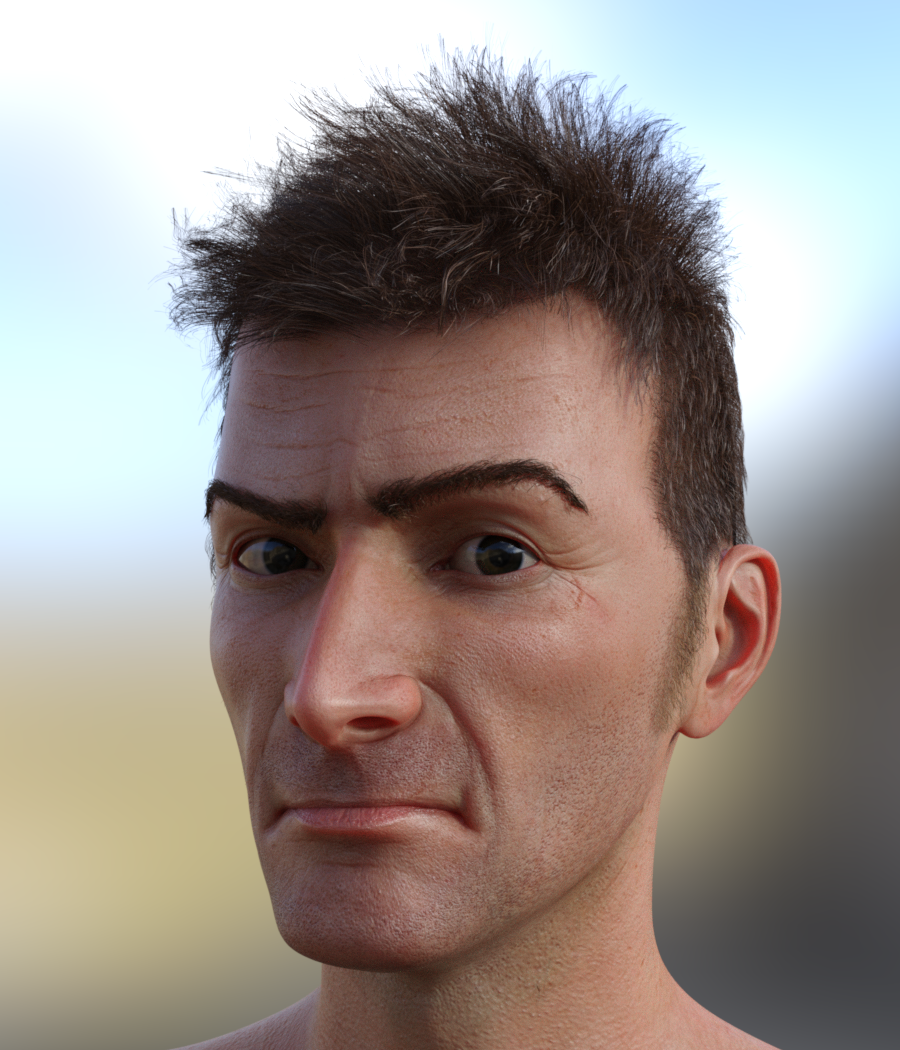

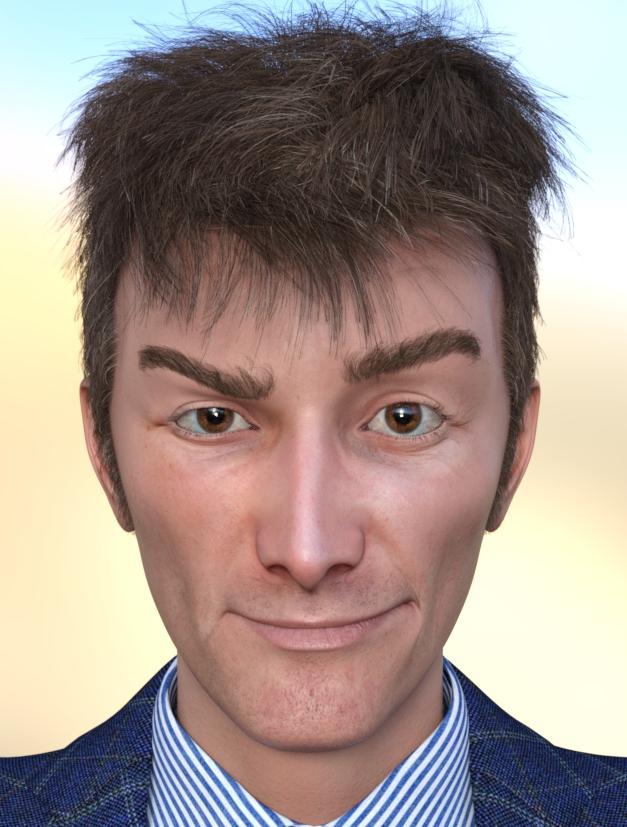
https://www.renderosity.com/freestuff/items/83886/david10-for-g8m
Product: David10 for G8M
Author: RKane_1Hello. I present to you David10 for G8M. This is really just a morph with a Character Preset that uses a Skin Materials found in Edward 8
The morph is under Actor/People/Real World
I have included a Character Preset but it does use Edward 8's Materials.
The Hair he is pictured with is not included but it is as follows:
-Super Natural Brows G8M with the Shape Preset of SNB G8M Style 33
-CC Beard Boss with the Brown Material and Shaping -> Sides preset of CC Beard Boss - Short Burns with Materials 02 Brunettes -> CC Beard Boss - 02 Brunettes - 02
-Tousled Hair with the Brown Materials set.Please enjoy his Timey Wimey Goodness.
[Released] dForce2Morph [Commercial]Will this work even when the character (and therefore the clothing item also) has been heavily morphed prior to simulation? For example, my character has been morphed to an ogre, the clothing grew along with them via auto-follow, and after this I ran the simulation, and then created the morph. I suspect the morph would not work if used when the character is not an ogre, but I hope it will work when the character has been morphed in the same way as it was before running this script.
Obj bodysuit not following morphs after transfer - solvedOK, I got this to work:
- I create a G8F geoshell, that I export to OBJ then re-import.
- I then use Geom Editor to remove all geometry but the torso, for my specifc applicaiton.
- I then run the transfer utility from G8F to the OBJ (defaults), but under Morph Targets I add ALL, and set Content Type at the bottom to Follower-Wardrobe-Full Body.
- I end up with a Figure that I can move and morph.
- I then Fit To G8F (which has morphs applied), and the morphs follow.
#5 and 6 were optional, after the above There are still a few morphs that don't follow, but they are freebies, so I figure if I check follow-and resave them as a morph asset they are just specific problems to those couple of morphs.
Thanks!
(why I am doing this...? It's for a torso wrap that I can use as a collision object that does not have a modifier itself. This means shirts and such don't wrap around the arms, when they get too close to the torso)
Obj bodysuit not following morphs after transfer - solvedOK, I think I tried that, but I will try it again. So I am going to try this, added #5 & #6:
- I create a G8F geoshell, that I export to OBJ then re-import.
- I then use Geom Editor to remove all geometry but the torso, for my specifc applicaiton.
- I then run the transfer utility from G8F to the OBJ (defaults), but under Morph Targets I add Shaping and Pose, and set Content Type at the bottom to Follower.
- I end up with a Figure that I can move and morph.
- Save as Support Asset - Figure/Prop Asset with content type follower.
- Delete the object and reload from content lib
- I then Fit To G8F (which has morphs applied), and non of the morphs follow. I see AutoFollow is not checked, and even if I check it...they still don't follow.
I will report back
Daz 3D is part of

Connect
DAZ Productions, Inc.
7533 S Center View Ct #4664
West Jordan, UT 84084Licensing Agreement | Terms of Service | Privacy Policy | EULA
© 2026 Daz Productions Inc. All Rights Reserved.