-
[Released] RSSY Character And Material Conversion Bundle Genesis 8 to Genesis 9 [Commercial]
Hi
If you add a g9 model to the scene then apply the morphs ie 8 or 8.1 that i've mentioned you get bad results, the same as you get when you have created a g9 transfer
in other words you get the same issue with appying a g8 or 8.1 to a g9 figure that you see in a g9 modified one
To clarify this further
I used your app to create morphs for the g9 figure from the g8 and g9
I listed the ones I had found problems with head, body, eyes, eyelashes. I could dial out a number of these issues, it looks like a number of dials were not set to 0 some had missing amounts and had a ? mark next to them
I have then now tried using the existing 8, 8.1 morphs on the g9 to see what happens
I see very simular issues to both existing and the app modded morphs, what im pointing out is that the existing morphs head should not control the body but they do in some and dont in others
Your app is'nt causing this
Hi RiversoftArt
I had to change my PC motherboard, so I have completely reinstalled eveything from scratch. no Daz folders at all
Had a job installing Daz Studio using DIM. but the other installer worked in the end
There are now no Genesis 9 modified morphs from using your app only the original one's
I woke up wondering, if opened up the Genesis 9 figure and applied the nail morphs what would happen?
Well using the Genesis 9 figure it does the same with the nail morphs without your app
The MSO_G9_NAILS WORK OK
A&AB NAILS MORPH THE WHOLE BODY NOT THE HEAD TO A FEMALE FIGURE
HALLIE NAILS MORPH THE WHOLE BODY NOT THE HEAD TO A FEMALE FIGURE
A&A NAILS MORPH THE WHOLE BODY NOT THE HEAD TO A FEMALE FIGURE
ACRILIC NAILS MORPH THE WHOLE BODY NOT THE HEAD AND CAUSE THE NOW FEMALE FIGURE TO LOOK UNFED
CYNDER81 NAILS MORPH THE WHOLE BODY NOT THE HEAD TO A FEMALE FIGURE
CYNDER_LONG_SQUARE NAILS MORPH THE WHOLE BODY NOT THE HEAD TO A FEMALE FIGURETO LOOK UNFED
DT-BEAUTIFUL NAILS MORPH THE WHOLE BODY NOT THE HEAD TO A FEMALE FIGURE
DT-FARAH NAILS MORPH THE WHOLE BODY NOT THE HEAD TO A FEMALE FIGURE
DT NAILS MORPH THE WHOLE BODY NOT THE HEAD TO A FEMALE FIGURE
KAYLEYSS SQUARE NAILS MORPH THE WHOLE BODY NOT THE HEAD TO A FEMALE FIGURE
LONG NAILS BY FWART MORPH THE WHOLE BODY NOT THE HEAD TO A FEMALE FIGURE
CB SQUARE NAILS MORPH THE WHOLE BODY NOT THE HEAD TO A FEMALE FIGURE
MOUSSO NAILS MORPH THE WHOLE BODY NOT THE HEAD TO A FEMALE FIGURE
OZ NAILS NAILS MORPH THE WHOLE BODY NOT THE HEAD TO A FEMALE FIGURE
SQUARE NAILS BY FWSA MORPH THE WHOLE BODY NOT THE HEAD TO A FEMALE FIGURE
STELETTA NAILS MORPH THE WHOLE BODY NOT THE HEAD TO A FEMALE FIGURE
DEMONHDFINGER NAIL FIX MORPH THE WHOLE BODY NOT THE HEAD TO A MALE FIGURE
DEMONHDFINGER NAIL FIX hd MORPH THE WHOLE BODY NOT THE HEAD TO A MALE FIGURE
HALLE EYE DETAILS HD EYES AND MOUTH DISTORTED AT 100% CHANGES WHOLE FACE
CATHERINE EYE EFFECTS WHOLE FACE
EYERIM REFINE HD EYES AND MOUTH DISTORTED AT 100% CHANGES WHOLE FACE
EYES CORNEA BULGE CHANGES FACE SHAPE
GOU LUK TOTALY CORRUPTS FIGURE
GOU LUK WITHOUT EYEBROWS TOTALY CORRUPTS FIGURE
DEMON HDEYE MOISTURE FIX CHANGES INTO A MALE FIGURE
OTHER G9 EYE MORPHS WORK FINE
DT FARAH HEAD CHANGES G9 BODY TO FEMALE
DT FELICIA HEAD OK
DT KIRANA HEAD CHANGES G9 BODY TO FEMAIL WITH SOME HEAD DISTORTION
DANAE HEAD OK
DOVE HEAD OK
DUCIBELLA HD HEAD OK
EILEEN HEAD OK
ELENA HEAD HD OK
EMMALEIGH HEAD OK
EMMANUELLE HEAD OK
ENDELLION HEAD OK
ERIKA HEAD CHANGES G9 TO FEMALE
EYRNN HEAD OK
ETSU HEAD CHANGES G9 BODY TO FEMALE
EVANGELINE HEAD OK
EVELYN HEAD OK
GA CIRCA HEAD OK
GEM HEAD 1 OK
GEN HEAD 2 OK
GEMMA HEAD OK
GOU LUK HEAD LOOKS DISTORTED
GWYN HEAD OK
HD RIO HEAD OK
HALLIE HEAD OK
HALLIE HEAD HD OK
HASHIMOTO HEAD CHANGES G9 BODY TO FEMALE
HELINA HEAD HD OK
HYUNA HEAD OK
JA DEVERY HEAD OK
MSO ALEXANDRA HEAD OK
VICTORIA HEAD OK
VICTORIA HEAD 8.1 OK
ZELARA HEAD OK
GS_ MISSINGHEAD_HD_LV4 CHANGES G9 BODY TO FEMALE
PHMTEENGAOHEAD SHAPE ADJUST1 OK
PHMTEENGAOHEAD SHAPE ADJUST1 OK CHANGES G9 BODY TO FEMALE
'CLEARLY A LOT OF THESE MORPHS ACT ON THE G9 FIGURE INCORRECTLY' BEFORE USING YOUR APP '
HOPE THAT HELPS
[Released] RSSY Character And Material Conversion Bundle Genesis 8 to Genesis 9 [Commercial]Keiron said:
Hi RiversoftArt
I had to change my PC motherboard, so I have completely reinstalled eveything from scratch. no Daz folders at all
Had a job installing Daz Studio using DIM. but the other installer worked in the end
There are now no Genesis 9 modified morphs from using your app only the original one's
I woke up wondering, if opened up the Genesis 9 figure and applied the nail morphs what would happen?
Well using the Genesis 9 figure it does the same with the nail morphs without your app
The MSO_G9_NAILS WORK OK
A&AB NAILS MORPH THE WHOLE BODY NOT THE HEAD TO A FEMALE FIGURE
HALLIE NAILS MORPH THE WHOLE BODY NOT THE HEAD TO A FEMALE FIGURE
A&A NAILS MORPH THE WHOLE BODY NOT THE HEAD TO A FEMALE FIGURE
ACRILIC NAILS MORPH THE WHOLE BODY NOT THE HEAD AND CAUSE THE NOW FEMALE FIGURE TO LOOK UNFED
CYNDER81 NAILS MORPH THE WHOLE BODY NOT THE HEAD TO A FEMALE FIGURE
CYNDER_LONG_SQUARE NAILS MORPH THE WHOLE BODY NOT THE HEAD TO A FEMALE FIGURETO LOOK UNFED
DT-BEAUTIFUL NAILS MORPH THE WHOLE BODY NOT THE HEAD TO A FEMALE FIGURE
DT-FARAH NAILS MORPH THE WHOLE BODY NOT THE HEAD TO A FEMALE FIGURE
DT NAILS MORPH THE WHOLE BODY NOT THE HEAD TO A FEMALE FIGURE
KAYLEYSS SQUARE NAILS MORPH THE WHOLE BODY NOT THE HEAD TO A FEMALE FIGURE
LONG NAILS BY FWART MORPH THE WHOLE BODY NOT THE HEAD TO A FEMALE FIGURE
CB SQUARE NAILS MORPH THE WHOLE BODY NOT THE HEAD TO A FEMALE FIGURE
MOUSSO NAILS MORPH THE WHOLE BODY NOT THE HEAD TO A FEMALE FIGURE
OZ NAILS NAILS MORPH THE WHOLE BODY NOT THE HEAD TO A FEMALE FIGURE
SQUARE NAILS BY FWSA MORPH THE WHOLE BODY NOT THE HEAD TO A FEMALE FIGURE
STELETTA NAILS MORPH THE WHOLE BODY NOT THE HEAD TO A FEMALE FIGURE
DEMONHDFINGER NAIL FIX MORPH THE WHOLE BODY NOT THE HEAD TO A MALE FIGURE
DEMONHDFINGER NAIL FIX hd MORPH THE WHOLE BODY NOT THE HEAD TO A MALE FIGURE
HALLE EYE DETAILS HD EYES AND MOUTH DISTORTED AT 100% CHANGES WHOLE FACE
CATHERINE EYE EFFECTS WHOLE FACE
EYERIM REFINE HD EYES AND MOUTH DISTORTED AT 100% CHANGES WHOLE FACE
EYES CORNEA BULGE CHANGES FACE SHAPE
GOU LUK TOTALY CORRUPTS FIGURE
GOU LUK WITHOUT EYEBROWS TOTALY CORRUPTS FIGURE
DEMON HDEYE MOISTURE FIX CHANGES INTO A MALE FIGURE
OTHER G9 EYE MORPHS WORK FINE
DT FARAH HEAD CHANGES G9 BODY TO FEMALE
DT FELICIA HEAD OK
DT KIRANA HEAD CHANGES G9 BODY TO FEMAIL WITH SOME HEAD DISTORTION
DANAE HEAD OK
DOVE HEAD OK
DUCIBELLA HD HEAD OK
EILEEN HEAD OK
ELENA HEAD HD OK
EMMALEIGH HEAD OK
EMMANUELLE HEAD OK
ENDELLION HEAD OK
ERIKA HEAD CHANGES G9 TO FEMALE
EYRNN HEAD OK
ETSU HEAD CHANGES G9 BODY TO FEMALE
EVANGELINE HEAD OK
EVELYN HEAD OK
GA CIRCA HEAD OK
GEM HEAD 1 OK
GEN HEAD 2 OK
GEMMA HEAD OK
GOU LUK HEAD LOOKS DISTORTED
GWYN HEAD OK
HD RIO HEAD OK
HALLIE HEAD OK
HALLIE HEAD HD OK
HASHIMOTO HEAD CHANGES G9 BODY TO FEMALE
HELINA HEAD HD OK
HYUNA HEAD OK
JA DEVERY HEAD OK
MSO ALEXANDRA HEAD OK
VICTORIA HEAD OK
VICTORIA HEAD 8.1 OK
ZELARA HEAD OK
GS_ MISSINGHEAD_HD_LV4 CHANGES G9 BODY TO FEMALE
PHMTEENGAOHEAD SHAPE ADJUST1 OK
PHMTEENGAOHEAD SHAPE ADJUST1 OK CHANGES G9 BODY TO FEMALE
'CLEARLY A LOT OF THESE MORPHS ACT ON THE G9 FIGURE INCORRECTLY' BEFORE USING YOUR APP '
HOPE THAT HELPS
I am confused what you are saying @Keiron. How can G8 morphs work on G9 without being converted?
[Released] RSSY Character And Material Conversion Bundle Genesis 8 to Genesis 9 [Commercial]Hi RiversoftArt
I had to change my PC motherboard, so I have completely reinstalled eveything from scratch. no Daz folders at all
Had a job installing Daz Studio using DIM. but the other installer worked in the end
There are now no Genesis 9 modified morphs from using your app only the original one's
I woke up wondering, if opened up the Genesis 9 figure and applied the nail morphs what would happen?
Well using the Genesis 9 figure it does the same with the nail morphs without your app
The MSO_G9_NAILS WORK OK
A&AB NAILS MORPH THE WHOLE BODY NOT THE HEAD TO A FEMALE FIGURE
HALLIE NAILS MORPH THE WHOLE BODY NOT THE HEAD TO A FEMALE FIGURE
A&A NAILS MORPH THE WHOLE BODY NOT THE HEAD TO A FEMALE FIGURE
ACRILIC NAILS MORPH THE WHOLE BODY NOT THE HEAD AND CAUSE THE NOW FEMALE FIGURE TO LOOK UNFED
CYNDER81 NAILS MORPH THE WHOLE BODY NOT THE HEAD TO A FEMALE FIGURE
CYNDER_LONG_SQUARE NAILS MORPH THE WHOLE BODY NOT THE HEAD TO A FEMALE FIGURETO LOOK UNFED
DT-BEAUTIFUL NAILS MORPH THE WHOLE BODY NOT THE HEAD TO A FEMALE FIGURE
DT-FARAH NAILS MORPH THE WHOLE BODY NOT THE HEAD TO A FEMALE FIGURE
DT NAILS MORPH THE WHOLE BODY NOT THE HEAD TO A FEMALE FIGURE
KAYLEYSS SQUARE NAILS MORPH THE WHOLE BODY NOT THE HEAD TO A FEMALE FIGURE
LONG NAILS BY FWART MORPH THE WHOLE BODY NOT THE HEAD TO A FEMALE FIGURE
CB SQUARE NAILS MORPH THE WHOLE BODY NOT THE HEAD TO A FEMALE FIGURE
MOUSSO NAILS MORPH THE WHOLE BODY NOT THE HEAD TO A FEMALE FIGURE
OZ NAILS NAILS MORPH THE WHOLE BODY NOT THE HEAD TO A FEMALE FIGURE
SQUARE NAILS BY FWSA MORPH THE WHOLE BODY NOT THE HEAD TO A FEMALE FIGURE
STELETTA NAILS MORPH THE WHOLE BODY NOT THE HEAD TO A FEMALE FIGURE
DEMONHDFINGER NAIL FIX MORPH THE WHOLE BODY NOT THE HEAD TO A MALE FIGURE
DEMONHDFINGER NAIL FIX hd MORPH THE WHOLE BODY NOT THE HEAD TO A MALE FIGURE
HALLE EYE DETAILS HD EYES AND MOUTH DISTORTED AT 100% CHANGES WHOLE FACE
CATHERINE EYE EFFECTS WHOLE FACE
EYERIM REFINE HD EYES AND MOUTH DISTORTED AT 100% CHANGES WHOLE FACE
EYES CORNEA BULGE CHANGES FACE SHAPE
GOU LUK TOTALY CORRUPTS FIGURE
GOU LUK WITHOUT EYEBROWS TOTALY CORRUPTS FIGURE
DEMON HDEYE MOISTURE FIX CHANGES INTO A MALE FIGURE
OTHER G9 EYE MORPHS WORK FINE
DT FARAH HEAD CHANGES G9 BODY TO FEMALE
DT FELICIA HEAD OK
DT KIRANA HEAD CHANGES G9 BODY TO FEMAIL WITH SOME HEAD DISTORTION
DANAE HEAD OK
DOVE HEAD OK
DUCIBELLA HD HEAD OK
EILEEN HEAD OK
ELENA HEAD HD OK
EMMALEIGH HEAD OK
EMMANUELLE HEAD OK
ENDELLION HEAD OK
ERIKA HEAD CHANGES G9 TO FEMALE
EYRNN HEAD OK
ETSU HEAD CHANGES G9 BODY TO FEMALE
EVANGELINE HEAD OK
EVELYN HEAD OK
GA CIRCA HEAD OK
GEM HEAD 1 OK
GEN HEAD 2 OK
GEMMA HEAD OK
GOU LUK HEAD LOOKS DISTORTED
GWYN HEAD OK
HD RIO HEAD OK
HALLIE HEAD OK
HALLIE HEAD HD OK
HASHIMOTO HEAD CHANGES G9 BODY TO FEMALE
HELINA HEAD HD OK
HYUNA HEAD OK
JA DEVERY HEAD OK
MSO ALEXANDRA HEAD OK
VICTORIA HEAD OK
VICTORIA HEAD 8.1 OK
ZELARA HEAD OK
GS_ MISSINGHEAD_HD_LV4 CHANGES G9 BODY TO FEMALE
PHMTEENGAOHEAD SHAPE ADJUST1 OK
PHMTEENGAOHEAD SHAPE ADJUST1 OK CHANGES G9 BODY TO FEMALE
'CLEARLY A LOT OF THESE MORPHS ACT ON THE G9 FIGURE INCORRECTLY' BEFORE USING YOUR APP '
HOPE THAT HELPS
Daz Studio 5 development update3DApprentice said:
DAZ_Rawb said:
As for the final Daz Studio 5 release:
- The timeline for this is to have it out near the very end of this year.
- Features and enhancements will be rolling in through the rest of the year.
- Anyone who has Daz Studio 4 in their account will be able to keep it. You'll be able to continue to download and use it for the foreseeable future.I hope everyone is just as excited about Daz Studio 5 as we are.
So that was back in 2021... We are now here in 2023 and there is still no Daz Studio 5 - what happened? Can we get an update?
To be fair, that timeline was based on needing to get a pre-beta to Mac users to be able to use DAZ Studio at all and the end-of-year 2021 version would have been bare bones for everyone, with the bell and whistles being added throughout 2022 so that by now we'd have a fully-functional, all the bells and whistles version with about a half-year of updates by now.
The "good news" was that they got help from Apple and no longer needed to match that hectic, two-year update plan, which puts us here today, waiting. I believe someone heard in the release video for Victoria 9 that they'd hoped to have DAZ Studio 5 out this spring, but it's less than a month until summer so, that's doubtful.I've been waiting for the Filament rendering engine since November, 2020, but at this point, I've stopped waiting. I've also stopped investing time and money in DAZ until D|S 5 comes out.
I took stock last month and realized that I've spent almost $70,000 over the decades at DAZ and I really have more than enough assets to do what I want without spending another dime (especially when you add in money spent at other sites over the decades).
It all came down to, "What am I waiting for?".
Well, this is what we *know* is coming in DAZ Studio 5:
1. It will use a much-newer version of Qt than D|S 4 uses, which will solve some UI issues some people have and possibly add some new UI features.
2. The Mac version will have Filament available.
3. The Mac version will use Apple's Metal library, but other than possibly replacing OGL, no one has said any more regarding Metal.
4. They were going to *try* to make the Mac version native.
5. ???
As far as I know, that's all that I've heard about what's coming in D|S 5. If anyone knows any more about what's been promised or actually planned, please update the list, I really would like to know.
As it stands, it looks like I'd continued to wait and invest in DAZ for the last couple of years when the only sure-thing coming for me was Filament. I've also started having more and more issues opening old characters due to updates to D|S and/or older base models, like Genesis.
I would love to hear of anything else planned (for whenever) as to what's coming down the pipe, but if that's it, I'm going to pass for now.
My only other big want would be a 64-bit version of their Mimc-based lip sync; I have yet to see anything as well-done out elsewhere. Honestly, I'm getting a little tired of keeping my 2012 machine running just to be able to lip sync.
I'm hoping to hear good news in the near future, but I'm just not investing in the mere possibility anymore.
-- Walt Sterdan
Edited two times for typos.
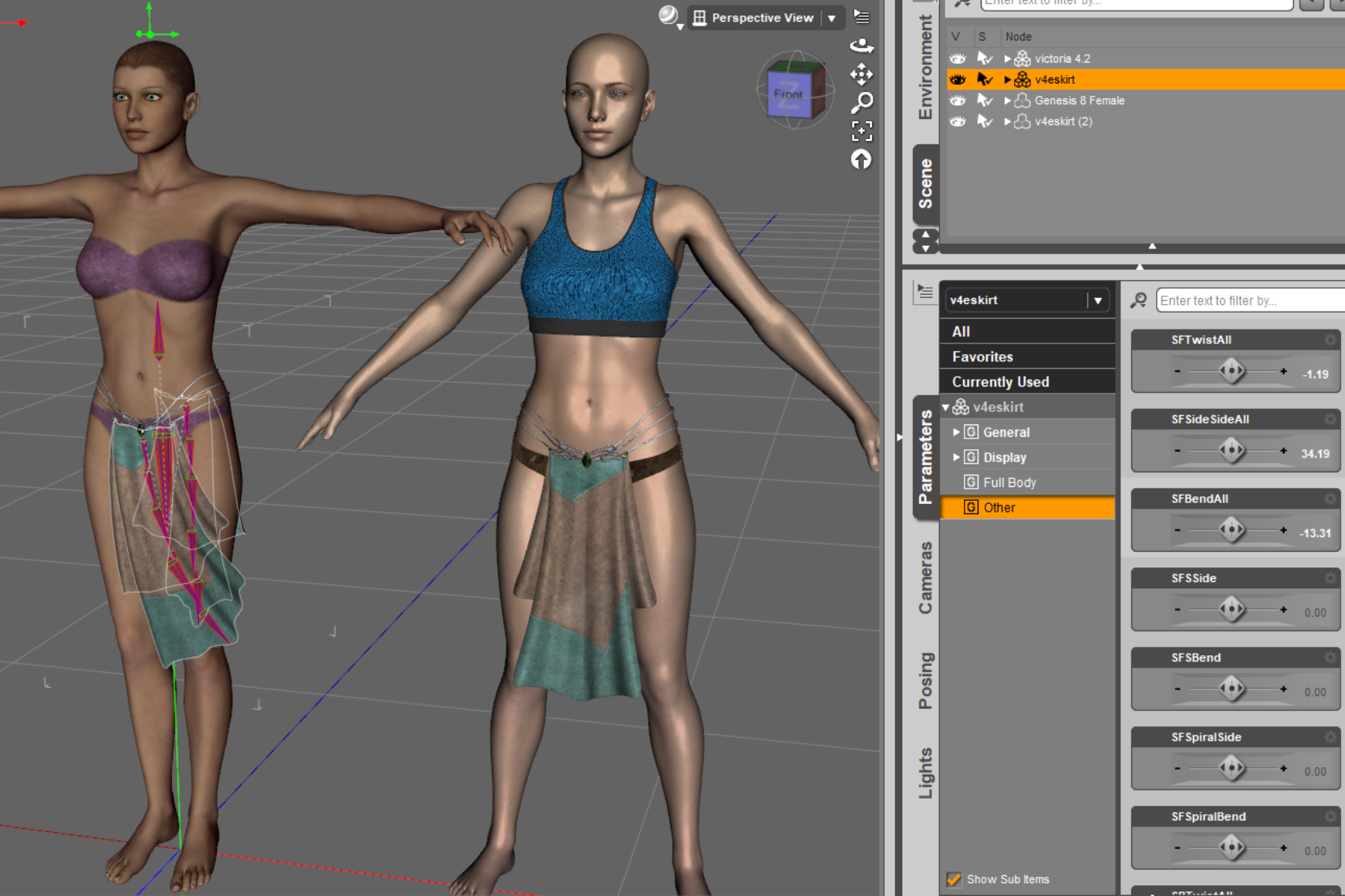
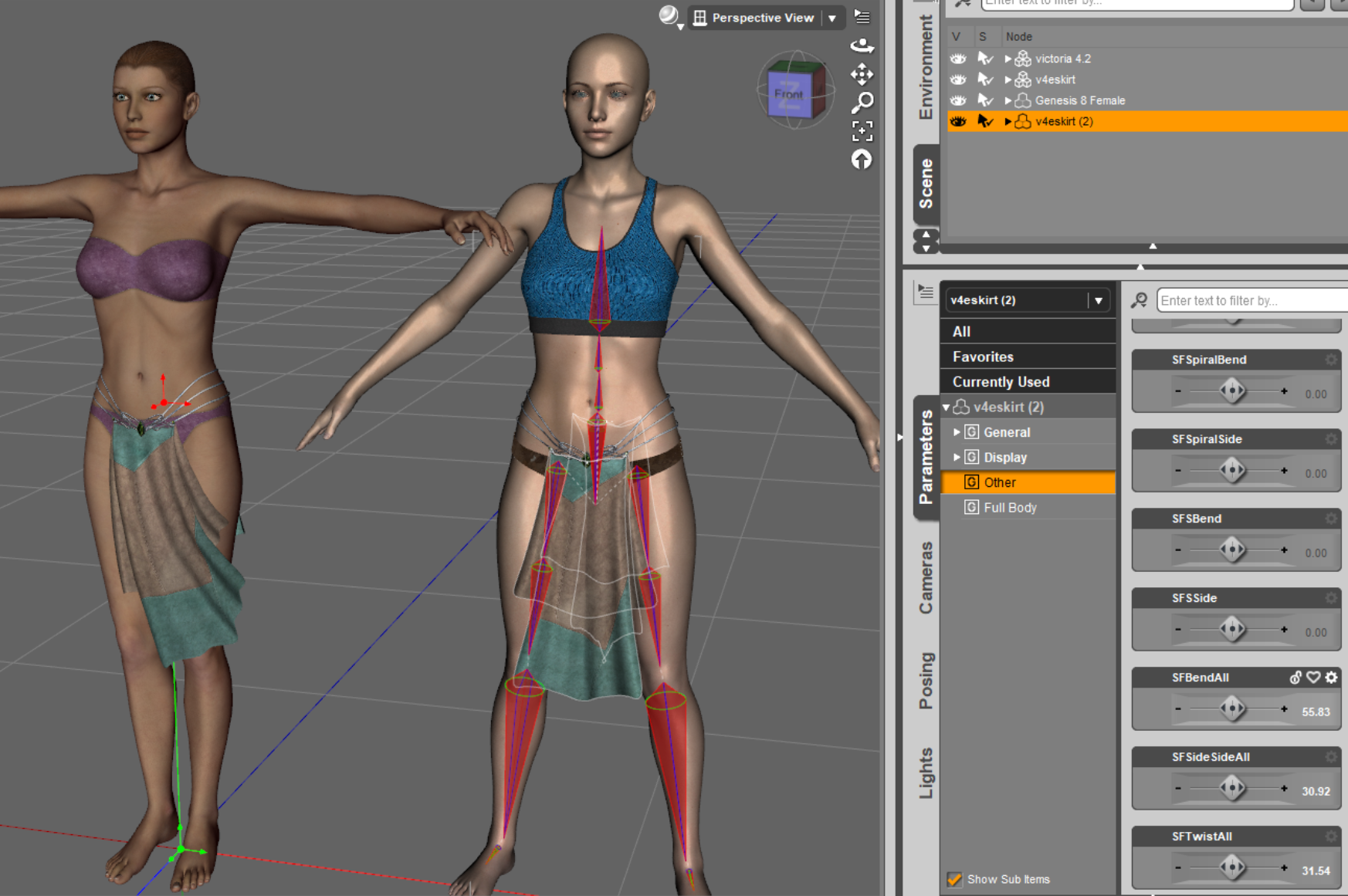
v4 skirt morph problem when fit to G8FThere is an old product EaraneOutfit which is old but pretty, product ID is 5661, it has a V4ESkirt which is a .cr2 file.
As shown in attached pictures, it can be used on V4.2, no problem, the skirt keeps its own bones so that it can be adjusted by the 'other' slidder. But when applied to G8F, the skirt changes to the G8F bones, the consequence is, all its own morphs such like SFBendAll don't work anymore, so the skirt is no use for G8F under whatever poses.
Any idea to let the skirt keep its own bones when fit to G8F so that its own morphs can be used? The product 'RSSY Clothing Converter from Victoria 4 to Genesis 8 Female' has no use since it gets the same result as the DAZ default fit, bones changed.
 [Released] RSSY Character And Material Conversion Bundle Genesis 8 to Genesis 9 [Commercial]
Astroz said:
Hey,
I don't have such big distortions, but I got this eyball shrink on left side, no idea why & how to fix it permanently.
It always reset, when I change poses or expressions back to this distortion.
I tried all methods mentioned in the PDF...
Replacing eyballs was the only option.
The Eylashes never fit, but Hair & skin seems to be converted well.
So far only one figure had bad overall shape, Melina from maelwenn.
Additional none of my shoes fit to the converted characters & the toes are always disshaped.
They seem to stick together. When I move one toe the neighbouring toe is following partialy & disshape because of it.
The skin & overall shapes seems to be ok for most Individual & Original Characters, like Mousso's Aakash in the picture here.
But Victoria 8 had also distoretd toes after conversion to 9....
What i am doing wrong & is there a chance to autifix this issues in an update?
For the eyes, I would suggest looking in the My Library\data\DAZ 3D\Genesis 9\Genesis 9 Eyes\Morphs. Perhaps you used the Eye Placement dialog for only one eye and a morph was created that is messing things up. Rename the morph directory so it is not seen.
For the toes, depending on the figure, I can have some distortion in the toes but they are not stuck together. I think it depends on the original geometry of the G8 character. I will ask SickleYield if there is anything you can do.
[Released] RSSY Character And Material Conversion Bundle Genesis 8 to Genesis 9 [Commercial]Hey,
I don't have such big distortions, but I got this eyball shrink on left side, no idea why & how to fix it permanently.
It always reset, when I change poses or expressions back to this distortion.
I tried all methods mentioned in the PDF...
Replacing eyballs was the only option.
The Eylashes never fit, but Hair & skin seems to be converted well.
So far only one figure had bad overall shape, Melina from maelwenn.
Additional none of my shoes fit to the converted characters & the toes are always disshaped.
They seem to stick together. When I move one toe the neighbouring toe is following partialy & disshape because of it.
The skin & overall shapes seems to be ok for most Individual & Original Characters, like Mousso's Aakash in the picture here.
But Victoria 8 had also distoretd toes after conversion to 9....
What i am doing wrong & is there a chance to autifix this issues in an update?
Ally 9Haven't checked on just a base Gen 9 female character yet, but will do when I get home.
Just disappointed to see that the stuff that came with a bundled character doesn't work OOTB with a bundled character. First noticed the glasses were wonky, then noticed some poke through down on the abdomen of the shirt...and the hips of the jeans...
This isn't the first time. There's a few things that came with the Victoria 9 bundle that don't quite fit right on Victoria 9 and I just wrote it off in my mind as, "Eh...Gen 9 is still new. I know that really old Gen 3 stuff didn't quite fit right, and old Gen 8 stuff was a little wonky too...give the PA's time to work with the models." But here we are...7 months in since Gen 9 was released and still problems.
Ally 9Ally's skin really looks some kind of a mess......in this 9 Generation Daz Originals made some really great core characters. Victoria, Julia, Kala, Angela, Xiu Lin but also Freja are probably the most realistic models in my library......in this new Gen, skin quality is the most important thing. In my my opinion this release is a step back in many ways. Hope Daz will soon recover with a Britney 9, Babina 9, Penny 9 or similars :)
Hylas' cornerAlly 9 is not getting the warmest reception... I totally get it. Following Pixie, Josie, and Kiri she's really not adding much.
But bad timing aside, I really like her promos. I think she's the strongest character Thorne has made in a while. I think her characters tend to be a bit "overdone" (case in point, Josie 9) but Ally is very pretty.
Anyway... I'm sticking with G8.1. But Ally 9 has inspired me to make my own "Ally 8.1". I started with Mynx, added a lot of Sage and a little bit of Aiko 8, and then some dials on top of it. Skin of Sage, HD of Mikasa.
Could you help me find this character please?Victoria 4 is well over ten years old and 80% of the products made for the character figure have long since been retired and remove from the various stores.
Missing DAZ FilesSo that's what the triangles are for!
I reinstalled Daz, used DIM, and ran some test renders, everything checked out ok. Only issue now was the missing thumbnails in some of the Genesis, Genesis 2, and Victoria 4 items that have PoserCF.Could you help me find this character please?hello, does anyone know this character, he is from the Victoria 4 generation but I cannot find out who he is...Could you help me find this character please?
 exporting Victoria
I have a strange problem: I need to export a Daz puppet from Carrara (Vic4); in Carrara, where the characters have been placed, a normal size V4 is holding a small (30%) V4... on arrival, in Collada, Fbx, or Obj, the small V4 is "blown up", ; apparently the re-size is not supported; would there be a solution? thank you for helping!
[Released] RSSY Character And Material Conversion Bundle Genesis 8 to Genesis 9 [Commercial]w_r_brook_ec9f3e956e said:
RiverSoftArt said:
w_r_brook_ec9f3e956e said:
RiverSoftArt said:
w_r_brook_ec9f3e956e said:
Looks like there are some problems withe material stuff. I'm trying to convert MSO Miley G8F and it comes up with some errors, which are kinda weird, claiming not to be able to find files which are clearly present for the material skin. They relate to the eyes and mouth. I get no materials copied. Also, the body shape seems pretty weird. I'm running on macos Ventura. Have I done something stupid here?
For the installation, is the file in the location? How did you install?
The files are present in the specified folders and the cases match (which can sometimes be an issue with macs). The product was installed by DIM, automatically. Attached is a screen shot of the Material Suit folder, which is under the location shown in the second attachment. These match the missing file warning.
Yeah, case sensitivity matters
 I assume the directory is in your Content Manager folders?
Yes, they are. Still getting this issue, just complains it cannot find these files. Given that I now have the material skin working with Victoria 8 correctly (apologies for misunderstanding this initially) it's odd that this doesn't also work with the character converter - clearly the required files are present.
I also tried loading a generic Genesis 9 dev load, loading the material suit for G8F using the relevent script and applying the Miley G8F uber skin to it. This did not report errors, but simply did not appear to work at all. This is attachment 3, following the material load - as can be seen, there is no material apparent in either the NVidia preview, nor in the textures preview (not shown). Clearly there is something screwed up with this installation, despite using DIM. Maybe something macos related??
I assume the Miley skin is a hierarchical map, and you selected the preset and then executed the Material Suit Apply G8-G9 Hierarchical Material from the favorites menu as per the manual? Please post the log.
I didn't - mistook the apply for the add script. I now have that working.
I'll take a closer look at the manual regarding the morph distortions - thanks.
The conversions are still behaving very strangely. I've tried this again with Victoria 8 as a more 'standard' product. In this case, however, the Victoria head morph works as expected on G9, only impacting the head, but the body morph and the Victoria 8 HD Details morph appear to interact badly - the HD morph does little at base resolution on Victoria 8, but on the converted character, it impacts the body, interfering with the Victoria 8 morph (second attachment - Victoria 8 alongside Victoria 9, both with HD details and body dialled up). This is different to the MSO Miley case, but similar in that parameter morphs are apparently being linked or replicated in ways that are different to the originating model. Is this me making mistakes again?
HD morphs cannot be converted (limitation of DS). I would not even convert the HD character and just do the regular V8.
[Released] RSSY Character And Material Conversion Bundle Genesis 8 to Genesis 9 [Commercial]w_r_brook_ec9f3e956e said:
w_r_brook_ec9f3e956e said:
RiverSoftArt said:
w_r_brook_ec9f3e956e said:
w_r_brook_ec9f3e956e said:
RiverSoftArt said:
w_r_brook_ec9f3e956e said:
Looks like there are some problems withe material stuff. I'm trying to convert MSO Miley G8F and it comes up with some errors, which are kinda weird, claiming not to be able to find files which are clearly present for the material skin. They relate to the eyes and mouth. I get no materials copied. Also, the body shape seems pretty weird. I'm running on macos Ventura. Have I done something stupid here?
For the installation, is the file in the location? How did you install?
The files are present in the specified folders and the cases match (which can sometimes be an issue with macs). The product was installed by DIM, automatically. Attached is a screen shot of the Material Suit folder, which is under the location shown in the second attachment. These match the missing file warning.
I also tried loading a generic Genesis 9 dev load, loading the material suit for G8F using the relevent script and applying the Miley G8F uber skin to it. This did not report errors, but simply did not appear to work at all. This is attachment 3, following the material load - as can be seen, there is no material apparent in either the NVidia preview, nor in the textures preview (not shown). Clearly there is something screwed up with this installation, despite using DIM. Maybe something macos related??
I'll take a closer look at the manual regarding the morph distortions - thanks.
Here is the log entry for the material load onto the material suit loaded on the Genesis 9 dev character. I'm not sure this is massively enlightening, but anyhow.
2023-05-20 12:33:52.804 [INFO] :: Prepare asset load (merge): /People/Genesis 8 Female/Characters/Mousso/Miley/Genesis 8 MATs/Iray UBER/Miley Base MAT NB Light.duf
2023-05-20 12:33:52.804 [INFO] :: Locking viewport redraw...
2023-05-20 12:33:52.804 [INFO] :: Viewport redraw locked.
2023-05-20 12:33:53.105 [INFO] :: Native format content directories: 2
2023-05-20 12:33:53.105 [INFO] :: Poser format content directories: 1
2023-05-20 12:33:53.105 [INFO] :: Other import format content directories: 0
2023-05-20 12:33:53.105 [INFO] :: Begin asset load (merge): /People/Genesis 8 Female/Characters/Mousso/Miley/Genesis 8 MATs/Iray UBER/Miley Base MAT NB Light.duf
2023-05-20 12:33:53.148 [INFO] :: Determining missing assets...
2023-05-20 12:33:53.876 [INFO] :: Setting textures...
2023-05-20 12:33:53.877 [INFO] :: Creating materials...
2023-05-20 12:33:53.882 [INFO] :: Applying animations...
2023-05-20 12:33:54.053 [INFO] :: Setting up follow targets...
2023-05-20 12:33:54.057 [INFO] :: Finished asset load (merge): 0m 0.951s - /People/Genesis 8 Female/Characters/Mousso/Miley/Genesis 8 MATs/Iray UBER/Miley Base MAT NB Light.duf
2023-05-20 12:33:54.388 [INFO] :: Unlocking viewport redraw...
2023-05-20 12:33:54.388 [INFO] :: Viewport redraw unlocked.
2023-05-20 12:34:00.561 Iray [INFO] - IRAY:RENDER :: 1.0 IRAY rend progr: Received update to 01322 iterations after 106.642s.
That does not look like you used the Material Suit Apply G8-G9 Hiearchical Map script. Please use according to the manual.
I followed the manual to the letter:
1. Loaded the G9 Dev load
2. Selected the G9 Dev load and then ran the script entitled "Material Suit Add G8F Material Suit" from the Scripts/RiversoftArt folder.
3. With Genesis 9 still selected, applied Victoria 8 all maps material (which you probably do have, given it's listed in the manual).
Result: no textures - see attachment.
(Clearly something is very wrong here. Incidentally, I should mentioned that just to be sure, before running the above test, I closed studio, un-installed and reinstalled G8F material suit product using DIM and restarted Studio).
I should also note that this is a new mac running M2 Max chipset.
Ok, figured it out. It WAS MY MISTAKE! My eye had skipped over the bit in the manual which says you have to select the hierarchical material (in this case Victoria 8 all maps) and then then NOT DOUBLE CLICK to load but select the script 'apply materials' which by default is in added in my 'Favourites' menu. It now works: shown in the attached.
Onto the next issue, which is why the character converter is complaining about missing files... when they are present in the folder it specifies.
Apologies for missing this, Riversoft.
Not a problem! Glad you figured it out.
[Released] RSSY Character And Material Conversion Bundle Genesis 8 to Genesis 9 [Commercial]Mark_e593e0a5 said:
w_r_brook_ec9f3e956e said:
RiverSoftArt said:
w_r_brook_ec9f3e956e said:
RiverSoftArt said:
w_r_brook_ec9f3e956e said:
Looks like there are some problems withe material stuff. I'm trying to convert MSO Miley G8F and it comes up with some errors, which are kinda weird, claiming not to be able to find files which are clearly present for the material skin. They relate to the eyes and mouth. I get no materials copied. Also, the body shape seems pretty weird. I'm running on macos Ventura. Have I done something stupid here?
For the installation, is the file in the location? How did you install?
The files are present in the specified folders and the cases match (which can sometimes be an issue with macs). The product was installed by DIM, automatically. Attached is a screen shot of the Material Suit folder, which is under the location shown in the second attachment. These match the missing file warning.
Yeah, case sensitivity matters
I assume the directory is in your Content Manager folders?Yes, they are. Still getting this issue, just complains it cannot find these files. Given that I now have the material skin working with Victoria 8 correctly (apologies for misunderstanding this initially) it's odd that this doesn't also work with the character converter - clearly the required files are present.
I also tried loading a generic Genesis 9 dev load, loading the material suit for G8F using the relevent script and applying the Miley G8F uber skin to it. This did not report errors, but simply did not appear to work at all. This is attachment 3, following the material load - as can be seen, there is no material apparent in either the NVidia preview, nor in the textures preview (not shown). Clearly there is something screwed up with this installation, despite using DIM. Maybe something macos related??
I assume the Miley skin is a hierarchical map, and you selected the preset and then executed the Material Suit Apply G8-G9 Hierarchical Material from the favorites menu as per the manual? Please post the log.
I didn't - mistook the apply for the add script. I now have that working.
I'll take a closer look at the manual regarding the morph distortions - thanks.
The conversions are still behaving very strangely. I've tried this again with Victoria 8 as a more 'standard' product. In this case, however, the Victoria head morph works as expected on G9, only impacting the head, but the body morph and the Victoria 8 HD Details morph appear to interact badly - the HD morph does little at base resolution on Victoria 8, but on the converted character, it impacts the body, interfering with the Victoria 8 morph (second attachment - Victoria 8 alongside Victoria 9, both with HD details and body dialled up). This is different to the MSO Miley case, but similar in that parameter morphs are apparently being linked or replicated in ways that are different to the originating model. Is this me making mistakes again?
Do you have any "Duplicate morph" message in the log? I have only a very select set of G8 and 8.1 characters in my library. The ones I am not currently working with ar disabled via TurboLoader. If I am enabling all my G8 and 8.1 characters, I do get duplicate formulas errors - and weird results after conversion
No, there are no dupliucate morph errors in the log file.
I've spent the afternoon running about 6 or 8 character conversions. I've switched off the automatic material suit load, as this doesn't work for some reason, perhaps to do with the missing file errors.
The common factor with all the errors I am seeing is that head and body morphs are getting linked incorrectly to character morphs. So for example, dialling in the character morph should also dial in the body and head morphs, in many cases. But this is getting screwed up somehow, but differently for different characters, so for some, dialling in the character also dials in the head, but the body morph never got created, despite the original character being there - in that case, the character morph dials in the body somehow, but not via a separate body morph. In cases where the script has created all three morphs, apparently correctly, dialling the character morph in dials in the head and body, but as the character morph also seems to impact the whole body as well, you get two body morphs loaded, with extreme distortion. Many (but not all) of the cases like this I have been able to fix by dialling the character morph to zero, and then manually dialling up the body and head morphs seperately to 100%. In one case though, it didn't create a body morph at all. Dialling the character morph to 50% got the character approximately to where it should be with no distortion. This is all redolent of some sort of bug, frankly - there is no issue with the original characters who are from a range of vendors and the problem includes Victoria 8. I do have a large library of 8 and 8.1 characters. Although I have turbo loader, I don't use it much.
Attached for example is a Genesis 9 base figure with just one morph dial turned to 100% - Victoria 8 HD, under Actor/People. This has automatically dialled in a whole load of other morphs which screw things up on G9, but not on G8. (second attachment). But if you manually dial out the HD body and head, it starts to look ok. These do not operate this way on the original G8 figure. (attachment 3). So all in all, apart from the material copy which refuses to find files which are present, this can be made to work with some effort, it's just not very easy or pretty. I believe these 'automatic' linkages are called ERCs? It is some bug in the way the script treats these ERCs which appears to be causing the issue, IMHO (not an expert, but 40 years as a programmer you do get hunches).
[Released] RSSY Character And Material Conversion Bundle Genesis 8 to Genesis 9 [Commercial]w_r_brook_ec9f3e956e said:
RiverSoftArt said:
w_r_brook_ec9f3e956e said:
RiverSoftArt said:
w_r_brook_ec9f3e956e said:
Looks like there are some problems withe material stuff. I'm trying to convert MSO Miley G8F and it comes up with some errors, which are kinda weird, claiming not to be able to find files which are clearly present for the material skin. They relate to the eyes and mouth. I get no materials copied. Also, the body shape seems pretty weird. I'm running on macos Ventura. Have I done something stupid here?
For the installation, is the file in the location? How did you install?
The files are present in the specified folders and the cases match (which can sometimes be an issue with macs). The product was installed by DIM, automatically. Attached is a screen shot of the Material Suit folder, which is under the location shown in the second attachment. These match the missing file warning.
Yeah, case sensitivity matters
I assume the directory is in your Content Manager folders?Yes, they are. Still getting this issue, just complains it cannot find these files. Given that I now have the material skin working with Victoria 8 correctly (apologies for misunderstanding this initially) it's odd that this doesn't also work with the character converter - clearly the required files are present.
I also tried loading a generic Genesis 9 dev load, loading the material suit for G8F using the relevent script and applying the Miley G8F uber skin to it. This did not report errors, but simply did not appear to work at all. This is attachment 3, following the material load - as can be seen, there is no material apparent in either the NVidia preview, nor in the textures preview (not shown). Clearly there is something screwed up with this installation, despite using DIM. Maybe something macos related??
I assume the Miley skin is a hierarchical map, and you selected the preset and then executed the Material Suit Apply G8-G9 Hierarchical Material from the favorites menu as per the manual? Please post the log.
I didn't - mistook the apply for the add script. I now have that working.
I'll take a closer look at the manual regarding the morph distortions - thanks.
The conversions are still behaving very strangely. I've tried this again with Victoria 8 as a more 'standard' product. In this case, however, the Victoria head morph works as expected on G9, only impacting the head, but the body morph and the Victoria 8 HD Details morph appear to interact badly - the HD morph does little at base resolution on Victoria 8, but on the converted character, it impacts the body, interfering with the Victoria 8 morph (second attachment - Victoria 8 alongside Victoria 9, both with HD details and body dialled up). This is different to the MSO Miley case, but similar in that parameter morphs are apparently being linked or replicated in ways that are different to the originating model. Is this me making mistakes again?
Do you have any "Duplicate morph" message in the log? I have only a very select set of G8 and 8.1 characters in my library. The ones I am not currently working with ar disabled via TurboLoader. If I am enabling all my G8 and 8.1 characters, I do get duplicate formulas errors - and weird results after conversion
[Released] RSSY Character And Material Conversion Bundle Genesis 8 to Genesis 9 [Commercial]RiverSoftArt said:
w_r_brook_ec9f3e956e said:
RiverSoftArt said:
w_r_brook_ec9f3e956e said:
Looks like there are some problems withe material stuff. I'm trying to convert MSO Miley G8F and it comes up with some errors, which are kinda weird, claiming not to be able to find files which are clearly present for the material skin. They relate to the eyes and mouth. I get no materials copied. Also, the body shape seems pretty weird. I'm running on macos Ventura. Have I done something stupid here?
For the installation, is the file in the location? How did you install?
The files are present in the specified folders and the cases match (which can sometimes be an issue with macs). The product was installed by DIM, automatically. Attached is a screen shot of the Material Suit folder, which is under the location shown in the second attachment. These match the missing file warning.
Yeah, case sensitivity matters
I assume the directory is in your Content Manager folders?Yes, they are. Still getting this issue, just complains it cannot find these files. Given that I now have the material skin working with Victoria 8 correctly (apologies for misunderstanding this initially) it's odd that this doesn't also work with the character converter - clearly the required files are present.
I also tried loading a generic Genesis 9 dev load, loading the material suit for G8F using the relevent script and applying the Miley G8F uber skin to it. This did not report errors, but simply did not appear to work at all. This is attachment 3, following the material load - as can be seen, there is no material apparent in either the NVidia preview, nor in the textures preview (not shown). Clearly there is something screwed up with this installation, despite using DIM. Maybe something macos related??
I assume the Miley skin is a hierarchical map, and you selected the preset and then executed the Material Suit Apply G8-G9 Hierarchical Material from the favorites menu as per the manual? Please post the log.
I didn't - mistook the apply for the add script. I now have that working.
I'll take a closer look at the manual regarding the morph distortions - thanks.
The conversions are still behaving very strangely. I've tried this again with Victoria 8 as a more 'standard' product. In this case, however, the Victoria head morph works as expected on G9, only impacting the head, but the body morph and the Victoria 8 HD Details morph appear to interact badly - the HD morph does little at base resolution on Victoria 8, but on the converted character, it impacts the body, interfering with the Victoria 8 morph (second attachment - Victoria 8 alongside Victoria 9, both with HD details and body dialled up). This is different to the MSO Miley case, but similar in that parameter morphs are apparently being linked or replicated in ways that are different to the originating model. Is this me making mistakes again?
[Released] RSSY Character And Material Conversion Bundle Genesis 8 to Genesis 9 [Commercial]w_r_brook_ec9f3e956e said:
RiverSoftArt said:
w_r_brook_ec9f3e956e said:
w_r_brook_ec9f3e956e said:
RiverSoftArt said:
w_r_brook_ec9f3e956e said:
Looks like there are some problems withe material stuff. I'm trying to convert MSO Miley G8F and it comes up with some errors, which are kinda weird, claiming not to be able to find files which are clearly present for the material skin. They relate to the eyes and mouth. I get no materials copied. Also, the body shape seems pretty weird. I'm running on macos Ventura. Have I done something stupid here?
For the installation, is the file in the location? How did you install?
The files are present in the specified folders and the cases match (which can sometimes be an issue with macs). The product was installed by DIM, automatically. Attached is a screen shot of the Material Suit folder, which is under the location shown in the second attachment. These match the missing file warning.
I also tried loading a generic Genesis 9 dev load, loading the material suit for G8F using the relevent script and applying the Miley G8F uber skin to it. This did not report errors, but simply did not appear to work at all. This is attachment 3, following the material load - as can be seen, there is no material apparent in either the NVidia preview, nor in the textures preview (not shown). Clearly there is something screwed up with this installation, despite using DIM. Maybe something macos related??
I'll take a closer look at the manual regarding the morph distortions - thanks.
Here is the log entry for the material load onto the material suit loaded on the Genesis 9 dev character. I'm not sure this is massively enlightening, but anyhow.
2023-05-20 12:33:52.804 [INFO] :: Prepare asset load (merge): /People/Genesis 8 Female/Characters/Mousso/Miley/Genesis 8 MATs/Iray UBER/Miley Base MAT NB Light.duf
2023-05-20 12:33:52.804 [INFO] :: Locking viewport redraw...
2023-05-20 12:33:52.804 [INFO] :: Viewport redraw locked.
2023-05-20 12:33:53.105 [INFO] :: Native format content directories: 2
2023-05-20 12:33:53.105 [INFO] :: Poser format content directories: 1
2023-05-20 12:33:53.105 [INFO] :: Other import format content directories: 0
2023-05-20 12:33:53.105 [INFO] :: Begin asset load (merge): /People/Genesis 8 Female/Characters/Mousso/Miley/Genesis 8 MATs/Iray UBER/Miley Base MAT NB Light.duf
2023-05-20 12:33:53.148 [INFO] :: Determining missing assets...
2023-05-20 12:33:53.876 [INFO] :: Setting textures...
2023-05-20 12:33:53.877 [INFO] :: Creating materials...
2023-05-20 12:33:53.882 [INFO] :: Applying animations...
2023-05-20 12:33:54.053 [INFO] :: Setting up follow targets...
2023-05-20 12:33:54.057 [INFO] :: Finished asset load (merge): 0m 0.951s - /People/Genesis 8 Female/Characters/Mousso/Miley/Genesis 8 MATs/Iray UBER/Miley Base MAT NB Light.duf
2023-05-20 12:33:54.388 [INFO] :: Unlocking viewport redraw...
2023-05-20 12:33:54.388 [INFO] :: Viewport redraw unlocked.
2023-05-20 12:34:00.561 Iray [INFO] - IRAY:RENDER :: 1.0 IRAY rend progr: Received update to 01322 iterations after 106.642s.
That does not look like you used the Material Suit Apply G8-G9 Hiearchical Map script. Please use according to the manual.
I followed the manual to the letter:
1. Loaded the G9 Dev load
2. Selected the G9 Dev load and then ran the script entitled "Material Suit Add G8F Material Suit" from the Scripts/RiversoftArt folder.
3. With Genesis 9 still selected, applied Victoria 8 all maps material (which you probably do have, given it's listed in the manual).
Result: no textures - see attachment.
(Clearly something is very wrong here. Incidentally, I should mentioned that just to be sure, before running the above test, I closed studio, un-installed and reinstalled G8F material suit product using DIM and restarted Studio).
I should also note that this is a new mac running M2 Max chipset.
Ok, figured it out. It WAS MY MISTAKE! My eye had skipped over the bit in the manual which says you have to select the hierarchical material (in this case Victoria 8 all maps) and then then NOT DOUBLE CLICK to load but select the script 'apply materials' which by default is in added in my 'Favourites' menu. It now works: shown in the attached.
Onto the next issue, which is why the character converter is complaining about missing files... when they are present in the folder it specifies.
Apologies for missing this, Riversoft.
Daz 3D is part of

Connect
DAZ Productions, Inc.
7533 S Center View Ct #4664
West Jordan, UT 84084Licensing Agreement | Terms of Service | Privacy Policy | EULA
© 2026 Daz Productions Inc. All Rights Reserved.