-
the torso is deformed in Genesis 9
Richard Haseltine said:
How did you shape him? It looks as if there are newly sculpted morphs for which the joint centres have not been adjusted (or a bunch of morphs exported as OBJ and imported as a new morph, in which case this shows a reason you should not do that)
I didn't understand hahaha, I sculpted a model in Blender and when I tried to place it in a pose the shoulder became disfigured, the problem is in the shoulder every time it moves the torso becomes deformed
the torso is deformed in Genesis 9How did you shape him? It looks as if there are newly sculpted morphs for which the joint centres have not been adjusted (or a bunch of morphs exported as OBJ and imported as a new morph, in which case this shows a reason you should not do that)
Clutch purse with morphs.nabob21 said:I have been unable to find a clutch purse for Daz Studio that has open and close morphs. I found an old one for Poser but it would be nice to have a more modern one with some morphs instead of just a static prop like most of them are.
That’s such a good point! I’ve run into the same issue—most clutch or handbag props in Daz Studio are gorgeous, but they’re static, which really limits posing options. An open/close morph would make renders look way more natural, especially for wedding or fashion scenes where characters might be holding or reaching into the bag. Hopefully a creator picks up on this because it would definitely fill a gap!
[Released] Blender to Daz Studio Plugin released!!! Official support thread [Commercial]crosswind said:
Artini said:
Thanks, I have tried to hidden certain collections in Blender scene and used Transfer All.
Right ~ or right-click to Select Objects with the selected Collection, then Export Selected.
Ok, thanks. Have to try it myself.
Have tried some demo scenes from Blender, but they are using some other materials and they look different in Daz Studio.
How do I Add the Missing Shine to Hair for 3Delight Renders?Bejaymac said:
With 4.10 studio is probably still applying the default surface shader to any Poser content you load in, this is a basic shader, best bet would be to apply one of the other 3DL shaders to the hair, that way you get far more advanced surface settings to play with.
I don't know much about it, or if it will work with Mitsu Hair for Aiko 3. I do have most of the Mil 3 Gen X morphs for Genesis, including Aiko 3, however I am using a morph for Aiko 3 called Sarina, and matching that look with the admittedly better A3 for Genesis version is an exercize in trial and error. I have lot's of slider dial morphs for Genesis, but Sarina is a rather cute but unique character, and she has dark skin that makes her even more interesting. I do have the Mitsu Hair for Genesis 2 Female(s), which is easy enough to fit to Genesis. In fact I am rather skilled at fitting most hair to almost any human figure, and making it look like it belongs. The Aikos, through the different generations, all have differently shaped heads, with Aiko 3's defalt head being the most Anime of all the ones I have. The Sarina Head Morph looks a lot more realistic, rather than Anime.
Even if I were to be able to make the Genesis version look like Sarina, in shape though, the skin textures would not transfer well from the Mil 3 version, and the other product I am using for her is DAZzling Gaze, made specifically for the Mil 3 figures. Those textures won't work with Genesis either, so far as I have experienced. Something to do with the UV maps, I think.
But all that said, you have given me the Idea I might need to get this to work better. The G2F version of Mitsu Hair can be manually fitted to Aiko 3's head, even in its Sarina shape. So thank you for that Bejaymac. You may have led me to the right solution.
[Released] Blender to Daz Studio Plugin released!!! Official support thread [Commercial]Artini said:
Thanks, I have tried to hidden certain collections in Blender scene and used Transfer All.
Right ~ or right-click to Select Objects with the selected Collection, then Export Selected.
[Released] Blender to Daz Studio Plugin released!!! Official support thread [Commercial]Thanks, I have tried to hidden certain collections in Blender scene and used Transfer All.
Daz to Unreal kinda not working with G8 Character Interactive License?Which versions of DS, Unreal, and the bridge are you using?
The interactive License is needed to distribute software (games etc.) that include the 3D data and/or textures for the licensed products - it doesn't chnage the content as such, so it would have no bearing on the transfer process.
Daz to Unreal kinda not working with G8 Character Interactive License?So im creating a game on unreal 5.5 and i have the updated david file which works and followed the instruction how to install but im having trouble with the g8 character (Michael 8) that shows up in unreal after i transfer it. bones missing and look disfigured and sometimes sideways that cant be adjusted properly. Am i missing something? a big question i have is do i need to buy the interactive license for everything on my character for it to work properly? i want this to be a game with the main 3rd person character my daz character.
If anyone can help me out i would really appreciate it :)
Victoria 4 loading issueThis is where you need to run the DzCreateExPFiles-v4 command, from the !DAZ folder - it will build that list of .pz2 files, which are essentially instructions to load all the morph expansions installed when it was run. The PowerLoader tool in Daz Studio does the same job on the fly, and under user control, but it appears you are using neither and so the needed files do not exist.
[Released] Blender to Daz Studio Plugin released!!! Official support thread [Commercial]Matronius said:
New Blender to Daz Studio tutorial just released on my Youtube channel!!!!
Blender to Daz Version 3 tutorial
Best wishes,
Matronius
Great tutorial. I am amazed, how easy you transfer animations from Blender to Daz Studio.
I have only tried imported FBX file with the character and its animations in Blender,
but after exporting to Daz Studio, the animations was gone and not transferred.
Apparently I am missing something in Blender, that prevents animations to be transferred.
Cannot find Victoria 4.2 in my daz libraryIf the morphs aren't showing up in Powerloader, Parameters tab, or the Shaping tab when you run the INJ file, it's prossibly because the DzCreateExPFiles.exe didn't run or glitched, or files are not in their proper paths for the exe to add the channels.
The path to this file is Runtime\Libraries\!DAZ.
Try running this manually, and it should create the channels for the morphs in V4.
When you load the V4 figure after this, the morphs should be there, and you can verify it by running the INJ, or by enabling Show Hidden in the parameters or shaping tabs.
The channels should appear in their appropriate paths as EMPTY-(Morph name) and be greyed out if the exe ran properly and the morph files were in the correct path.
If they're still not showing up, make sure the morphs you're adding are in the correct path, which is the same as the script, but one level down in the Victoria 4 directory.
Runtime\Libraries\!DAZ\Victoria 4.
If they're not there, there may be a problem with your install path, or the file itself.
Check DIM or what ever install method you're using to make sure the path is correct.
Cannot find Victoria 4.2 in my daz libraryV4 INJ morphs for the standard head and body shapes don't apply the morph, they only enable the morph dials.
Look for the morph dials in the Parameters tab, not shaping. Shaping tab is only for DS-format figures.
Space Crimes - Cover ideasYour posing is brilliant @junk. I do wish I could get that sort of feel with couples poses. You seem to be able to instinctively get everything right. As for the pose transfer script - that's just the sort of thing it's there for. So glad it's been of use. Regards, Richard.Genesis 2 Appreciation ThreadThe pose is largely based on one of my G8F everyday walking poses. However, I've not yet written a G8F to G2F pose transfer script, so it's no more than 'A bit like the pose', as opposed to being the same pose. Regards, Richard.Can't Open My Longtime DAZ Account on New ComputerRichard Haseltine said:
Connect installs won't transfer to a new system without reinstalling (if the files are in the correct place they should need only checking, not literal downloading, but it can still take a while) or copying the database over (which might be better avoided this time). If you logged in and had Update Metadata checked (it is off by default) you should see everything in the Install pane. Since DS is now logging in it may be worth t rying DIM again (if you use DIM then the only reason to have DS working online is for Premier exclusives - to use the plug-ins, and to get the exclusive shapes for the featured characters).
Well, I copied over the database onto my new computer's harddrive anyway because I can;t coonect a mouse and an external drive to it at the same time, and I need that mouse. So now all my immediate needs are downloaded, I can still install products I never installed beforeat will while running DAZ or simply install them from DIM now that I am using a computer with enough TB to hold it all, and hooray! I finally figurede out how to access my files and use DAZ like normal. I am even managing to access my account here and using my new computer to post here; something I was unable to do before. I may still need some help doen the line if I run into any new problems but the main crisis has been solved.My sincere thanks to everyone who replied to my post here. You are all lifesavers. Because I would have likely gone cuckoo if this crisis kept up for too much longer. Using DAZ Studio is often a regular part of my part and just the thought of being unable to access it when I feel the need to render just drives me bonkers. Now I can breathe again! :-)
(Edited by mod to fix quote)
Can't Open My Longtime DAZ Account on New ComputerConnect installs won't transfer to a new system without reinstalling (if the files are in the correct place they should need only checking, not literal downloading, but it can still take a while) or copying the database over (which might be better avoided this time). If you logged in and had Update Metadata checked (it is off by default) you should see everything in the Install pane. Since DS is now logging in it may be worth t rying DIM again (if you use DIM then the only reason to have DS working online is for Premier exclusives - to use the plug-ins, and to get the exclusive shapes for the featured characters).
Mesh grabber for Daz 2025 Alpha?stripe6499_9253833ae8 said:
joshua.r.fletcher said:
Here's a simple example. Meshgrabber was used in 4.24 to grab the bottom of the shirt, and I can load, restart, etc. that file until the cows come home and it stays. Load it in 2025 alpha? It's gone for the above reason. What I am hoping for is confirmation that geometry sculpter in premier doesn't work that way.
Well, I just loaded up a scene in 2025 that I created in 4.24 that had morphs on a skirt and shorts. They loaded up in 2025 just as created. So... here's a question,: Once you've created your morph, are you saving it in Mesh Grabber or DFormer, and then doing File/Save As/Support Asset/Modifier Asset?
You don't have to save deltas as Modifer Asset... Saving them as morph property will just do.
Freebie Challenge August 2025 - "Pure Cinema" - Entries ThreadEnd of the Line
"No matter what you tell me or tell yourself, you’ll ultimately die fighting these bastards. So what I’m asking is this. Wouldn’t you rather give it all at once to something real...I burn my decency for someone else’s future. I burn my life to make a sunrise that I know I’ll never see." - Luthen Rael
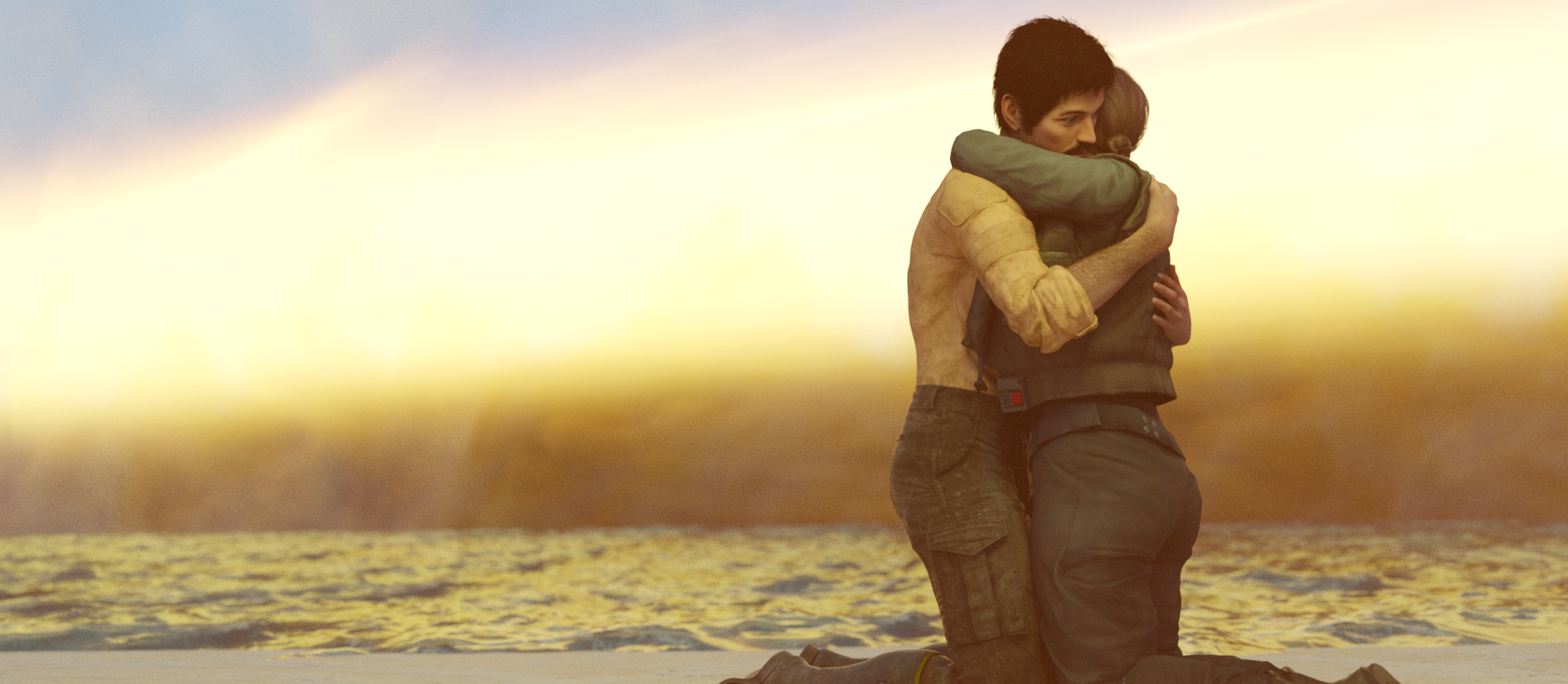
FREE
magnus1871 DLuna G9 morph https://www.deviantart.com/magnus1781/art/G9-Upgrade-v5-1155126306
magnus1871 DLuna G3 material https://www.deviantart.com/magnus1781/art/Facegen-Textures-8-899857401
Joel (hair) https://www.patreon.com/posts/joel-for-g8m-40154646
Cal Kestis (clothing) https://www.patreon.com/posts/cal-kestis-82732903
Jyn https://www.patreon.com/posts/jyn-erso-for-g8f-55595467
ocean https://www.renderosity.com/freestuff/items/96105/free-deep-ocean-for-daz
HDRI https://polyhaven.com/a/industrial_sunset_puresky
sandy ground (3 parts) https://www.renderosity.com/freestuff/items/97285/sandy-ground-daz3d-iray-obj-included-part-1-of-3
https://www.renderosity.com/freestuff/items/97286/sandy-ground-daz3d-iray-obj-included-part-2-of-3
https://www.renderosity.com/freestuff/items/97291/sandy-ground-daz3d-iray-obj-included-part-3-of-3
Fogsphere https://www.renderosity.com/freestuff/items/79716/prop-fogspherePAID
Legacy UVs for G9: G3M, G8M, G8.1M
Top knot hair (beard & mustache)
Epic Props: Dynamic Lens Flare & Starburst for Iray
MMX VDB Smoke FX 01Mesh grabber for Daz 2025 Alpha?joshua.r.fletcher said:
stripe6499_9253833ae8 said:
joshua.r.fletcher said:
Here's a simple example. Meshgrabber was used in 4.24 to grab the bottom of the shirt, and I can load, restart, etc. that file until the cows come home and it stays. Load it in 2025 alpha? It's gone for the above reason. What I am hoping for is confirmation that geometry sculpter in premier doesn't work that way.
Well, I just loaded up a scene in 2025 that I created in 4.24 that had morphs on a skirt and shorts. They loaded up in 2025 just as created. So... here's a question,: Once you've created your morph, are you saving it in Mesh Grabber or DFormer, and then doing File/Save As/Support Asset/Modifier Asset?
Ah I think that was the difference. It works if you save it as a morph slider, but just doesn't save it like it does in 4.24. Thanks.
Was it a morph or a Mesh Grabber modifier? A Mesh Grabber modifer is using Mesh Grabber directly, so it requires the plug-in (and so won't be usable beyond DS 4.x) but a morph is just data and will load fine using saved asset files or embedded in a Scene, Scene Subset, or Character/Persona preset used to load a new figure.
Daz 3D is part of

Connect
DAZ Productions, Inc.
7533 S Center View Ct #4664
West Jordan, UT 84084Licensing Agreement | Terms of Service | Privacy Policy | EULA
© 2026 Daz Productions Inc. All Rights Reserved.