-
Problems with geograft morph merging
So basically there are 17 morphs that im combining, all which are morphs from the GEOGRAFT, but then there are another 4 morphs which are from the GENESIS 8 FEAMLE FIGURE itself, in the morphs section of that figure. Making it a total of 21 morphs having to be turned into a single morph for the geograft. However, when I'm exporting, only the 17 morphs from the geograft are merged into one, those 4 ones from the figure are completely skipped. I'm trying to find a way to merge all the 21 morphs, so the 17 morphs are already merged no issue but i need to also merge them with the other 4 ones from the G8F morphs (which are not directly geograft morphs).
[Released] Blender to Daz Studio Plugin released!!! Official support thread [Commercial]dragotx said:
crosswind said:
dragotx said:
crosswind said:
dragotx said:
How do we set up characters for G9 when they are transferred in with this utility? I haven't been able to get them rigged at all yet
Transfer a G9 character from Blender to DS ? G9 is already in DS ~~ what do you want to be exactly ?
I'm looking to convert characters that are made in blender over to G9 in Studio, not ones that started in Studio.
If you mean you're making a character morph for G9, i.e you sculpted / shaped a figure base on a G9 mesh in Blender, then you don't need this BTD add-on at all. You just export it to OBJ, import OBJ as a morph to G9 in DS by using Morph Loader Pro.
If you mean you're making a standalone character in Blender but want to make it as a G9, that'll be another story ~~ You have to wrap this figure with G9's mesh and import it as a morph to G9 in DS....
Hmm, ok, that gives me an idea on what to look for in tutorials, thanks!
To get accurate advice on what steps you need to take, you would first need to define what you mean by "characters that are made in blender over to G9 in Studio".
You cannot load any custom mesh onto G9 via Morph Loader Pro in Daz Studio. It needs to have the same topology. You cannot load any texture onto G9 mesh; the texture map needs an appropriate UV layout.
Transferring topology (wrapping the base mesh to a custom figure) and texture transfer between different topologies and UVs are both standard processes in 3D and you can google "wrapping" and "texture transfer". You can do both in Faceform Wrap. Whether these processes apply in your case is of course is an open question.
Change/adapt the shirt automatically generated wrinklesOK, do you know some software like Blender ? You can send the shirt to Blender, reshape the wrinkles by using Draw / Grab / Smooth / Flat brushes, etc. so as to make them look more organic and / or natural. Then import the shirt back as a fixing morph to DS.
[Released] Blender to Daz Studio Plugin released!!! Official support thread [Commercial]dragotx said:
crosswind said:
dragotx said:
crosswind said:
dragotx said:
How do we set up characters for G9 when they are transferred in with this utility? I haven't been able to get them rigged at all yet
Transfer a G9 character from Blender to DS ? G9 is already in DS ~~ what do you want to be exactly ?
I'm looking to convert characters that are made in blender over to G9 in Studio, not ones that started in Studio.
If you mean you're making a character morph for G9, i.e you sculpted / shaped a figure base on a G9 mesh in Blender, then you don't need this BTD add-on at all. You just export it to OBJ, import OBJ as a morph to G9 in DS by using Morph Loader Pro.
If you mean you're making a standalone character in Blender but want to make it as a G9, that'll be another story ~~ You have to wrap this figure with G9's mesh and import it as a morph to G9 in DS....
Hmm, ok, that gives me an idea on what to look for in tutorials, thanks!
You're welcome !
G9 WoesMasterstroke said:
8k texture - check
better expressions G8.1 started it. - check
(BTW: Standard expressions doesn't really work on heavy customized characters anyway)
Unisex, for better vendors' support. Give a male base morph to G8F - check
Renaming groups for industrial standards - just call it G8.2 - well kinda check8K texture - yes, theoretically possible on any base, but there is an advantage in setting that as a precedent from the start of the generation.
Better expressions - actually, quite aside from the thing where they by default disabled G8.0 expressions on G8.1, this had a lot of compatibility issues.
I *presume* they took the decision to hide the G8.0 face sliders to avoid the need for vendors to try to support two sets of face expressions. But what you ended up with was a load of G8.0 controllers that ended up non-functional, and even if you reenabled them G8.1 characters had no correctives for the G8.0 expressions, and G8.0 characters had no correctives for the G8.1 expressions. A blank slate had advantages.Unisex - It's actually pretty easy to set a male morph on G8F (I use it quite a lot for making teen boys, as I find it's generally easier to masculinise G8F teen morphs than get G8M ones to match well with them), but clothing fits are going to be mediocre to poor because it wasn't set as a precedent from the start of the generation, and existing clothes will not have support for it.
Renaming groups for industrial standards - the level of change they did absolutely cannot be addressed by "just make a 8.2". In renaming all the bones and controls, and altering the skeletal heirarchy, you'd break compatibility with all existing rigging for character morphs and their correctives, and all clothing. All you might retain is compatibility with is G8 UVs.
So, what do we need G9 for?
What did we need G8 for? At its core, it was a reposed G3.
It did way less than G9 was trying to overhaul.
Most annoying example is Strand base dforce Hair for G9 only, unsuable with previous G8.
Actually, a large number of these strand based hairs use a standalone scalp and are not restricted to being generated from the G9 geometry.
Even the ones that are generated from the G9 geometry, you can actually work around most of those by turning G9 into a bodysuit that can be fitted to G8F.
richardandtracy said:
can I ask that you think of the levels of compatibility between G3/G8 and G8.1 before disagreeing too much
Worse than many people think, actually.
The change in base pose means that all the correctives for the shoulders and thighs have changed, both in shape and name, so clothes lose those when converted, and if you just use a scene ID override, the difference in base silhouette between the clothing and figure causes issues with auto-follow.
I have an active ticket on a product where it's been created with a non-matching base pose (it is unfitted here, this is the base pose for both):
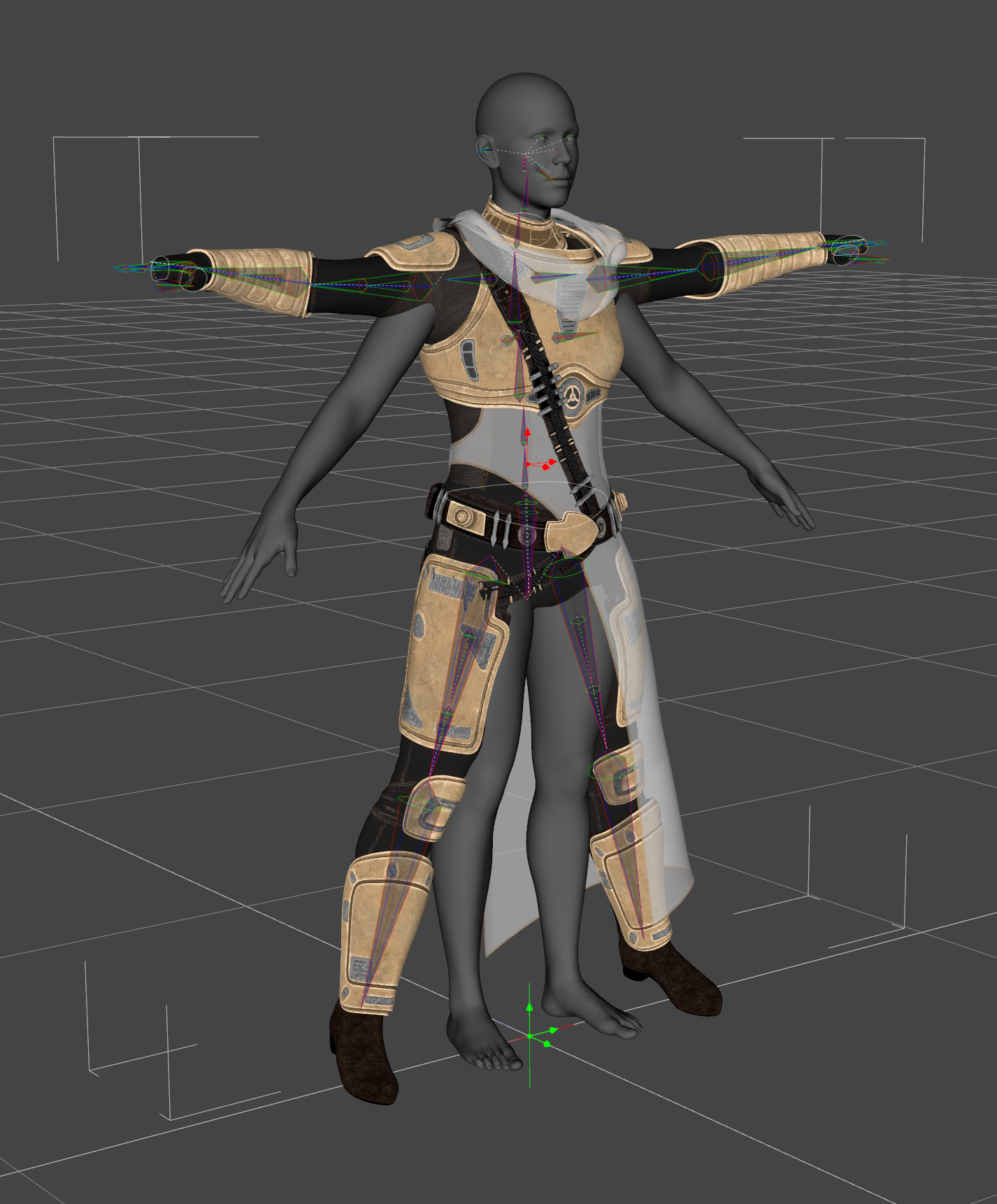
While fitting it causes the skeleton to follow, it causes mucked up rigging in the hands: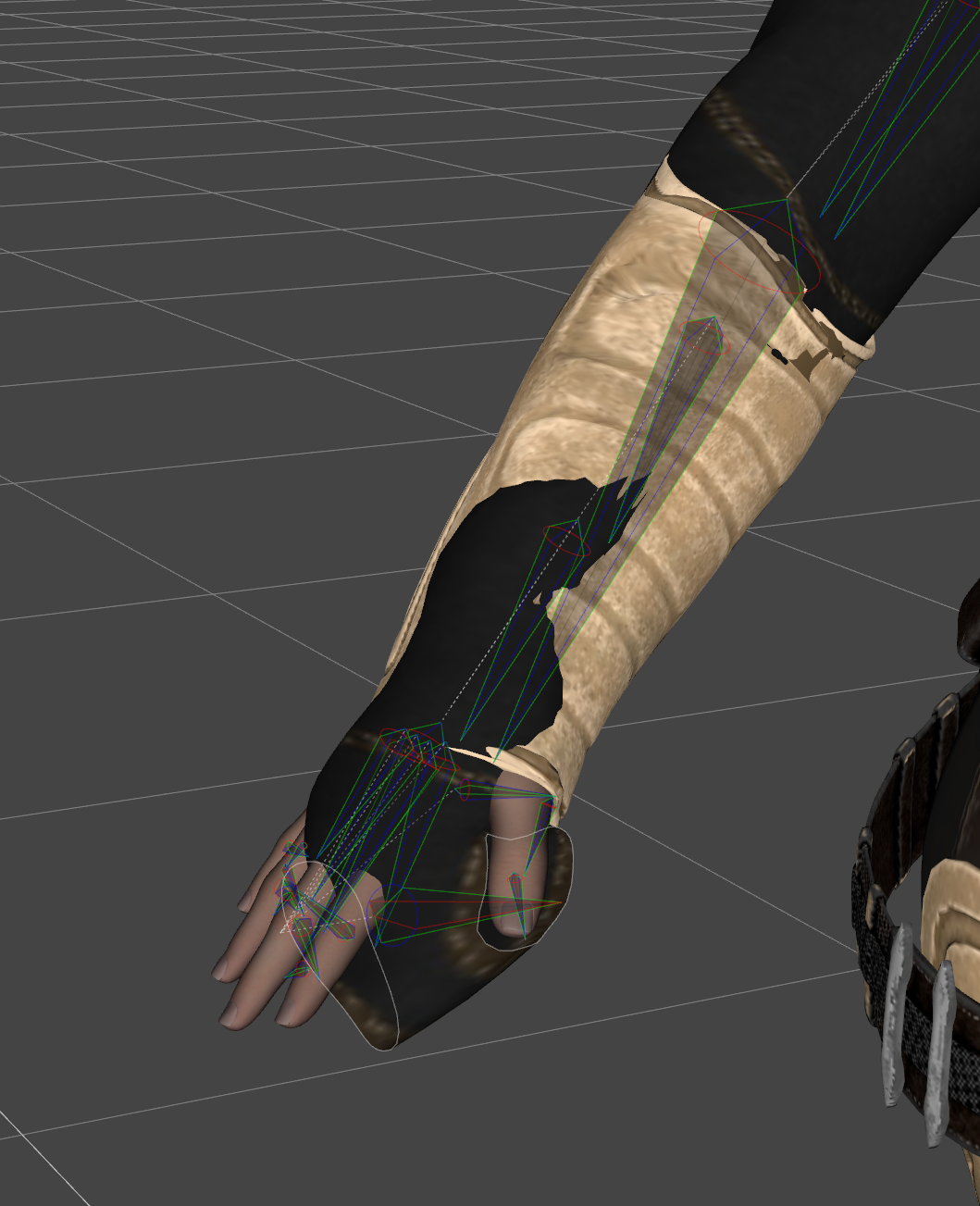
And on heavier morphs, auto-following is wildly off, because it's trying to copy morphs from the wrong part of the figure - here's a comparison between the actual product (left) and my fixed version (right) on Astaroth:
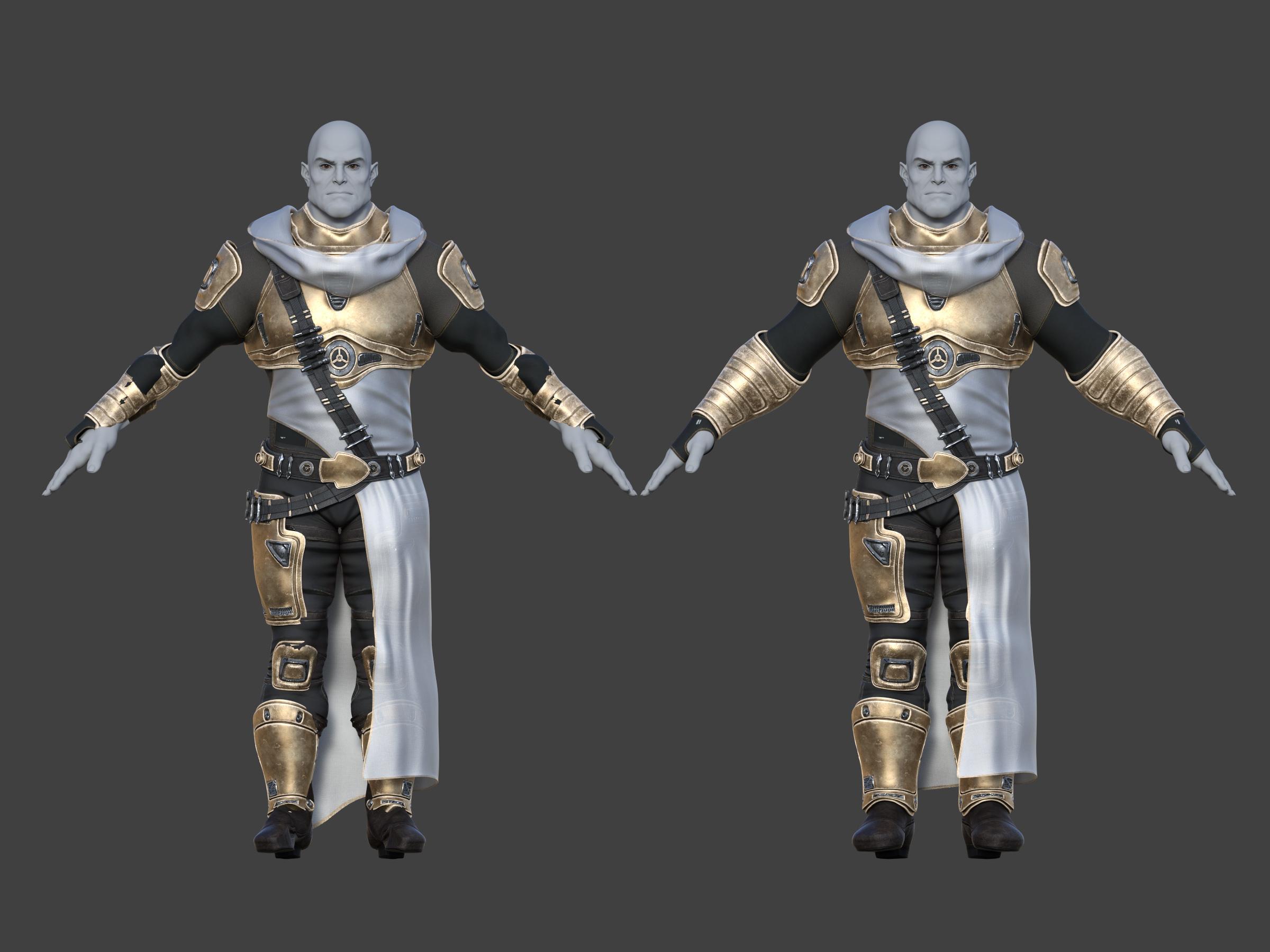
(To be clear, although this is a G9 product - or, more specifically, a G9 version within a product - this is not a G9 specific issue, this is a "the clothes weren't made in this base pose issue", which is what comes up when you try to scene ID G3 clothes onto G8).
Fortunately, I'm already a weirdo who cares about this stuff and has a suite of custom scripts for carrying out this conversion between G3 and G8, so could apply it to fix this G9 product, but it *does* come up as an issue.
[Released] Blender to Daz Studio Plugin released!!! Official support thread [Commercial]crosswind said:
dragotx said:
crosswind said:
dragotx said:
How do we set up characters for G9 when they are transferred in with this utility? I haven't been able to get them rigged at all yet
Transfer a G9 character from Blender to DS ? G9 is already in DS ~~ what do you want to be exactly ?
I'm looking to convert characters that are made in blender over to G9 in Studio, not ones that started in Studio.
If you mean you're making a character morph for G9, i.e you sculpted / shaped a figure base on a G9 mesh in Blender, then you don't need this BTD add-on at all. You just export it to OBJ, import OBJ as a morph to G9 in DS by using Morph Loader Pro.
If you mean you're making a standalone character in Blender but want to make it as a G9, that'll be another story ~~ You have to wrap this figure with G9's mesh and import it as a morph to G9 in DS....
Hmm, ok, that gives me an idea on what to look for in tutorials, thanks!
[Released] Blender to Daz Studio Plugin released!!! Official support thread [Commercial]dragotx said:
crosswind said:
dragotx said:
How do we set up characters for G9 when they are transferred in with this utility? I haven't been able to get them rigged at all yet
Transfer a G9 character from Blender to DS ? G9 is already in DS ~~ what do you want to be exactly ?
I'm looking to convert characters that are made in blender over to G9 in Studio, not ones that started in Studio.
If you mean you're making a character morph for G9, i.e you sculpted / shaped a figure base on a G9 mesh in Blender, then you don't need this BTD add-on at all. You just export it to OBJ, import OBJ as a morph to G9 in DS by using Morph Loader Pro.
If you mean you're making a standalone character in Blender but want to make it as a G9, that'll be another story ~~ You have to wrap this figure with G9's mesh and import it as a morph to G9 in DS....
[Released] Blender to Daz Studio Plugin released!!! Official support thread [Commercial]crosswind said:
dragotx said:
How do we set up characters for G9 when they are transferred in with this utility? I haven't been able to get them rigged at all yet
Transfer a G9 character from Blender to DS ? G9 is already in DS ~~ what do you want to be exactly ?
I'm looking to convert characters that are made in blender over to G9 in Studio, not ones that started in Studio.
[Released] Blender to Daz Studio Plugin released!!! Official support thread [Commercial]dragotx said:
How do we set up characters for G9 when they are transferred in with this utility? I haven't been able to get them rigged at all yet
Transfer a G9 character from Blender to DS ? G9 is already in DS ~~ what do you want to be exactly ?
[Released] Blender to Daz Studio Plugin released!!! Official support thread [Commercial]savagestug said:
On my phone so I can't reply to above post, but I ran into issues being unable to export all. I was trying to export one of the smaller kitbash3d Shogun buildings (has a back yard area with pond, bridge, and vegetation) and could only export partial elements at a time. Nothing happened but map transfer with export all
You just right-click on the parent node to Select Hierarchy, then click Export > Selected button. It'll work.
MimicMolly's Renders & WIPsG9 is easily becoming my favorite figure because my rule of judging DAZ figures is how easy it is to recreate my OCs and G9 stays winning.
In this WIP, I'm trying to make Ernest's best friend/right-hand man, and didn't really need to try that hard and got close-enough in one sitting. (He's the big guy.) Unfortunately, he uses some unavailable morphs by AOBB, but he mostly uses M3D Mauro HD as a base. I need to redo Ernest's body and it seems like Wagner 9 + SY's "Tortilla Chip" body can work but I have to figure out how to zero out Wagner's feet/create a foot neutralizing morph because they look "innaccurate" for my OC.
 [Released] Blender to Daz Studio Plugin released!!! Official support thread [Commercial]
On my phone so I can't reply to above post, but I ran into issues being unable to export all. I was trying to export one of the smaller kitbash3d Shogun buildings (has a back yard area with pond, bridge, and vegetation) and could only export partial elements at a time. Nothing happened but map transfer with export all
Smooth Out Imperfections in Clothing When Posed?Masterstroke said:
n.aspros123 said:
crosswind said:
n.aspros123 said:
crosswind said:
Okay, but they're different in terms of design ~ It's tight under figure's breasts on the one you're using while that Rendo's one is obviously with a looser design. If the figure has larger breasts, you won't get the expected result with that Shrug Style Top... no matter you simulate in whatever way.
I suggest another way around since I ever mentioned that the initial shape of the cloting is important before simulation. You can make a morph with Blender to give the top a "looser style". (screenshot 1)
Then you'll get the expected result afer simulation and you won't have to tweak it each time after simulation. (screenshot 2)
Which tools did you use in Blender to make the morph?
As usual, Draw brush and Smooth brush in Sculpt mode.
I don't know what's going on with Blender. When scuplting the top using the draw and smooth brushes, it looks okay. See Top Blender 1 and Top Blender 2. When I change back to Object mode the top doesn't look as smooth while in sculpt mode. Top Blender 3. I've tried more smoothing and drawing sculpting. Best I can without someone having a look for me.
Did I have the Draw and Smooth brushes Radius and Strength set correctly?
When I dForce the top with the Blender Morph, it doesn't look smooth under the breasts. See Top After Blender 1 and Top Blender 4 p. I also have the use Mesh Grabber to pull the bottom of the top out as it clips with the skirt.
I can share any files if needed to be troubleshooted.
Can I try your top morph.obj ? @crosswind . I think the mesh in yours might be better than mine possibly. When the silk shader is applied, the imperfections standout more possibly?
Is your figure the base figure or a character morph?
There is one big annoying issue in DS, that is a downer.
When you make changes in body proportions of your character, as part of a full body morph, you will get those ugly creases all the time.
It happens on clothes and also on hair.
I have not yet found a solution to avoid this. I have fixed it in zbrush and saved it as a character morph on the cloth set, but when loading the clothing the next time the same ugly creases are back.
It might go away with a dforce simulation, but not permanently.
Morph projection issue is long lasting there... The more tighter the cloting is, the more distortion you'll get. Some fixing job has to be always necessary loh ~
Problems with geograft morph mergingThat's almost the SOP as Masterstroke said above.
Only: as for Export BOTH as obj at base resolution... actually just selecting G8F to export it as OBJ will do.
The final step needs to be Adjust Rigging to Shape with G8F selected and the single morph dialed, ERC Freeze the single morph on G8F. Save two morphs on G8F & geo-graft as Modifier Assets (morph assets). Then delete those 17 + 4 morphs as needed.
Edit: You may further need to check the morphs' behaviors by posing the figure, see if there's any corrective morphs need to be made.
[Released] Blender to Daz Studio Plugin released!!! Official support thread [Commercial]reitaku said:
UncannyValet said:
It will probably be a consequence of vertex order not being preserved, as i did mention above.
If vertex order gets mixed up on a standard mesh, the results will be a mess of polygons, and it's easy to diagnose as a vert order issue. But for polyline hair, you noted that the final shape isnt a mess and still looks ok. The reason it still looks ok at 100% is probably only because the mesh is made of continuous strands, so will still be sequentially numbered correctly relative to the 1st index vert, but they will neverless be mixed up. I did explain the correct process in post above.
Thank you, I finally did it!
I checked the steps and tried the following in order.
1. Create hair in Blender.
2. Use the “Blender to Daz Studio Plugin” to import the hair into DAZ.
3. Sculpt the hair and import it into DAZ using the “Blender to Daz Studio Plugin.” After importing, export this hair as an OBJ file.
4. Import the exported OBJ file into Morph Loader Pro and create the morphs.That's the right way ~ DO NOT convert but just export to polylines with BTD and create morphs.
[Released] Blender to Daz Studio Plugin released!!! Official support thread [Commercial]UncannyValet said:
It will probably be a consequence of vertex order not being preserved, as i did mention above.
If vertex order gets mixed up on a standard mesh, the results will be a mess of polygons, and it's easy to diagnose as a vert order issue. But for polyline hair, you noted that the final shape isnt a mess and still looks ok. The reason it still looks ok at 100% is probably only because the mesh is made of continuous strands, so will still be sequentially numbered correctly relative to the 1st index vert, but they will neverless be mixed up. I did explain the correct process in post above.
Thank you, I finally did it!
I checked the steps and tried the following in order.
1. Create hair in Blender.
2. Use the “Blender to Daz Studio Plugin” to import the hair into DAZ.
3. Sculpt the hair and import it into DAZ using the “Blender to Daz Studio Plugin.” After importing, export this hair as an OBJ file.
4. Import the exported OBJ file into Morph Loader Pro and create the morphs. MJCelevate script not working
Open the script DSA file with Notepad++, select the coding block from line 472 to 491, then Ctrl + H to Relace All: objMorph with obj. Ctrl + S to Save. (screenshot 1)
Then run the script to create the morph, the error message will be gone.
[Released] Blender to Daz Studio Plugin released!!! Official support thread [Commercial]reitaku said:
UncannyValet said:
reitaku said:
However, the issue is that editing the hair (curves?) exported in OBJ format is difficult, and I'm stuck.
As you have discovered, your order of operations might not be the best workflow as you cannot easily re-style the curves in Blender once they are like this.
I am not at a computer right now so cannot refresh my mind as to a good workflow, but I believe you can right click on imported polyline mesh in Blender and go to Convert to -> Curve then right click and Convert to -> Curves, which makes the hair into Blender's new Geometry Node hair. Then you need to update Hair's surface to be your Genesis Figure or haircap. At this point, I beleive you can use the Sculpt mode to style the hair curves in Blender's Hair Curves system. But I am doubtful that is going to preserve the vertex order. If vertex order is not preserved, morph loader will not work.
To ensure vertex index is preserved, it is probably best to go back a few steps and make all the morphs for the hair before doing the conversion/export. I believe I might have mentioned that in the link you posted, but I also cannot access deviantart on my current ISP so cannot remind myself what I wrote.
Thank you very much!
Following the steps, I was able to convert the object into a curve and then sculpt the Hair. After sculpting, I converted the curve back into a mesh and loaded it into Morph.
Morph works fine when set to 100%, but the appearance becomes poor when set between 0 and 100%. What could be causing this?
It will probably be a consequence of vertex order not being preserved, as i did mention above.
If vertex order gets mixed up on a standard mesh, the results will be a mess of polygons, and it's easy to diagnose as a vert order issue. But for polyline hair, you noted that the final shape isnt a mess and still looks ok. The reason it still looks ok at 100% is probably only because the mesh is made of continuous strands, so will still be sequentially numbered correctly relative to the 1st index vert, but they will neverless be mixed up. I did explain the correct process in post above.
MJCelevate script not workingI just tried. I got the same message, but the message is from Daz Studio,
And it still generated a morph. So I think there is something DS 4.24 don't like, but not effecting the result.
MJCelevate script not workingI followed the instructions on the website, click on create elevation morph, then when I come out of the script it says "an error occured while reading the file...".
Daz 3D is part of

Connect
DAZ Productions, Inc.
7533 S Center View Ct #4664
West Jordan, UT 84084Licensing Agreement | Terms of Service | Privacy Policy | EULA
© 2026 Daz Productions Inc. All Rights Reserved.