-
The G8F morph dilemma
If you buy a lot of characters for G8F she takes a half hour to load.
So you start uninstalling characters.
Then you begin being more picky about the characters you will buy in the future.
This is a dilemma for a store that sells a lot of characters
Daz Studio Iray - Rendering Hardware Benchmarkingoutrider42 said:
Unless the card is running on the high side I really wouldn't bother water cooling it, I think any performance gain would be pretty small in the scope of things.
Most likely. However, since I have so much watercooling headroom in my system already (right now it's the single Titan RTX being cooled by an entire one of these) and the cost of an additional waterblock + fittings is almost negligible at this point, I'll most likely try it out.
It is pretty cool to see just how much faster the A5000 is over the last generation Titan. It is not even close.
And at a considerably smaller power budget too - 230 vs. 280 watts. Which might not sound like all that much of a difference by itself. But when you're talking about having too or more of these in a system together... that can easily be difference between needing a new power supply or not (my 750 watt EVGA G2 is still going strong with this setup.)
Saxa -- SD said:
Hey, congratz on your RTX A5000 plunge!
Huh, good to know that PCI3 vs 4 has basically no diff.
When I get re-focussed in next month or two, will test that out too.
Will be interesting to see if PCI4 will make a diff at all in this next hardware lifecycle.Barring major changes to the way Iray handles data transfer during the rendering process (preloading all render data to GPU memory) the chances of it making any sort of difference are basically zero. Unless Nvidia were to bring back memory pooling between multiple GPUs via the PCI-E bus (it is a little known fact that prior to the introduction of NVLink with the GP100, Nvidia GPUs already had a system for memory pooling: GPUDirect P2P.) But the chances of that are pretty small imo for the obvious reasons...
If you do add water would be interested to hear what you decided on and what you did.
I'm still firmly in the air is safest route, but very open to suggestions.Everyone's gonna have their own comfort level when it comes to intentionally bringing water near/in your computing equipment. For me it's being able to have the waterloops themselves located below (rather than above or sandwiched in between as you often see these days) the core components of a PC that make me comfortable with it. Which is why I am such a big fan of the Tower 900 case specifically for watercooling - since it allows you to do just that (you can see the pre A5000 version of my implementation of it here.)
chrislb said:
RayDAnt said:
RE: @JamesJAB @Skyeshots @Saxa -- SD
Finally took the plunge on an RTX A5000 after seeing proof from Igor's Lab that the A5000 (and likely the A6000 as well) is directly compatible with all RTX 3080/3090 Reference (not Founders) Edition waterblocks for custom watercooling. For what it's worth to you. First,
The A5000 is a 230 watt card according to Nvidia.
https://www.nvidia.com/content/dam/en-zz/Solutions/gtcs21/rtx-a5000/nvidia-rtx-a5000-datasheet.pdf
With a waterblock, I don't think you will see any significant improvement in render times with water cooling unless your air cooler temperatures are rather high. The main benefit might be noise reduction. It appears that the A5000's default fan curve keeps the GPU around 78C. You can drop those temperatures with a higher fan speed and more noise.
Can confirm that the A5000 likes to keep its core temp in the lower to mid 70s (with clock speeds hovering in the 1650-1850 range) with the default cooling setup. In my partcular case, increased computing noise is a major issue (the system doubles as an audio production PC in a home recording studio) so turning up fan speeds only for last resort.
Dropping the GPU temps to 45C with water cooling might get you up to an additional 85-100 MHz in GPU clock speed with the default VBIOS on the card.
It may be possible to use certain versions of MSI afterburner and raise the power limit a little along with increasing the GPU clock speed. However, I doubt that even with that method you will be getting much more than 250 watts power draw at the peak.
As a rule, I don't mess with voltages on my pc components (other than turning them down when undervolting is possible) for both component longevity and power efficiency reasons. But I'm more than willing to spend the extra buck necessary to get them the best cooling/power delivery subsystems possible so that they perform the best they can while still maintianing spec. Especially in systems where the end goal is to have 2+ high end GPUs in them (where thermal interaction between GPUs starts to become a concern
With the A5000 having its 8 pin power connector attached by a pigtail, would it cause any waterblock clearance issues?
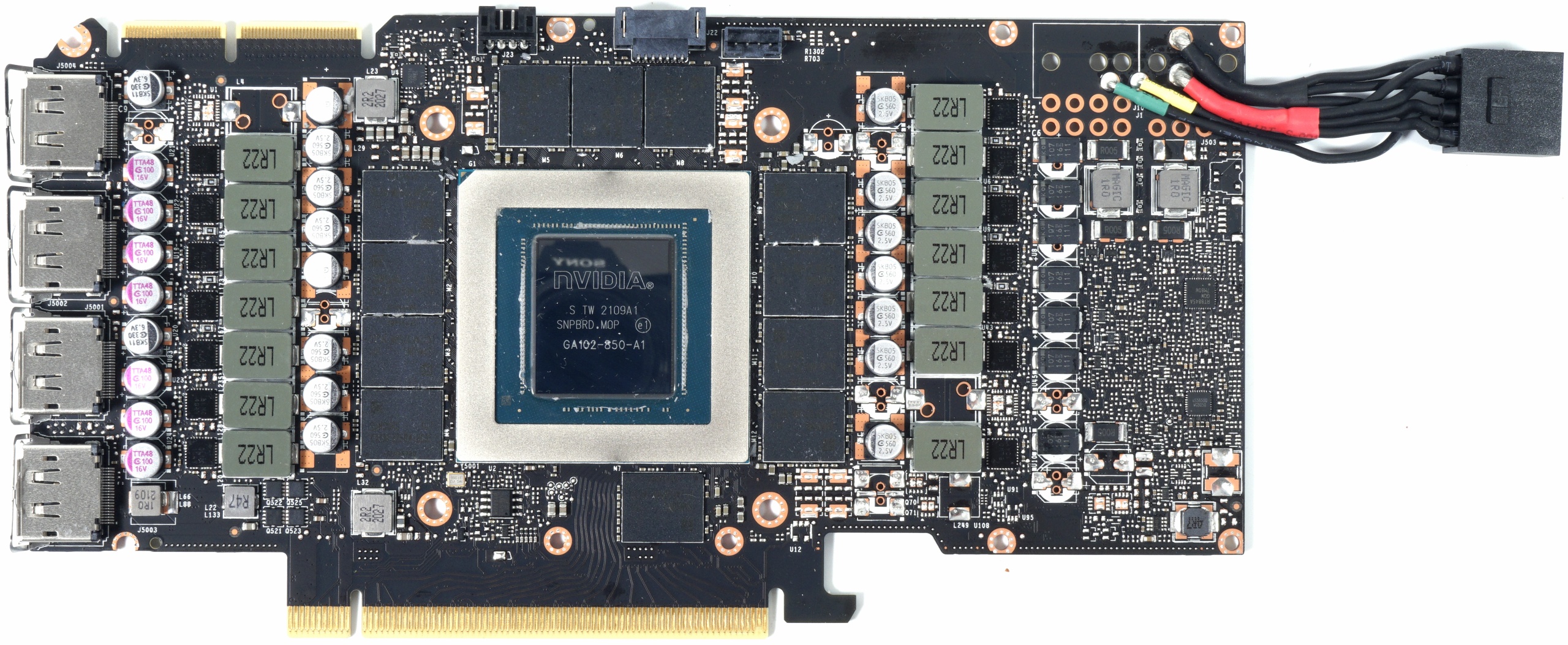
Since the Tower 900's vertical layout puts GPUs in a hanging downward (from the rear panel IO end) position, I don't see it as much of a concern in my specific case. But it is something I will be evaluating closely if/when I make the change to watercooling.
ETA: That's another thing I'm really appreciating about this A5000 right now: All that performance - just a single 8-pin power connector.
How to remove custom or unwanted morphsThat depends - if they were saved as morph assets (or came as instalalble content) then it is as RL_Media says, but if they are embedded in a scene file then you can right-click on the slider with the Parameters pane in Edit mode and delete them.
How to remove custom or unwanted morphsYou gotta find the morph files inside the data folder and nuke em.
Show us more of your 3Delight rendersMisselthwaite said:
Hey, I'm a part-time, small-town librarian, so I don't get paid much by anyone's standards :-D
You're still lucky you're not a Russian librarian :) If you're curious about comparing statistics, we could take it to PM so as not to derail the thread further.
Misselthwaite said:
It's why I don't care about later Genesis iterations; I build 90% of my characters in Genesis1, and there's no way I'm going to screw up all the previous images by trying to shuffle them forward. I did it for the one character I build on V4... and even with tweaking, the new Genesis version just doesn't look the same as the V4. :-(
I'd stayed with oldschool Gen3 and the original Genesis for as long as I could, but the rigging limitations of older figures have done me in at last... I'm not particularly looking forward to actually doing those conversions - but I dislike fixing issues in post even more.
The V4-to-Genesis conversion has lots of pitfalls... from geometry resolution mismatch to the default DAZ V4 UV for the Genesis face being kinda... messed up. There's a fix for that UV in the store, but still... V4's eyes are so much better mesh- and morph-wise. There was barely anything comparable on the market till Chevybabe's eye enhancers for 8 and 8.1.
Misselthwaite said:
ParrotDolphin did 2 fabulous 3DL shader sets, which are over in The Other Store
Thanks for clarifying :) An "intermission" for PD indeed :)
Speaking of tiling textures, I hope everyone knows (and maybe even supports) PolyHaven. I have Substance (thanks to former Allegorithmic's willingness to allow regional pricing on Steam) - but I will still find a use for "Greg Zaal and friends' " materials, they're awesome (same as anything else there).
How to remove custom or unwanted morphsI reada forum post on how to remove a custom morph or unwamted morph from Genesis 8 Female, but now after searching the forums I can not find the post again. Can someone direct me to it. Thank you.
Cannot transfer Basic Suit from G3M to G8MThanks for the reply @Richard Haseltine.
I was able to get working by transfering to none, then transferring to G8M directly - kind of like what you have suggested
EDIT: I do not know if this helped, but I selected the BasicSuit, then ran the following script before trying to transfer - see attached screenshot
Cannot transfer Basic Suit from G3M to G8MHey guys,
I purchased the Genesis Supersuit so that I could use it for my G8M figures. I am able to transfer from Genesis Male to G2M and from G2M to G3M, but when it is time to take the last step, the program is stuck on FBMAnubis - see attached screenshot
BTW, why is it trying to load all those dsf files? It did not try to do this with the other transfers.
Also, I looked in the log files and there does not appear to be an error. At least not one that I can see. I am copying & pasting the last few lines just to demonstrate what I am referring to above:
2021-09-20 11:33:44.398 Loaded morph deltas: 0m 0.9s - /data/DAZ 3D/Supersuit/Basic Suit/Morphs/DAZ 3D/Base/FBMTheGirl4.dsf
2021-09-20 11:33:44.415 Loaded morph deltas: 0m 0.7s - /data/DAZ 3D/Supersuit/Basic Suit/Morphs/DAZ 3D/Base/FBMStephanie4.dsf
2021-09-20 11:33:44.426 Loaded morph deltas: 0m 0.7s - /data/DAZ 3D/Supersuit/Basic Suit/Morphs/DAZ 3D/Base/FBMMichael4.dsf
2021-09-20 11:33:44.443 Loaded morph deltas: 0m 0.7s - /data/DAZ 3D/Supersuit/Basic Suit/Morphs/DAZ 3D/Base/FBMHiro4.dsf
2021-09-20 11:33:44.459 Loaded morph deltas: 0m 0.7s - /data/DAZ 3D/Supersuit/Basic Suit/Morphs/DAZ 3D/Base/FBMFreak4.dsf
2021-09-20 11:33:44.476 Loaded morph deltas: 0m 0.7s - /data/DAZ 3D/Supersuit/Basic Suit/Morphs/DAZ 3D/Base/FBMAnubis.dsf
The previous was as simple as the following, without loading any other dsf files:
2021-09-20 11:31:11.019 Connect base morphs: Genesis 2 Male << BasicSuit
2021-09-20 11:31:11.019 Base morphs connected: Genesis 2 Male << BasicSuit
2021-09-20 11:31:11.020 Creating morph projection map: Genesis 2 Male << BasicSuit
2021-09-20 11:31:20.122 Stop following: Genesis 2 Male << BasicSuit
2021-09-20 11:31:20.123 Following stopped: Genesis 2 Male << BasicSuit
2021-09-20 11:31:20.123 Start following: Genesis 3 Male << BasicSuit
2021-09-20 11:31:20.124 Following started: Genesis 3 Male << BasicSuit
2021-09-20 11:31:20.268 Retrieving conversion options...
2021-09-20 11:31:23.825 Starting conversion: BasicSuit >> Genesis 3 Male :
2021-09-20 11:31:23.861 Loaded morph deltas: 0m 0.14s - /data/DAZ 3D/Genesis 3/Male/Morphs/DAZ 3D/Clones/CloneGenesis2Male.dsf
2021-09-20 11:33:15.593 Finished conversion: BasicSuit >> Genesis 3 Male :
However, it started off the same as the previous transfer, but followed with trying to load all those dsf files:
2021-09-20 11:33:15.602 Connect base morphs: Genesis 3 Male << BasicSuit
2021-09-20 11:33:15.603 Base morphs connected: Genesis 3 Male << BasicSuit
2021-09-20 11:33:15.603 Creating morph projection map: Genesis 3 Male << BasicSuit
2021-09-20 11:33:36.515 Stop following: Genesis 3 Male << BasicSuit
2021-09-20 11:33:36.516 Following stopped: Genesis 3 Male << BasicSuit
2021-09-20 11:33:36.516 Start following: Genesis 8 Male << BasicSuit
2021-09-20 11:33:36.518 Following started: Genesis 8 Male << BasicSuit
2021-09-20 11:33:36.651 Retrieving conversion options...
2021-09-20 11:33:43.699 Starting conversion: BasicSuit >> Genesis 8 Male :
It is also ironic that it would die on the Anibus character. Wasn't he the one that help those cross over into death
 Alex Capital 8.1
I remember when whatshername (Tara 8) came out with the scar, and no way to remove the scar, everyone was annoyed about the scar... and then they put out an option without the scar (although you could get by with some photoshop skills).
The morph looks like a good shape, overall.
I tend not to like massive and bulky, so leaner male figures with muscle definition are at least a good thought.These themes & bundles are not really my era of thing, so I'll punt for now.
I'm confused by the goal of the theme, as others point out. Is there a vast demand for Prohibition-era stuff these days?
I'm all for "I didn't know I wanted this" themes, but I'd imagine it's an easier sell if they approached something closer to other popular themes... Weird Fantasy, Planetary Romance, Afrofuturism, whatever. Like, give me a really good Afrofuturist bundle if they want to shake up the genres.Shaping Tub Trouble: my morph is not thereRichard Haseltine said:
Yes, you need to put the morph in the Acrtor group - and, though this shouldn't be an issue coming from ZBrush via GoZ, make sure the Property Type iss et to Modifier/Shape.
The problem is I don't know how to put the morph in the Actor group. Please, look at the picture. I don't see such an option there. How do you put the morph in the Actor group?
How do you adjust generated dforce hair based on hair caps?How do you adjust generated dforce hair based on hair caps?
So I have a bit of a problem. The hair cap on Lexi hair fits perfectly on my character (who has many morphs, including height morphs and a scaling of 85% on the base figure). The generated dforce hair, unfortunately, is positioned well below the hair cap. I'm not sure how to make the generated hair attach back to the top of the cap, as it has no adjustment morphs. I can morph the cap itself, but it already fits. Do I need to somehow detach the generated hairs, move them, and then reattach them? I have no idea how to do this with dforce hair! This is all for an elf character my brother runs in a D&D campaign I was doing for his birthday, and any help would be greatly appreciated! A screen shot of the current situation is attached below.
Auto Muscle Enhancer HD [Commercial]TD, this is really quite brilliant. Thank you for putting in all of the work required. I'm using it to experiment with a G8M version of one of Freja's alternate shapes. The ability to dial out the AME body shape to the extent desired is very useful. So far, I've been able to achieve a pretty decent bicep split without overdriving the flex morph, though I can see where it might be necessary in some instances, as with an in-season fitness competitor or bodybuilder who is extremely shredded. I'll try to post her once I get her finished.
hi can someone tell me why this happening to the genesis 8 male charactersThat is not surprising. What we have established is that it is an add on causing this, not a problem with the base. My suspicion is that a character or morph set you recently isntalled, one that makes a big change to the body shape (bulking it up probably) has a JCM that should be on only when the arm is bent and the shape is applied, but instead it lacks the link to the character shape is applying everytime you bend the arm. So, can you recall adding a character (muscular, heavy, or soem kind of big monster) for Genesis 8 Male just before this started?
hi can someone tell me why this happening to the genesis 8 male charactersYou might have a bad morph interfering.
hi can someone tell me why this happening to the genesis 8 male charactersso that morph is gone but its still doing the same damn thing ....
hi can someone tell me why this happening to the genesis 8 male characterswhat morph
hi can someone tell me why this happening to the genesis 8 male charactersDid you dial that one morph to zero?
Celebrity Look-a-Likes for 3D figures part 3maikdecker said:
menghienrico said:
mah .. Surely I am not capable but I can never get recognizable characters with only the head morphs.
It should have an excellent texture. I also tried applying the texture of a celebrities, generated via Face Transfer, but it doesn't look like him/her.
Could be because - for me - Face Transfer doesn't really do that good in capturing the vital parts of the person's "personality" unless matched with the perfect 3d sculpting.
Sure! But once you have found a good morph, how do you also find an excellent texture,
which makes the character recognizable?
Celebrity Look-a-Likes for 3D figures part 3menghienrico said:
mah .. Surely I am not capable but I can never get recognizable characters with only the head morphs.
It should have an excellent texture. I also tried applying the texture of a celebrities, generated via Face Transfer, but it doesn't look like him/her.
Could be because - for me - Face Transfer doesn't really do that good in capturing the vital parts of the person's "personality" unless matched with the perfect 3d sculpting.
Celebrity Look-a-Likes for 3D figures part 3mah .. Surely I am not capable but I can never get recognizable characters with only the head morphs.
It should have an excellent texture. I also tried applying the texture of a celebrities, generated via Face Transfer, but it doesn't look like him/her.Daz 3D is part of

Connect
DAZ Productions, Inc.
7533 S Center View Ct #4664
West Jordan, UT 84084Licensing Agreement | Terms of Service | Privacy Policy | EULA
© 2026 Daz Productions Inc. All Rights Reserved.