-
XTransfer Module 1- Genesis 3 to Genesis 8 Morph Converter (Commercial)
Hi. Was the transfer session interrupted? eg was studio minimized or placed in background over a browser? That is the only time a morph transfer gets corrupted mainly. Also, how many morphs were being transferred when this happened?
Import/Convert xnalara .mesh.ascii / .mesh / .xps models?FSMCDesigns said:
margrave said:
Haruchai said:
margrave said:
Use the XNALara importer to open them in Blender. If you use snapping and the shrinkwrap modifier, you can theoretically make a morph for Genesis that conforms exactly to the XNALara base model. However, Blender has better posing/IK capabilities than Daz anyway, so unless you really want yo swap their hair/outfits, you're better off just posing them in Blender and exporting as an OBJ if you want to render in Iray.
XNALara/XPS has the ability to export to OBJ directly, and gather the textures, so not sure what the benefit if having Blender as an intermediate step is. Is there one?
The OP is asking how to open XPS format models they found on DeviantArt. They didn't say anything about using the actual XNALara program. That's another option, though it's not one I'm familiar with.
That is the way I do it since blender makes no sense to me. pose it in XPS/XNALara and then save as OBJ and import into DS. I used to import it into 3DSMax and pose it, but the plugin stoppd working.
It's how I did this image
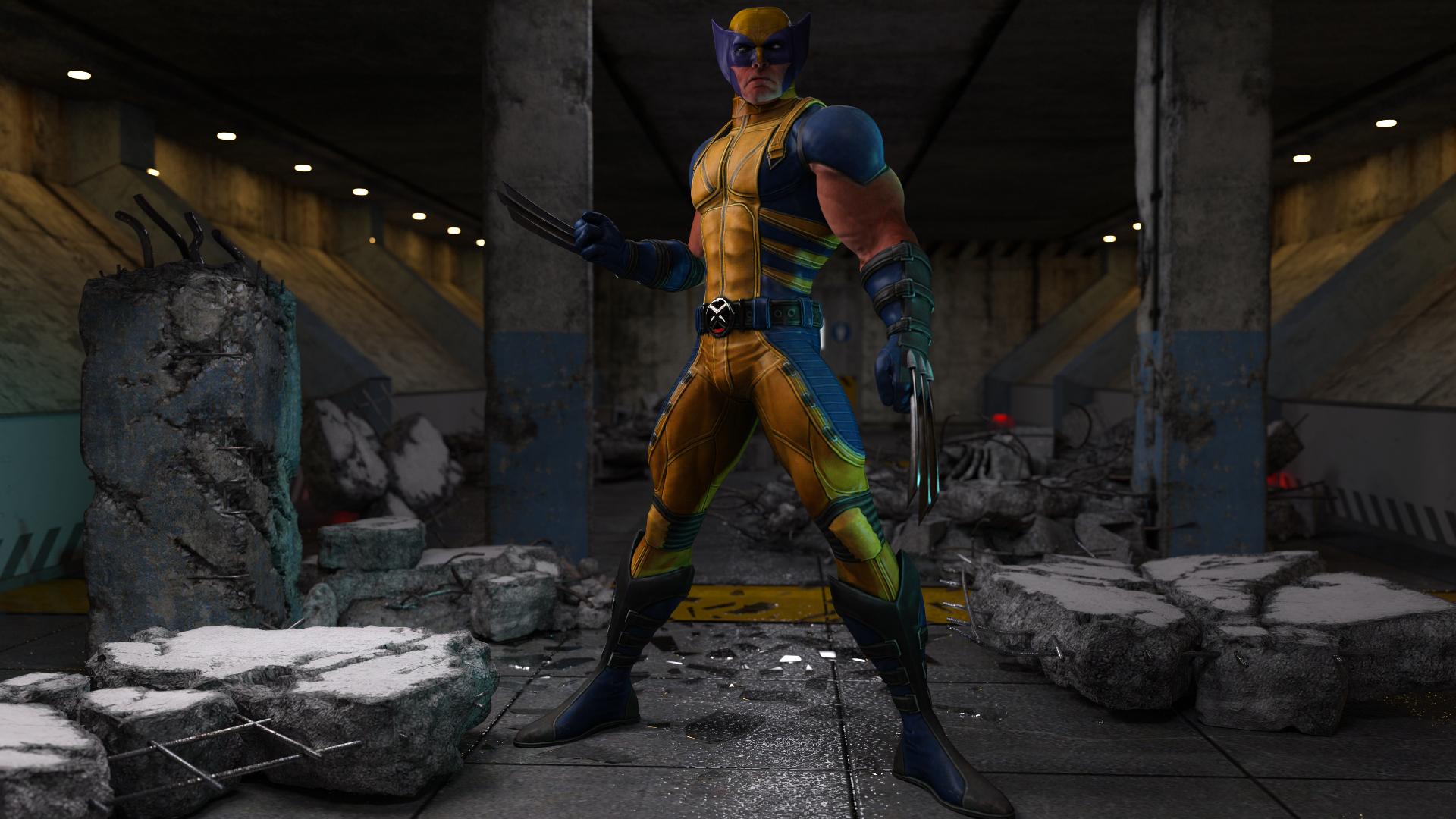
If possible to share , What setting You`ve used when importing OBJ from XNA ? Those object always flipped in DAZ studio
New one for me. Part of the hair doesn't auto-follow.I've never experienced this before. The morph is part of Zevo's Body Diversity for Genesis 8. The morph itself is BD Proportions Body Scale.
Hair is Vertigo Ponytail for Genesis 8.
When the morph slider is all the way to 100% (making the model smaller) the actual tail fits to the hair. As the slider goes the other direction, the body and hair cap move but the tail doesn't. I couldn't see anything out of the ordinary in the settings either. Does anyone know how to fix it? I did try to reload the hair but that didn't work. I've attached screenshots.
Does anyone have any idea how I can fix this?
Toon Generations for G8 question {project finished :)}Yeah, it's a really good morph package.
You just dial in partial strength Toon Generations to get a more hybrid "Realistic"/"Toon" figure. There's a lot of good Toon figures between Genesis 3 & 8.
Star 2.0, Sakura 8, plus others... a lot of good ways to come up with good Toon figures. Toon Generations is another super tool to have, and a good baseline across both Male and Female figures. Toons are not an everyday render for me, but I think 3DU's Daz work has gotten better and better... definitely worth having for when I feel like toons.
How to make a certain part of an outfit unchanged by morphs?mikelsebastian said:
It's because i added a chinstrap to the hat, which of course will cause clipping when i morph the characters, also i made a moprh in the hat that rises the hat so it can be weared with hair or other hats, like bandanas.
Also i want to save it as an instance and have it be use in smart content, but as far as i know sets cannot be drag 'n drop wearables.
As I said, you could look into rigidity maps, which will prevent dialed morphs from affecting parts of your object. Using Transfer Utility will also create some hidden corrective morphs in your hat object that you'll need to delete.
Another option would be to make the chinstrap a conforming object, then use a Rigid Follow node to anchor the hat to the top of the straps. AFAIK, the rotation of the straps' ends should transfer over to the rigid follow node and move the hat.
How to make a certain part of an outfit unchanged by morphs?barbult said:
Why not just make the hat a prop and parent it to the head, instead of making it a conforming wearable that autofollows character morphs.
It's because i added a chinstrap to the hat, which of course will cause clipping when i morph the characters, also i made a moprh in the hat that rises the hat so it can be weared with hair or other hats, like bandanas.
Also i want to save it as an instance and have it be use in smart content, but as far as i know sets cannot be drag 'n drop wearables.
The G8F morph dilemmaYeah, I recall finding a morph, that was attempting to call a morph, but it was misspelled, so it would take ages going through every single morph, just to come up empty. Correcting that one mispelling shaved minutes off my load time. Every time I install a new person, I load it up right away, and check log for errors. If I find any, I uninstall immediately, unless it's something I can fix really easy myself, I refund. Also, it's not only character morphs that add to the time, but also expressions that are morph driven.
How to remove custom or unwanted morphsIf it loads with the figure then sometimes Ctrl + Shift + F (Restore Figure) works. At least until the next time the figure loads up from the library. You can also find the offending morph slider and set it to zero. Then, as RL_ said, you'd want to note the name of the rogue and then track it down - and nuke it by zipping it as a backup and then deleting it.
The G8F morph dilemmaPerttiA said:
The morphs don't need to be broken. There just may be another morph from an other creator (maybe even from different store) that's using the same names, labels, formulas and/or id's and when both the morphs have been installed, there is a conflict and that may confuse DS, causing delays in loading the figure.
Logfile is the best source of information on tracking down those morphs and uninstalling them the easiest option to deal with them.
If there's a name conflict, I would still consider that "broken", even if both technically work in isolation. But regardless, uninstalling them is the way to go in either case.
The G8F morph dilemmamargrave said:
While it does take longer the more morphs you have, it does not take a half-hour unless some of those morphs are broken. Just check your log file, uninstall the broken ones, and file a ticket so they can (eventually) be patched.
Hopefully Daz Studio 5.0 will be able to improve on the loading process though.
The morphs don't need to be broken. There just may be another morph from an other creator (maybe even from different store) that's using the same names, labels, formulas and/or id's and when both the morphs have been installed, there is a conflict and that may confuse DS, causing delays in loading the figure.
Logfile is the best source of information on tracking down those morphs and uninstalling them the easiest option to deal with them.
M3 texture to any version of GenesisLeana said:
Noah LGP said:
I use M3 obj as a UV set for V3 figure and V3 Legacy UV for G3F
Map transfer : M3 -> V3 -> G3F -> G3M
Legacy UVs don't enable you to use map transfer to make a G3F map from a V3 one, only to use the V3 map on G3F with the geografts.
Except if you export/import the figure as an OBJ
I use this OBJ with Map Transfer tool
https://www.daz3d.com/forums/discussion/302076/genesis-8-uv-for-legacy-uvs-geograft-done#latest
[Released] MI Summer Swimwear Set for Genesis 8 and 8.1 Males [Commercial]Linton said:
Looks amazing, will you be releasing him too? I've run out of items to purchase from your store!
I 1,000% agree and second this request.
1. Your work is amazing, and we need more quality male stuff. Your release has honestly been the one really interesting thing to me in this otherwise rather disappointing (for me personally) artist sale. You have a certain...feel to your work. Strong, elegant, and masculine, but not over-the-top cliches or magical-fantasy-only. The model in the image quoted above looks almost exactly like a police officer I saw last weekend. Sadly, he wasn't wearing a swimsuit so I couldn't verify the accuracy of his build. ;) That kind of realism is, I find, rare in the 3D realm.
2. I'm always hesitant to buy a product that I can't really replicate the scenes of, especially ones with such phenomenal promo art.
On a somewhat related note, what you did with the Alex Capital character would make him an instant buy for me. You may want to consider releasing that as a morph, or coordinating with the original artist to do something jointly. I'm not a fan of the forced scar, and that's why I haven't been interested in buying him, but seeing what you did with him completely changed my mind - or it would if I could actually do that.
AIUTO...CHI CONOSCE L’ITALIANO? PARTE TREDICIhttps://zbrushcore.com/compare.php
Ad occhio rapido:
- Non hai l'import/export in FBX.. per cui i rigging fatti con le dynasphere restano in Zbrush.. puoi sempre usare l'OBJ come formato (DAZ lo supporta)
- GOZ non c'è.. per cui il bridge di DAZ non funziona (devi esportare e reimportare i file in OBJ manualmente)
- Manca la possibilità di creare texture: non ti f fare l'UV Mapping e nemmeno dipingere una texture (ti fa applicare solo colori singoli alle geometrie)
- Niente Fibermesh: niente peli 3d
- Hai meno pennelli
- Molte funzioni sono basiche senza parametri avanzati
Puoi usarlo comunque per modellare/scolpire. Se devi fare dei morph è più che sufficiente
UVmap, Texture e pelurie varie li puoi fare con un altro programma 3D@Imago
qualcosina in Zbrush la so fare... ho già provato in passato a scolpire qualcosina di basico (un vaso, una spada).Inoltre ho visto molti tutorial brevi in Italiano (cerca Accademia Zeta) mi manca però molta manualità (che è il cardine del software).
M3 texture to any version of GenesisNoah LGP said:
I use M3 obj as a UV set for V3 figure and V3 Legacy UV for G3F
Map transfer : M3 -> V3 -> G3F -> G3M
Legacy UVs don't enable you to use map transfer to make a G3F map from a V3 one, only to use the V3 map on G3F with the geografts.
How to remove custom or unwanted morphsCheck the documentation - I believe it uses the same Author name for all covnersion, I'm not sure about the product names.
/Data/Genesis 8/Female/Morphs/Author/Product/
will be the location for the files, whatever Author and product may be, and there will be a .dsf file for each morph (and possibly for hidden corrective morphs too).
M3 texture to any version of GenesisI use M3 obj as a UV set for V3 figure and V3 Legacy UV for G3F
Map transfer : M3 -> V3 -> G3F -> G3M
If you can find Universal Texture Convertor + UTC Bundle Pack, it can convert M3 to M4.
Character creation problemWhen you talk about creating character, how do you do the creating?
Are you talking about a character morph that you have made in Blender/ZBrush or are you creating the character by adjusting existing sliders?
Character creation problemI have been creating g8f-based female characters with some success, but there is one step in the process where I have had a continual problem.
One of the last steps in character creation is the saving of character assets. The full character is saved in the G8F/People/Vendor/character folder through the character preset while the head/body apply and remove are saved through shaping preset to the same folder. I won't go through both head and body since they're roughly done the same way, but when you save head apply you dial body to 0, head to 100%, select shaping preset, right-click on Genesis 8 female and unclick all. Drop down and select actor/head/people/real world and click on character head, then save. To do head remove, you dial head morph down to 0%, select shaping preset, right-click on Genesis 8 female and unclick all. You then drop down and select actor/head/people/real world and click on character head and save. For body apply/remove you follow the same steps except do actor/full body/people/real world and click on character full body.
These head and body apply/remove presets are not working with my character yet the full character and the material presets do work fine. Someone had suggested there might be a glitch with my software but I don't see how. I just installed Studio 4.15 Pro a week ago, and this character was just created.
Has anyone had a this kind of a problem or have any suggestions on how to correct it?
The G8F morph dilemmaIf you buy a lot of characters for G8F she takes a half hour to load.
So you start uninstalling characters.
Then you begin being more picky about the characters you will buy in the future.
This is a dilemma for a store that sells a lot of characters
Daz Studio Iray - Rendering Hardware Benchmarkingoutrider42 said:
Unless the card is running on the high side I really wouldn't bother water cooling it, I think any performance gain would be pretty small in the scope of things.
Most likely. However, since I have so much watercooling headroom in my system already (right now it's the single Titan RTX being cooled by an entire one of these) and the cost of an additional waterblock + fittings is almost negligible at this point, I'll most likely try it out.
It is pretty cool to see just how much faster the A5000 is over the last generation Titan. It is not even close.
And at a considerably smaller power budget too - 230 vs. 280 watts. Which might not sound like all that much of a difference by itself. But when you're talking about having too or more of these in a system together... that can easily be difference between needing a new power supply or not (my 750 watt EVGA G2 is still going strong with this setup.)
Saxa -- SD said:
Hey, congratz on your RTX A5000 plunge!
Huh, good to know that PCI3 vs 4 has basically no diff.
When I get re-focussed in next month or two, will test that out too.
Will be interesting to see if PCI4 will make a diff at all in this next hardware lifecycle.Barring major changes to the way Iray handles data transfer during the rendering process (preloading all render data to GPU memory) the chances of it making any sort of difference are basically zero. Unless Nvidia were to bring back memory pooling between multiple GPUs via the PCI-E bus (it is a little known fact that prior to the introduction of NVLink with the GP100, Nvidia GPUs already had a system for memory pooling: GPUDirect P2P.) But the chances of that are pretty small imo for the obvious reasons...
If you do add water would be interested to hear what you decided on and what you did.
I'm still firmly in the air is safest route, but very open to suggestions.Everyone's gonna have their own comfort level when it comes to intentionally bringing water near/in your computing equipment. For me it's being able to have the waterloops themselves located below (rather than above or sandwiched in between as you often see these days) the core components of a PC that make me comfortable with it. Which is why I am such a big fan of the Tower 900 case specifically for watercooling - since it allows you to do just that (you can see the pre A5000 version of my implementation of it here.)
chrislb said:
RayDAnt said:
RE: @JamesJAB @Skyeshots @Saxa -- SD
Finally took the plunge on an RTX A5000 after seeing proof from Igor's Lab that the A5000 (and likely the A6000 as well) is directly compatible with all RTX 3080/3090 Reference (not Founders) Edition waterblocks for custom watercooling. For what it's worth to you. First,
The A5000 is a 230 watt card according to Nvidia.
https://www.nvidia.com/content/dam/en-zz/Solutions/gtcs21/rtx-a5000/nvidia-rtx-a5000-datasheet.pdf
With a waterblock, I don't think you will see any significant improvement in render times with water cooling unless your air cooler temperatures are rather high. The main benefit might be noise reduction. It appears that the A5000's default fan curve keeps the GPU around 78C. You can drop those temperatures with a higher fan speed and more noise.
Can confirm that the A5000 likes to keep its core temp in the lower to mid 70s (with clock speeds hovering in the 1650-1850 range) with the default cooling setup. In my partcular case, increased computing noise is a major issue (the system doubles as an audio production PC in a home recording studio) so turning up fan speeds only for last resort.
Dropping the GPU temps to 45C with water cooling might get you up to an additional 85-100 MHz in GPU clock speed with the default VBIOS on the card.
It may be possible to use certain versions of MSI afterburner and raise the power limit a little along with increasing the GPU clock speed. However, I doubt that even with that method you will be getting much more than 250 watts power draw at the peak.
As a rule, I don't mess with voltages on my pc components (other than turning them down when undervolting is possible) for both component longevity and power efficiency reasons. But I'm more than willing to spend the extra buck necessary to get them the best cooling/power delivery subsystems possible so that they perform the best they can while still maintianing spec. Especially in systems where the end goal is to have 2+ high end GPUs in them (where thermal interaction between GPUs starts to become a concern
With the A5000 having its 8 pin power connector attached by a pigtail, would it cause any waterblock clearance issues?
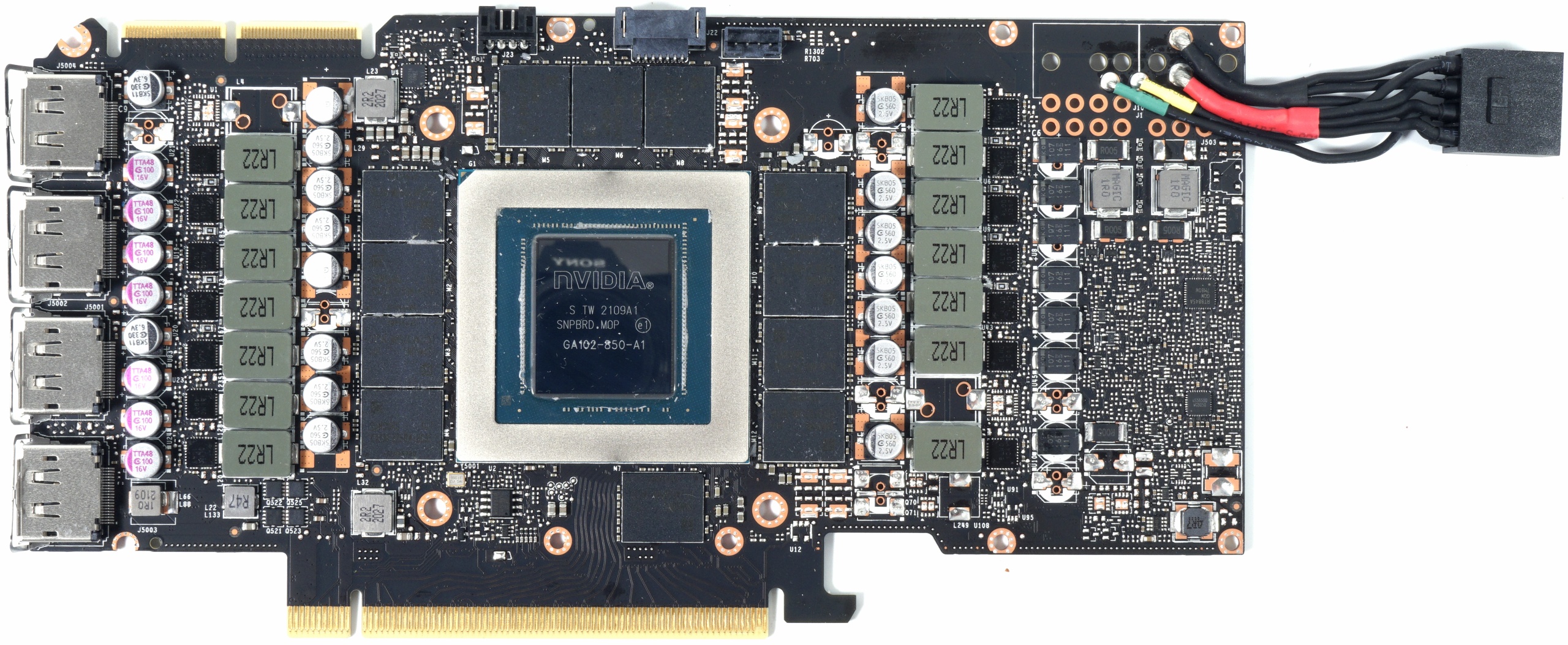
Since the Tower 900's vertical layout puts GPUs in a hanging downward (from the rear panel IO end) position, I don't see it as much of a concern in my specific case. But it is something I will be evaluating closely if/when I make the change to watercooling.
ETA: That's another thing I'm really appreciating about this A5000 right now: All that performance - just a single 8-pin power connector.
Daz 3D is part of

Connect
DAZ Productions, Inc.
7533 S Center View Ct #4664
West Jordan, UT 84084Licensing Agreement | Terms of Service | Privacy Policy | EULA
© 2026 Daz Productions Inc. All Rights Reserved.