-
Is DAZ ever gonna be better with handling dense geometry?
So popular consensus is that it's the textures in "texture" (openGL) viewport mode that is causing the viewport slowdown and not the geometry?
I'll admit, I never use filament, but is it any faster?
I like to be able to see the textures in the scene when I'm building.
Viewport render like EeveeSince it is made for Filament materials Iray scenes tend to look wrong and mostly too bright. I'd like to see that, too, or have Iray tell a more abstract pre-stage at least roughly how to setup the scene. Not the full show but an approximation.
I hear Daz5 will have a new GPU based tex prev mode, maybe that addresses this, too, but then again I know zilch about the Daz5 roadmap.
[Fisio SB addOn released] Fisio: Physics SimulatorPeter Wade said:
Alberto said:
Peter Wade said:
Something is broken in your system.
Which version of windows do you have?
Is it updated?
Are you able to render with Filament?
According to the properties window it's Windows 10 Pro Version 22H2 Build 19045.2251 and it has Windows Feature Experience Pack 120.2212.4180.0
Windows Update says it is up to date
Filament renders OK.
I need to have a look at ways to check the system, I think there are a couple of commands I can use for that. I did a search for the things that were showing as missing and a couple of sites said they are part of the 2015 runtime for Visual C or it might habe been C++, I'll have to look i to that further.
Peter,
Could you check with CFF Explorer the file "dzfilamentapi.dll"? It's inside the subfolder "\Program Files\DAZ 3D\DAZStudio4\"
dzfilamentapi.dll requires the api-ms-win-crt files.
Interesting. That .dll shows the api-ms-win-crt files as missing as well but filament does render. If the code contains refeneces to a library that isn't there but it never calls the functions would that work? When I saw stdio in the list my experience with C made me wonder if the developers were using it as some sort of debug console that doens't get used in the release version. But I'm way out of date with current programming methods so I may be talking rubbish.
Did you try to reinstall Daz Studio?
If this doesn't work, you could, if you wish, reinstall or repair the redistributable https://www.microsoft.com/en-us/download/details.aspx?id=53840
[Fisio SB addOn released] Fisio: Physics SimulatorAlberto said:
Peter Wade said:
Something is broken in your system.
Which version of windows do you have?
Is it updated?
Are you able to render with Filament?
According to the properties window it's Windows 10 Pro Version 22H2 Build 19045.2251 and it has Windows Feature Experience Pack 120.2212.4180.0
Windows Update says it is up to date
Filament renders OK.
I need to have a look at ways to check the system, I think there are a couple of commands I can use for that. I did a search for the things that were showing as missing and a couple of sites said they are part of the 2015 runtime for Visual C or it might habe been C++, I'll have to look i to that further.
Peter,
Could you check with CFF Explorer the file "dzfilamentapi.dll"? It's inside the subfolder "\Program Files\DAZ 3D\DAZStudio4\"
dzfilamentapi.dll requires the api-ms-win-crt files.
Interesting. That .dll shows the api-ms-win-crt files as missing as well but filament does render. If the code contains refeneces to a library that isn't there but it never calls the functions would that work? When I saw stdio in the list my experience with C made me wonder if the developers were using it as some sort of debug console that doens't get used in the release version. But I'm way out of date with current programming methods so I may be talking rubbish.
[Fisio SB addOn released] Fisio: Physics SimulatorPeter Wade said:
Something is broken in your system.
Which version of windows do you have?
Is it updated?
Are you able to render with Filament?
According to the properties window it's Windows 10 Pro Version 22H2 Build 19045.2251 and it has Windows Feature Experience Pack 120.2212.4180.0
Windows Update says it is up to date
Filament renders OK.
I need to have a look at ways to check the system, I think there are a couple of commands I can use for that. I did a search for the things that were showing as missing and a couple of sites said they are part of the 2015 runtime for Visual C or it might habe been C++, I'll have to look i to that further.
Peter,
Could you check with CFF Explorer the file "dzfilamentapi.dll"? It's inside the subfolder "\Program Files\DAZ 3D\DAZStudio4\"
dzfilamentapi.dll requires the api-ms-win-crt files.
Finished and in Freebies *Please Delete Thread*@MachineClaw Sometimes the Filament PBR render preview looks better then the Iray or 3Delight
Also in general if anyone would like to beta test the charater just DM me
[Fisio SB addOn released] Fisio: Physics SimulatorSomething is broken in your system.
Which version of windows do you have?
Is it updated?
Are you able to render with Filament?
According to the properties window it's Windows 10 Pro Version 22H2 Build 19045.2251 and it has Windows Feature Experience Pack 120.2212.4180.0
Windows Update says it is up to date
Filament renders OK.
I need to have a look at ways to check the system, I think there are a couple of commands I can use for that. I did a search for the things that were showing as missing and a couple of sites said they are part of the 2015 runtime for Visual C or it might habe been C++, I'll have to look i to that further.
[Fisio SB addOn released] Fisio: Physics SimulatorPeter Wade said:
Alberto said:
Peter Wade said:
I can't get this to work on my computer. I installed it using DIM and entered my registration code. I've tried setting up the bouncing ball demo but when I try to run the simulation I get three error boxes, first one, then the next when I close each one. The error messages are:
A dynmic link library (DLL) Initialization routine failed
Can't load FisioEngine.dll at c:/Program Files/DAZ 3D/DazStudio4/libs/Fisio/FisioEngine.dll
Can't load Fiso EngineThe FisioEngine.dll file is there in that directory as well as ChronoEngine.dll and ChronoEngine_multicore.dll. I've got Studio Release 4.20 and Beta 4.21 installed. They both give the same errors except the path is different for the Beta version. I've tried de-installing and re-installing with no difference. I'm running it on Windows 10 Pro with a 6 core i7 990X CPU and 12 GB Memory.
Any ideas what could be causing this and how to fix it?
If you wish, you could do the following to find the problem:
Use the utility CFF Explorer: https://ntcore.com/?page_id=388. Download the Explorer Suite.
Install it and then go to the File - Open menu. Then open the FisioEngine.dll that is in /libs/.
You should see something like this: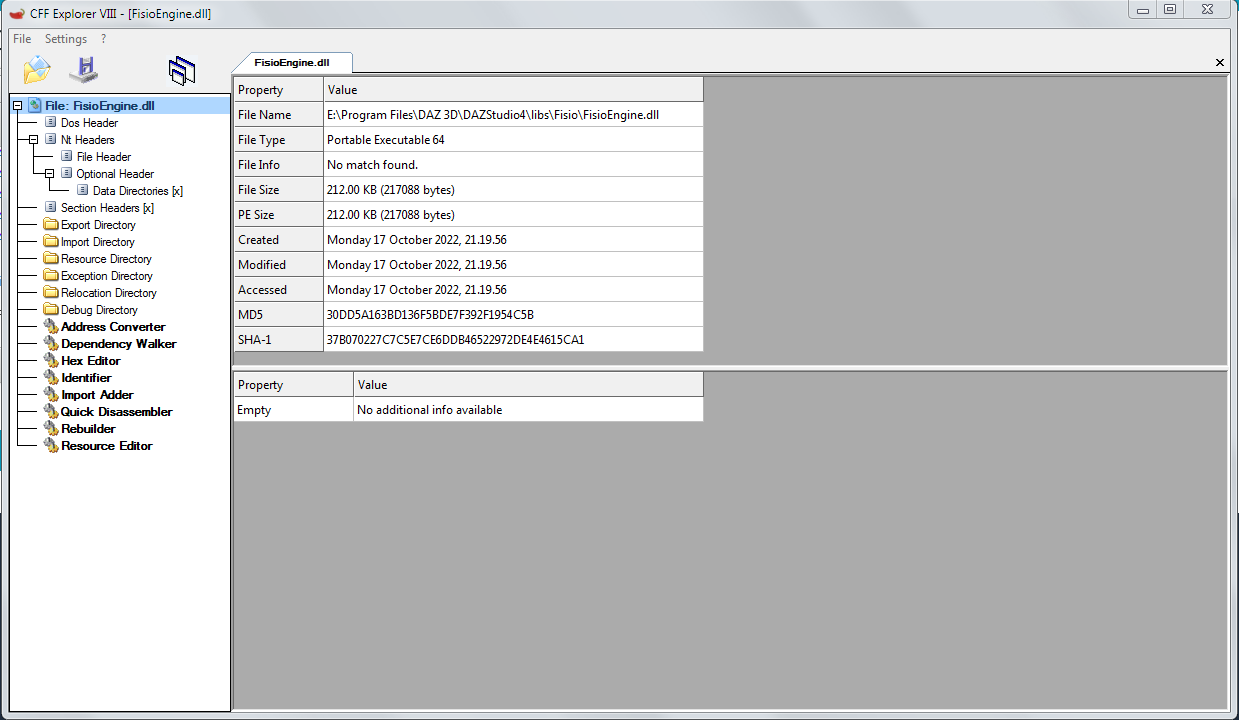
Click in Dependency Walker and expand ChronoEngine.dll and ChronoEngine_multicore.dll below FisioEngine.dll. You should see something like this:
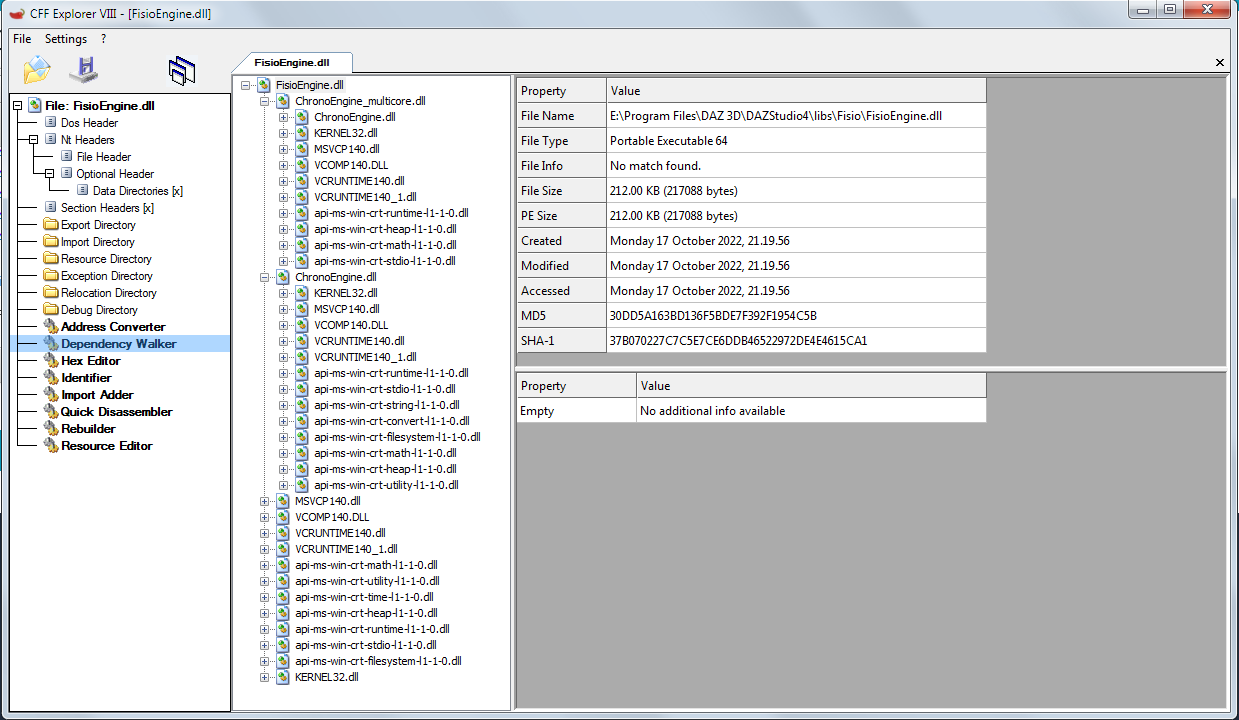
If any dependency is missing, you'll see a red X, like this:
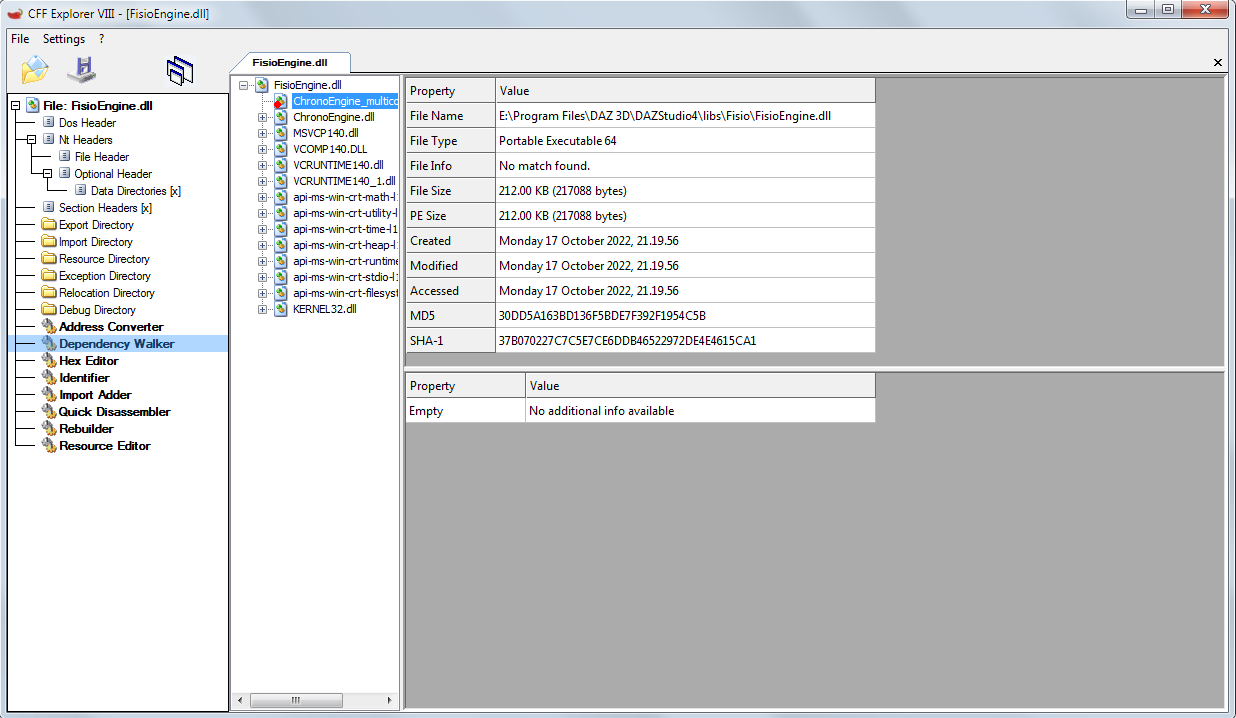
Try and show me the results, please.
I've tried that. I'm getting a lot of missing things that start with api-ms-win-crt
Something is broken in your system.
Which version of windows do you have?
Is it updated?
Are you able to render with Filament?
[Fisio SB addOn released] Fisio: Physics SimulatorSaxa -- SD said:
Just wanted to say that first demo was just perfect amount of detail for me.
Not too much or too little.
Was actual really nice finding instructions that were just about perfect. Thanks!Switched to Filament for Fisio-simulation and was exactly as fast as texture-based display.
Like real-time.
Nice to see a glossy ball bounce on a shiny flat surface >>>> real time >>> in DazStudio.
Makes me anticipate even more soft body physics eventually.Sure you know all this already.
Just nice that there is a good use for filament!Just thought would highlight in case any users did not consider filament.
edit: playing with various settings for 1st demo - was intuitive. Ball is heavier and spinning now. Very nice.
Richard Haseltine said:
Fisio does not install for betas, so that is expected.
You made me curious. Unless i misunderstood. Took a break to check out Fisio quick.
Primarily use betas (public build) and still using DS 4.16.1.43. The 1st demo in Fisio manual simulated fine for me. Was exciting to see realtime via Filament in DS! Using win10x64 pro.
My beta was out of date (I'd ended up with Public Builds unchecked in the Download filters), although not by much. I guess that also stopped it from installing the beta version of Fisio, although I did have a beta there. Sorry for the confusion.
[Fisio SB addOn released] Fisio: Physics SimulatorJust wanted to say that first demo was just perfect amount of detail for me.
Not too much or too little.
Was actual really nice finding instructions that were just about perfect. Thanks!Switched to Filament for Fisio-simulation and was exactly as fast as texture-based display.
Like real-time.
Nice to see a glossy ball bounce on a shiny flat surface >>>> real time >>> in DazStudio.
Makes me anticipate even more soft body physics eventually.Sure you know all this already.
Just nice that there is a good use for filament!Just thought would highlight in case any users did not consider filament.
edit: playing with various settings for 1st demo - was intuitive. Ball is heavier and spinning now. Very nice.
Richard Haseltine said:
Fisio does not install for betas, so that is expected.
You made me curious. Unless i misunderstood. Took a break to check out Fisio quick.
Primarily use betas (public build) and still using DS 4.16.1.43. The 1st demo in Fisio manual simulated fine for me. Was exciting to see realtime via Filament in DS! Using win10x64 pro.
How do you use/combine puppeteer layers?Ah thanks - I'm not up on the play with DAZ since a few years, I've been Blendering with eevee but now coming back into DAZ to try out Filament animations since I have invested a bit in G9 (with hope and fingers crossed).
Don't you need Animate2 full version to make aniblocks? Again the lack of documentation is letting me down.
I might have to resort to animating in Blender which is much more feature rich although also has pitfalls.
Seems weird though that you can add layers to a figure but seemingly no way to "combine" them in a useful way.
What is going wrong with this Texture?Nothing wrong with the texture once rendered with Iray (even 3DL, but not Filament). The texture-shaded preview is a little funky, showing all those seams, but so is the UV mapping and texture bitmap.
(SOLVED) Filament (PBR) doesn't work or somethingIceCrMn said:
Is that on a mac or Windows?
as far as I know Filament isn't working on macs.
https://www.daz3d.com/forums/discussion/449631/filament-does-not-work-on-macos-yet
I don't have a mac so can't be of much help with those.
Thanks for answering. I am using DAZ on Windows.
But I have already fixed it, I just had to disable the "Hardware Anti-Aliasing" option and it works perfectly now.
(SOLVED) Filament (PBR) doesn't work or somethingIs that on a mac or Windows?
as far as I know Filament isn't working on macs.
https://www.daz3d.com/forums/discussion/449631/filament-does-not-work-on-macos-yet
I don't have a mac so can't be of much help with those.
(SOLVED) Filament (PBR) doesn't work or somethingWell, I wanted to try the option "Filament (PBR)" in the Viewport and when I select it, the figure that I import into the scene turns all gray. I have seen some videos and I see that this does not happen to others.
What could be the problem?
I attach images of the problem, btwThanks for the attention.
EDIT: If anyone is experiencing this same error, try turning the "Hardware Anti-Aliasing" option to "Off". That was the solution for me.
I attached image of the solution, btw.Viewport render like EeveeHave you tried Filament? That's the closest thing DS has right now.
Genesis 9 disappearing eyes after renderI have a custom character that I set up for Genesis 9. Because of the limitations of my laptop I usually render in 3Delight. All seemed to go well after I did the render and then I noticed that Genesis 9 doesn't have any eyes in the render. They were there when I set up the file. They appear when I do a filament render. The only thing I did was swap out the base texture for one of my own and I reduced the eye moisture opacity to zero. Genesis 9 looks like he was born without eyes (just think the Companion from the Sandman series on Netflix). Is there something I'm missing? I didn't have this issue with Genesis 8.
Zirael Flyte Hatchback Car - Underside?Filament works great for this! I tried multiple times to set the Rignt temp to 73. It failed every time, so maybe it is temperature specific. In fact, I can't set Left or Both to 73 either.
Zirael Flyte Hatchback Car - Underside?gcjellyfish said:
they should also be visible if you use filament in the viewport
I didn't even think of that! I'll give it a try. Thanks.
Zirael Flyte Hatchback Car - Underside?they should also be visible if you use filament in the viewport
Daz 3D is part of

Connect
DAZ Productions, Inc.
7533 S Center View Ct #4664
West Jordan, UT 84084Licensing Agreement | Terms of Service | Privacy Policy | EULA
© 2026 Daz Productions Inc. All Rights Reserved.