-
Carrara. ... and Unity?
adding 2c,
unity and unreal are entire dev and presentation 3D world platforms that are intended for real-time game/interactive use by end-users.
One ruler to help measure their place relative to 'our' own 3D scheme, is that neither of those engines export squat (well, except live and captured video/images). They are the end point for their intentions, period. This is great, by the way, but simply where they fit.
Both environments (everything DS/Carrara do, and more) can be practically free to use/develop in, as they have indy-friendly business models - so we can all play and dream, hence the interest by DAZ/Reallusion in providing their content (and 'interactive licenses' - note the recent push on the DAZ main page? - yup...) to this marketplace. It's a prudent business direction/decision.
The unity and unreal world developer would typically create their mesh worlds from DAZ/Reallusion/Sketchup/Turbo-squid/Rendo assets (and licenses), add then their figures (from same sources) with animation/rigging (fbx/collada/...) to those worlds. (Think actors and sets - much like the games I believe you already play)
Then within their respective scripting contexts, developers map interactive user-controls to 'canned' figure animated events and/or they script logic to take commands from the users and the story logic/scripts to generate the reactions and results in an interactive context (if user does X, then figure does Y, and if figure A hits figure B with Axe, then activate gory death animation, etc.). Add camera controls, physics engines, lighting, atmosphere, rendered styles, etc. to add the magic that we hand-key in our animations...
It's all very-much a realtime interactive environment at the end, but uses a lot of preset elements that are generated using essentially the same 3D elements that we all work with. Hence the urge to find overlap. We also do this with tools like Marvelous Designer - very much the same, but different.
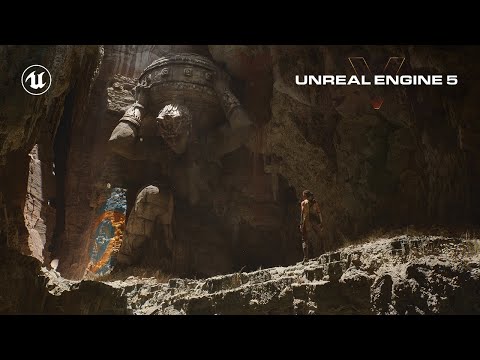
Take a look at the latest unreal-5 engine demo that Wendy posted a few weeks back and understand that the figure is being 'driven' through that world by a user with an Xbox-like controller, and while the figure is driven by the user, the world iteslef (lights, gravity, dust, bugs, rocks-falling, etc.) is programatically generated and reacting with the meshes and environment fed to the renderers (masterfully pre-setup), and also responding to the user/figure as it interacts with their world(s).
unreal engine 5 demo:
Then, last week they released this stuff with interactive super-real people. Cool/humbling:

To be honest, everything that goes on in those demos makes me believe that *if* that can all happen in realtime on a high-end Intel processor, and a pair of NVIDIA 3070s (cavemen tools, relative to even human brains), that perhaps we *are* all living in a simulation of some sort :) If so, I really want to have a chat with the guy/gal that's got my controller in hand, heh.
Add to that, that the whole oculus-rift immersive headset environments are doing all of this in realtime, all around you ( picture 15 4K TVs worth of imagery updating at 30-60 frames-per-second, in every direction around you - in 3D-stereo, so that's times X 2 for each frame - jeez.
Check out the demo - unity has similar goals and strengths/differences, etc. - it's mind-blowing and humbling stuff, and hopefully, after seeing/reading this, the framing of all of this unity/unreal stuff will fall into place relative to Carrara/DS/Poser/C4d/Maya more readily. For animators, it just changes the game entirely, but the enjoyment of 'old school' still has its own value. Think Farrari and convertable VW-Thing, heh. I think I'll take the 'Thing' and some AM radio or 8-track for the win.
Personally, I'm obviously impressed, but kind of afraid of it all, so I'll go back to my humble DS/Carrara world and run another render or two, and be happy and impressed with my mastery (!) of this domain.
That the humble pencil and paper can still enable the most powerful of ideas to propagate, leaves me quite inspired with the tools I'm able to explore in the comfort of my own space. In both cases, it's safe to blame the operator.
best to you misty,
--ms
Future of Hexagon?I don't see anything wrong with hexagon. Especially since it's last upgrade. It rarely crashes on me and I do all my modelling on it for everything I do and not just DAZ although mostly for DAZ and I have programs such as 3dsMax, ZBrush, and others of that caliber and still turn to Hexagon. Hexagon just takes time to get to learn how to use it properly. I ve have used it since it was first introduced and only now am I becoming very good with it as I have learned to use it. Any mistakes I make now are because of my error and not its and are usually in my construction by making something not the way it should actually be such as the example attached. For a free product hexagon is extremely powerful. You just have to learn what to do and not to do. Many things you can do very well with hexagon and a few things you can't. For example again, I never UV in hexagon. That is not a strong attribute of hexagons. I use a different program designed for just UVs. Hexagon is a model builder and for that it is excellent and rivals some most expensive products out there. Bar none.
I am working right now on a set for DazStudio for Vince 8. Two guns, clothing and other accessories... below are some pictures of those models. The clothing I am still working on. Pants in front of me right now. All of this is done in Hexagon, except UVing. I am very good with 3dsMax, zbrush, carrara, sketchup, and others that I have. But Hexagon is my program of choice for modeling. It cannot be beat especially for the price.
Lighting a painting.It's not the obj importer thats doing that. Sketchup just does that to pretty much any rectangular surface. It's related to the way it also insists on closing everything up automatically and not really leaving wide open empty spaces inside objects. Like you have to go back and delete planes that you never put there, but you can never get them all because it just keeps making more. It's also related to how they achieved such an easy to learn, fun modeler that can also create really complex and amzing things. Like everything about it is pretty much completely different than other programs, right?
The tool I linked to will most likely make the model you already made work perfectly.
Alternately just model the lamp hardware and use a DAZ primitive for the bulb.
Lighting a painting.You're absolutely right about sketchup and the weird geometry sometimes. Try running your object through this https://github.com/wjakob/instant-meshes . I forget who to thank, but i found it on a forum thread here recently. It will clean up your sketchup geometry and convert it to quads which will work better here in DAZ.
Lighting a painting.This is what I mentioned in my previous post. The surface normals of geometry for the surface have to be pointing in the right direction or the IES Profile wont work as intended. There was a wall light/street light in the store with an IES Profile already loaded that shone in the wrong direction, to the right instead of down, which had the normals facing the wrong way and had to be fixed. I did it myself by using the Geometry tool I think, it was a while ago so I can't remember exactly :)Sure, of course they are. That's one of the great things about sketchup is a single surface will appear triangulated if the vertices aren't coplanar, and if they're pointing "away" from the viewpoint they appear with a blueish tint. The issue is more subtle I think. For example, I applied BEGA 2675 (from here) IES profile to my light material, with the following result:

As you can see, the lighting is skewed to the right. You would expect that simply choosing the first three vertices on the surface, assuming they're coplanar, would be enough to generate a basis for transforming the profile. This is not the first time I've had trouble with IES profiles on surfaces.
Note that normals don't have a helicity, so it's not clear from looking at the above what's "wrong" with the geometry (the geometry is fine, there's something wrong with the algorithm).
Lighting a painting.Here's a thing I'm trying to do... not sure how to do it... Got some archviz I made in Sketchup and want to light some paintings, so I thought I'd do a wall lamp, art gallery style (in Sketchup) and make one of the surfaces emissive.

Now from previous experience I know that IES profiles don't really work on arbitrary geometry (I tried one profile, but it seemed to be skewed off to the left so I gave up on that). As you can see from the second image with a standard emissive, I'm simply getting over-exposed from the light against the top of the painting.

What I want to do is illuminate a whole area of the painting, as if it were coming from the lamps. Here's a close-up of the lamp:

Are there any "tricks" I can use? I tried a light plane with very low opacity, but of course it emits two sided so lights the entire room, which I don't really want. Any ideas gratefully accepted.
Imported .obj with messy geometry textureThere is a sketchup plugin which offers front-to-back and back-to-front copy: https://sketchucation.com/plugin/740-tt_uv_toolkit
**FREE* 20 Free Classic Car Models!Miss Bad Wolf said:
Checking them out, but what is a skp file?
Sketchup. It's a different modeling program.
Imported .obj with messy geometry textureyes Sketchup has double the geometry as it backface culls and DAZ studio does not like overlapping geometry inhabiting the same 3D space
Imported .obj with messy geometry textureYes, it will be broken into triangles - the thing to avoid, or at least a thing to avoid, is long, thin triangles - which you appear to have above (it's the way Sketchup has always tended to break up the large planes that make up its models, and it has always tended to be an issue as here as I recall).
Imported .obj with messy geometry textureMerry Christmas Everyone!
i'm a beginner and maybe the problem i'm having is something simple to solve but i don't know how.
I made this street in sketchup, I opened it in 3ds max, everything ok and exported as obj ... for some reason only the part of the asphalt got messy and as I change the position of the camera, the mess in the texture changes randomly .
There are no double faces on the model.
I don't know if this is something that needs to be corrected within DAZ or directly in the model (but as I said, everything is perfect in sketchup and 3ds max), but I have already created two complete furnished houses, using this same process and I didn't have this problem importing into DAZ before ... now this asphalt thing is killing me.
Obj's Exported From SketchUp Into Daz Not Showing UPTry exporting it as a DAE into Blender and from Blender, out as an OBJ...
Are you using SketchUp Pro's native OBJ export or a Ruby plugin like TIG's OBJexporter or the one that comes with SketchUV?
Those are good, but they often fail with bad or complicated models... and to be honest SU's native OBJ export really sucks and I stopped using it years ago because it's just unreliable when used with DS or Poser... it seems to work okay with other programs, but with each version of SU, the OBJ export/Import had some other unique weirdness (Then again... that impression was formed when I worked on a Mac, and everything is weird on a Mac).
To avoid me being too wordy or not wordy enough, I hope you don't mind me asking... How familiar with SketchUp are you?... do you model with it or just use it to bring stuff over from 3D Warehouse?
Like if you are fairly familiar with it, I don't wanna make suggestions you probably already know, and if you don't give a poop about ever using SU for anything other than getting models into DS, then I don't want to bother you with unnecessary info or potentially unfamiliar terminology.Obj's Exported From SketchUp Into Daz Not Showing UPI can't seem to edit my friggin' comment without messing with code, so sorry to make this a separate post...
I'm not clear as to whether the import has failed or the import seems successful, but you just are not seeing the model... two common reasons for this is the model is either scaled hundreds of times larger than the opening scene and you are actually inside the model and it so large it's outside the camera's range (plus if you are inside you are looking at the back of the normals which make them invisible)... and the other is the model is way outside the world center or world zero (X-0.0, Y-0.0, Z-0.0 coordinates)... the camera is set to aim a world center, but your model was made in Timbuktu 1000 miles away, so it's there but so far away you can't see it... that can be compounded by scale in consistency making it worse.
SketchUp models generally end up being really, really big in most other programs.
If you can see that the model has been imported but you don't see it, try shrinking the scale... it might be gigantic... DS's import scale is confusing (I generally import to Poser and make it a PP2, and export that to DAZ, but that's because their my own models)... you might have to shrink it down by 95% or more.
Obj's Exported From SketchUp Into Daz Not Showing UPI used to make my own models in SketchUp and export them as DAEs into Blender, then after tweaking whatever need to be tweaked in Blender, I'd export them a OBJs to DAZ or Poser...
The "SketchUp export DAE, open in Blender and export as OBJ" is the most reliable way to assure a model works in DS.
I've found a way better method that involves using Ultimate Unwrap 3D... that's a bit more complicated, but it yeilds better results.
Many warehouse models are usually a mess with reversed faces, weird grouping, crazy scaling, models made way out of world zero, hidden geometry and other trashy mistakes that make most of them too much trouble to fix or use.
I have a bit of knowledge about SU to DS import and I'd be happy to share whatever I can if you are interested.
Obj's Exported From SketchUp Into Daz Not Showing UPI use a lot of SKP models from 3D Warehouse. I open the SKP with Sketchup and then export them as Obj's to be used in Daz. Seems nothing I do will make the imported obj show up. As shown as I click accept nothing happens. It use to be 90% success rate bringing in the model, but its down less than 1 in 20 making it through.
Any Sketchup users here?
Why do YOU use DS instead of something else?...as mentioned in several replies here, initially it was the cost of entry and rather intuitive setup. I also wasn't sure at the outset if I'd like this (particularly coming from a traditional art background), so plunking down 250$ (the price for Poser) or multiple hundreds/thousands for one of the pro grade programmes up front on a very limited income didn't seem like a sound idea (kind of like all those expensive exercise machines advertised on television that wind up in the attic or garage to become dust collectors after a few uses).
Daz on the other hand was free, and was the full base programme, not a hamstrung demo that lasted only a limited time and/or you couldn't save what you did in it. It came with a bundle of free content (the old 3D Bridge Pack which had the LE versions of Aiko 3 and a few animals as well as some props) and there were more freebies available not just on teh site here, but on others like Rendo, Content Paradise, and ShareCG. This was enough to get a good feel for the software before actually putting down the zlotys for content in the store. Yeah there was also Blender (2.4) but at the time I found the UI was rather cumbersome (keyboard driven and coming from a lifetime of working with traditional art media it seemed rather counter intuitive). To create a scene in Blender one also had to pretty much create everything in it from scratch, a fairly daunting process (I actually dabbled a bit with CG in the 80s back when everything needed to be coded, debugged, and compiled).
I also worked with the other programmes Daz offered (Bryce Carrara and Hexagon, the latter which was rather unstable at the time) as well as looked into Vue, Sketchup, Wings3D, and eventually bought Poser 6 (at a discount when 7 was in the wings) for its materials and cloth room. However Daz became my primary software, particularly as it began to grow. Yeah it isn't designed for creating large environments like Bryce and Carrara, but I learned to "fake it" back in the days before HDRs. Granted it is very limited in modelling potential having only primitives, grouping and basic surfacing to work with, however the Polygon Editor makes kitbashing much easier. With the Genesis concept and Iray, it evolved into something more powerful. I could now design my own custom characters by mixing different figure morphs and shapes which was not possible beforehand. As I find it to now be superb for character design, much of my content purchasing has gravitated towards merchant, morph, and shader resources along with plugins like GenX2 Skin Builder, LAMH, Garibaldi Express (now the built in Strand Hair Creator), and Ultimate Pose Master.
In short, I have seen this quirky little programme I installed thirteen years ago has grown immensely. over the years I've bene working with it (I still have the installer for ver. 1.8 as well as those for all subsequent updates).
Since Blender reworked it's UI and set-up, I have finally adopted it primarily for modelling purposes as it is not only more powerful but very stable. However,with the new Daz bridge, I am curious about exploring it for rendering as well since Cycles also has an out of core process like Octane (albeit being a path tracing rather than of PBR engine).
So, I guess to address the original question, I've used Daz for along time, know my way around it pretty well, understand it's potentials and limitations (along with ways to get around the latter), have a hefty investment in it built over the years, it is not subscription based software (yet), and it basically does what I need for my illustration work. As long as it doesn't change the minimum OS requirement to W10 I'm good (and even then I'll just stay with the whatever last version supports W7). A Linux version would be nice but I also understand the can of worms that would open up (even some of the big software developers don't support it).
Marvelous Designer - SurveyI only have daz as a hobby. Limited time and financial demands force me to make choices. After learning DAZ for more than 2 years, I decided to get some modeling and texture software. During this week Black Friday, I'll probably buy Zbrush (or 3DCoat) and definitely Substance. This is learning for me for about next 3 years :) I have access to Sketchup. MD could be great, but I don't have the time or the money for the other software, especially so specialized. I had the opportunity to try it, for me definitely better than Blender / the connection between me and Blender will never work /. I will need to modify some dresses rather than create a brand new one and ZBrush or 3DCoat could handle that too.
Dalek appreciation threadOnly just seen this tread. Thought I’d put this up.
This is a model I made in sketchup based on the famous 60s book cover. I exported it and rendered in daz Studio. Not sure I got the shape quite right probably a bit too tapered but for a first Dalek attempt I think it captures the spirit of it.
Though very different from the actual TV Daleks I sort of like the look of it from a nostalgic point of view.
nice work
Dalek appreciation threadOnly just seen this tread. Thought I’d put this up.
This is a model I made in sketchup based on the famous 60s book cover. I exported it and rendered in daz Studio. Not sure I got the shape quite right probably a bit too tapered but for a first Dalek attempt I think it captures the spirit of it.
Though very different from the actual TV Daleks I sort of like the look of it from a nostalgic point of view.
(Halloween) Norman Bates house from the movie "Psycho"Did you tried blender?
I have Blender but I really don't understand how it works. I am so used to Sketchup... I tryed it out a few times but it drives me crazy.
Yes. It needs to do a few days YouTube viewing to get the ground. But it's worth. I for myself use it to remap texture zones and UV mapping (smart) of 3rd party 3d models.
Daz 3D is part of

Connect
DAZ Productions, Inc.
7533 S Center View Ct #4664
West Jordan, UT 84084Licensing Agreement | Terms of Service | Privacy Policy | EULA
© 2026 Daz Productions Inc. All Rights Reserved.