-
Headshop Pro -- does it work?
rnollman said:
How well does Headshop Pro work? Is it easy to use? Does anyone have any samples they have created to show how well it works?
March 19: First Ever HeadShopPRO at DAZ! (Commercial)I already own a HeadShop 14 licence: what additional functionality does HeadShop PRO offer beyond that in HeadShop 14?
Also - is there an upgrade route - or do existing users need to pay full price if they want to upgrade their current edition?
Headshop Pro -- does it work?How well does Headshop Pro work? Is it easy to use? Does anyone have any samples they have created to show how well it works?
Artbreeder and PrototypingHi cherpenbeck. What I'm doing is taking the head portraits from Artbreeder and creating Daz characters from them. (You can also do it with images from sites like thispersondoesnotexist.com, or just real photos.) Since Face Transfer - also FaceGen and presumably HeadShop, which I don't have experience using - only transfers the face anyway, the rest of the body is not needed. I'm hoping to find a group of others who are creating characters that way, or want to.
Cannot get Headshop OneClick Plugin to work once installed manually.When first trying to install Faceshop 14 pro. I got a odd msg. After reading, watching several instal videos i gaind some ground. But now i get the " cant se" msg. Hours of trying to figure this out has left me frustrated beyond belefe. A simple picture showing me where the main " Headshop plugin" folder would help. Also after updating to the latest version of Daz i se there is no " DazStudio4" folder. It dumps the entire program into my " programFile86- Daz folder. Plz knote i do not have internet ava for my laptop wich is a 2011 Dell Windows7. So im forced to download everything using my cellphone Stylo6 and transfering files from it. Your time ans attention to this matter will not only help me but many others in my situation. Thanks.Fantastic freebie characterwell if its just a shape transfer using morphs I am not sure if it really counts a a rip
I do this too using Zprojection in Zbrush to make clone shapes for my own use, I have for the Unreal Metahumans so I can match up DAZ clothes to them, HW3D figures, iClone CC figures as I only have iC6 you name it, I have even done a Skyrim clone shape, I don't distribute anything, it's just morph shaping on the DAZ mesh and for me, mostly Facegen for the textures using Nifskope to render front and side Skyrim character headshots for example.
One could use face transfer too or Headshop, most games have a screenshot function
One click 2022 error whenever I try to transfer to a Genesis figureJoneinen, thanks for the comments and the comparison artwork. I tried the image myself (see below).
In general, texture maps seem to work the same, maybe FaceGen somewhat better with frontal images.
The main difference in HeadShop's favor is twofold:
1. Open smile (which this image does not have)
2. Face Topo (which the image has)
We also tried to run some comparisons, you can see more in this video: https://youtu.be/qAn3ehnMhio
Best,
Laslo
Faceshop one click 2022 issuesJoneinen, thanks for the comments and the comparison artwork. I tried the image myself (see below).
In general, texture maps seem to work the same, maybe FaceGen somewhat better with frontal images.
The main difference in HeadShop's favor is twofold:
1. Open smile (which this image does not have)
2. Face Topo (which the image has)
We also tried to run some comparisons, you can see more in this video: https://youtu.be/qAn3ehnMhio
Best,
Laslo
One click 2022 error whenever I try to transfer to a Genesis figurejoneienleah said:
Hi. Just to give an update, I did have a Skype call with Abalone and we got Headshop Oneclick 2022 working. I have been trying it out for several days now but I am not really satisfied with the results of the head morphs. It doesn't seem to be really capturing the unique shapes from the photos of people, like jaw, nose, lips, etc. The face shape is very generic which was disapointing because I was really counting on Headshop's ability to work with difficult photos like tilted head or open smile. The textures don't turn out well either, particularlly with darker skintones. Which I figured I could always use other textures or do a lot of editing in photoshop. But with the actual head shape coming out generic, I get much better results with Facegen and Facetransfer in that department. Gives me something really unique and good to start with and then I can edit further with my morphs I have in Daz library. Facegen actually has turned out to be the best product in terms of textures and head shape so I'll be sticking with that.
The program also quickly gives erros after making just one morph, on the next one it says it has run out of memory, even after restarting Daz. This program just doesn't work as smoothly as my other plugins.
I am attaching examples of the result from the same photo from each Oneclick and Facegen, plus the orginal photo. The one from Facegen used textures straight from the program, no photoshopping. I did switch out the eye texture for one from my library (I always do this no matter the plugin) and I increased some bump maps, thats it. For the one from Oneclick this is rendered straight out of the box, no changes to textures except using eyes from my library, no adjustments of the morphs except the creases and lines I added within Oneclick with autosculpt.
As for Oneclick 2022 unfortunately I will be asking Daz for a refund. The resulting morphs and textures just wasn't worth the price when I can get much better results with other plugins. I appreciate the help from Abalone but I need a better working product.
Thank you for the update.
Glad you got it working and at least had a chance to see how it would work for you. And yes, that's the beauty of shopping at Daz3D, if it doesn't work out within 30 days of purchase, we can delete the product from our computers and ask for a refund. I tend to ask for refunds in the form of store credits - tends to be faster and easier to do and we all know we'll spend it!
For "starting" textures I've found Face Transfer to be my favourite of the Face morphing plugins. I'll use an image editor to frame and/or edit the photo [make it straight etc] and then click and poof, one face texture!
Faceshop one click 2022 issuesHi. Just to give an update, I did have a Skype call with Abalone and we got Headshop Oneclick 2022 working. I have been trying it out for several days now but I am not really satisfied with the results of the head morphs. It doesn't seem to be really capturing the unique shapes from the photos of people, like jaw, nose, lips, etc. The face shape is very generic which was disapointing because I was really counting on Headshop's ability to work with difficult photos like tilted head or open smile. The textures don't turn out well either, particularlly with darker skintones. Which I figured I could always use other textures or do a lot of editing in photoshop. But with the actual head shape coming out generic, I get much better results with Facegen and Facetransfer in that department. Gives me something really unique and good to start with and then I can edit further with my morphs I have in Daz library. Facegen actually has turned out to be the best product in terms of textures and head shape so I'll be sticking with that.
The program also quickly gives erros after making just one morph, on the next one it says it has run out of memory, even after restarting Daz. This program just doesn't work as smoothly as my other plugins.
I am attaching examples of the result from the same photo from each Oneclick and Facegen, plus the orginal photo. The one from Facegen used textures straight from the program, no photoshopping. I did switch out the eye texture for one from my library (I always do this no matter the plugin) and I increased some bump maps, thats it. For the one from Oneclick this is rendered straight out of the box, no changes to textures except using eyes from my library, no adjustments of the morphs except the creases and lines I added within Oneclick with autosculpt.
As for Oneclick 2022 unfortunately I will be asking Daz for a refund. The resulting morphs and textures just wasn't worth the price when I can get much better results with other plugins. I appreciate the help from Abalone but I need a better working product.
One click 2022 error whenever I try to transfer to a Genesis figureHi. Just to give an update, I did have a Skype call with Abalone and we got Headshop Oneclick 2022 working. I have been trying it out for several days now but I am not really satisfied with the results of the head morphs. It doesn't seem to be really capturing the unique shapes from the photos of people, like jaw, nose, lips, etc. The face shape is very generic which was disapointing because I was really counting on Headshop's ability to work with difficult photos like tilted head or open smile. The textures don't turn out well either, particularlly with darker skintones. Which I figured I could always use other textures or do a lot of editing in photoshop. But with the actual head shape coming out generic, I get much better results with Facegen and Facetransfer in that department. Gives me something really unique and good to start with and then I can edit further with my morphs I have in Daz library. Facegen actually has turned out to be the best product in terms of textures and head shape so I'll be sticking with that.
The program also quickly gives erros after making just one morph, on the next one it says it has run out of memory, even after restarting Daz. This program just doesn't work as smoothly as my other plugins.
I am attaching examples of the result from the same photo from each Oneclick and Facegen, plus the orginal photo. The one from Facegen used textures straight from the program, no photoshopping. I did switch out the eye texture for one from my library (I always do this no matter the plugin) and I increased some bump maps, thats it. For the one from Oneclick this is rendered straight out of the box, no changes to textures except using eyes from my library, no adjustments of the morphs except the creases and lines I added within Oneclick with autosculpt.
As for Oneclick 2022 unfortunately I will be asking Daz for a refund. The resulting morphs and textures just wasn't worth the price when I can get much better results with other plugins. I appreciate the help from Abalone but I need a better working product.
One click 2022 error whenever I try to transfer to a Genesis figureWe had a skype call with joneienleah (Oslo) and resolved issue. The problem was identified exactly as no installed C://User/Public/Public Documents/My DAZ 3D Library\Runtime\FaceShop\fs\SmoothedModel\Textures folder. After we created the folder, program worked fine.
As for the "moprher" folder, this folder supports "LoveChild", which is not included in OneClick, only in HeadShop 13, 14.
One click 2022 error whenever I try to transfer to a Genesis figurejoneienleah said:
So I was finally able to figure out fixing the UI of the program, but I didn't get much further than that. Once I loaded the photo the error "Daz Model Not Found" pops up. Again not sure what this means as I started with a Gen 8 Female in my workspace before starting Oneclick 2022. I click okay. Then I click apply and the "Unhandled Exception" pops up that other people are getting. Only my says "Value cannot be null. Parameter name: fileName". No idea what this means. I also tried adding the textures folder as mentioned above but still got the same error message.
I clicked continue to see what would happen. It goes to the next screen where I get another error message "Value cannot be null. Parameter name: image" and there is a red X where the image I uploaded should be.
I also wish there were instructions more specific for Oneclick as opposed to just Headshop 14. Some of the instructions for install are not exactly the same for Oneclick. For example I did not have a "morpher" folder in my zip file. Also when I start up the program the settings in the dialog box are not the same. Attached is an image of this dialog box. There is no explaination if I should or can change the morph/texture name and should/can I change the percent morph value from the default 70%.
I think I need assistance from the creators of this product, it seems to be very buggy.
1. Could try manually downloading the zip(s) and checking them to see if there is a morpher folder because I suspect there should be.
2. If you have purchased less than 30 days then you can ask for a refund.
3. Sending you a PM with the creator's email ;-)
One click 2022 error whenever I try to transfer to a Genesis figureSo I was finally able to figure out fixing the UI of the program, but I didn't get much further than that. Once I loaded the photo the error "Daz Model Not Found" pops up. Again not sure what this means as I started with a Gen 8 Female in my workspace before starting Oneclick 2022. I click okay. Then I click apply and the "Unhandled Exception" pops up that other people are getting. Only my says "Value cannot be null. Parameter name: fileName". No idea what this means. I also tried adding the textures folder as mentioned above but still got the same error message.
I clicked continue to see what would happen. It goes to the next screen where I get another error message "Value cannot be null. Parameter name: image" and there is a red X where the image I uploaded should be.
I also wish there were instructions more specific for Oneclick as opposed to just Headshop 14. Some of the instructions for install are not exactly the same for Oneclick. For example I did not have a "morpher" folder in my zip file. Also when I start up the program the settings in the dialog box are not the same. Attached is an image of this dialog box. There is no explaination if I should or can change the morph/texture name and should/can I change the percent morph value from the default 70%.
I think I need assistance from the creators of this product, it seems to be very buggy.
Faceshop one click 2022 issuesSo I was finally able to figure out fixing the UI of the program, but I didn't get much further than that. Once I loaded the photo the error "Daz Model Not Found" pops up. Again not sure what this means as I started with a Gen 8 Female in my workspace before starting Oneclick 2022. I click okay. Then I click apply and the "Unhandled Exception" pops up that other people are getting. Only my says "Value cannot be null. Parameter name: fileName". No idea what this means. I also tried adding the textures folder as mentioned above but still got the same error message.
I clicked continue to see what would happen. It goes to the next screen where I get another error message "Value cannot be null. Parameter name: image" and there is a red X where the image I uploaded should be.
I also wish there were instructions more specific for Oneclick as opposed to just Headshop 14. Some of the instructions for install are not exactly the same for Oneclick. For example I did not have a "morpher" folder in my zip file. Also when I start up the program the settings in the dialog box are not the same. Attached is an image of this dialog box. There is no explaination if I should or can change the morph/texture name and should/can I change the percent morph value from the default 70%.
I think I need assistance from the creators of this product, it seems to be very buggy.
Faceshop one click 2022 issuesI just purchased Headshop Oneclick 2022. I had no issues installing it however the interface is completely unusable. Everything is overlapping. I was able to randomly click on a space and load an image, but the button to move on to the next steps is not there. Here are screen shots. I believe it has to do with my high resolution screen. Normally I would go into explorer and right click and change the properties of an app to override the high resolution settings, but I can't seem to do this sinc it is a plugin. Can someone help? This program will be completely unusable if the interface remains like this.
Also right after I load the image and error message pops up saying "Daz Model Not Found". When I click okay it goes away but since it is unusable now I don't if I will get further errors if I ever get to continue past loading the photo.
Please help!
One click 2022 error whenever I try to transfer to a Genesis figureanonymousinfinte said:
i have no clue on whats happening here at all. ann i could find it that the directory names arent the same.
for headshop 14
Make the folder(s) as I said in my previous post.
One click 2022 error whenever I try to transfer to a Genesis figurei have no clue on whats happening here at all. ann i could find it that the directory names arent the same.
for headshop 14
Faceshop one click 2022 issuesYou're welcome.
I just went through having my laptop "reset" so had to do a reinstalll of HeadShop 14 which is similar to the One Click.
So for anybody else dropping in, as well as following the install instructions for either program:
Make this folder - the plugin does not make non-existent folders.
C:\Users\Public\Documents\My DAZ 3D Library\Runtime\FaceShop\fs\SmoothedModelTexturesBe sure to tuck the new textures into another folder BEFORE running the script again. The new textures will overwrite the old ;-)
Faceshop one click 2022 issueswizallah2000_25b58e8fa0 said:
Is there a thread that exists were issues with this particular plug-in are discussed? Can't seem to find it in the search and wondering if someone experienced with these forums can provide me with the link to it?
Yes, the thread is right here ;-)
Hope this helps:
If you are referring to: https://www.daz3d.com/headshop-oneclick2022
These are for the previous edition. They tend to be similar.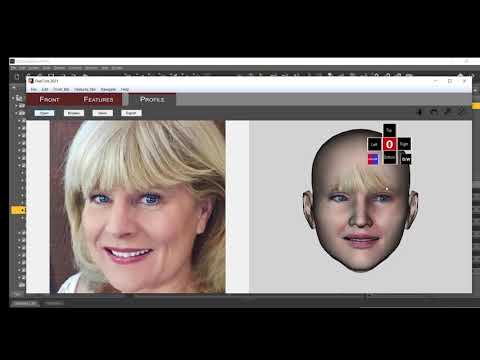

Hopefully you'll find an answer in these, if not: hopefully Abalone LLC will drop by and offer you his Skype info for support.
Daz 3D is part of

Connect
DAZ Productions, Inc.
7533 S Center View Ct #4664
West Jordan, UT 84084Licensing Agreement | Terms of Service | Privacy Policy | EULA
© 2026 Daz Productions Inc. All Rights Reserved.