-
Challenge - Beach Scene
Hi folks, here is my 2nd entry and is titled: Desert Beach Oasis and is more of a fantasy picture of being at a desert beach.. is slightly the same theme of the last render and 3rd entry.. don't know what my fascination with deserts and beaches, but I am originally from Utah, and have visited many water holes there swimming while growing up. I was imagining visiting an resort in the desert, maybe in the Mediterranean. The cliffs were made in Zbrush and the bed is a freebie but spent a lot of time making textures for it. This was challenging making the bark textures for the Bryce trees and the leaves are custom textures.
I was hoping to get a 3rd render here-it is rendering now because Bryce has decided to crash off and on all day when even pulling up the file. I had to unhitch my backup drive and that helped.. so it is 4pm here central and I am rendering..one I have been working on off and on all month.
 WELL DONE YOU FORGOT TO INCLUED THE FILES. not that its important or anything
Halcon Bluesky said:
myotherworld There is No need to install contents manually, unless these are from places other than Daz Store.
You have to do that via DIM (Daz Install Manager) this application will take care of the files being installed properly.
Doing a manual install, take time, usually as I said before, if you have got some content from places like Rendo and others.
If a Character, Environment, Props or anything bought from the Store does not work as it should, then contact Daz Support, these people are in charge to hadle it and wait for a fix.
It may take some time, but is worth the wait.
There is always a need to manually install files, but that is up to personal choice. There are way to many examples over the years of produicts not working like they should and DAZ either taking to long to get it fixed or it not being fixed at all. So while I can appreciate the thought, some users just want to take personal responsibility for the files on their system. I personally believe every user should have an understanding of the file paths and structure of the files for products used in DS. Something they will never understand if they install everything thru DIM or Central and use smart content to find product.
WELL DONE YOU FORGOT TO INCLUED THE FILES. not that its important or anythingI am never letting DIM/DAZ Central near my machine. Manual install only for me.
Regards,
Richard
WELL DONE YOU FORGOT TO INCLUED THE FILES. not that its important or anythingRichard Haseltine said:
What files are you missing? Lurnch looks close to launch, are you saying you can't tell Daz Central to open DS and load the file in one go? If you tell us what is wrong we can, if necessary, flag it up for a fix.
Wow, look at that! Richard not only makes typos, he can also decipher them!
 WELL DONE YOU FORGOT TO INCLUED THE FILES. not that its important or anything
What files are you missing? Lurnch looks close to launch, are you saying you can't tell Daz Central to open DS and load the file in one go? If you tell us what is wrong we can, if necessary, flag it up for a fix.
Please ignore this threadSfariah D said:
I forgot my glasses on the front porch. I was repotting my plants and took my glasses off. Somehow I got my shirt and hands dirty.
About malls, the 2 main malls around me are doing okay. There have been rumors about the mall I work at closing down. But that has been going on for years and years. However people keep coming to the mall and ordering food.
...the one In the picture I posted above has been around since the 1960, first as a standard shopping centre with individual stores and covered parking area... In the 1990s it was converted into a fully enclosed mall. with teh addition of a cimema multiplex, and food court on a third level as wel las a multi level parking garage. .
Unlike most malls which are usually way out in the burbs this one is in the central area of the city just northeast of Downtown..
How it appeared in 1963
 UltraScenery - new(er) territory [Commercial]
@Artini both images evoking memories for me. The first of the weird trails along the Central Coast of California where my son would do long-distance running in high school, jumping over snakes they came across. The second the current activity in the Rockies as folks are trekking to take in the changing leaves and seasons.
Thank you. Mary
where can I just install simple latest version of Daz studio?What Daz Central stuff?
where can I just install simple latest version of Daz studio?So where can I simply get the latest version of Daz please without all the confusion of this daz central stuff. thx.
Flowering Today - Orchid CactiGrab these beautiful tropical flowers today!
Orchid Cactus or Epiphillium spp are epiphytes, meaning that they grow on other trees or plants (but dont take nutrients from their host) and can be found in the jungles of central and south america.
These lovely blooms will look equally at home in a pot on a windowsill or hanging from the branches of a tropical tree.
The models are designed to be low poly so that the can be used in instancing and at mid to distannt placement in your scenes!
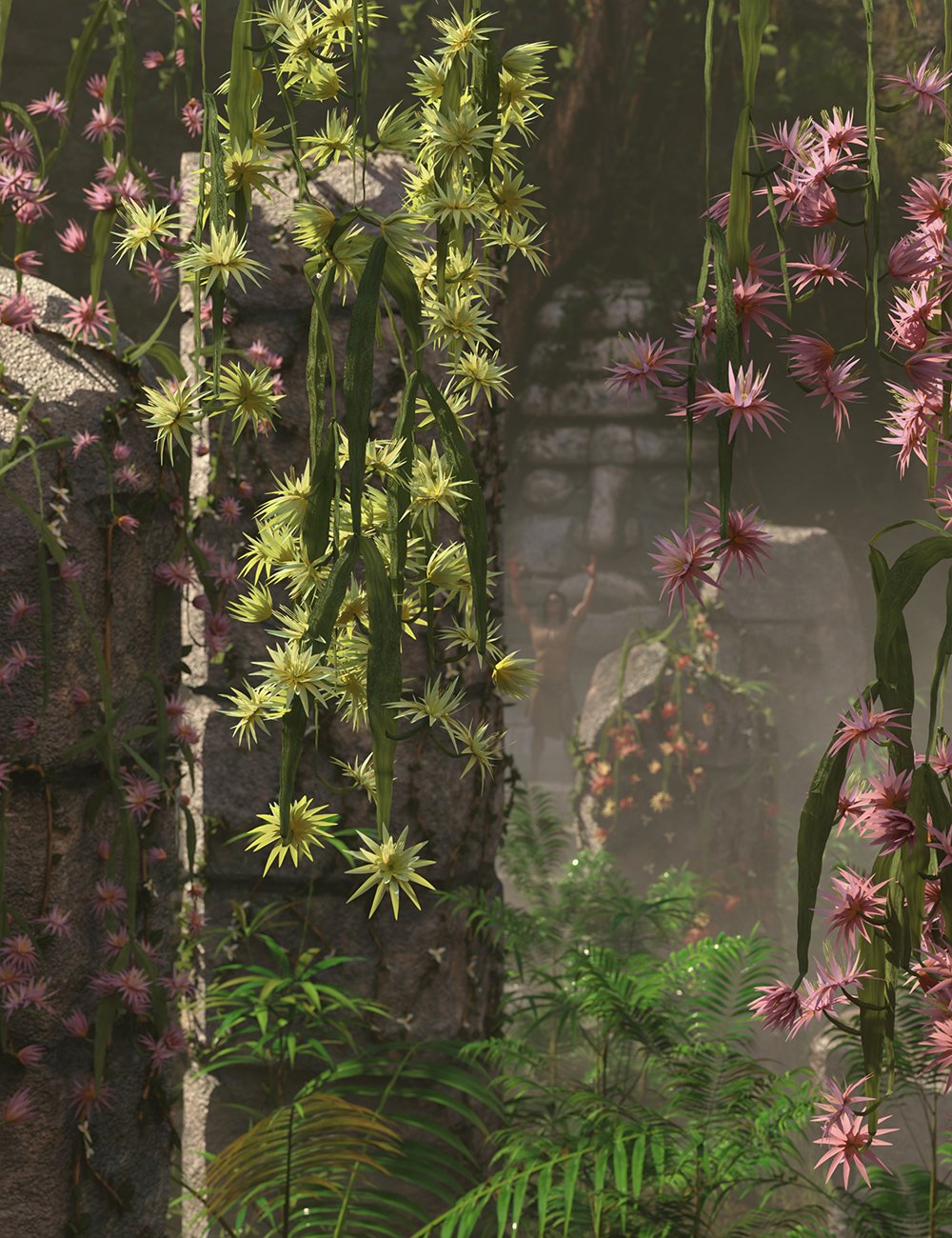
Grab them Here whilst they are hot!
HeadShop 2025 LT at DAZ this Friday (9/13)..or more accurately; "unlike many others I cannot install HeadShop 2025 LT". To remedy, please always email for Abalone Tech Support as instructed at [email protected].
Remember, as stated, HeadShop will not install with IM or DAZ Central but uses its own installer. To use installer, watch https://youtu.be/v3mtkh3-mrk
The Sky is Falling Complaint Thread...well summer here suddenly ended with much cooler temperatures more appropriate for late September.
Oh, and rain, lots of it. Not the usual drizzly kind we get, but a downpour on Wednesday evening of midwest proportions that I got caught in. The good part it should help the fire crews contain the blases in the central and eastern part of the state.
September 2024 - Daz 3D New User Challenge - Depth of Field and CanvasesAlias52 said:
Really good job so far. I like that dynamic pose. However, right now, my eye is almost drawn more to the creature on the right. Have you considered trying to move the camera to the left? That way, you would be looking through the main character and can DOF the background to include the creature.
If I thought about putting the camera in the direction you are talking about, when I started the framing composition of the camera, I started by putting the camera in that area.
There are times when the scene and the position of the figures is a little dismantled and I think about changing the poses. But what you tell me about focusing more on the creature at the moment reinforces my initial composition. One of my doubts about the composition is what the situation in the image is. By editing it without a story only from the pose of the main character, I have to decide where to put the DOF and help me as a narrative element. The scene that I still haven't resolved or the situation I think of in this way. The main character is on the left of the apparently still shot, but I have not put any reference to whether he wants to move and go to the right of the frame or through the central passageway, in any case, the other character the "creature" has great relevance in that action. The other option is if the main character, in that situation wants to move to the left of the frame, which at this point I've looked at the image and the main character I don't know if he would have to have the right shoulder of the frame higher than the left or the orientation of the shoulders with different inclination to show the directionality of the movement. I think a lot about those details, I put that shoulder like that because it seemed to me to be more of a protective position and if the main character had to make a quick movement or a support on the wall it seems to me that with the shoulder in that position you can make more force.
In the first composition I did the main character gives me the feeling of waiting to make some movement and the other character seems to be in a very fixed and immovable position and in the next two I get the feeling of another dynamic, with more movement.DAZ Studio 4 Installation Guide Windowsiampeterparkerjr said:
Help, I'm using Daz Central Installer and it's stuck at 57%. The Status percentage just disappears and goes back to Install Button. I click install, and it continues to around 70% but then it goes back to Install Button again, I click it but then it goes back to 57% and goes up again to 70% but closes and Install Button appeara again, so I have to click Install again, but instead of 70%, it's back again to 57% and the cycle goes on
Try using Daz Install Manager
UPD: OH, I just noticed that I replied to the ancient issue...
Smart Content not showing/Daz Connect problem SOLVEDetaktrash_d29ae59121 said:
Might try reinstalling. Again.
Well, that was an even worse idea.
I uninstalled both Daz and DIM, moved all the installed files to the bin, and started again, reinstalling completely clean through DIM. I've tried this several times now, and keep getting the same problem: PostGreSQL CMS will not install (see screenshot). It'll download, but it will NOT install. I've clicked retry a million times, I've quit and reopened DIM, I've uninstalled and reinstalled DIM. I've tried the suggestions in this thread https://www.daz3d.com/forums/discussion/629881/dim-not-installing-anything and in this solved-new-pc-ds-not-installing-error, incuding tracking down Daz Central and using that to install Daz (it did, but didn't fix the CMS issue). I tried the fix apparently suggested by Daz, involving downloading a certificate--but that link just opened Keychain on my Mac, which I don't think was the goal? (even if it was, I couldn't see anything relevant there). I've tried searching for and deleting anything that looks like it might be Daz-related so it's not clashing with a previously installed file. I've tried dragging the old CMS file out of the bin back into the location it was before in case removal was the problem. Same result every time.
This is what Daz's log file says:
2024-09-09 06:14:00.020 [WARNING] :: /src/sdksource/cloud/dzcloudtasknotifier.cpp(184): Unexpected exception in contentFilterPathsToCloudInstalledContent: Unable to connect to the database
2024-09-09 06:14:00.021 [WARNING] :: /src/sdksource/cloud/dzcloudtasknotifier.cpp(184): Unexpected exception in contentFilterPathsToCloudInstalledContent: Unable to connect to the database
2024-09-09 06:14:00.028 [WARNING] :: /src/sdksource/cloud/dzcloudtasknotifier.cpp(184): Unexpected exception in contentGetByRelativePath: Unable to connect to the database, can not quoteAnd here's what DIM's says:
2024-09-09 06:18:40.413 [VERBOSE] :: Begin processing serial number data...
2024-09-09 06:18:40.413 [VERBOSE] :: Finished processing serial number data: Elapsed Time 0 min 0 sec 0 msec
2024-09-09 06:18:40.422 [VERBOSE] :: Evaluating Default Install Module...
2024-09-09 06:18:40.422 [VERBOSE] :: Install set "DAZ Studio" has potential
2024-09-09 06:18:43.517 [WARNING] :: Install Failed: PostgreSQL CMS (Mac 64-bit)
2024-09-09 06:18:43.528 [INFO] :: Install Queue Finished: 0 min 4.6 sec
2024-09-09 06:18:45.029 [VERBOSE] :: Begin processing actions...
2024-09-09 06:18:45.029 [VERBOSE] :: Finished processing actions: Elapsed Time 0 min 0 sec 0 msec
2024-09-09 06:18:45.105 [VERBOSE] :: User accepted install sets
2024-09-09 06:18:45.130 [INFO] :: Json Parser (1,1): Syntax error - expected '{' or '['
2024-09-09 06:18:45.138 [INFO] :: Installing: 18869-4 : PostgreSQL CMS (Mac 64-bit)
2024-09-09 06:18:46.072 [WARNING] :: Install Failed: PostgreSQL CMS (Mac 64-bit)
2024-09-09 06:18:46.073 [INFO] :: Installing: 13176-4 : DAZ Studio 4.22 (Mac 64-bit)
2024-09-09 06:18:48.385 [WARNING] :: Install Failed: DAZ Studio 4.22 (Mac 64-bit)
2024-09-09 06:18:48.386 [INFO] :: Install Queue Finished: 0 min 3.2 sec
2024-09-09 06:18:48.490 [INFO] :: Install Queue Finished: 0 min 0.0 secI'm all out of ideas.
[Solved] New PC - DS not installing error ?I found Daz Central: https://www.daz3d.com/blog/dazcentral-your-new-content-manager?srsltid=AfmBOoqIqn83WI56ndTWTF-srrYLPJY7DKhCFrh2QNWMSaI2jdmhJ2Pt, and it installed Daz for me, but I'm still having the same problem with CMS. When I tried the solution that worked for everyone else, all it did was open Keychain on my Mac; there was nothing there that seemed relevant to Daz!
There's Always Another Sale Thread -- Discussions Only Pt 3Leana said:
Wonderland said:
PerttiA said:
Wonderland said:
murgatroyd314 said:
Wonderland said:
The use of a seemingly AI description here is confusing. In the last line it mentions snow and foliage and also mentions a city environment which doesn't seem to be part of the product. I can't find anything about an included HDRI or city background. . https://www.daz3d.com/central-ice-skating-park
The file list does include one hdr file.
How did you find a file list before purchasing? The HDRI is listed as snowy cemetery! Weird.
Even the free version of DazDeals puts a link to readme-page on the Product Page, and in the readme one can find a link to filelist.
Although for me DazDeals is not currently working on Chrome, but the same Chrome-plugin does work in Opera.
Oh, I do all my shopping on an iPad which is incompatible with DazDeals. Especially now because I fractured my foot and am mostly in bed with my foot raised on pillows. I take forever shopping here, like to be relaxed and get away from the computer and it's easier to see details on my iPad Pro with the ability to zoom in. But I hadn't thought to check DazDealz on the computer since they took everything I used away like sort by percentage off.
A simple way to access the readmes without the add-on:
URL for readmes uses this format: http://docs.daz3d.com/doku.php/public/read_me/index/<SKU>/start
(for example http://docs.daz3d.com/doku.php/public/read_me/index/103048/start for the new Stonemason's set)
So you can bookmark the readme for any product to have an example saved, then when you want to access the one for another product you simply use that bookmark then change the product SKU in the URL.
I usually get the doc link near the top if I search for Product + Daz. Search engine doesn't seem to matter, like Google vs. Duck Duck Go
There's Always Another Sale Thread -- Discussions Only Pt 3Wonderland said:
PerttiA said:
Wonderland said:
murgatroyd314 said:
Wonderland said:
The use of a seemingly AI description here is confusing. In the last line it mentions snow and foliage and also mentions a city environment which doesn't seem to be part of the product. I can't find anything about an included HDRI or city background. . https://www.daz3d.com/central-ice-skating-park
The file list does include one hdr file.
How did you find a file list before purchasing? The HDRI is listed as snowy cemetery! Weird.
Even the free version of DazDeals puts a link to readme-page on the Product Page, and in the readme one can find a link to filelist.
Although for me DazDeals is not currently working on Chrome, but the same Chrome-plugin does work in Opera.
Oh, I do all my shopping on an iPad which is incompatible with DazDeals. Especially now because I fractured my foot and am mostly in bed with my foot raised on pillows. I take forever shopping here, like to be relaxed and get away from the computer and it's easier to see details on my iPad Pro with the ability to zoom in. But I hadn't thought to check DazDealz on the computer since they took everything I used away like sort by percentage off.
A simple way to access the readmes without the add-on:
URL for readmes uses this format: http://docs.daz3d.com/doku.php/public/read_me/index/<SKU>/start
(for example http://docs.daz3d.com/doku.php/public/read_me/index/103048/start for the new Stonemason's set)
So you can bookmark the readme for any product to have an example saved, then when you want to access the one for another product you simply use that bookmark then change the product SKU in the URL.
There's Always Another Sale Thread -- Discussions Only Pt 3PerttiA said:
Wonderland said:
murgatroyd314 said:
Wonderland said:
The use of a seemingly AI description here is confusing. In the last line it mentions snow and foliage and also mentions a city environment which doesn't seem to be part of the product. I can't find anything about an included HDRI or city background. . https://www.daz3d.com/central-ice-skating-park
The file list does include one hdr file.
How did you find a file list before purchasing? The HDRI is listed as snowy cemetery! Weird.
Even the free version of DazDeals puts a link to readme-page on the Product Page, and in the readme one can find a link to filelist.
Although for me DazDeals is not currently working on Chrome, but the same Chrome-plugin does work in Opera.
Oh, I do all my shopping on an iPad which is incompatible with DazDeals. Especially now because I fractured my foot and am mostly in bed with my foot raised on pillows. I take forever shopping here, like to be relaxed and get away from the computer and it's easier to see details on my iPad Pro with the ability to zoom in. But I hadn't thought to check DazDealz on the computer since they took everything I used away like sort by percentage off.
There's Always Another Sale Thread -- Discussions Only Pt 3Wonderland said:
murgatroyd314 said:
Wonderland said:
The use of a seemingly AI description here is confusing. In the last line it mentions snow and foliage and also mentions a city environment which doesn't seem to be part of the product. I can't find anything about an included HDRI or city background. . https://www.daz3d.com/central-ice-skating-park
The file list does include one hdr file.
How did you find a file list before purchasing? The HDRI is listed as snowy cemetery! Weird.
Even the free version of DazDeals puts a link to readme-page on the Product Page, and in the readme one can find a link to filelist.
Although for me DazDeals is not currently working on Chrome, but the same Chrome-plugin does work in Opera.
Daz 3D is part of

Connect
DAZ Productions, Inc.
7533 S Center View Ct #4664
West Jordan, UT 84084Licensing Agreement | Terms of Service | Privacy Policy | EULA
© 2026 Daz Productions Inc. All Rights Reserved.