-
help needet for Generate good landscape in the near local area.
RuudL said:
@Khoe I've just tested this roadmaker with WineHQ on my Mac (macOS 10.12 Sierra and 10.13 High Sierra) and it just runs fine. But I'm not sure if it will work on your Mac.
https://wiki.winehq.org/StartSeite
There are test reports that indicate that it runs on Sonoma. ( https://appdb.winehq.org/objectManager.php?bIsQueue=false&bIsRejected=false&sClass=distribution&sTitle=View+Distributions&sReturnTo=&iId=0&iItemsPerPage=25&iPage=1&inameOp0=2&snameData0=mac&sOrderBy=name&bAscending=true&iItemsPerPage=50 )
my Carrara runs with Parallels as a simulation under High Sierra.
I only have Montary in the company at the moment. That should work.Carrara Community Art Gallery - Show us your Renders!!!Steve K said:
Khoe said:
What does that tell us ;) Carrara can do far more than a lot thinks is possible.
I still think that many people who once bought Carrara simply didn't use the potential.
With a little more practice you can do such landscapes very well,
I'll try it when I get the chance. also a small camera movement but I have to practice a lot first :)Agreed. The Carrara products from Howie Farkes are a good example, and I have most of them. Similarly, a major reason I like VUE is the availability of products from a favorite vendor in VUE format. Being lazy, I prefer to let a talented creator do the hard work (at very reasonable prices, $10 +/-).
 The landscape in the video above is one of those products. That vendor has since switched to Blender, but I have many of his products for VUE.
 You can create a landscape like this in a very short time, you just have to get some trees as a texture first (they're available for free on Texture.com) or use Ki to make it white ;) Once you have the idea, you can create a landscape very quickly Create in the editor, then immediately paint the places where the trees should go, save the texture on the landscape, activate the replicator and assign the painted texture and throw in the tree bilboards, play a little more with the size and quantity and you're done, it takes less than 30 minutes with practice.
I also thought Vue was great, but when the subscription models came out it became too expensive for me. Vue and Carrara were the same for some time when it came to landscape. Then development at Carrara stopped. Unfortunately. It looks like I'll have to decide where to go at some point.Someone, please make an advanced animation tutorial for DAZ Studio.Dartanbeck said:
Richard Haseltine said:
WendyLuvsCatz said:
I too asked for all these things over the past 14 years but nobody who could write scripts let alone DAZ developers were interested in animating
at least one of the developers is interested in animation.

I bought both of your products, partially because you share and share and share and I felt supporting you was a no brainer and partially because you were brave enough to leave carrara for a moment or tons of moments and dive into animation within Daz. Kudos to you for taking the leap and sharing your journey. I will let you know howI feel about your tutorials in the near future, and again congrats and best wishes towards successful sales. You do deserve them.
Someone, please make an advanced animation tutorial for DAZ Studio.WendyLuvsCatz said:
I too asked for all these things over the past 14 years but nobody who could write scripts let alone DAZ developers were interested in animating
at least one of the developers is interested in animation.
MCasual has been my mainstay
 as far as doing any animation in D|S
 (I mostly just swear and go back to Carrara or iClone etc
)S l o w l y DAZ is finally adding usefull animation features to Studio and for that I am grateful
but
please developers look in Carrara for some ideas for more
 (if you are not going to develop Carrara further that is)Someone, please make an advanced animation tutorial for DAZ Studio.
I too asked for all these things over the past 14 years but nobody who could write scripts let alone DAZ developers were interested in animating
MCasual has been my mainstay
as far as doing any animation in D|S (I mostly just swear and go back to Carrara or iClone etc
)S l o w l y DAZ is finally adding usefull animation features to Studio and for that I am grateful
but
please developers look in Carrara for some ideas for more
(if you are not going to develop Carrara further that is)Animated Shader VFX in Carrarathanks for the tutorial DesertDude

I did play with it myself, I even played with the same thing in DAZ studio and Casual's Matanim
but in my current scenario ended up going back to PhotoMirage and rendering a 900 frame animation of the waterfall foam texture because the looping the offset just didn't look right on that particular scene
it certainly will work for other scenes where a regular loop needed like a tank tread
this was the DAZ studio one, Carrara it looked much the same but I never rendered it as was not what I wanted but yes it worked
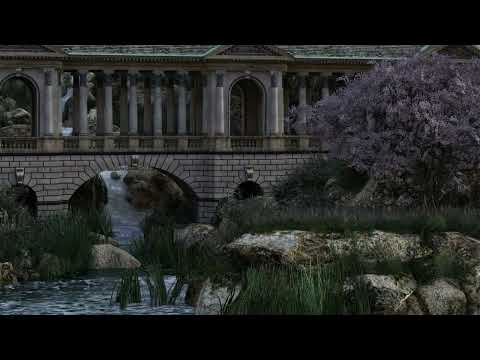
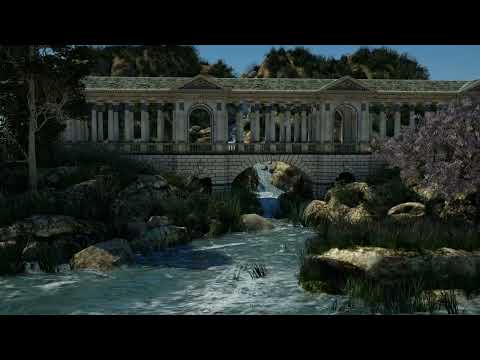
the Carrara 900 frame opacity foam maps one I ended up doing
 Carrara Community Art Gallery - Show us your Renders!!!
Khoe said:
What does that tell us ;) Carrara can do far more than a lot thinks is possible.
I still think that many people who once bought Carrara simply didn't use the potential.
With a little more practice you can do such landscapes very well,
I'll try it when I get the chance. also a small camera movement but I have to practice a lot first :)Agreed. The Carrara products from Howie Farkes are a good example, and I have most of them. Similarly, a major reason I like VUE is the availability of products from a favorite vendor in VUE format. Being lazy, I prefer to let a talented creator do the hard work (at very reasonable prices, $10 +/-).
The landscape in the video above is one of those products. That vendor has since switched to Blender, but I have many of his products for VUE. Someone, please make an advanced animation tutorial for DAZ Studio.wolf359 said:
Hmmm... I wonder if Oscillate is in there! ;)
There are many powerful mathmatical Cycling filters in this FREE plugin from Mcasual.
Adding cyclical auto-animation of any animatable parameter in Daz studio including morphs
(Character clothing & hair wheels ,helicopter blades , autoblinking of lights etc)Looks like an oscillating tweener! I'm going to have to check that out - see what else it has besides "Sine".
Carrara has functions like Sine, Sawtooth, Noise, Bounce, Formula and I think Cubic or something like that. It's been a while.
Fenric even made a plugin that allows us to stack multiple tweeners, but I haven't run across a situation that compelled my to try it yet.
Animated Shader VFX in CarraraHi everyone!
A while back I started watching tutorials demonstrating real time shader effects for video games and I was thinking, we can totally do these things in Carrara. There are so many cool things you can achieve manipulating the UV space and stacking up various Operators like Multiply, Add and Subtract etc.
I didn't really know where to start, then Wendy recently asked a question about having a UV offset parameter and...Carrara has just such a feature introduced in 8.5. This is a fairly easy example to set up, so let's jump in!
Fire up Carrara and create a new scene
Insert a Vertex Object.
In the Vertex Room, go to Construct > Insert 3D > Grid.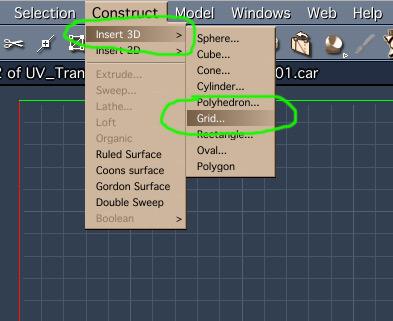 Carrara Community Art Gallery - Show us your Renders!!!
Steve K said:
Khoe said:
After many more attempts, the initial forest finally became a picture. Other trees were added and not so good ones were taken out. At first I had big problems adding the fog. There were always white edges, which was ultimately caused by the ambient light as soon as the trees had soft transitions.
that is the resultVery cool. That is the kind of landscape that I buy VUE for (and pay a subscription - don't tell anybody). An exampls in this short animation, about ten seconds starting at ~0:36:
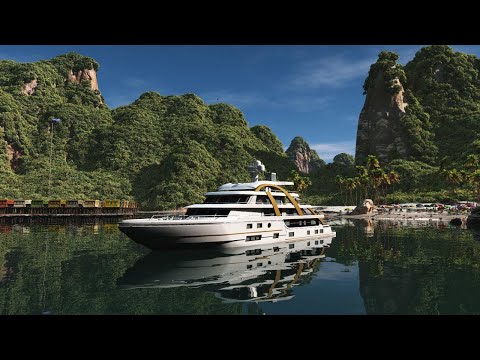
What does that tell us ;) Carrara can do far more than a lot thinks is possible.
I still think that many people who once bought Carrara simply didn't use the potential.
With a little more practice you can do such landscapes very well,
I'll try it when I get the chance. also a small camera movement but I have to practice a lot first :)Llola Lane’s RENDER A MONTH Challenge 2024 (ALL are welcome to join) (CLOSED)Stezza said:
-------
if you have Carrara handy then import the fish 3ds file and then export it back out as an OBJ for DS or Poser
then you may be able to import the new obj file into DS
if not then just use Carrara

I guess I missed this Stezza... Didn't think I had Carrara... but it turns out I have Carrara 8.5 Pro (64-bit)... Never opened it up... No idea what it looks like. I guess now is as good a time as any. I'll play with your suggestion this week and see what I can come up with... That fish looks great. Thanks oodles.
Someone, please make an advanced animation tutorial for DAZ Studio.crosswind said:
Dartanbeck said:
crosswind said:
Dartanbeck said:
Oh My... the ability to grab a whole slew of collapsed keys and drag them around... something I've always just taken advantage of in Carrara... it's finally doable in DS! So Happy, and I've been doig a Lot of it ever since!
Beyond that I'm also amazed at how much easier the keys are to select and work with now. Kudos to whoever on the team decided to make this happen!
Yeah, being able to 'shape' the motion path of an arm, leg or hip is really cool stuff.
Again, I'm nearly drown in the ocean of wording though I'm developing my English but I'm happy to learn these animation stuff from you guys anyway, hoho ~

摇滚吧,我的朋友!
那必须滴! Let's rock !
的确!
在 Daz Studio 中摇滚和动画!Someone, please make an advanced animation tutorial for DAZ Studio.Dartanbeck said:
crosswind said:
Dartanbeck said:
Oh My... the ability to grab a whole slew of collapsed keys and drag them around... something I've always just taken advantage of in Carrara... it's finally doable in DS! So Happy, and I've been doig a Lot of it ever since!
Beyond that I'm also amazed at how much easier the keys are to select and work with now. Kudos to whoever on the team decided to make this happen!
Yeah, being able to 'shape' the motion path of an arm, leg or hip is really cool stuff.
Again, I'm nearly drown in the ocean of wording though I'm developing my English but I'm happy to learn these animation stuff from you guys anyway, hoho ~
摇滚吧,我的朋友!
那必须滴! Let's rock !
ISO Newfie Dog FigureVIArts said:
Stezza said:
played around a bit more... to export the fur would take some time I reckon unless you decrease the number down a significant amount. Daz MilDog doesn't have may morphs ( no tongue ones that are worth while ) but Daz dog 2 may be better..
anyways an extra 10 minutes in Carrara

Jelly beans! Even this blind guy can see an improvement. What's the trick?
Spot on!
ISO Newfie Dog FigureWendyLuvsCatz said:
Faeryl Womyn said:
Where do I find this plugin that converts Carrara hair?
Also I have the Mil Dog and a Pupply LE which I believe is part of the Mil Dog. I have Dog 8, with the Dachshund, French Bulldog and Great Dane. I have no problem using Hexagon or Blender to morph either versions if I have to. And recently got Mesh Grabber bundle so that might do some morphs as well once I learn to use it.
the link in my post ^
I'm claiming temporary blindness lol completely missed the link lol
ISO Newfie Dog FigureStezza said:
played around a bit more... to export the fur would take some time I reckon unless you decrease the number down a significant amount. Daz MilDog doesn't have may morphs ( no tongue ones that are worth while ) but Daz dog 2 may be better..
anyways an extra 10 minutes in Carrara
Jelly beans! Even this blind guy can see an improvement. What's the trick?
ISO Newfie Dog Figureone advantage of Carrara converted fur is it keeps the same vertex count regardless of length
so morphloader works with it
but I have only done human wigs not animal furs as would not want to try rigging it
in theory it's possible as can use transfer utility on zero length then add a length morph but DAZ studio would likely crash at every stage trying
ISO Newfie Dog Figureplayed around a bit more... to export the fur would take some time I reckon unless you decrease the number down a significant amount. Daz MilDog doesn't have may morphs ( no tongue ones that are worth while ) but Daz dog 2 may be better..
anyways an extra 10 minutes in Carrara
more....Wacky Modelling ~ In Carrara ~her outfit would Dforce nicely in DAZ studio
probably too many polygons for VWD in Carrara
Off Topic Thread #2am I in an alternate Carrara Universe?
It's not my birthday as far as I know...

but thanks anyways and in lieu of gifts a paypal donation will suffice

Daz 3D is part of

Connect
DAZ Productions, Inc.
7533 S Center View Ct #4664
West Jordan, UT 84084Licensing Agreement | Terms of Service | Privacy Policy | EULA
© 2026 Daz Productions Inc. All Rights Reserved.