-
Filament transparency fix
Was it working as some point? I purchased this:
https://www.daz3d.com/glass-for-filament
I couldn't get it to work, but assumed that it might be due to my running Windows on my Mac and decided to set it aside until DAZ Studio 5, when I could use Filament natively.
-- Walt Sterdan
Filament transparency fixfelis said:
I don't think there is a fix
There is some hair shaders that don't use cut-out oppacity in the store, but I wouldn't call that a fix, but a work-around.
The Filament renderer is being continously developed, and it might be better in newer versions, but I don't know to which extent Daz upgrades the versions.
Thats also my impression, I think most of us will take filament more seriously when this opacity problem is fixed. Atm i perceive it more like a betaversion - promising, but still with fundamental flaws.
Filament transparency fixI don't think there is a fix
There is some hair shaders that don't use cut-out oppacity in the store, but I wouldn't call that a fix, but a work-around.
The Filament renderer is being continously developed, and it might be better in newer versions, but I don't know to which extent Daz upgrades the versions.
Filament transparency fixSomewhere in the forum someone suggested a simple way to fix the wacky transparencies using Filament but I can't remember which thread is was...
Someone knows that method or the thread where it is described?
Need help making iRay match FilamentThank you, but I do not want to use Filament, I am trying to replicate in Iray what I see in Filament preview.
More specifically, I want to make the muscles more visible in Iray.
Need help making iRay match Filamentmy experience, Filament has no opacity and emmission, can not work under HDRI, difficult to build shadow, difficult to treat hair, may need to convert iray materials to Filament's but not always success, and so on. For these reasons, I gave up trying Filament after few weeks.
If you want try, here are two efficent tools for it:
RSSY 3Delight And Iray To Filament 80055
SF Beautiful Skin Filament 77057
Need help making iRay match FilamentSo I was working on this Orcish character, and as I was tweaking the iRay shader (iRay Uber MDL) I noticed I liked how the Filament preview looked more than the iRay render. I am only using this for a light source https://www.daz3d.com/orestes-iray-hdri-environments--cave-shelter.
Not being familiar enough with iRay, I was wondering if you could help me make the iRay shader (left image), look closer to Filament (right image). I tried playing with Transluncency color and values and SSS, but I'm having a particular hard time making the muscles "pop" more, look at the middle of the chest, there is some shading going on which in iRay looks more "flat" (to my eyes). I tried adding a separate ambient oclussion pass and it helps, but it is not quite there.
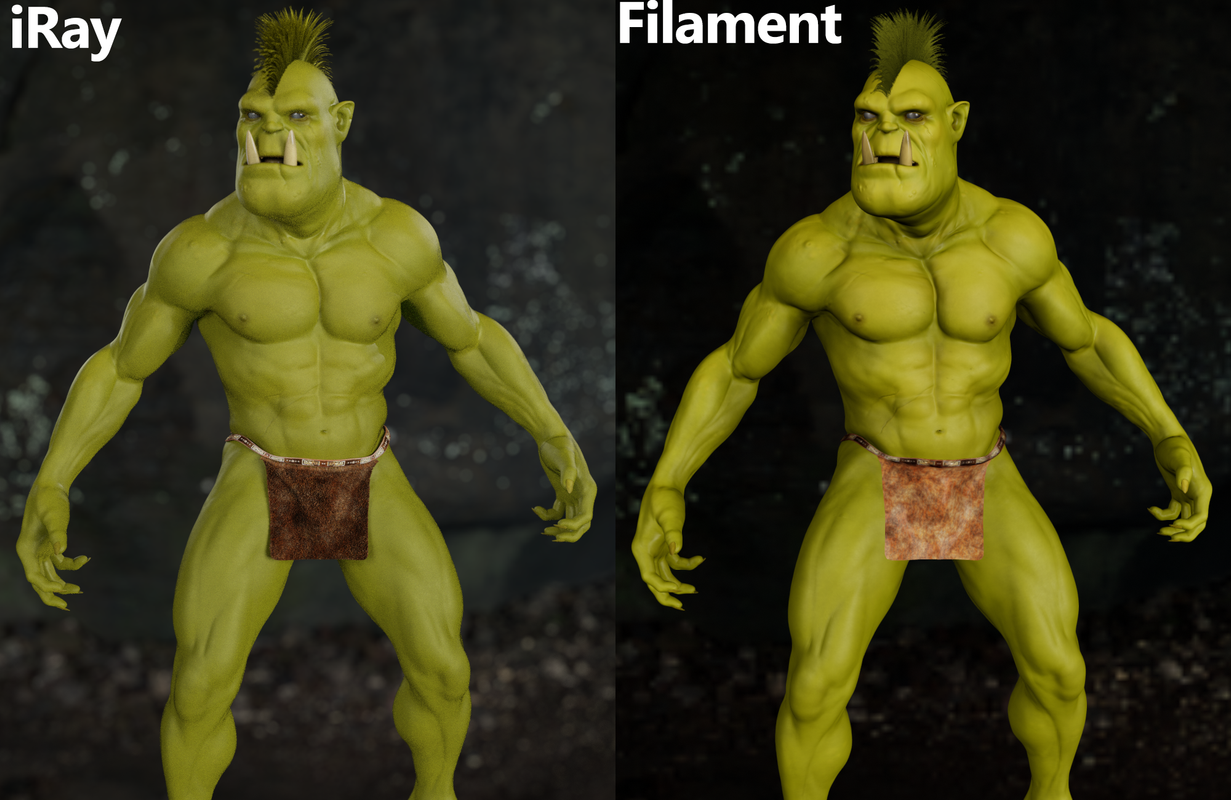
I am not looking for the more "real", this is an artistic choice of what looks "better" for my purposes, it is a look I am after.
Thank you.
Filament Toolbar shortcut?I added the Filament Viewport Drawstyle shortcut to the main toolbar, but it does nothing.
The other Drawstyle shortcut buttons I added to the main toolbar all function when clicked. Just not the Filament button.
The only way to get the Filament Drawstyle to work for the Viewport is to select it from the dropdown.
Should I report this to DAZ Technical team?
Iray Preview Slow as MolassesJust tried Filament again. It works great.
I'll use it in place of texture shaded... it even shows HDRI backgrounds.
It does not show shadows or emissive lights but it's better than using the super slow Iray preview.
Thank you for the suggestion!
However, when I add Filament drawstyle button to the toolbar it does not change the view, it appears unclickable (greyed out) and I have to use the Filament preview from the Drawstyles dropdown instead. All the other viewport drawstyle buttons work from the toolbar. Strange!
Iray Preview Slow as Molassesrichardandtracy said:
I have an old PC, and find posing is impossible with iRay preview, now that Filament preview is available I use that wherever possible. Filament isn't possible for transparent items, which can make life awkward unless the material is changed. Shame shadows are not possible in Filament.
I tried Filament when it was first introduced on DAZ Studio, but it crashed my PC.
I have an Alienware Aurora R7 desktop purchased in 2018 so it's not state of the art, but it's not bad.
I may try Filament again if it is a faster preview than Iray.
Slow timeline scrolling?jeremyjonsson said:
Hi there. I recently got an upgrade for my computer, an RTX 3080 card, and I've been having a blast rendering things at the speed of light compared to my old card. Anyways, I started doing some animating, and while doing so I've noticed that daz slows down while scrolling through frames. I've tried having only cpu, only gpu, both, the slowdown is basically the same using filament as wire bounding box, models completely stripped down or not. Is there a fix to this or is this just how the software behaves? Having a second or two of stuttering each time i scroll through the animation really slows down the work and is just frustrating. Mind, the animation itself plays smoothly when actually playing it, its just the scrolling that slows things down.
Any help would be appreciated!
What version of Daz Studio are you using? It seems to me that up until 4.11 the timeline worked smoothly. About 4.12 they changed things and it has generally been sluggish for me ever since (sluggish as in scrolling does not do well like you are mentioning). I have not found a fix for this (nor have I been trying much either).
Help regarding game modsFor the sake of clarifying it for the several people who jumped on it, the standard licence clause is:
User may access, use, copy and modify the Content in the creation and presentation of two-dimensional animations and renderings ... (including two-dimensional images that simulate motion of three-dimensional objects) ... provided that User may not in any case publish, market, distribute, transfer, sell or sublicense any renderings, animations, software applications, data or any other product from which any Content, or any part thereof, or any substantially similar version of the Content can be separately exported, extracted or de-compiled into any re-distributable form or format.
If you're using it solely for personal use game mods, this is not redistributing the content, and it is covered under the very permissive terms of being a use or modification of the content to create a rendering or animation. The EULA makes no stipulations about whether the rendering is real-time, what application is used, or whether it is an interactive experience. (Despite the name of the Interactive Licence*, the EULA has no clauses relating to interactive use - it can't, as technically even posing the content in the Daz Studio OpenGL or Filament viewport is an interactive real-time rendered experience).
* I have grumbled many times in the past about how the Interactive Licence is, in my opinion, poorly named.
I of course have to offer the traditional "I am not a lawyer" disclaimer here, but to my reading the OP's request is entirely legitimate as long as they do not distribute the mod.
~~~~~
As far as the actual question, I have done this in a technical sense (I put Daz content in Source Filmmaker for personal use, and Source Filmmaker is technically a game engine), but what I can tell you is that the method is going to vary massively from game engine to game engine. As a general thing, the method is likely to be to get it into a modelling tool like Blender, then look for guides for how to get it from Blender to your game engine of choice. That may be a complicated process though, as it is likely to involve things like re-rigging the meshes to the skeletons used by the game.
Slow timeline scrolling?Hi Catherine, as I mentioned in my original post, I've tried just about all the view shaders. Texture shaded, wire box, or filament, the stuttering is about the same.
Iray Preview Slow as MolassesWish they had a simple matcap/workbench style renderer using the Filament renderer.
Filament is faster (at least on my PC) than most of the other viewport drawstyles and has shadows etc. I pretty much use Filament now instead of texture shaded.
Iray Preview Slow as MolassesI have an old PC, and find posing is impossible with iRay preview, now that Filament preview is available I use that wherever possible. Filament isn't possible for transparent items, which can make life awkward unless the material is changed. Shame shadows are not possible in Filament.Slow timeline scrolling?Hi there. I recently got an upgrade for my computer, an RTX 3080 card, and I've been having a blast rendering things at the speed of light compared to my old card. Anyways, I started doing some animating, and while doing so I've noticed that daz slows down while scrolling through frames. I've tried having only cpu, only gpu, both, the slowdown is basically the same using filament as wire bounding box, models completely stripped down or not. Is there a fix to this or is this just how the software behaves? Having a second or two of stuttering each time i scroll through the animation really slows down the work and is just frustrating. Mind, the animation itself plays smoothly when actually playing it, its just the scrolling that slows things down.
Any help would be appreciated!
August 2022 - Daz 3D New User Challenge - Open Render Challengesueya said:
I have added depth of field to my image and changed the pose and camera angle slightly.
I don't think my PC can cope with dForce so I have tried to use the garment handles to alter the skirt poses instead
Dear sueya :
look this pic first one , you will see that the girls have no shadow on the ground so is not clear if they are on the flor , but the boxes on the wall they have shadows.
see my second pic now ,inmagine that cylinders are person and you will see that my boxes on wall have shadow bud cylinders dont on the flor.
om my third pic i added spot light and cylinders now have shadows on the flor and its sure that they are on the flor and not levitating .
on four pic you see how and where i added light and on pic 5 my configuration for this light
what i want to say try to play with ligts to get some shadows .
in pic 7 you can see how I configured DOF for camera
on image 6 final render
this all made in 5 min and is simple whit primitives
you dont need powerfool PC to do it
last thing is i dond know how you render iRay , 3Deligt , filament .. ?And sorry on my English I can realy expres myself like i wish :D
Best regards
Is Every Product with a 3D Printing License In Fact Printable?daveso said:
I have a resin printer and a filament printer. So far, NONE of the models I've tried to 3d Print from DAZ just work. The tutorial being given away shows how to use ZBrush, but hoe many hobbyists own that? BLENDER is the way to go for sure.
There is a 3d printing Plugin for it.
Hair is very problematic as someone stated ... it has to basically be a solid model. Some of the way old stuff, or maybe the cartoon hairs might work. Proably be good enough for 3D printing. I read someplace that either Genesis or G2 is the model to use for 3D printing. I have not tried yet as I got real frustrated trying to print g3/8 stuff.
The deal being if you;re not somewhat fluent at 3d modeling, getting these models ready for 3d printing is a bit of a challenge.I print daz3d models with resin, g2,g3,g8,g8.1 without problem. from g2 to g8 you need to fix in other software because export is really low quality and you get a quad mesh. g8.1 is exported as good quality.
i use 3dsmax to fix models, it take abou 5 mins but yo get good finished model, in the image you see (on the left) original exported by daz and (on the right)model finshed for 3d print. figure is g8 based.
if someone interested i will write a little tutorial for make models ready for 3d print with 3dsmax.
Has anyone tried to render DAZ3D models in Lumion?well, I had the same problem before (faster photorealistic render engine), then tried Filament and Octane, finally I was disappointed with them by different reasons and went back to Iray.
After that, I did a deep study on Iray render and found it is possible to reduce render time to few minutes and still has good quality.
Attached is my suggest render settings:
3D Printing Licences - What?I'm glad that DAZ3D is doing this. I was just entering June 2020, and just realized that my data-entry has been EXTREMELY lossy. As in, I'd click on 20 items, in 20 tabs, come back, and only have 2-5 more items in my cart. I do believe I'll let you guys do it. That was over an hour wasted with maybe 20% success.
That said. I got back to when I purchased the "Dream Home" series, back when it was on sale. https://www.daz3d.com/dream-home-front-drive https://www.daz3d.com/dream-home-entrance-lanai-and-mud-room https://www.daz3d.com/media-room-accessories
They're doing some wonderful things, these days, printing in concrete, so I have my hopes that, one day soon, I could have this printed, and now I have the license to do it.
Just one question.
What filament do I need to print a working big screen TV?Daz 3D is part of

Connect
DAZ Productions, Inc.
7533 S Center View Ct #4664
West Jordan, UT 84084Licensing Agreement | Terms of Service | Privacy Policy | EULA
© 2026 Daz Productions Inc. All Rights Reserved.