-
Need a bit of help - can't get Carrara to start
that my friend is the problem..

there is a fix
Carrara crashes with Huion tablet ( Workaround ) - Daz 3D Forums
Need a bit of help - can't get Carrara to startSo I decided to give Carrara a try - I've had it forever, just never got around to it.
I've tried installing the 64 bit version with DIM - and from the downloadable insttaller. I've tried installing to my preferred directory - D:\bits-64\DAZ 3D\ and to the default Program Files on the C: drive.
It won't start. I click on the desktop shortcut or on the program in the start menu and I get a screen blink like something is loadng - and that's it. No log that I can find; nothing in the system logs.
The system is Windows 10 Pro, 64 GB, dual 27 inch 1920 X 1280 monitors on an Nvidia 1080 TI. No internet access from the system, but running Windows Defender.
Where do I look? Do I need to have something besides the main app installed before it will run?
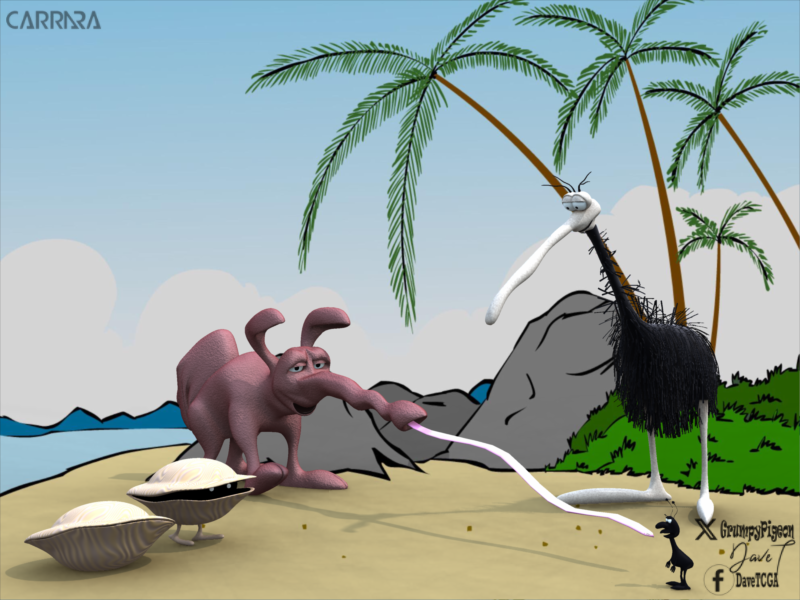
more....Wacky Modelling ~ In Carrara ~the Carrara Cube has been busy the last few days...
Clams morphed and an ant eater boned and morphed

 Daz Studio 5 development update
Saxa -- SD said:
WendyLuvsCatz said:
Carrara also has a lot in common with Hexagon
Nice to hear Hex & Carrara have alot in common.
Hex is just an awesome program for quick morph-making.
So have hopes for Carrara for some things.Hopefully DS5 will include an option to select what to send to Hex (or Zbrush).
Right now if send base g8f, it auto-sends all children.
Would be so nice for DS5 to have option to toggle this and not that.
Right now, Little bit more work for spontaneous morphs.See you wrote in another thread (2021) that Carrara needs blended weights?
Saw in Carrara 8.5 pro features that General Weights are seamless fit?
Just trying to figure out what can do and not.
Tried an ultra simple 3ds import from Carrara (not .obj) and looked good.btw. the displacement painting, 3d paiting and bullet physics looked intriguing too.
Carrara actually uses quaternions just not ones compatible with the DAZ studio flavour
there are typos in the hidden naming of bones in Genesis 3 and 8/8.5 that crash Carrara that were fixed in Genesis 9 (or rather not misnamed in the matching hidden node) https://www.renderosity.com/forums/comments/4312857/permalink
Mistylara fixed them in DSON editor but (notepad should work too) on the base character files but sadly she pulled her genesis 3 characters from the Renderosity marketplace
and has been MIA for a couple years (am very concerned)
she has a freebie for Genesis 8.1 up still
https://www.renderosity.com/freestuff/items/88523/carrara-presets-for-genesis-81?AID=4737
Daz Studio 5 development updaterichardandtracy said:
WendyLuvsCatz said:
Carrara has a ...gasp manual
http://docs.daz3d.com/lib/exe/fetch.php/artzone/pub/software/carrara/carrara7_user_guide.pdf
Thanks Wendy. It was enough to convince me to buy it yesterday while at a discounted price. I was able to model more in 15 minutes with Cararra than I managed in 8 hours with Blender.
Regards
Richard
come to the Carrara boards ... we have cake
Daz Studio 5 development updateWendyLuvsCatz said:
Carrara also has a lot in common with Hexagon
Nice to hear Hex & Carrara have alot in common.
Hex is just an awesome program for quick morph-making.
So have hopes for Carrara for some things.Hopefully DS5 will include an option to select what to send to Hex (or Zbrush).
Right now if send base g8f, it auto-sends all children.
Would be so nice for DS5 to have option to toggle this and not that.
Right now, Little bit more work for spontaneous morphs.See you wrote in another thread (2021) that Carrara needs blended weights?
Saw in Carrara 8.5 pro features that General Weights are seamless fit?
Just trying to figure out what can do and not.
Tried an ultra simple 3ds import from Carrara (not .obj) and looked good.btw. the displacement painting, 3d paiting and bullet physics looked intriguing too.
Daz Studio 5 development updateI never got Hex to work past two functions. It crashed every time
Really liked Carrara I used it before Daz took it over
Daz Studio 5 development updateGordig said:
WendyLuvsCatz said:
DAZ owns 2 wonderful programs to poach from
I'm surprised you didn't include Bryce.
thanks, I actually think an iray or at least any GPU driven render engine addon to Bryce would be awesome, my main gripe with it is the working in wireframe and slowness of rendering
adding it to D|S5 would certainly also be awesome
I was mainly thinking of modelling capabilities for D|S but yes the other features of Carrara and Bryce some of which are already being addressed by PAs are great additions
Alberto recently added booleans which Bryce has
Daz Studio 5 development updateCarrara also has a lot in common with Hexagon
without the need for validating everything
and freezing and crashing
Hexagon can do some stuff Carrara cannot but not enough for me to torture myself in it
I often try to use it and do have enormous respect for those who model in it as their work is awesome but it just has never played nice for me on any computer
Carrara is certainly not above freezing and crashing but nowhere near as much as Hexagon does for me
to get back on topic
if only D|S5 could include vertex modelling options those who don't want can hide
(rather than moan about it like they do when it's suggested)
DAZ owns 2 wonderful programs to poach from
Daz Studio 5 development updaterichardandtracy said:
WendyLuvsCatz said:
Carrara has a ...gasp manual
http://docs.daz3d.com/lib/exe/fetch.php/artzone/pub/software/carrara/carrara7_user_guide.pdf
Thanks Wendy. It was enough to convince me to buy it yesterday while at a discounted price. I was able to model more in 15 minutes with Cararra than I managed in 8 hours with Blender.
Regards
Richard
Thank you to you both.
Just bought 8.5 pro. Price was super great today. :)
With all the things that Carrara can do, am sure will be useful for something. Looking around quick, seemed like a logical parent of DS with lots of similar commands. For a few modelling projects, look forward to the familiarity. Blender was not my cup of tea either. Glad it's there. Just not for me.
creating HDRI with CarraraYes is the short answer. I have never done it. But this thread will have some information, and some pointers to more information.
https://www.daz3d.com/forums/discussion/68198/can-carrara-make-hdris/p1
EDIT - Note that Carrara is merely generating the multiple 360 degree images necessary for an HDRI or EXR. You will need to use another program to process them. The link gives examples of other programs.
creating HDRI with CarraraAll i've found about creating HDRI with Carrara is "different angles, different exposures, use a 3rd party app". No actual instructions.Anyone know of any tuts or can teach me?
Tango Alpha DAL Webinar on Designing 3D Environments for Studio@Diomede, you probably shed a light (at least for me) on why Tim is not including Carrara versions anymore. He sounds like still appreciates our beloved program.
Daz Studio 5 development updateWendyLuvsCatz said:
Carrara has a ...gasp manual
http://docs.daz3d.com/lib/exe/fetch.php/artzone/pub/software/carrara/carrara7_user_guide.pdf
Thanks Wendy. It was enough to convince me to buy it yesterday while at a discounted price. I was able to model more in 15 minutes with Cararra than I managed in 8 hours with Blender.
Regards
Richard
Off Topic Thread #2Bunyip02 said:
Stezza said:
so, I thought I'd get my old laptop out, about 13 years old and hardly used... I think the power supply is stuffed... it's the second one I've bought since I've had it.. it won't charge the battery.. oh well... and won't run the laptop on it's own..

The battery on my laptop is Kaput but it runs okay on mains power
mine too but does not run well either, overheats
is 15 years old Dell Inspiron and I thrashed it rendering in Carrara
has Linux Mint installed now but I cannot get the WiFi driver to work (yes grabbed a Linux one and tried all the suggestions)
Carrara Non Photo Realistic Works 2Saurolophus - Test render from Laptop

Yay - got Carrara working !!!
Badlands took about 5 mins to load, Dino took about 3 mins, 7 mins to do the render.
Tried opening PSP with the render, then opening the render in PicToPaint, computer froze had to abort by turning the power off.
Next try opened the image in PSP only, plugin for Filter Forge not working.
Opened render in Filter Forge and adjusted it there.
Looks like my workflow will be longer and doing things one program at a time !!!
Off Topic Thread #2Managed to get the old Laptop running faster so have installed Carrara and will be able to run a bit more when I have to shut down the graphics computer due to heat.
Is a very basic old laptop so won't be doing anything high memory !!!
Had to install to C:\Carrara as my anti-virus nuked the Program files installation....
Motion Capture and Daz3d currently?I love this post by Wolf in another thread:
wolf359 said:
Blender is affordable Daz inc supports it.
https://www.daz3d.com/blender-bridge
Maya - $1,875/year or $235/month - stop paying, stops working
iClone - $599 - not too bad if this license includes the ability to export motions back to Daz 3D figures easily
Autodesk Motionbuilder - $3,180/year or $400/month - stop paying, stops working
Houdini - $1,995 perpetual + yearly maint ($995) NODE LOCKED (whatever that means - didn't feel like finding out) - not bad if you make money using it
Carrara 8.5 Pro - $286 Perpetual - Currently for Daz + Members (time of this writing) $65 Perpetual - Lacks support beyond Genesis 1, partial support for Genesis 2
For clarity on costs
Blender FOSS/ GPL-$0 literally becomes your personal property for life
AutoRig pro -$40 purchase with lifetime free updates.Rig any biped humanoid in minutes also supports quadripeds, mechs tentacled aliens etc etc.
Industry standard HumanIK control rig for both manual key frame animation and
Built-in mocap retarget system with presets to import motion data from:
Mixamo
Rokoko (suits)
perception neuron(suits)
Deep motion
Reallusion IcloneCC3/4
unreal engine skeleton
Unity,
Daz Studio
MB lab
Xsense (suits)
Wonder studio AI (Video to mocap )
and manual remap motion datafrom any biped without a preset such as poser, endorphin online free BVH archives etc
and save custom preset for later reuse.
Also has ability to trigger joint control morps
if you take the time to sculpt them in blender.
If addon developer quits or dies and new Blender version breaks any older adandoned addons
ALL previous versions of Blender permanently available for redownload at Blender website.
unlimited multiple version of blender can be run on same computer with ZERO conflicts
removing any fear of updating to new version.Built-in Pyro and Fluid Dynamics engine (mantaflow)
also animated VBD Smoke& pyro import from FREE version of Houdini Apprentice(Perpetual)
Film production quality Cycles Unbiased render engine will work with NON NVIDIA GPU computers
even CPU only machines with intel integrated graphics.( slower of course)
Realtime Viewport EEVEE render Engine both have cinematic motion blur.
Fully supports Windows Mac & linux
Two FREE Daz figure and content importers direct from DS content library for Daz native content inside blender with material conversion for Cycles & EEVEE (Diffeomoprhic & Daz to Blender)
Actors in StarWars video below are a mixture of Daz genesis 8 figures and free models from sketchfab
ALL rigged & animated with ARP in Blender.
Daz figures retains facial lipsync import ability from Daz mimic,Anilip2, pose recorder or
facemojo.
For sale in the Daz store https://www.daz3d.com/shop
Any Blender animation can be converted to nonlinear motion clip that can be blended & layered with other clipsDon’t have the $40 for Auto Rig pro?
use FREE Diffeomorphic and Blender native rigify control rig
and FREE Rokoko and /or Exp kit retargeting addons.
Making your total costs ZERO My 2023 Daz Studio Animation Demos
Dartanbeck said:
SapphireBlue said:
I was catching up on your work in your animation threads. Sorry to hear you lost so much of your older work earlier. That totally sucks! But I'm glad you didn't let it get you down and are working on so many newthings.
It's amazing how quickly you're putting animations together now. Rosie's movements are really cool! And that's a lot of monsters you've collected!! Um, I hope poor Rosie doesn't need to fight them all. Hahaha.I tried some of your videos showcasing Animate 2 and it's still gobbledygook, but maybe one day I'll try my hand at some animation. Or maybe I should just try some very quick and simple ones just to get my feet wet.
Thanks for sharing all your work and your journey. It's inspiring, and very interesting to know how much animation is possible with just DAZ Studio!

Thank you!
You know, being in software other than Daz Studio for all those years, it's funny how we're told that you cannot animate in Daz Studio so much that we just "know" that as fact! It's Horrible!!!
Linday came out with that hair (you know the story) and I just had to try Daz Studio. What a great thing it is! Wow... Iray! Love it!!!
So, of course, getting into Daz Studio I have many questions getting going - so I head to the Daz Studio forum.
It was fairly early on when I saw someone asking "If they could animate in Daz Studio"
I looked inside and that poor person - not asking if Daz Studio was the professional route to take to become a professional animator - was attacked with every form of "No" there was! And nothing positive!!! Nothing that said - "Yes, you can"
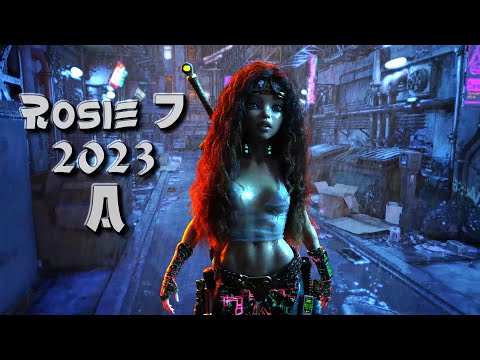
So in earnest, I decided to finish the solution I was working on and put together a demo reel. That was this:
For me, the easiest way to start out animating is to just grab a collection of aniBlocks or animated poses that are doing something similar to what you want your character to be doing.
Just load one of them, set things up how you want them to look, and render it.
It's a Great way to start and the animation collections we have available to us at Daz 3D are really nice.
I have an excellent source of information brewing on the subject that will continue to grow:
 The Power of aniMate 2 (main page/article)
Dartanbeck's workflow tips:

This is great. Will definitely go through it.
Carrara Community Art Gallery - Show us your Renders!!!Khoe said:
You can create a landscape like this in a very short time, you just have to get some trees as a texture first (they're available for free on Texture.com) or use Ki to make it white ;) Once you have the idea, you can create a landscape very quickly Create in the editor, then immediately paint the places where the trees should go, save the texture on the landscape, activate the replicator and assign the painted texture and throw in the tree bilboards, play a little more with the size and quantity and you're done, it takes less than 30 minutes with practice.
I also thought Vue was great, but when the subscription models came out it became too expensive for me. Vue and Carrara were the same for some time when it came to landscape. Then development at Carrara stopped. Unfortunately. It looks like I'll have to decide where to go at some point.Sounds like good advice, thanks.
Daz 3D is part of

Connect
DAZ Productions, Inc.
7533 S Center View Ct #4664
West Jordan, UT 84084Licensing Agreement | Terms of Service | Privacy Policy | EULA
© 2026 Daz Productions Inc. All Rights Reserved.