-
Getting on the 9 train, or not
jdavison67 said:
No!
Reasons:
-It's not compatible with anything I own, and I cant transfer face morphs of my existing characters to it.
-The body, expressions, and face morphs are in separate purchases.
-This feels like a money grab.
Honestly, it's been a long time since anything out of DAZ itself (corporate, not the PAs) has felt like much more than a money grab to me. They're a company that's out to make money, after all, so that's not surprising, but while there are still a lot of relatively inexpensive products, the value for dollar spent ratio is far less than what it once was. Meanwhile, the general drop in quality control, the lack of attention to basic customer support items like updating the user manual (which STILL doesn't even mention iray, which became the default rener engine way back with DS 4.9, let alone DAZ Connect D-Force, Filament, any figures later than Genesis 2, and dozens of other features in the current version of DS,) increasingly less substantial product upgrades, constant diversions into completely unrelated markets like NFTs and failed spinoffs to enter markets that DAZ quickly proves to have been completely unprepared to enter, and the one/two negative whammy of increasingly overcomplicated sales promotions that consistantly prove to have not been been properly tested combined with a lack of 24 hour support in a store that is supposed to be a world-wide operation yet releases new products at a time when store staff are eight hours away from being available, all increasingly give me the vibe of a company that's lost touch with its roots and is now focused on squeezing the most out of short range profits and new users.
-Most of this stuff was included in older genesis versions, and the prices were better.
-load times for Gen 8 characters sucked...so I can only imagine what 9 is like.
-Daz doesn't dedicate to character versions as long as they used to...8.1 to 9 was really short, and 8.1 was a huge flop for me...I own it but never use it...I find it worthless...feel a bit ripped off on that one.
JD
Yeah, I found 8.1 to be pretty disappointing as well, with the only real redeeming quality being that at least a lot of the hair and clothes would fit G8. The new UVs and the PBR skins on the other hand... :/
Oh, Misty, I forgot my Complaint ThreadWendyLuvsCatz said:
LeatherGryphon said:
WendyLuvsCatz said:
I have one I cannot use due to DRM on the filament cartridges
I have the genuine cartridges but it won't recognise them and because I am in Australia not the USA their Customer Service wiped their hands of the issue
Query: When you throw money into a black hole in Australia, does it flow down clockwise or counterclockwise?

it just sucks

Technically speaking black holes don't suck as suction is caused by pressure differential. They bend space-time so objects that get too close to black holes fall inside it instead of being sucked in. You are perfectly safe from a black hole as long as your velocity keeps you outside the trajectory that takes you within the black hole. You can even orbit black hole safely*. This is the same reason why earth doesn't fall into sun - it has high enough speed to miss the sun but low enough that it can't escape its pull entirely (and thus fly out of the solar system)... so really, earth's path around the sun is just a collection of missed attempts to hit the sun.

*though the orbit paths are likely erratic and if the black hole is active you would likely die out of high levels of radiation but, eh...
Oh, Misty, I forgot my Complaint ThreadLeatherGryphon said:
WendyLuvsCatz said:
I have one I cannot use due to DRM on the filament cartridges
I have the genuine cartridges but it won't recognise them and because I am in Australia not the USA their Customer Service wiped their hands of the issue
Query: When you throw money into a black hole in Australia, does it flow down clockwise or counterclockwise?
it just sucks
Oh, Misty, I forgot my Complaint ThreadWendyLuvsCatz said:
I have one I cannot use due to DRM on the filament cartridges
I have the genuine cartridges but it won't recognise them and because I am in Australia not the USA their Customer Service wiped their hands of the issue
Query: When you throw money into a black hole in Australia, does it flow down clockwise or counterclockwise?
Oh, Misty, I forgot my Complaint ThreadI have one I cannot use due to DRM on the filament cartridges
I have the genuine cartridges but it won't recognise them and because I am in Australia not the USA their Customer Service wiped their hands of the issue
Matcaps for Filament rendererIm not sure where im supposed to post suggestions for Daz Studio development, so feel free to move this if it's in the wrong place.
In Blender, we have Workbench render mode, with various matcaps to help visualise scene details.
In Daz Studio, the purple matcap that preloads when using Filament draw style would be very good for this purpose. Unfortunately, we dont have a way to permanently stay in this state as Filament loads textures within a split second.
So basically my suggestion is, could we get matcaps for Filament? It's already there... but just no way to use it.
The default/startup lighting settings for Filament also need to be calibrated so they are about equal with the Iray renderer defaults.
Bright WorkspaceBat22 said:
This may be kids' stuff but...
So I finally updated DAZ Studio and the first thing that struck me as I played around with the workspace is how brightly lit the objects are! At least my previous version of Studio used images with skin and textures similar to what would be rendered, so I didn't have to render each time I wanted a better look at the skin or object clarity.
Is there a shortcut I can take to restore the workspace to its previous style?
Change the DrawStyle option to Texture Shaded or Iray, instead of Filament.
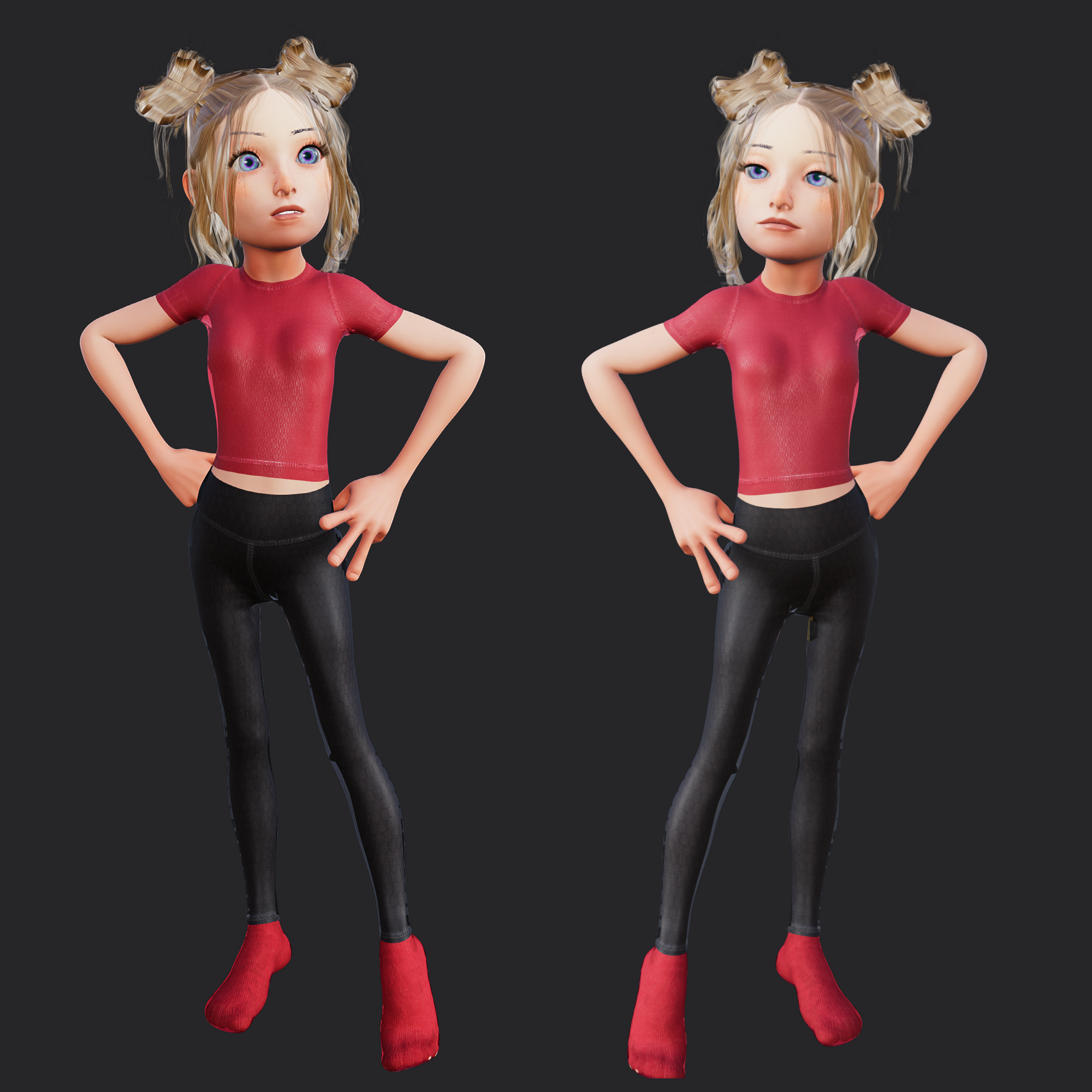
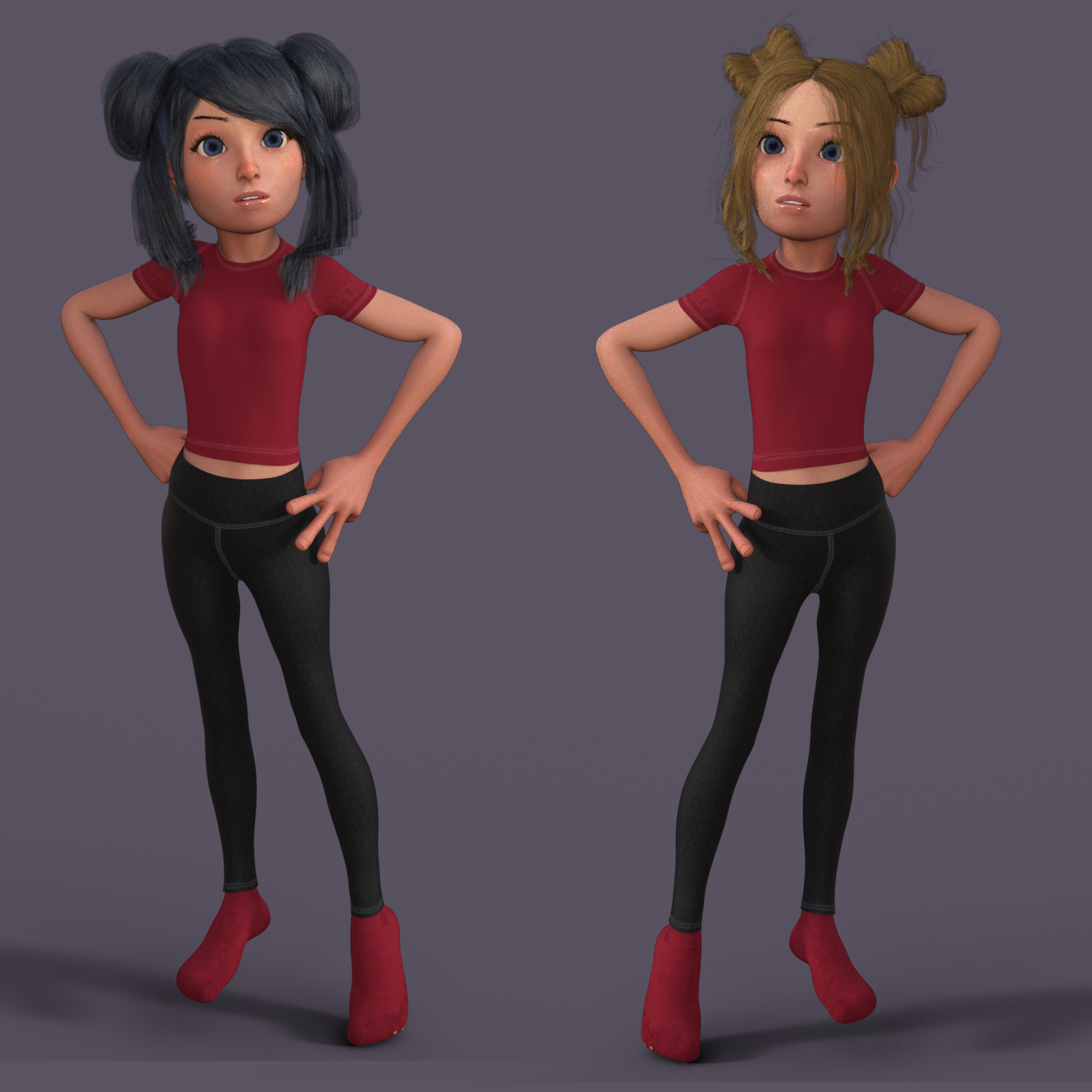
Toon Kids and Toon Kids Mixes RendersI snagged Toon Kids Gen 9, mixed with Victoria 9 and tweaked the head proportions. I've rendered the first pic in filament and the second in iray.. I probably should have made the hands a tad smaller. Anyway, I thought I'd start a thread for people to post their own renders. Mine are just basic pics :)
Also, kudos to JoeQuick, as always!
 Genesis 8 model loads in with white shell
gghost166 said:
So I just got a new computer and installed Daz3D. I haven't even started adding assits into it yet. But when I load Genesis 8 models, instead of the normal flesh tone, they come out in this weird white mesh shell thing. What's causing this and how do I get it back to normal?
You are in Filament Render Mode. Press the button next to perspective view to go to texture mode.
DAZ Filament not updating Environment Map in Environment OptionsIt's very slow. It will, eventually, update it.
EDIT: it seems to have got faster. Of course "Ruins" is fast, it will provide a splurge pretty much immedately when Draw Dome is turned on:
- Launch DAZ (4.21)
- Swap to Filament in the viewport
- Create a new "Environment Options Node" (otherwise it's not possible to set the dome properties).
- Render Settings.../Draw Dome; instant splurge.
- If you want, create a camera, put it at (0,180,0) rotation (0,0,0) and load a PolyHave 16k HDRI for the dome and set the camera to a focal length of 8mm to see what you have.
Filament does not, so far as I can tell, respect the lens type; I tried "Spherical" but nothing happened, hence the 8mm focal length (same as my favorite fisheye :-)
Transparent Backgrounds with FilamentHum. Forget what I said; I don't know how to do a Filament render. I did once but clearly not now.
Select "viewport" in the render engine settings (dropdown), render. It's instant and it has alpha (I did it from scratch; it has alpha by default).
Transparent Backgrounds with FilamentFilament can do it: https://github.com/google/filament/issues/1441, but it looks like Studio is creating an RGB buffer; at least both the PNG output and a canvas (EXR, TIFF). There's nothing in the Filament Draw Options node (which has to be created manually) to fix that.
You could try green-screening, indeed you could even use the GIMP to fill the black background with an alpha channel, but black screening doesn't work well because it's impossible to stop it bleeding into the foreground (the screen color has to have at least one color component 0 and another 1.0).
Do I need to Render if Bridging to another 3D program like Unity or Blenderso maybe it's because i tried it without rendering
I have the feeling there's a big confusion here.
You have 2 types of 3D (at least) :
- the 3D that your pre-render using ray or path tracing rendering engines. Iray, Vray, Corrona, Renderman, Redshift, etc. That's for images. Or sequential images that you video-composite into animations.
- the 3D that you do not render. The rendering (same term, totally different meaning) is done in real-time by a 3D rendering engines that follow 2 different PBR workflows : Metallic/Roughness or Specular/Glossiness. Real-time rendering engines : Filament, Cycles, Unreal, Unity. That's for games, AR, VR, etc.
It's not at all the same. Although nowadays workflows between both worlds are beginning to merge, with real time raytracing in real-time 3D, and PBR materials in pre-rendered 3D.
---------------------
Things being a bit more clear now I hope, your question : "Do I need to Render if Bridging to another 3D program", and this sentence : "the Blender bridge didn't work, so maybe it's because i tried it without rendering", don't mean anything.
NO you don't need to... render ? before exporting a mesh, or a mesh and its skeleton to another app. You send geometry and bones to a real-time engine. Render will be done in real-time by this engine. Period.
Vocabulary is the same : Rendering, Shaders, PBR, Materials, Textures, Metalness, etc. But it's definitely two very different 3D worlds.
Transparent Backgrounds with FilamentI'm a mid-level Studio user. Recently I've been experimenting with Filament rendering to speed up producing animations. In Iray turning "draw dome" and "draw ground" off leaves the background transparent so I can layer the animation in Premiere. However I can't get my Filament renders to do the same thing. The backgrounds always come out opaque black. What do I need to do?
DAZ Filament not updating Environment Map in Environment OptionsAnyone else running into this issue where the Environment Map is not updating the scene in Fliament? I do have the Draw Dome on:
It does show in Iray - it just wont update in Filament. I have done this via script and manully through the parameters. Any advice appreciated.
I tried DAZ Studio 4.20 and 4.21.
Lutyens Garden BenchThat is remarkable. Just no idea how you managed it. It is going to have a horrific poly count simply because it's an amazingly complex shape. Provided the shader doesn't use enormous textures, it should render OK. I don't know what spec GPU you have, but my GTX 1060 really can't be used for previewing in iRay mode, it's so slow when moving the camera, and heaven help you if you forget & try to pose a figure in iRay preview. Have to use Filament, which is almost the same speed as texture mapped preview mode. Regards, Richard.AI 'Render' optionis not hard to use a GUI like https://nmkd.itch.io/t2i-gui if you have a Nvidia card and browse to and add your render, an OpenGL or Filament one is even sufficient
you need a minimum of 6GB VRAM to do a small image but it upscales it 4X too
otherwise
https://pharmapsychotic.com/tools.html
list of other local and online options free paid
New PC build for Daz3DPerttiA said:
nonesuch00 said:
Yes, two characters with highly complex hair and subD not exceeding 3 for the model surfaces, a GeForce GTX 1650 4GB can handle. Do not set anything above subD 3. You can try skin surfaces at subD 4 should work for most characters. I've done it multiple times. Highly complex clothing? Doesn't matter but don't set above subD 3.
And those are Iray renders, not filament or 3DL?
iray only
New PC build for Daz3Dnonesuch00 said:
Yes, two characters with highly complex hair and subD not exceeding 3 for the model surfaces, a GeForce GTX 1650 4GB can handle. Do not set anything above subD 3. You can try skin surfaces at subD 4 should work for most characters. I've done it multiple times. Highly complex clothing? Doesn't matter but don't set above subD 3.
And those are Iray renders, not filament or 3DL?
New PC build for Daz3DPerttiA said:
nonesuch00, you are not making any sense. Do you know when you are rendering on a GPU and when on CPU?
Also - DO NOT use iRay preview. Do not switch back and forth between iRay & Filament renderers alot in the same DAZ Studio session.
Daz 3D is part of

Connect
DAZ Productions, Inc.
7533 S Center View Ct #4664
West Jordan, UT 84084Licensing Agreement | Terms of Service | Privacy Policy | EULA
© 2026 Daz Productions Inc. All Rights Reserved.