-
Where is V7 and Eva7 3delight mats?
People/Genesis 3 Female/Materials/Victoria 7/3Delight/
People/Genesis 3 Female/Materials/Eva 7/3Delight/
NEW! Novica & Invited Guest Contributors Tips & Product Reviews Pt 6So I kept twiddling (it's all personal taste but to me there was too much glare/reflectivity) and even though I was reading what did what on the docs page, I tested things whether it sounded like I should be using it or not. (What the heck.) This shows the final result, again I had to lighten it and desaturate it a tad, but it shows the sheen on the face, chest, and hand. I like it much better than the clayish look you get with iray out of the box. The Uber Base settings do need to be tweaked IMO, it's not a fix-it-all-with-a-click solution. The one thing I would definitely do is switch the PBR setting off of Metallicity/Roughness and over to the glossy option. I also lightened the Emission color (which was almost black) substantially. Tweaked on it for six hours, testing everything and documenting it with renders. They didn't go the full 100% but the same amount of time for each one. I might do a separate mini thread on the renders so it doesn't dominate this one as my 3DL thread visitors would be bored to death.
 and I'm not sure what interest people have in skin settings experiments. These also will yield different results depending on the character's materials. I'm probably going to add a little more sheen, more tests needed. And still can't get the skin as light as I want it, and all the colors in the shader are already lightened. Some of the settings make the skin darker (saturated, less reflective, etc) so it's trial and error. I admit I don't know what I'm doing, lol.
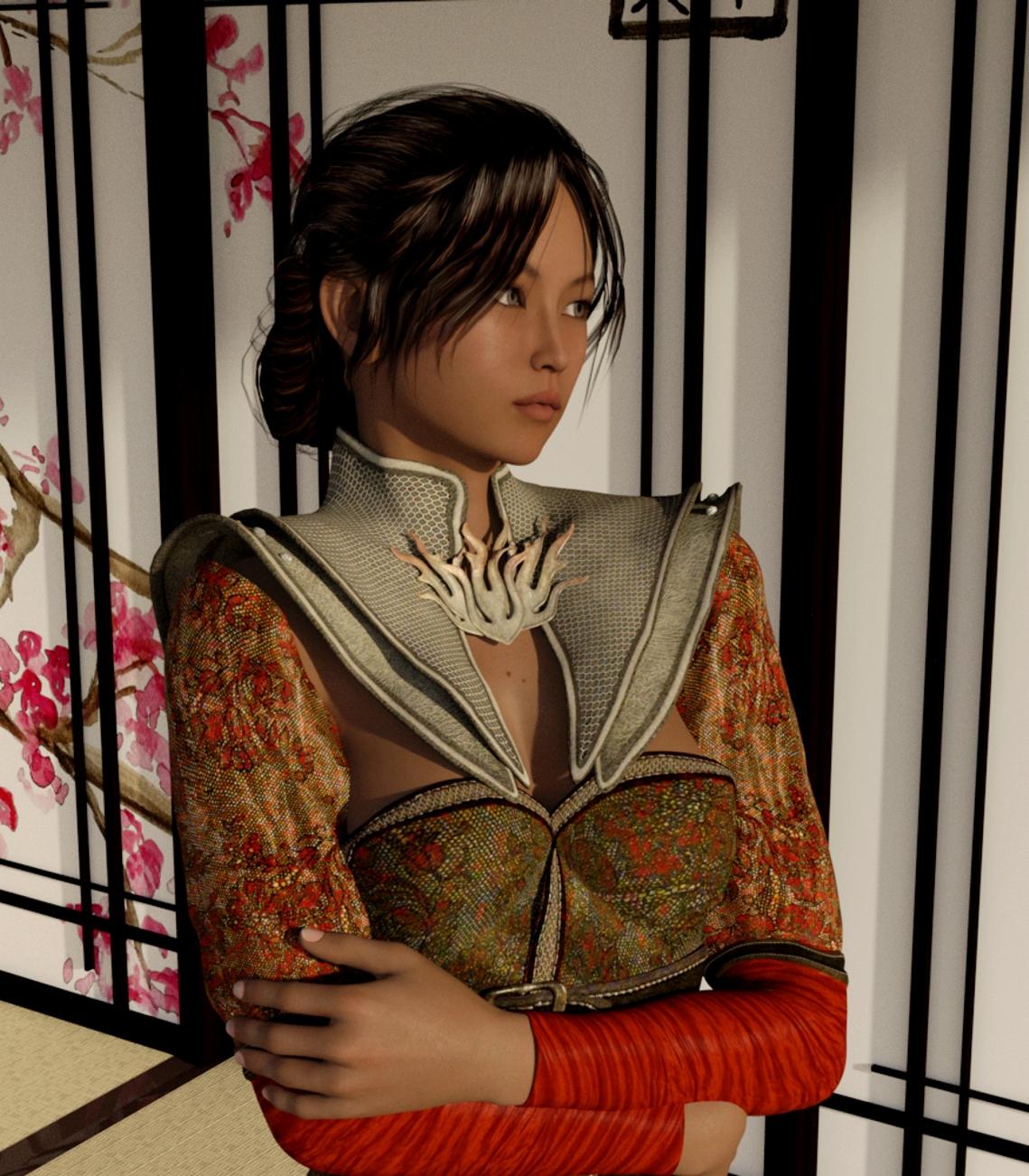
Fire Lilly Outfit for Genesis 2 Female(s) Snapping Asian Interior Construction Kit Niaby Hair for Genesis 2 Females and Victoria 4
But for everyone, here's Mei Lin in the very pretty Fire Lilly outfit in the Snapping Asian building.
 Creature Creator Morphs
I have tried installing the V4 Creature Creator morphs several dozen times, and they never seem to actually install. They are there in my library but when I try to add them into my V4 figure, absolutely nothing happens, which I'm guessing means I didn't install them properly. Can anyone tell me what I'm doing wrong? I want to use the morphs but can't seem to!
OK, I had the hardest time getting the Creature Creator Morphs to load in for M4, because they don't work like the G1/G2 morphs, But I did finally get them to work.
First: Did you install them via DIM or Manually? If DIM, They should be where they need to be. If manually, make sure the morphs are in directory: (Runtime\Libraries\!DAZ\Victoria 4\Deltas\Creature) and InjDeltas.CreatureV4 is in Directory (Runtime\Libraries\!DAZ\Victoria 4\Deltas)
Next: When you load V4 (At least for myself, I use Powerloader, not sure if that is a built in or if it came with a bundle....), I get a list of morph items to autoinject. Make sure Creature Creator is checked.
Now: once V4 is loaded, if you select her, and go to the Parameters tab, and look for the >Morphs/Shapes and select CreatureCreator, you should get a bunch of sliders for body shape / limbs. To get the head shape sliders, you need to click on V4's head. ( I think it took me 3 weeks to figure it all out).
You can also do the same thing in the Shaping tab, it works almost exactly the same
Last: The Creature Creator Addons package (Hooves, Horns, Tail, Paws, etc) are Geo-Graphs, and not morphs, and as such you must find them in your content library. Assuming you bought this too, even if you didn't say so, If you installed that with DIM, you can find these in the Products: M> M4 Creature Creator (one of a couple places, but the easiest for me to remember where they are. As for manual install... Well, wherever you put them.
Hope this helps you
Victoria 4 Eyes are not rendered in Daz 4.8It's Victoria 6 with original textures....I just selected Iray and rendered didnt change the settings, all defaults... would you please provide a step by step guide on how to render with iray? or is there any video or help document available?
thanks
Is it not possible to buy just a basic figure?After some research, it seems that I might want to buy Genesis 3 male and female figures. From what I understand, they offer the most posability and morphing options.
However, I literally just want to buy the figures. Plain, no textures, no hair, no skin tones, no clothes, nothing but the figures. When I search in the shop for "Genesis 3 female", though, all I can find are "starter bundles" with names like "Victoria" and "Eva", that come with make up, clothing, hair, and whatever.
I just want the figures, and absolutely nothing else. Later, I might buy poses or morphs, but I want to start with the absolute minimum with zero accessories.
Is it not possible to just buy the figures without a bunch of other stuff I don't need or want?When you get DAZ Studio for free, you get the base figures included for free. You just have to download them from your products library in the starter essentials packs for genesis.
What Prompts Your Decision To Buy (Or Not Buy) A Figure?I tend to go for more toony looks if I'm getting things for just rendering or the making of videos. If I'm planning to use it for other purposes, it depends on whether or not the current project calls for it.
I just got the V7 Pro Bundle because it had one thing I need for my current project. I could have picked up Eva instead and got the same thing, but Victoria's look is more useful, and had a couple of bits of hair that I'd actually use.
Where did the texture templates go for V4 Base and other products?Where did the texture templates go for V4 Base and other products?
It used to be that on the product page there was a link to download the texture template for the product.
For example V4 Base ( https://www.daz3d.com/victoria-4-2-base ). Yes found the templates for G2F/M and G3F in starter essentials.
Looked on the product page and in the product library without any luck.
If it is no longer available, then what are the EASY steps to generating a texture template using Daz Studio, Hexagon, Carrara, Blender, and/or GIMP?
Victoria 4 Eyes are not rendered in Daz 4.8It is the original Victoria 6 and I used facemorphs to change her nose, mouth, eyebrows and chin parameters and Im using NvidiaIray...even with her original blue eyes I have the same problem.
Is it not possible to buy just a basic figure?The figures normally come with textures. The Genesis 3 Female can be downloaded with the Essentials pack which is free.
The base figures can be found with just the skin texture, such as http://www.daz3d.com/victoria-7; starter bundles include a bit more.
Is it not possible to buy just a basic figure?After some research, it seems that I might want to buy Genesis 3 male and female figures. From what I understand, they offer the most posability and morphing options.
However, I literally just want to buy the figures. Plain, no textures, no hair, no skin tones, no clothes, nothing but the figures. When I search in the shop for "Genesis 3 female", though, all I can find are "starter bundles" with names like "Victoria" and "Eva", that come with make up, clothing, hair, and whatever.
I just want the figures, and absolutely nothing else. Later, I might buy poses or morphs, but I want to start with the absolute minimum with zero accessories.
Is it not possible to just buy the figures without a bunch of other stuff I don't need or want?Bored about Bikinis, lingerie and underwear for female charactersAMEN AMEN AMEN!!!! You never see muscular, bare chested men in ANY of DAZ's banners across the web. Or dressed men. It's Botox Boob Babe- again.
Um, on the front page ;)
True (and yummy, lol) but I'm not talking about this site- "across the web" means those banners appearing across the web, aka, the advertising banners on other sites. Sorry if I wasn't clear.
Yeah, I now see ads for Daz3d almost everywhere... and they almost alway Victoria, Akio, Kieko or some nameless femae model, and about 50% of the time they are in skimpwear. I don't think I've ever seen a male model in one of these ads, but then again I do tend to tune them out now.
How do you make hair hang back?hair hang back woes. it's a fight destined to end in defeat.
even the pros can't win.
the poor girl on the left. feel hot and itchie lookin at it
 Is there an update for Genesis 2 to use V4/M4 figures/morphs?
http://www.daz3d.com/victoria-4-for-genesis-2-female
http://www.daz3d.com/v4-skins-auto-converter-for-genesis-2-female-shttp://www.daz3d.com/genx2-addon-for-genesis-2
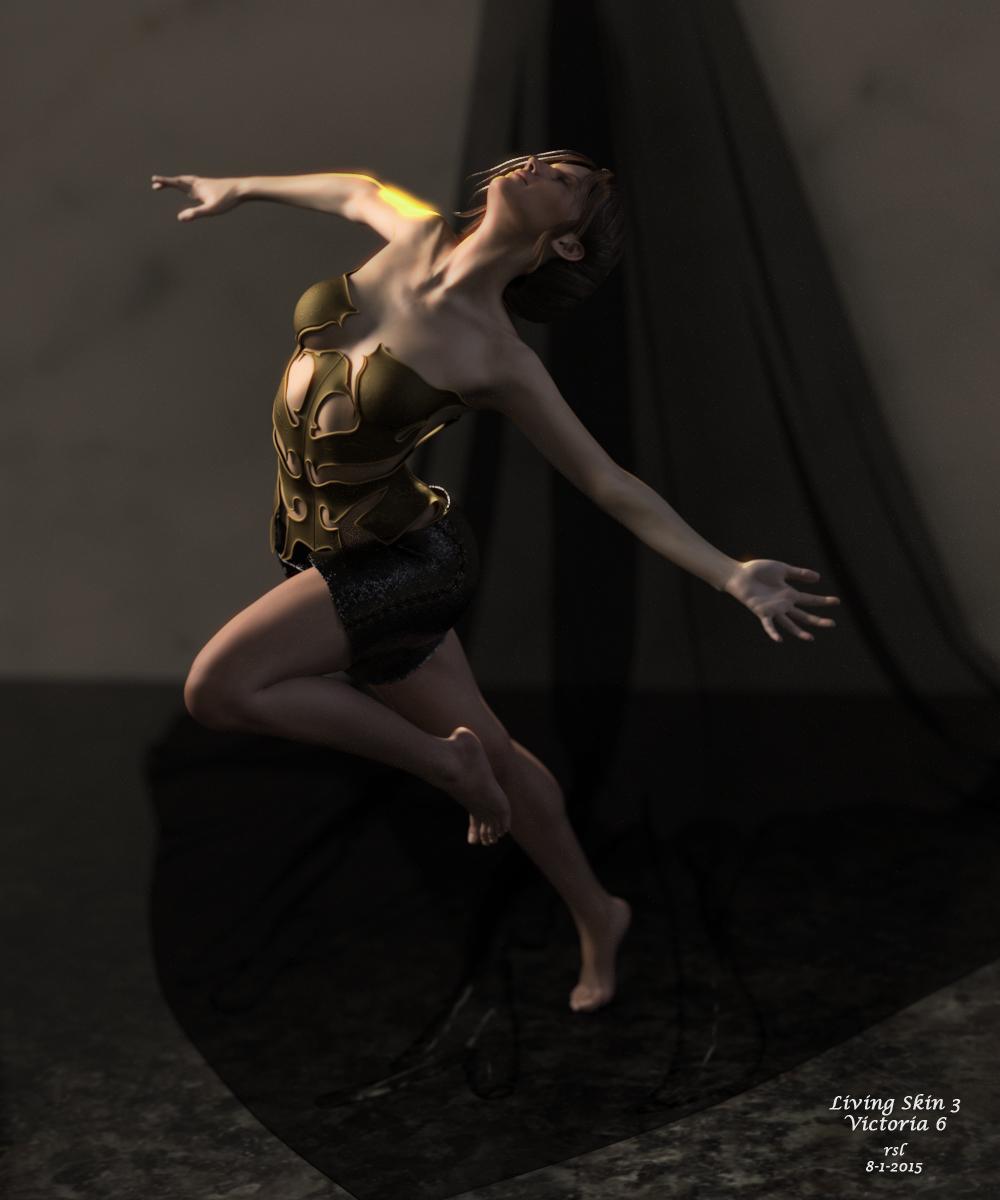
Show Us Your Iray Renders. Part IVLiving Skin 3 -- Victoria 6
The ladies seem much harder than the fellows, but perhaps that's just me.
 Victoria 4 Eyes are not rendered in Daz 4.8
Problem with victoria 6 eyes render in daz4.8
Victoria 4 Eyes are not rendered in Daz 4.8I have the same problem with Victoria 6 eyes!
Looking for quality G2F textures with realistic skinIf you like tempesta's stuff I think you would also like Raiya's stuff from the Daz store, as a lot of their textures are similarly non-smooth http://www.daz3d.com/stella-hd-for-victoria-6 is a good example. Their textures also have much more consistent spec and bump maps.
Also don't forget that a lot of tempesta's newer stuff is at runtimedna
Favorite 5 - What are your favorite 5?Unfortunately I can't narrow it down to just 5 non-Carrara specific DAZ3D products, mainly because for Genesis 2, there are several individual products that combined together make it my favorite figure.
1) My top figure is Genesis 2 (which is free) with the following items that make it my favorite figure. (Having a couple additional characters is a plus as well, my favorites to use mix with other morphs are V6 and G6)
- Genesis 2 Female Morphs Bundle - These are a simple must have for Genesis 2
- Genesis 2 Female Head Morph Resource Kit - Expands the capabilities of the Genesis 2 morphs
- Genesis 2 Female Morph Resource Kit II - Expands the capabilities of the Genesis 2 morphs
- Genesis 2 Female Mixed Morph Resource Kit - Expands the capabilities of the Genesis 2 morphs
- Poke-Away2! for Genesis 2 Female(s) - Another must have for using Genesis 2 in Carrara. Sure, you could use the vertex modeler to make fit adjustments - but this is SO much faster/easier
- FM Muscle Flexing for Genesis 2 Female(s) - Adds the all important muscle flex morph capabilities to Genesis 2
- Clothing Breast Fixes For Genesis 2 Female - Fixes the shrink wrapped cloths syndrome around the breasts
- Shape Shift for Genesis 2 Female and V6 - Adds real world variety to your figures - used mainly used for minor adjustments (i.e. moving the location of the belly button up or down, adjusting the placement of the calf muscles up/down or side to side)
- Victoria 4 for Genesis 2 Female - Another must have if you have many V4 items, will allow you to use V4 cloths on Genesis 2
2) My favorite outfit - another category that it is hard to pick only one. There are a lot more than I listed below, but these come to the top of my mind right now.
- Battle Kimono for Genesis 2 Female(s) - I just think that the texture detail on the kimono is outstanding, as it the attention to detail on the entire outfit, bot the modeling and the texture sets (including the displacement maps).
- Alphakini Bundle - This one isn't for everyone, but is is a very versatile bikini set for a whole wide variety of renders. If your tired of "skimp wear", this one isn't for you.
- Angie Lee Riae Bundle - This is for V4, but it is a very versatile bundle. It's designed for steampunk renders, but works well in a variety of scenarios.
- DX30 - Any shoes by DX30 seem to be very high quality.
3) For environments/architecture 3 vendors come to mind, Stonemason, Jack Tomalin, and The AntFarm.
- The Village Courtyard by Sonemason is probably my favorite.
4) For hair, the more recent G2F hair by goldtassle that I have works/renders extremely well in Carrara and Octane (no more annoying obvious baked in specular and great detailed transmaps). Georgia hair, Vida hair, Oron hair, Marielle hair, and Xenia hair from 3Dream/Mairy works very well on Genesis 2 and in Carrara (and Octane), but some of them (maybe all, I don't remember for sure) only come in the old .dsf format, so you need to re-save them as .duf using DS.
5) I almost forgot, Faveral has some great environments too, my favorite is Medieval Docks.
It really is hard to pick out just 5 favorites!! I think the important thing to note is that without all ability to directly use all the great DS/Poser content available, Carrara wouldn't be such a great tool for me. I really don't know what I would do, because neither DS or Poser offer the wonderful 3D tool kit that Carrara has.
Realistic Renders.... NOT! 14: A new frontier.....Have you already forgotten about Victoria 4?
Not me, I have just found my new favorite character for iray renders - Odelle.
Rendering Time: 3 minutes 32 seconds
 Bored about Bikinis, lingerie and underwear for female characters
"I see more harm in the store's reputation to lower the bar to bring on low selling items and vendors. There's not much point adding content that only a tiny portion of consumers will use."
Theres no growth without risks, and if it means daz seeks out New fresh blood PAs willing to tackle the really uncharted areas in the 3D realm, even if they are slow producers, then what is there to loose? Yes there has to be quality standards... something I see has bounced UP and DOWN here at daz. Quality has nothing to do with the type/themes of content a PA creates for. And on that note, how in the world is a PA who makes content that deviates from this current Same-Same skimp market right now, automatically considered bad quality? Sorry, but I do not see Luthbel's beautifully imagined outfits bringing down Daz's reputation, because its not skimp and apparently would sell less than Victoria 7's latest fishnet stockings and cut up mini skirt.
Content that deviates from this threads title will never be possible, if it's avoided or gets a possibly reduced effort when produced on the assumption "it sells badly, so I wont bother". Not trying to argue with anyone, I just dont see the logic. Risks must be taken for improvements. If no risk is taken, nothing ever changes. Its the exact same thing that made Iray possible in Daz Studio
I think the point is that the risk will be not worth it if the majority of the buying public buying habits do not change. Bringing in new PAs just so they can sell 10 items a piece and get discouraged is not growth. Increasing the actual demand and purchasing power of the customers so that those items affect the bottom line is really the goal. Vendors simply can't or should be asked to bear this burden. That's really in the customer's hands.
Daz 3D is part of

Connect
DAZ Productions, Inc.
7533 S Center View Ct #4664
West Jordan, UT 84084Licensing Agreement | Terms of Service | Privacy Policy | EULA
© 2026 Daz Productions Inc. All Rights Reserved.