-
Daz Studio 5 development update
Noah LGP said:
How many Mac users are we telling about ?
I thought it was a small minority compared to the Windows users.
There are definatley far fewer Mac users than Windows users, but that's only one statistic that we don't know. A more important metric would be how much money is spent at DAZ by Windows users versus Mac users. We know neither statistic. If I were a Windows user and had to spend hundreds of dollars on a new nVidia card just to keep iRay running, that's hundreds of dollars that I wouldn't have available to spend on DAZ assets that a Mac user would have, so who knows?
I suspect that any portion of their profit from Mac users, even if only 20 or 30%, makes it still worthwhile to develop for Mac users, even if all of the features aren't available in the Mac version. If there wasn't enough profit from Mac users to be worthwhile financially, I expect they will drop Mac support like a hot potato as it would be the most prudent decison to make. I believe developing the Mac software has been profitiable enough so far to explain why they're still supporting Mac.Should the day come when Mac support isin't worth it, my feelings wouldn't be hurt if they dropped our support. It's just business.
When DAZ Studio was first released, it's release date was set back a few months simply because the Mac version wasn't ready yet, so Windows users had to wait a few weeks. That was then, this is now, and as we've seen, they didn't wait on releasing Filament support until the Mac version was ready. I suspect that if the Windows version is ready long before Mac version is ready, they might just release the Windows version and possibly a Beta version for Mac to play with while they finish it off.
All speculation, of course; it would be nice to get an actual update.
Daz Studio 5 development updateIceCrMn said:
Daz isn't writing one version of DS5 they are writing two.
One for windows and one for mac.
Maintaining feature parity between them is going to cost time and cause delays itself.
Milestones in development may have been met, but negated because something wouldn't work in one of the versions.
That can cause days, weeks or even months worth of work to be lost if parity is a requirement.
It may even necessitate a complete rewrite of certain features. So the "first line of code" can be rendered useless if you get to start over.
I'm not a programmer, but I'm sure there is some boilerplate code that gets added to the first stanza and other places so generic things can be done quickly.
Filament, a feature introduced in the Windows version two years ago, is still not available for Mac users. If they were going to hold release to maintain a parity between Window and Mac users, they're two years too late.
The excessive time it's takiing to produce DAZ Studio 5 is mainly due to updating all of the code (Windows and/or Mac) is due to moving to the latest version of the Qt libraries.
From the few times I've glanced at the change logs, it seems like most changes and fixes tend to deal with keeping iRay running properly, as is witnessed as well by the vast numbers of threads asking for help with or detaling problems with iRay. I guess if they didn't spend that much time keeping iRay working, they might have release D|S 5 long ago, but you're correct, we don't really know where they are development-wise. We do know that scripts and plug-ins need a lot of attention as they're not gonig to work without updating, and so on.
Based on my two-year-and-counting wait for Filament, I don't believe that complete and total feature parity is the thing holding them back.
Daz Studio 5 development updatewsterdan said:
IceCrMn said:
vrba79 said:
I can't help but feel DS5 would be much closer to a reality, if Daz3D weren't chasing certain pipe dreams.
We the users really have no clue how far along DS5 is.
We can only guess and make assumptions.
Maybe it's finished and waiting release after Christmas.
Maybe they haven't typed the first line of code yet.
We just don't know.
Well, yes, we do, in fact, know that they've "typed the first line of code".
If you go back to the first page, first entry of this thread you'll see that in July, 2021 they had a pre-beta they were going to release to allow Macintosh users to run DAZ Studio on machines using Big Sur, and that they'd planned on releasing a more functional version around New Years a few months later. In the thread announcing that Apple had helped them get 4.x running on Macs so the pre-beta was off (https://www.daz3d.com/forums/discussion/514751/daz-studio-5-preview-release-is-delayed-and-that-s-good-news/p1), they also informed us that the pre-beta already had Filament working on Macs.
I – like everyone else – would like an update, but I'm also confident that they have been working on it consistantly and they'll release when they're comfortable that it'll be fairly solid and useable.
The point I was trying to make is, we have no idea where DS5 is in development.
Obviously it's going to be somewhere between not started yet and finished. Hence the generalization.
Yes, I have read both threads concerning DS5.
There was no mention in either about other projects delaying the release of DS5 or the milestones achieved other than what was posted by DAZ_Rawb.
Nor have I seen any other posts about DS5 delays in any other forum.
I could have missed some though. I'm only one person and there are only so many hours in the day to scour the internet looking for info.
If you have more complete and up to date info lots of people would be interested in reading about it.
---
In the future I'll make note of the things I'm generalizing in my posts so it's clearer to the readers what I'm writing.
Daz Studio 5 development updateIceCrMn said:
vrba79 said:
I can't help but feel DS5 would be much closer to a reality, if Daz3D weren't chasing certain pipe dreams.
We the users really have no clue how far along DS5 is.
We can only guess and make assumptions.
Maybe it's finished and waiting release after Christmas.
Maybe they haven't typed the first line of code yet.
We just don't know.
Well, yes, we do, in fact, know that they've "typed the first line of code".
If you go back to the first page, first entry of this thread you'll see that in July, 2021 they had a pre-beta they were going to release to allow Macintosh users to run DAZ Studio on machines using Big Sur, and that they'd planned on releasing a more functional version around New Years a few months later. In the thread announcing that Apple had helped them get 4.x running on Macs so the pre-beta was off (https://www.daz3d.com/forums/discussion/514751/daz-studio-5-preview-release-is-delayed-and-that-s-good-news/p1), they also informed us that the pre-beta already had Filament working on Macs.
I – like everyone else – would like an update, but I'm also confident that they have been working on it consistantly and they'll release when they're comfortable that it'll be fairly solid and useable.
Is DAZ ever gonna be better with handling dense geometry?What do you use for "Render Settings / Optimisation / Instance Optimization", Speed, Memory or Auto?
Neither option yields and improvement. BTW - I believe this option affects Iray only?
Two or three characters sitting in what would be considered a normal room with a sofa, TV, and common other furnishings will drag the viewport to crawl for me,and I've got 128GB of system ram and all the drives in my system are NVMEs.
Same here... Previously I had an i7 8700 + RTX 3090, 64GB ram, all disks SSD. Now I'm working on an Alienware x17 R1 (i7 11800H, RTX3080, 16GB version, 64GB RAM + the RTX3090 in an eGpu enclosure), two PCIE NVME disks. Same story. In my case, 5 characters (SUBD=1 in the viewport) + some architecture + ~10k instances of grass and foliage and the viewport update rate is like once every 15 seconds if I try to move the camera, or any object.
it's the textures that are an issue
Nope, not really... With a simpler scene I can load 8-16K textures all over the place and this has nothing to do with openGL viewport performance. For me it's the geometry that kills it.
I'll admit, I never use filament, but is it any faster?
Just checked it, and no. Same story.
the opposite of this is true in my experience...
i load an insanely high poly obj and instance it several times and daz viewport is as fast as ever. but if i load the same thing in blender (not even instanced, just by itself) and it's incredibly slow.
This is interesting. May I ask what CPU brand you have?
Is DAZ ever gonna be better with handling dense geometry?Filament is the fastest viewport draw style imo. but that might be GPU dependent
Is DAZ ever gonna be better with handling dense geometry?So popular consensus is that it's the textures in "texture" (openGL) viewport mode that is causing the viewport slowdown and not the geometry?
I'll admit, I never use filament, but is it any faster?
I like to be able to see the textures in the scene when I'm building.
Viewport render like EeveeSince it is made for Filament materials Iray scenes tend to look wrong and mostly too bright. I'd like to see that, too, or have Iray tell a more abstract pre-stage at least roughly how to setup the scene. Not the full show but an approximation.
I hear Daz5 will have a new GPU based tex prev mode, maybe that addresses this, too, but then again I know zilch about the Daz5 roadmap.
[Fisio SB addOn released] Fisio: Physics SimulatorPeter Wade said:
Alberto said:
Peter Wade said:
Something is broken in your system.
Which version of windows do you have?
Is it updated?
Are you able to render with Filament?
According to the properties window it's Windows 10 Pro Version 22H2 Build 19045.2251 and it has Windows Feature Experience Pack 120.2212.4180.0
Windows Update says it is up to date
Filament renders OK.
I need to have a look at ways to check the system, I think there are a couple of commands I can use for that. I did a search for the things that were showing as missing and a couple of sites said they are part of the 2015 runtime for Visual C or it might habe been C++, I'll have to look i to that further.
Peter,
Could you check with CFF Explorer the file "dzfilamentapi.dll"? It's inside the subfolder "\Program Files\DAZ 3D\DAZStudio4\"
dzfilamentapi.dll requires the api-ms-win-crt files.
Interesting. That .dll shows the api-ms-win-crt files as missing as well but filament does render. If the code contains refeneces to a library that isn't there but it never calls the functions would that work? When I saw stdio in the list my experience with C made me wonder if the developers were using it as some sort of debug console that doens't get used in the release version. But I'm way out of date with current programming methods so I may be talking rubbish.
Did you try to reinstall Daz Studio?
If this doesn't work, you could, if you wish, reinstall or repair the redistributable https://www.microsoft.com/en-us/download/details.aspx?id=53840
[Fisio SB addOn released] Fisio: Physics SimulatorAlberto said:
Peter Wade said:
Something is broken in your system.
Which version of windows do you have?
Is it updated?
Are you able to render with Filament?
According to the properties window it's Windows 10 Pro Version 22H2 Build 19045.2251 and it has Windows Feature Experience Pack 120.2212.4180.0
Windows Update says it is up to date
Filament renders OK.
I need to have a look at ways to check the system, I think there are a couple of commands I can use for that. I did a search for the things that were showing as missing and a couple of sites said they are part of the 2015 runtime for Visual C or it might habe been C++, I'll have to look i to that further.
Peter,
Could you check with CFF Explorer the file "dzfilamentapi.dll"? It's inside the subfolder "\Program Files\DAZ 3D\DAZStudio4\"
dzfilamentapi.dll requires the api-ms-win-crt files.
Interesting. That .dll shows the api-ms-win-crt files as missing as well but filament does render. If the code contains refeneces to a library that isn't there but it never calls the functions would that work? When I saw stdio in the list my experience with C made me wonder if the developers were using it as some sort of debug console that doens't get used in the release version. But I'm way out of date with current programming methods so I may be talking rubbish.
[Fisio SB addOn released] Fisio: Physics SimulatorPeter Wade said:
Something is broken in your system.
Which version of windows do you have?
Is it updated?
Are you able to render with Filament?
According to the properties window it's Windows 10 Pro Version 22H2 Build 19045.2251 and it has Windows Feature Experience Pack 120.2212.4180.0
Windows Update says it is up to date
Filament renders OK.
I need to have a look at ways to check the system, I think there are a couple of commands I can use for that. I did a search for the things that were showing as missing and a couple of sites said they are part of the 2015 runtime for Visual C or it might habe been C++, I'll have to look i to that further.
Peter,
Could you check with CFF Explorer the file "dzfilamentapi.dll"? It's inside the subfolder "\Program Files\DAZ 3D\DAZStudio4\"
dzfilamentapi.dll requires the api-ms-win-crt files.
Finished and in Freebies *Please Delete Thread*@MachineClaw Sometimes the Filament PBR render preview looks better then the Iray or 3Delight
Also in general if anyone would like to beta test the charater just DM me
[Fisio SB addOn released] Fisio: Physics SimulatorSomething is broken in your system.
Which version of windows do you have?
Is it updated?
Are you able to render with Filament?
According to the properties window it's Windows 10 Pro Version 22H2 Build 19045.2251 and it has Windows Feature Experience Pack 120.2212.4180.0
Windows Update says it is up to date
Filament renders OK.
I need to have a look at ways to check the system, I think there are a couple of commands I can use for that. I did a search for the things that were showing as missing and a couple of sites said they are part of the 2015 runtime for Visual C or it might habe been C++, I'll have to look i to that further.
[Fisio SB addOn released] Fisio: Physics SimulatorPeter Wade said:
Alberto said:
Peter Wade said:
I can't get this to work on my computer. I installed it using DIM and entered my registration code. I've tried setting up the bouncing ball demo but when I try to run the simulation I get three error boxes, first one, then the next when I close each one. The error messages are:
A dynmic link library (DLL) Initialization routine failed
Can't load FisioEngine.dll at c:/Program Files/DAZ 3D/DazStudio4/libs/Fisio/FisioEngine.dll
Can't load Fiso EngineThe FisioEngine.dll file is there in that directory as well as ChronoEngine.dll and ChronoEngine_multicore.dll. I've got Studio Release 4.20 and Beta 4.21 installed. They both give the same errors except the path is different for the Beta version. I've tried de-installing and re-installing with no difference. I'm running it on Windows 10 Pro with a 6 core i7 990X CPU and 12 GB Memory.
Any ideas what could be causing this and how to fix it?
If you wish, you could do the following to find the problem:
Use the utility CFF Explorer: https://ntcore.com/?page_id=388. Download the Explorer Suite.
Install it and then go to the File - Open menu. Then open the FisioEngine.dll that is in /libs/.
You should see something like this: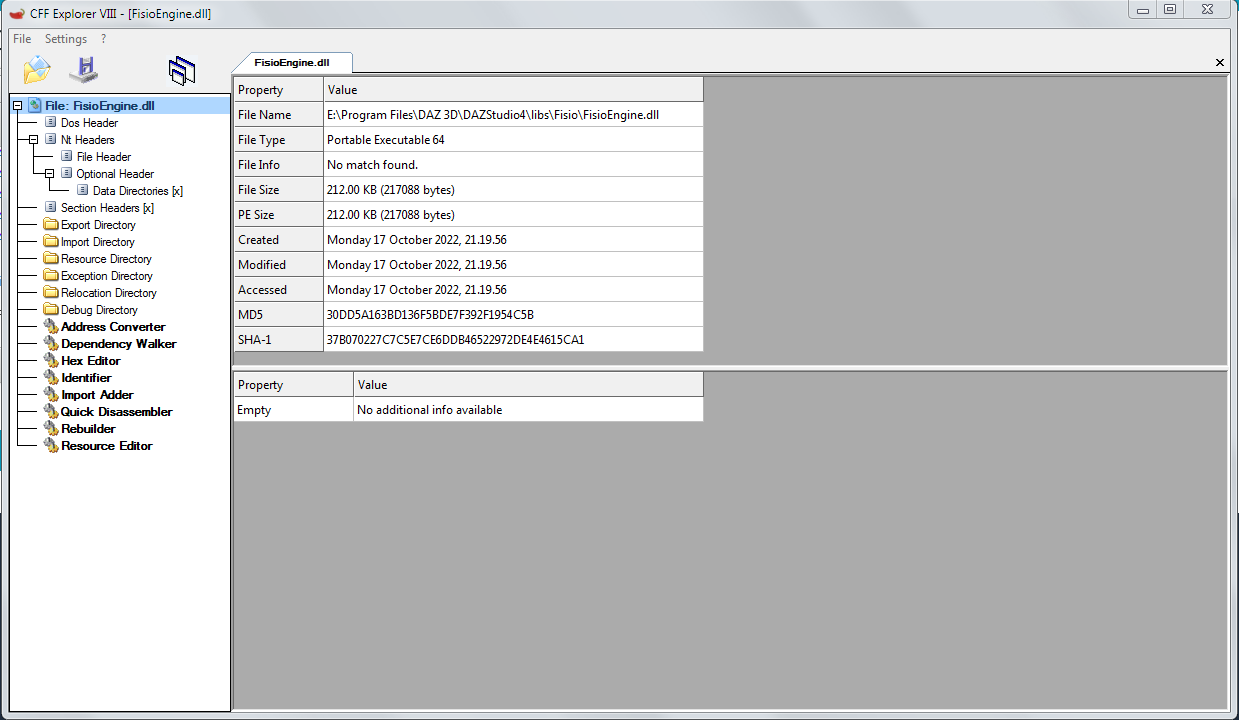
Click in Dependency Walker and expand ChronoEngine.dll and ChronoEngine_multicore.dll below FisioEngine.dll. You should see something like this:
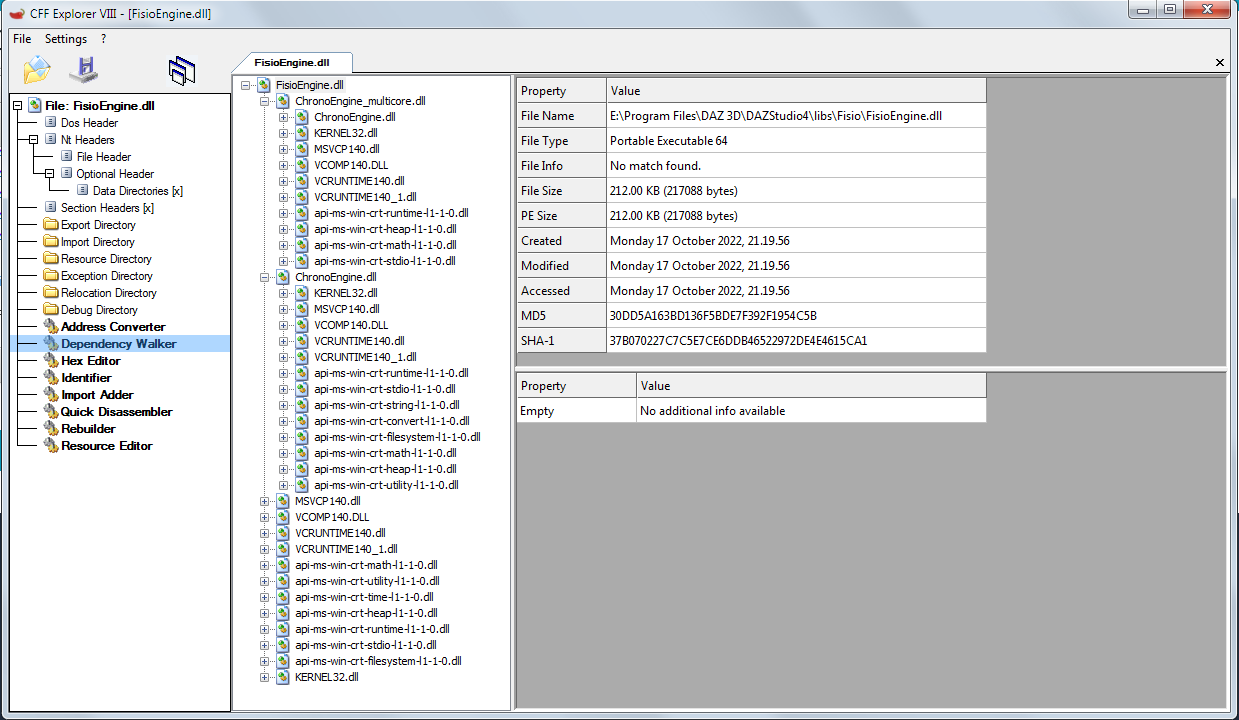
If any dependency is missing, you'll see a red X, like this:
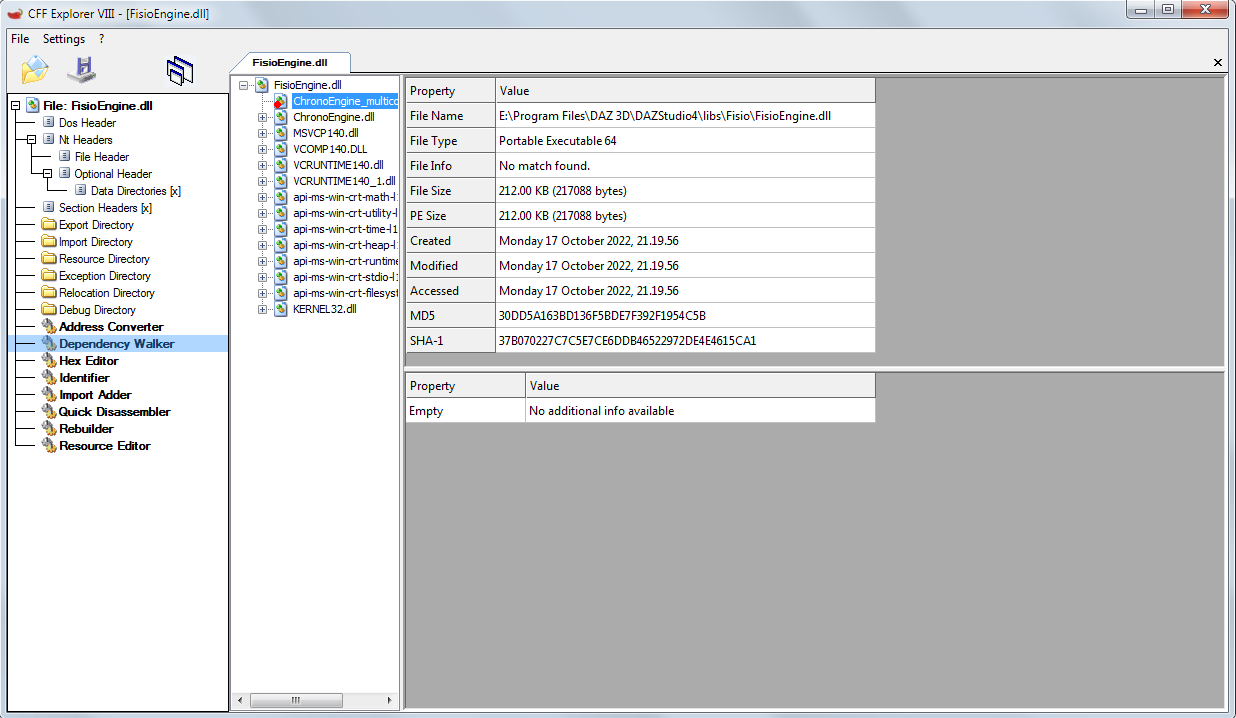
Try and show me the results, please.
I've tried that. I'm getting a lot of missing things that start with api-ms-win-crt
Something is broken in your system.
Which version of windows do you have?
Is it updated?
Are you able to render with Filament?
[Fisio SB addOn released] Fisio: Physics SimulatorSaxa -- SD said:
Just wanted to say that first demo was just perfect amount of detail for me.
Not too much or too little.
Was actual really nice finding instructions that were just about perfect. Thanks!Switched to Filament for Fisio-simulation and was exactly as fast as texture-based display.
Like real-time.
Nice to see a glossy ball bounce on a shiny flat surface >>>> real time >>> in DazStudio.
Makes me anticipate even more soft body physics eventually.Sure you know all this already.
Just nice that there is a good use for filament!Just thought would highlight in case any users did not consider filament.
edit: playing with various settings for 1st demo - was intuitive. Ball is heavier and spinning now. Very nice.
Richard Haseltine said:
Fisio does not install for betas, so that is expected.
You made me curious. Unless i misunderstood. Took a break to check out Fisio quick.
Primarily use betas (public build) and still using DS 4.16.1.43. The 1st demo in Fisio manual simulated fine for me. Was exciting to see realtime via Filament in DS! Using win10x64 pro.
My beta was out of date (I'd ended up with Public Builds unchecked in the Download filters), although not by much. I guess that also stopped it from installing the beta version of Fisio, although I did have a beta there. Sorry for the confusion.
[Fisio SB addOn released] Fisio: Physics SimulatorJust wanted to say that first demo was just perfect amount of detail for me.
Not too much or too little.
Was actual really nice finding instructions that were just about perfect. Thanks!Switched to Filament for Fisio-simulation and was exactly as fast as texture-based display.
Like real-time.
Nice to see a glossy ball bounce on a shiny flat surface >>>> real time >>> in DazStudio.
Makes me anticipate even more soft body physics eventually.Sure you know all this already.
Just nice that there is a good use for filament!Just thought would highlight in case any users did not consider filament.
edit: playing with various settings for 1st demo - was intuitive. Ball is heavier and spinning now. Very nice.
Richard Haseltine said:
Fisio does not install for betas, so that is expected.
You made me curious. Unless i misunderstood. Took a break to check out Fisio quick.
Primarily use betas (public build) and still using DS 4.16.1.43. The 1st demo in Fisio manual simulated fine for me. Was exciting to see realtime via Filament in DS! Using win10x64 pro.
How do you use/combine puppeteer layers?Ah thanks - I'm not up on the play with DAZ since a few years, I've been Blendering with eevee but now coming back into DAZ to try out Filament animations since I have invested a bit in G9 (with hope and fingers crossed).
Don't you need Animate2 full version to make aniblocks? Again the lack of documentation is letting me down.
I might have to resort to animating in Blender which is much more feature rich although also has pitfalls.
Seems weird though that you can add layers to a figure but seemingly no way to "combine" them in a useful way.
What is going wrong with this Texture?Nothing wrong with the texture once rendered with Iray (even 3DL, but not Filament). The texture-shaded preview is a little funky, showing all those seams, but so is the UV mapping and texture bitmap.
(SOLVED) Filament (PBR) doesn't work or somethingIceCrMn said:
Is that on a mac or Windows?
as far as I know Filament isn't working on macs.
https://www.daz3d.com/forums/discussion/449631/filament-does-not-work-on-macos-yet
I don't have a mac so can't be of much help with those.
Thanks for answering. I am using DAZ on Windows.
But I have already fixed it, I just had to disable the "Hardware Anti-Aliasing" option and it works perfectly now.
(SOLVED) Filament (PBR) doesn't work or somethingIs that on a mac or Windows?
as far as I know Filament isn't working on macs.
https://www.daz3d.com/forums/discussion/449631/filament-does-not-work-on-macos-yet
I don't have a mac so can't be of much help with those.
Daz 3D is part of

Connect
DAZ Productions, Inc.
7533 S Center View Ct #4664
West Jordan, UT 84084Licensing Agreement | Terms of Service | Privacy Policy | EULA
© 2026 Daz Productions Inc. All Rights Reserved.