-
Question mainly for Forum Moderator's (how much skin is allowed female chest) in gallery?
Many people who are new to Poser/DAZ will often in the beginning (or forever) make renders of skimpily dressed ( "Naked", but not really... just mostly-almost naked) female warriors (DAZ's mainstay female figure used to be "Victoria"- Vicky), fighting monsters with a sword in a temple or dungeon... Thus the inside joke arose "it's just another Naked Vicky In A Temple With A Sword render again..." Also conveniently trimmed down to "NVIATWAS".
Hahaha, being a "new to Daz" style mode like you remark, it allowed me to buy a new Rendering PC Desktop doing commisions on dA with naked babes.
... $100 USD per commision when your work is worth for others even if big boobs are double moral HERE.
you make money making renders?
real money dollars, not gc's or llamas?
How to Converting Genesis 1 and 2 Content for use with Generation 4?OK - How about using Michael 4 clothing on Genesis 2 Female? Or Victoria 4 clothing on Genesis 2 Male?
For V4 clothes on G2M the easiest way would be to convert them first from V4 to G2F, save the converted clothes to the library, then use autofit again to convert those from G2F to G2M.
Same for M4 clothes to G2F, convert them to G2M first then from G2M to G2F.
Since both figures are based on the same mesh you could also try "copying" the V4 clone from G2F to G2M, and the M4 clone from G2M to G2F.
How to put Genesis 1 or Genesis 2 clothes on Generation 4 without?
How to Converting Genesis 1 and 2 Content for use with Generation 4?OK - How about using Michael 4 clothing on Genesis 2 Female? Or Victoria 4 clothing on Genesis 2 Male?
I have the utility which allows clothing interchange between G2F adn G2M.
Never mind... I'm transferring this question to this thread:
http://www.daz3d.com/forums/discussion/41223/converting-to-g1-g2-and-g3-wip/p2
This is great thread, Thanks!
Is it able to Reverse Direction for convert the content..?
How to Converting Genesis 1 and 2 Content for use with Generation 4?Cloth:
1) Clone (I believe it do)
2) XDresser 4 + Victoria 4 license converts from genesis 1 to V4. You need save the genesis cloth to cr2 previously. For genesis 2, you need convert to genesis 2 cloth to genesis 1, then to V4. There is a product clone of G2 for G1, that is you need to convert from G2 to G1.
Hair: Parent
Textures: Nope, but is not impossible. Probably something like the blender method for G2F to G3F.
Poses: Pose Master in Rendo
Morph: ????
It's supposed that a genesis clone for dawn can be created, also a clone for two animals too. Tutorial for millennium horse and DAZ horse 2 is in this forum.
Would you please show me how to do clone if possible..?
What is the XDresser 4?
Why I can't find XDresser 4 in the Products List of DAZ?
Question mainly for Forum Moderator's (how much skin is allowed female chest) in gallery?Many people who are new to Poser/DAZ will often in the beginning (or forever) make renders of skimpily dressed ( "Naked", but not really... just mostly-almost naked) female warriors (DAZ's mainstay female figure used to be "Victoria"- Vicky), fighting monsters with a sword in a temple or dungeon... Thus the inside joke arose "it's just another Naked Vicky In A Temple With A Sword render again..." Also conveniently trimmed down to "NVIATWAS".
Hahaha, being a "new to Daz" style mode like you remark, it allowed me to buy a new Rendering PC Desktop doing commisions on dA with naked babes.
... $100 USD per commision when your work is worth for others even if big boobs are double moral HERE.
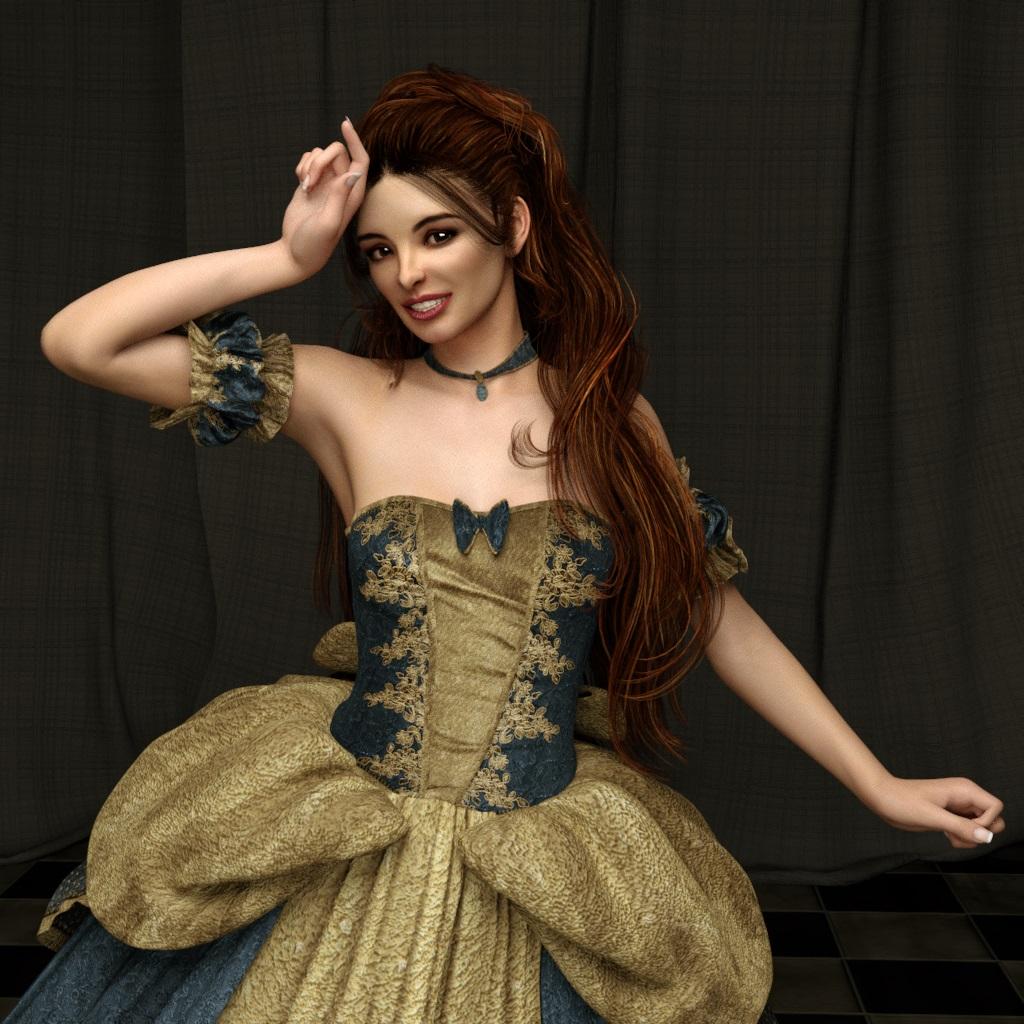
Realistic Renders.... NOT! 14: A new frontier.....Another test render with Reality 4.1. This time
http://www.daz3d.com/sase-kennedy-for-victoria-6
Rendering time: 30 minutes
CPU only, 666.93 S/p 391.33 kS/s
 Exporting morphs for attachments, daz is baking them in, need to export
I'm exporting an FBX using custom morphs and everything is working great, except for the morphs to the attachments..
Specifically, I'm using Victoria 7.
The morphs for attachments are being baked, not exported. I even changed my custom morph rules to: Anything -> Export and it still baked the morphs.
Is there a trick to this?
Character HD updates blow up existing sceneI noticed last night that there were three updates for G2 figures, Mei Lin 6 HD, Michael 6 HD and I think the third may have been Victoria 6 HD (or maybe it was Lilith 6 HD, I'm not sure. They were all HD updates). After I updated and loaded up Daz to work on my current scene, I found, when I did a test render, that 9 of the 12 characters in the scene had blown out skins (totally white), with one only being the face, not the body. The rest were not HD related figures (kids4 & standard G2M).
Does that seem right? Has anyone else noticed that? It seems rather odd that an update would blow up a scene like that. I was able to go back through all the characters and reload the SSS settings and they were back to normal, but that was really... weird.
Question mainly for Forum Moderator's (how much skin is allowed female chest) in gallery?Eight Words: Naked Vicky In A Temple With A Sword.
Okay, six words and two letters...uhm, u have me at a disadvatage, because I don't kow what that is.
Many people who are new to Poser/DAZ will often in the beginning (or forever) make renders of skimpily dressed ( "Naked", but not really... just mostly-almost naked) female warriors (DAZ's mainstay female figure used to be "Victoria"- Vicky), fighting monsters with a sword in a temple or dungeon... Thus the inside joke arose "it's just another Naked Vicky In A Temple With A Sword render again..." Also conveniently trimmed down to "NVIATWAS".
RefundsThere are two items, I'm only interested in with the option to return; is there a way of doing this?
Can't check out of Shopping CartSo I put Maret for Victoria 7 in my Cart. the little cart icon shows the number 1 but when I go to check out it shows my cart as empty. I've signed in-out, refreshed browser etc. and it stays the same. Help please.
NEW! Novica & Invited Guest Contributors Tips & Product Reviews Pt 6Hmm, I'm looking at some of the "also featured" characters (like I really need more characters..)
Does anyone have any renders of the following people:
Kristal (Genesis 2) has really nice eyebrows.
Haiku for Keiko 6 I have a question. If it says compatible figure is Genesis 2 Female, but requires Keiko 6, does that mean I can't use her skin materials/maps on anything other than the Keiko gals? I've never understood the "compatible" and the "required." In this case, since the Keiko figure is so stylized, I can't see this going on a regular Genesis 2 Female face.
Clarissa (Genesis 2) also has nice brows. I would change the nose a bit, but the skin looks good IMO from what I see.
Maret I have a question It says Daz Studio Material Presets (.DUF) twice. Is one supposed to be indentified as IRAY? She's rendered in IRAY, so someone might want to take a look at that product description. I think one is supposed to say Iray.
Love Hemlock Folly- that No Trespassing gate and driveway can be used for a lot of different settings. And with both interior and exterior done, that price with the discounts is really a good deal. Thanks again to the vendors for giving us such great variety!
If you read the "What's Included and Features", it states that Haiku for Keioko 6 uses the Base G2F UV maps, so the skin texures can be used on non Keiko characters. It's the actual character morphs which require Keiko 6, since they require her basic shape in order to work right, given that they were built upon that shape rather than the base G2F.
Something most 3D artists get wrong (including me)The original ad was just a close-up on a pair of eyes. The eyebrows were there, the top of the nose -- that's it. As far as it went, it was okay. And anyone who thinks there is a "problem" with that type of advertising has never made a billboard before (I've only made a few, but none of the ad agency guys I know have any problem with the idea of using CGI eyes). The ad used a really high-resolution map for the eyes and they looked okay. Especially driving by from a distance. If I had to guess, the whole thing was Victoria 4.
Sky Hndx Perfect symmetry is definitely an issue in modeling and texturing. A few imperfections do go a long way to enhancing the "reality" of CGI figures (assuming reality is the aesthetic to which you aspire). But, when designing a beautiful woman, you can only add a little imperfection before you negatively impact the "beauty" of the model. And I would argue (and probably fail to convince a lot of people) that it is easier to have "imperfections" in a living woman and still have her be beautiful because of the nuances of her soul (energy, subtlties of expression, humor, light in the eyes, etc.) can make her appear beautiful, whereas a static, lifeless CGI image -- which, even if based on scans/input from a real woman -- will not achieve beauty as easily because, by definition, she is not alive and therefore lacks the soul which can shine through in a photograph of a real person.
I doubt I put that well, but there it is.
Sky Hndx : Current music trends are nothing new -- every generation thinks they have "invented" the first music that sounds good. Your comments about modern music modulating (i.e. autotuning) voices is actually similar to a discussion in music that was going on back in the 1960s and 1970s. Back then, the multi-track editing made it possible for singers to combine multiple takes to create a song. Before then, it was (mostly) sing the song 10 times and we'll pick the best version (sometimes, if there was a natural break in a song, you could splice two versions together). With the multitrack system, it became easy to pick and choose phrases, takes, even single notes. And then layer them. This made it possible for Paul McCartney to sing the lead track, do his own backup vocals, and play every intrument on an entire album (https://en.wikipedia.org/wiki/McCartney_(album)). That's an extreme, but one little aspect of this technological advancement (that was complained about quite heavily way back when) has become so commonplace that I doubt anyone even notices it any more -- a single singer will be trailing off a long note and then start singing the next verse... while the original note is still heard. In other words: The singer must have two mouths! :-) This is "not natural," and waaaay back when I was a kid, there were a lot of complaints about it. I think the main version of the "complaint" that has remained is when some people note that the album version of a song sounds very different than the live version of the song.
Anyway -- just a random thought.
Some characters for V4 dont showLonewolf:
Slow down. No offense, but Rome wasn't built in a day, and learning any 3D application takes some time and patience. As for needing a supercomputer, that simply isn't so. This PC (the one I am typing this on right now) is essentially used for web access by anyone in the family needing it. It is practically ancient by current standards, having a Core 2 Quad processor, 8 GB of DDR2 memory and an HD3870 GPU with 512 MB of video memory. I currently have DAZ Studio open with V4 and a bunch of morph packages open and everything is as it should be. I have more than a hundred characters, both paid and free, installed for the model and can load any of them without problem. But I have been doing this for awhile and so it is second nature for me. My point is that you have everything you need to do what you want except one thing: experience. There are plenty of people here, most of whom are not DAZ employees, who are more than willing to take the time to help. All you need to do is ask and be a little patient. Eventually any issues you are having will get sorted out, and then you can share what you have learned with others and pay it forward.
Now, regarding "the shaping tab don't show when I load V4". Firstly, the shaping tab should be available when you open DAZ Studio without anything loaded. Depending on the version of DAZ Studio you are using and/or the style of the DAZ interface you have selected, it should be a tab available on either the right or left side of the viewport window. If no figure is loaded, or none selected, then accessing the tab will show nothing. If V4 is selected (not simply loaded, but loaded and selected under the Scene tab), then accessing the shaping tab should also show Victoria 4. I don't have the latest version of DAZ Studio installed on this PC, but I do have the public build installed, so it should be much the same as what you have. Here is a screenshot of what I have (note the red arrows). Do you not have the same?
NEW! Novica & Invited Guest Contributors Tips & Product Reviews Pt 6Hmm, I'm looking at some of the "also featured" characters (like I really need more characters..)
Does anyone have any renders of the following people:
Kristal (Genesis 2) has really nice eyebrows.
Haiku for Keiko 6 I have a question. If it says compatible figure is Genesis 2 Female, but requires Keiko 6, does that mean I can't use her skin materials/maps on anything other than the Keiko gals? I've never understood the "compatible" and the "required." In this case, since the Keiko figure is so stylized, I can't see this going on a regular Genesis 2 Female face.
Clarissa (Genesis 2) also has nice brows. I would change the nose a bit, but the skin looks good IMO from what I see.
Maret I have a question It says Daz Studio Material Presets (.DUF) twice. Is one supposed to be indentified as IRAY? She's rendered in IRAY, so someone might want to take a look at that product description. I think one is supposed to say Iray.
Love Hemlock Folly- that No Trespassing gate and driveway can be used for a lot of different settings. And with both interior and exterior done, that price with the discounts is really a good deal. Thanks again to the vendors for giving us such great variety!
How to Converting Genesis 1 and 2 Content for use with Generation 4?OK - How about using Michael 4 clothing on Genesis 2 Female? Or Victoria 4 clothing on Genesis 2 Male?
For V4 clothes on G2M the easiest way would be to convert them first from V4 to G2F, save the converted clothes to the library, then use autofit again to convert those from G2F to G2M.
Same for M4 clothes to G2F, convert them to G2M first then from G2M to G2F.
Since both figures are based on the same mesh you could also try "copying" the V4 clone from G2F to G2M, and the M4 clone from G2M to G2F.
Genesis 3 female is missing in PoserAh, I can see what you mean. I read Victoria 7 product page so there is no Poser Companion files. That mean we have to wait for DAZ co to add PCF or not. It really sucks despite G3F is beautifully craft. Thank you for your answer to my question.
Because a girl has (not) to look good when...Some amount of realism in fantasy is certainly advisable, but what many people tend to forget is that it is not required.
Completely agree; in effect, art knows no bounds.
The problem I see with content, which is a product people use to help them create art, is that it starts out already bound; it needs to be portrayed in the promos as both product, and art, preferably in seperate images, and this is often the case. Not always though.
Take this product as an example (http://www.daz3d.com/z-comfort-in-red); I really liked it, the poses were appropriate - yeh I know there were more dreaded tip-toes, but like I said... Appropriate. What killed it for me, was that not one of the images did the Victoria model make an indentation in the seat - not at all. Sure it looks like one of those seats that doesn't give much, but even this one* didn't... It killed believability for me, that made me hesitate; up until then I was going to buy. Now one or two of the other promoes should probably show the interraction with seat and errr ass or other appendage, but none quite so as the one attatched. The products within the scene didn't interact, even though both existed in the same image. I hope I haven't offended the PA, after all, they are doing something I can't do: certainly not with my current skill set.
When PAs create the promos, it is an aspect that I've seen neglected; a scene, and promo renders need to show off the product (not cover every image as an example with clothes), and sell the image as a whole - they are supposed to be showing what is possible; Stonemason for instance, his promos always blow me away.
Cash is finite, so I always question each purchase. I rarely buy immediately, so they sit in my cart. The above product didn't get there, although it still might as I do like it; I actually like the prop more than the poses. The prop might swing it.
Pose Builder & Pose Converter Support Thread [Commercial]hi DraagonStorm, i was wondering more about the animation converter and I had some difficulties trying to operate victoria 7 and other genesis 3 figures. the screen claims that figures as victoria 7 karen 7 etc and other names under genesis 3 the animation seems to get lost or cannot indenitfy the figures with the number 7 even though they are stilll g3, only the others without 7 seem to work maybe I am somehow doing something wrong
please if can get back to me on that .
How to Converting Genesis 1 and 2 Content for use with Generation 4?OK - How about using Michael 4 clothing on Genesis 2 Female? Or Victoria 4 clothing on Genesis 2 Male?
I have the utility which allows clothing interchange between G2F adn G2M.
Never mind... I'm transferring this question to this thread:
http://www.daz3d.com/forums/discussion/41223/converting-to-g1-g2-and-g3-wip/p2
Daz 3D is part of

Connect
DAZ Productions, Inc.
7533 S Center View Ct #4664
West Jordan, UT 84084Licensing Agreement | Terms of Service | Privacy Policy | EULA
© 2026 Daz Productions Inc. All Rights Reserved.