-
Whimper Whine... M7 taking a long time!
I, too, wish DAZ would release both genders at the same time when they introduce a new generation. I'm not sure why they split them up, or why there is such a long gap between releases, but I'm sure they have their reasons. I think delaying the release of the female base and Victoria (7,8,9, whatever) for a few months until the male is ready to go with her would be a good idea, and PAs who specialize in one gender over another will have plenty to work on to get both out with a grand flourish. Anyway, I'm just happy to be able to work on any figure, but I definitely feel the sentiment you guys have.
The really funny thing about all this release ridiculousness is that sure, Vickie always gets first dibs but she's always full of bugs, by the time we get the male most of the bugs have been worked out so we get a pretty much flawless release (except for last time with the nipples on the male mesh beeing a bit too far to the center of the pec, odd). So here's hoping when he's released we get an even more flawless release. I wonder what WOULD happen if there was a solid equal timed release of both genders? Would content for both be more equal from the get go? Hmmmmmmmmmmm
Some characters for V4 dont show...and now, the three database files (the two I mentioned, plus the first you mentioned, Jimmy: PostgreSQL (Win 64 bit)) are all installed, and all the database problems have been fixed! For the moment, anyway...
Thanks so much for your patient explanation. And I went back to investigate the software issue. It seems that 4.8.0.59 - what my splash screen calls "Pro Edition" - is the current free download. So I don't get it. Is there more than one edition, and if so, what is it? Does DAZ sell any version of Studio? And if there's only one, why call it "Pro Edition?" It makes no sense. I guess I'll just uninstall 4.8.0.56...
When I said I use IM for anything with the naming convention, certainly that includes everything purchased from DAZ3D, plus some third-party vendors. I have a fair collection of object files too, that IM doesn't know what to do with. Anyway, the vendors will advertise that their products work in "DAZ Studio 4.8 or newer (free, advanced or pro)" - making my confusion that much deeper.
"Anyone just starting with DAZ Studio (and not coming from Poser) should not use Victoria 4 or Michael 4 or earlier figures." Excellent advice, jestmart. I see now that a combination of factors led me wrongly to attribute success with Michael 4 to his platform. I can see now the others are going to be way better. Thanks!
Some characters for V4 dont showAnyone just starting with DAZ Studio (and not coming from Poser) should not use Victoria 4 or Michael 4 or earlier figures. The gen 4 figures lack many of the advancements the Genesis 1,2, & 3 figure have and tend to work slower as the latest Studio is built for the Genesises.
Some characters for V4 dont showI've already used Michael a few times, and I still can't figure out how to get him into a scene. I'm told the Smart Content tab keeps your most curently used files ready to use again, but as you can see in the first image below, that's not working out so well for me. I haven't even loaded anything else since him. You can also see in the second image, searching for "Michael" in either the Content Library tab in the left pane, or the Smart Content tab in the center, yields no results. Can anyone explain this to me? He's not in Content Library/DAZ Studio Formats/My DAZ 3D Library/People/Michael 4. (And neither is Victoria 4 in her respective directory!) There's only one way I think I was able to get him before... but check out the Content Library tab in the third image.
First of all, Smart Content does not do what you think it does, and it relies on the database and Metdata to work at all. If you load M4, and have him selected in the Scene pane (or Viewport), then Smart Content will only display items that relate to him. That is the 'Smart' part. It has nothing to do with what was loaded before.
I can see from your images, that the CMS is not running, so Search wont work and Smart Content wont work either. In your third image, I can see that you don;t have Products or Categories displayed in the Content Library pane, that is enough to tell me that CMS is not running. We need to sort that out first.
You wont ever find M4 in the Content Library pane undere DAZ Studio Formats, M4 (like all generation 4 figures and before) is in Poser Format. You should find him in Poser Formats > My DAZ 3D library > Figures > DAZ People. A lot to learn, granted.
How did you install DS and it's content, using DIM (DAZ Install Manager)? If so, did you install PostgreSQL which is the latest CMS that DS uses?
How does pc sale usually work?Cool. Cool. One thing that I didn't see mentioned is base characters. Have they in the past posted pro bundles? I noticed during the pa festival daz never put any character bundles on sale....if they did I missed it which also means it was "Ultra-speed Flash Sale."
I think it may have been during the PA sale one year that Daz offered various Generation 4 pro bundles (Michael, Victoria, Freak, Girl, Stephanie, Aiko) for free when you purchase $10 or more.
They did and some of the Gen 5 ones as well. Thats how I got 75% of the pro bundles I have. They also did a sale on the HD morphs for the figures too if I recall corectly. Only reason I picked those up is they were like 2.99 with a purchsed.
Some characters for V4 dont showI totally get your frustration, Kenneth - my "deeply hooked" 3-weeks-in was only a few weeks AGO and my head is still spinning too, with stuff that makes no sense. I started a thread about HeadShop that I can't even respond to because it's so frustrating. No offense to the good people trying to help there; it has nothing to do with them. (Note to anyone happening to follow it: I'm working on it, and I'll get back to it. This other issue came up in the course of trying to work around Head Shop.) I came across your thread trying to figure out my own invisible-Victoria-character dilemma (Michael 4 really, but same difference).
I get the sense that DAZ is trying to protect us adults from our own prurient interests, forcing us to start with pre-dressed figures. (Somebody should mention to them that maybe they've already let that particular cat out of its bag!) Normally if I want to remove a clothing item from my scene, I just select it in the Scene tab and click "delete." Not so with M4/V4. There's nothing to select! (If I could load him again, I'd take a screen shot and show you what I mean. But if I could do that, I wouldn't even be here lol) How do I get rid of it? Is it some sort of Material setting? Because I'm not seeing that either. Personally, I think they ought not treat us like we were 5. That's what the government's for!
I've already used Michael a few times, and I still can't figure out how to get him into a scene. I'm told the Smart Content tab keeps your most curently used files ready to use again, but as you can see in the first image below, that's not working out so well for me. I haven't even loaded anything else since him. You can also see in the second image, searching for "Michael" in either the Content Library tab in the left pane, or the Smart Content tab in the center, yields no results. Can anyone explain this to me? He's not in Content Library/DAZ Studio Formats/My DAZ 3D Library/People/Michael 4. (And neither is Victoria 4 in her respective directory!) There's only one way I think I was able to get him before... but check out the Content Library tab in the third image.
There are supposed to be two more directories. One should give me an alphabetical listing of all the Products I have, and the other is supposed to list things by Category. Both have disappeared. AGAIN. What am I inadvertently clicking, to make this happen? How do I get them back? The pane menu in the upper right corner has no hint. But if I could open the M tree under Products, I could select Michael 4 there and add him to the Smart Content tab. Then I could go there and add him to the scene.
If DAZ were trying to make its software as complicated to use as humanly possible... would they have designed it any differently? I think not.
Now, I know I can learn this. So can you, Kenneth. I taught myself Visual Basic for [Microsoft] Applications programming, very successfully. I also taught myself Arcview for creating GIS maps. I'm still getting familiar with GIMP. I had no prior background in any of it. I know how you feel, truly. But consider this advice, please:
Give yourself at least a good six weeks before you have a meltdown and chuck it all... like I'm doing with HeadShop!
NEW! Novica & Invited Guest Contributors Tips & Product Reviews Pt 6ooo nice! I LOVE Maret!!! Played with her last night and posted a pic in the commercial thread for her, in 3Delight. (can't do iray til i get new computer)
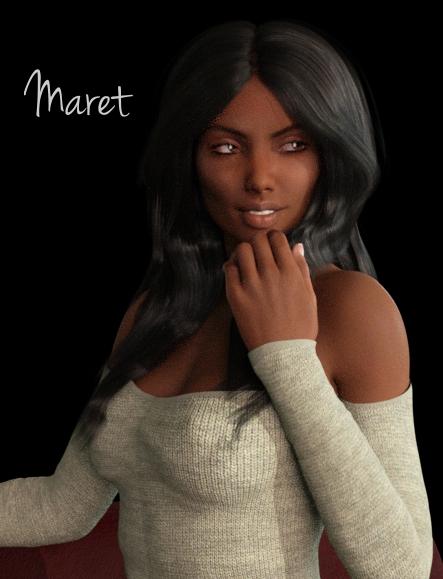
Trying to do some of the new products in a more timely manner, this was a 6 hour render and I think she's mostly "done" in Iray- she certainly is finished enough so you can see she is a really neat character. I was testing dark on dark background lighting, and this turned out well enough to share it.
Say hello to Maret for Victoria 7 wearing Dance Gear and sporting Christina Hair. That hair has one click wind morphs, really nice, and a lot of movement options. You'll love the hair. The Dance Gear (Genesis 3 Females) sweater has quite lovely textures.
And kudos to OOT- look who the hair is made for: (WOW)
All Christina Hair options come with both native Daz Studio and Poser files, making use of the hair in your preferred software easy. It comes with fits for Victoria 4, Aiko 4, The Girl 4, Genesis 2 Female, Victoria 6, Aiko 6, The Girl 6, Genesis 3 Female and Victoria 7.
NEW! Novica & Invited Guest Contributors Tips & Product Reviews Pt 6Trying to do some of the new products in a more timely manner, this was a 6 hour render and I think she's mostly "done" in Iray- she certainly is finished enough so you can see she is a really neat character. I was testing dark on dark background lighting, and this turned out well enough to share it.
Say hello to Maret for Victoria 7 wearing Dance Gear and sporting Christina Hair. That hair has one click wind morphs, really nice, and a lot of movement options. You'll love the hair. The Dance Gear (Genesis 3 Females) sweater has quite lovely textures. I would also recommend Z Comfort in Red for the poses and great couch. I added a dark color in Diffuse and made the couch a chocolate-maroon in some of my test renders, looked quite elegant. The hand positioning is quite nice.
And kudos to OOT- look who the hair is made for: (WOW)
All Christina Hair options come with both native Daz Studio and Poser files, making use of the hair in your preferred software easy. It comes with fits for Victoria 4, Aiko 4, The Girl 4, Genesis 2 Female, Victoria 6, Aiko 6, The Girl 6, Genesis 3 Female and Victoria 7.
 Whimper Whine... M7 taking a long time!
I, too, wish DAZ would release both genders at the same time when they introduce a new generation. I'm not sure why they split them up, or why there is such a long gap between releases, but I'm sure they have their reasons. I think delaying the release of the female base and Victoria (7,8,9, whatever) for a few months until the male is ready to go with her would be a good idea, and PAs who specialize in one gender over another will have plenty to work on to get both out with a grand flourish. Anyway, I'm just happy to be able to work on any figure, but I definitely feel the sentiment you guys have.
How does pc sale usually work?Cool. Cool. One thing that I didn't see mentioned is base characters. Have they in the past posted pro bundles? I noticed during the pa festival daz never put any character bundles on sale....if they did I missed it which also means it was "Ultra-speed Flash Sale."
I think it may have been during the PA sale one year that Daz offered various Generation 4 pro bundles (Michael, Victoria, Freak, Girl, Stephanie, Aiko) for free when you purchase $10 or more.
Christina Hair seems to be missing filesThe Christina hair is supposed to have fits for Aiko 4, The Girl 4, and Victoria 4. It's got a specific V4 installer. There are no fits for the V4 installer :(
http://www.daz3d.com/christina-hair
Christina Hair for Victoria 4 (.CR2 and .OBJ)
Aiko 4
The Girl 4
Victoria 4
Aiko 6
The Girl 6
Victoria 6When the hair loads, it fits V4 incorrectly, showing the character's skull top texture, rather than meeting in the center part. I tried repositioning the hair, but it doesn't fit V4 correctly. I've included pics, and have tried this on a plain un-morphed V4 too. One pic is the image before render, the other after. The poser version specific installer for V4 has no fit morphs. I checked the other installers to see if there are any poser specific files that might have been accidentally placed in them, but no luck.
Funky eyelash shadows with Iray (AKA don't stray from world center)In the hopes that reverting back to a 3Delight surface would resolve the issue I tried:
Replacing the eyelash surface with the dzDefault shader.
Reloading the entire V6 Belle material onto the figure. (Also tried Stephanie 6, Lilith 6, and V5 Bree)
Loading an entirely new Victoria 6 model from scratch with no surface adjustments and set it next to my model.
None of these things resolved the shadows around the eyes.
Free Hair and Hair related Items ListFisty has uploaded her hairs to sharecg! :o)
http://www.sharecg.com/v/82219/browse/11/Poser/Gnomie-Buns-Hair-for-Victoria-4
http://www.sharecg.com/v/82221/browse/11/Poser/Fuji-Hair-for-Victoria-4
List of all Daz Original figures G1-G3Lee 6: 5'7"
Teen Jayden: 5'8"
Michael 6: 6'2"
Ninieve 6: 5'7.5"
Aiko 4 & 5: 5'10" (Legacy shapes on G2F)
Girl 6: 5'10" (Legacy Shape on G3F)
Gia 6: 5'10.5"
Olympia 6: 5'9"
Steph 6: 5'5"
Steph 5: 5'2"
Steph 5 Model: 5'6"
Victoria 5: 5'6"
Victoria 5 Supermodel: 5'10"
David 5: 5'10.5"
Freak 5: 7'Measured the shapes (and as legacy shapes for the ones I don't have originals of!) I have... Hope this helps your chart for 'base' character/platform heights!
Thanks so much for that!
Everyone brings up some really good points and I'll definitely keep them in mind as I begin to develop a workflow in DAZ. I decided to work on using the dialers to recreate some of my sister's drawn characters. I did find that using a base (for her style I used the Aiko 5 legacy shape for the head) made a lot of sense for the style I was trying to emulate.
Oh, and whoever said that any searching should be done with google for finding a particular topic on the DAZ forum versus the search here wasn't kidding. That is so weird. I hunted a good deal on how I could get some custom brows on a character (that has a skin with no brows) and when I went to google, "BAM", topics on brows and geometry shells pop up.
Once I get a little more learned I think I'm going to test some renders to share. :)
FWSA Adaline for Victoria 7 is projecting a strange belly lump into clothingThis is strange, and I don't understand how it happens or how to fix it. The FWSA Adaline character is projecting a strange belly lump into clothing. There is no visible lump on the character's naked body; the lump is only on clothing fit to the Adaline character. Victoria 7 herself does not have this problem; it is only when the Adaline body morph is dialed in. The problem is not limited to a certain piece of clothing. I have tried several items. I have submitted a bug report, of course.
Is anyone else seeing this?
 Link to figure conversions
You can also fit, say, Victoria 4 clothes to Genesis, save as an asset, fit that to Genesis 2 Female, save as an asset, and fit that to Genesis 3 Female. Of course all of the intermediate steps will each introduce slight distortions, but it is a free way to get from the fourth geenration to Genesis 3.
question for Fisty or MarieahHere ya go

http://www.sharecg.com/v/82219/view/11/Poser/Gnomie-Buns-Hair-for-Victoria-4
http://www.sharecg.com/v/82221/view/11/Poser/Fuji-Hair-for-Victoria-4
Edit: Sorry it took me a while, I had to render new images, also lost those. >.<
Difference between Genesis 2 Base Male UV and Michael 6 UV ?There are 2 products in the store that I don't know the difference between: Genesis 2 Base Male and Female UVs for Genesis AND Victoria 6 and Michael 6 UVs for Genesis. Aren't the Genesis 2 Base UV and the Michael 6 UV the same? What's the difference? With all the character textures available for Genesis 2 and Michael 6, how do I know if they were made for the Genesis 2 Male base or Michael 6?
Thanks!
Link to figure conversionsI read a thread a couple of days ago about what stuff works with which *person* and now cannot find it. I.e. Does the stuff for Victoria 4 work with the Genesis figure? does Michael 4 stuff work with Genesis or with Genesis 2 male? I was going to print it out and now can't find it for the life of me. Every time I do a search I get a long list of show us your Iray Renders and not much of anything else. I want to purchase some more clothing for Genesis and Genesis 2 but am afraid to buy it without knowing what works with what. I swear I read that Victoria 4 stuff usually works with Genesis but am not commiting to any purchases until I know for sure lol.
Morphs example Hob Goblin HDyes its victoria 7 pro bundle and in it is content data and templates and in the content folder are all the stuff. There are data too in it the morphs. i saw yesterday all my dsf morphs dosnt work. But i dont get the error screen its just not loading. in other forum they say its a bug with genesis and something with new genesis, undo and than there are the morphs but not true. The morphs for clothes dosnt work too.
Daz 3D is part of

Connect
DAZ Productions, Inc.
7533 S Center View Ct #4664
West Jordan, UT 84084Licensing Agreement | Terms of Service | Privacy Policy | EULA
© 2026 Daz Productions Inc. All Rights Reserved.