-
Which DAZ files to Save for a Clean Windows Install?
You mean to preserve settings? Unfortunately some are in the registry, but a lot for Daz Studio, Install manager, and the content database are in
%appdata%/daz 3d/
Just make sure that all of the applicaitons are closed before trying to back it up.
If you install through DIM or Daz Central you will also want the Manifests folder, which defaults to the Public Documents folder on C: that is what tells DIM what it has installed, and where.
Can We Have This Stuff To Help Us Shop?Tomhip said:
I am also desperate for better search/sorting/paging/something to deal with long lists of products in Studio itself. I find it faster to google for products and check on main store if I own them and what path they are instaled under because the existing search will never show them.
If you're using Windows there is this one: https://3dcontentmanagers.com/products/pm-daz/
For full functionality it requires that your products are installed with DIM (may also work with DAZ Central, not tested yet though).
DAZ 4.23. not installingHi all.
I had Daz 4.22 so i decided to uninstall. I then opened DIMS to install 4.23. It apparantly did as i can see it in teh "installed" tab but when i select to open it from DIMS then nothing happens. Navigating to C:\Program Files\DAZ 3D\DAZStudio4 reveals nothing was installed, even though DIMS says it was.
When I try to do similar in Daz Central it starts to download/install and then when i click "Open" nothing happens. Same thing really here. When i click on the info option it shows v4.20 for some reason. I can uninstall this which ive done multiple times, but still nothing is actually installed.
Where can I manually downlaod the latest version and install myself as both DIMS / Daz Central seems to not be able to install it.
Daz Central Ending - New Enhanced Install ManagerJamieM said:
Happily, despite the warnings of imminent closure some months ago, Daz Central is still operating as normal (and long may it last).
I use Install Manager for all installs but I still find Daz Central the best way to find what I want to use when i'm creating images. It has scrollable large images, useful search, quick link to Daz Store page to read more etc. much more quick access friendly than Install manager.
Thanks!
Daz Central Ending - New Enhanced Install ManagerHappily, despite the warnings of imminent closure some months ago, Daz Central is still operating as normal (and long may it last).
I use Install Manager for all installs but I still find Daz Central the best way to find what I want to use when i'm creating images. It has scrollable large images, useful search, quick link to Daz Store page to read more etc. much more quick access friendly than Install manager.
Daz Central Ending - New Enhanced Install ManagerWill the latest DAZ Central still work if doing a fresh install (hasn't been installed before)?
Daz Central Ending - New Enhanced Install ManagerI was confused by this thread because it apparently refered to an announcement that I couldn't find. Then I read that the announcement was only seen by DAZ Central users.
In my early Poser and DAZ Studio years I insisted on manually installing all my content. But that was agonizingly painful. There are so many files within folders to drag and drop. There was too much potential for duplicate files, etc.
I want to use DAZ Studio to make art. I don't want to spend all my time installing or problem solving. So DIM has my vote.
Daz Central Ending - New Enhanced Install Managernabob21 said:
One of the things that I liked in Daz Central in addition to the larger thumbnails was that I could click on the thumbnail and it would take me to the product page at Daz. As far as I know, you can't do that with DIM.
You can go to the readme page of the package on daz3d.com by using the information bubble on the line of the asset you want info om and from there to the products page, so yes, you can do that with DIM.
Daz Central Ending - New Enhanced Install ManagerJamieM said:
Yes. All of this!
DIM is fine if you can remember what all those badly named items actually are.
DAZ CENTRAL is so much better at showing them to you so you can choose intelligently.
The loss of CENTRAL will make me use Daz a lot less because it will be a lot harder to use it in the way I need to use itDoesn't help much that DAZ Central was better if too few people actually used it. I found it sluggish and prone to have issues/errors, including asset installation issues.
Install of unowned product?One example is 'Carina HD for Robyn 8' (64859).
- I see it in the Product Library
- I see it in installation tab of DS 4.23; after installation it's in the updates tab; the update will result the same
- 2024-10-19 17:12:45.590 [WARNING] :: \src\sdksource\cloud\dzcloudtasknotifier.cpp(201): Invalid ownership reason structure for product: 64859
2024-10-19 17:12:45.590 [WARNING] :: \src\sdksource\cloud\dzcloudtasknotifier.cpp(201): Install of unowned product Carina HD for Robyn 8 64859
2024-10-19 17:12:45.592 [INFO] :: "Carina HD for Robyn 8": Install Failed.
2024-10-19 17:16:33.023 [INFO] :: Updated metadata for 0 of 1 items
2024-10-19 17:16:38.491 [WARNING] :: \src\sdksource\cloud\dzcloudtasknotifier.cpp(201): Product "NO_PRODUCT" has no token
2024-10-19 17:16:38.500 [INFO] :: Starting Update of "Carina HD for Robyn 8"
2024-10-19 17:16:38.554 [WARNING] :: \src\sdksource\cloud\dzcloudtasknotifier.cpp(201): Invalid ownership reason structure for product: 64859
2024-10-19 17:16:38.554 [WARNING] :: \src\sdksource\cloud\dzcloudtasknotifier.cpp(201): Install of unowned product Carina HD for Robyn 8 64859
2024-10-19 17:16:38.555 [INFO] :: "Carina HD for Robyn 8": Update Failed.
- 2024-10-19 17:12:45.590 [WARNING] :: \src\sdksource\cloud\dzcloudtasknotifier.cpp(201): Invalid ownership reason structure for product: 64859
- I can't find it in DIM 1.4.1.69; but I will see it in Daz Central
Identify Dress in Minerva 9 Mega bundle Picture???So I love the dress that Minerva is wearing in the central picture for the Minerva 9 Mega Bundle ... only, the dress doesn't appear to be actually in the bundle at all?
Does anyone know what that dress is so I can go buy it?
Thanks in advance!
Please make the installer more beautifulmike.smith2005 said:
100% agree! They promised when Central went away that an overhaul would come to DIM, but it's never happened. Some tried to argue that we should use Smart Content instead, but I don't like how that works. I wish Central was still here because it was a great tool for visualizing and sorting my inventory that nothing else has equaled.
I don't think it was promised, it was said to be being looked at. It would seem that Daz Studio has claimed a lot of developer ti,e recently so I wouldn't give up on the hope of a grid view.
Please make the installer more beautiful100% agree! They promised when Central went away that an overhaul would come to DIM, but it's never happened. Some tried to argue that we should use Smart Content instead, but I don't like how that works. I wish Central was still here because it was a great tool for visualizing and sorting my inventory that nothing else has equaled.
Please make the installer more beautifulNow that Daz Central can not be used to display the installed products, I am making this request.
You can not compare the beauty of the way the products are shown in Daz Central vs the Installer. U_U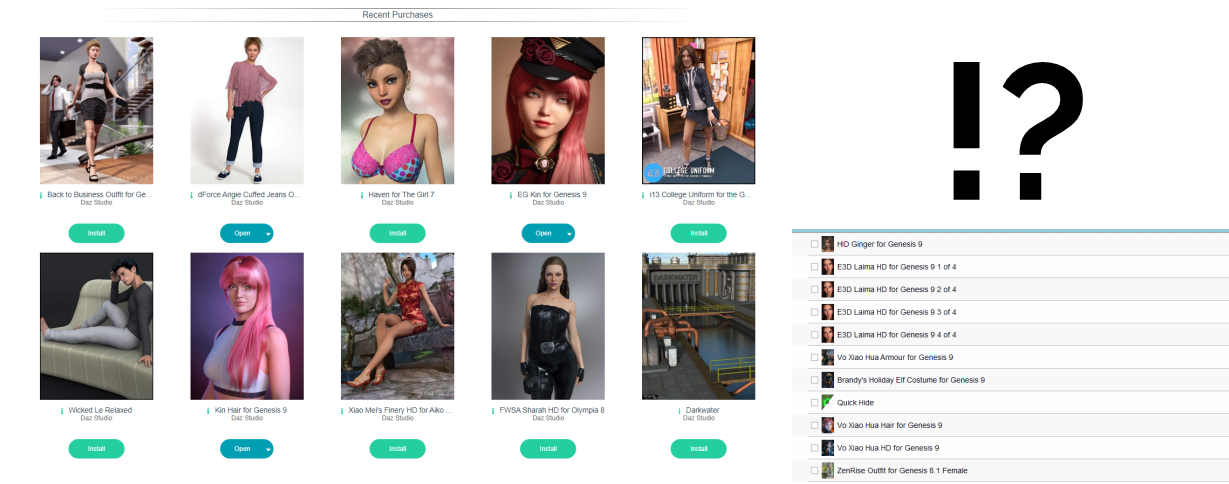
Three specific requests.1. Make the thumbnails of a decent size.
2. Make an option to display them in a grid.
3. Make an option to hide the parts of the same product so it does not repeat itself in the view.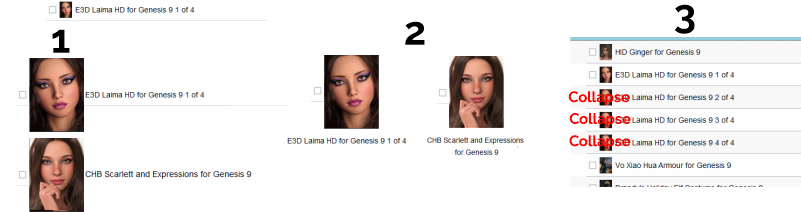
For me, Daz Central was not just an "installer". It was the way to see what models I have, what assets I could use on a project, what assets I needed to buy, etc.
Stuck installing Content Management ServiceI tried installing the 4.23 version of DAZ manually and I got stuck on installing Content Management Service. it keeps installing, installing and NOTHING. Had that for 5 mins, still NOTHING. I NEVER had this problem bfore, I always managed to install DS manually without problems. I am using no firewalls but the default Win10 thing. I can't find DAZ there to allow to go through. I don't know what chnaged or decided to cause this. So I decided to install previous version and OF COURSE same thing happens. I deleted everything thaqt says DAZ on the disk and from Users/Myname/AppData bla bla and still nothing. I even deleted from Registry. If I double click the PostgreSQL it just says to exti ALL applications that use it or somehting. What. The. Actual. F. I dont like using I hate using Daz Central, I want to be able to manually choose where to install what. I am clueless on what I did wrong to cause this [problem] and how to fix it.
"My DAZ 3D Library" folder on a network hard drive (Mac version)I have a setup where I "replaced" the original DAZ My Network Library folder with a symlink to the appropriate directory on the NAS. It works both on Mac and Win10 PC, both machines accessing the same NAS storage. I did the same with the user specific content libraries.
For DS, the paths look like they are referencing a local directory. A note of caution: for MacOS, you need to connect to the NAS using the smb protocol. AFS is case sensitive and will break.
EDIT:
to use linking, you
a) mount the network drive (see note of caution above)
b) link the DAZ shared network library (you should rename the original one!). In the termial window, you execute the command:
ln -s "/Volumes/NAS DAZ Network Library" "/Volumes/Macintosh HD/Users/Shared/My DAZ 3D Library"
c) you add the network drive icon to your Autostart Objects. This way, every time you log on, your network drives will be mounted.
However, the SmartContent files are kept locally. I am usually installing content via DIM on my Mac (only Windows-only products are installed directly on the Win10 box), so I need to re-import the metadata ever once in a while on the Win10 box. I have not found a solution yet for having a central Smart Content database.
Premier QuestionsTogire said:
If, as Richard has stated, there is only one version of DS, does that mean that the additional functionality for premier members will be plugins that are got through daz central?
If yes, this is a definite 'no way' for me. Last time I used daz central with DIM, it made such a mess that I almost had to reinstall all my content. TBH, if daz central was the only install option, I would gladly pay a subscription to get rid of it.
They are plugins, available via DIM. I'm not sure how they're going to be activated, my guess would be that you would need to log in from Daz Studio at least once a month so it can register your membership status, but there might also be an offline option.
Premier QuestionsIf, as Richard has stated, there is only one version of DS, does that mean that the additional functionality for premier members will be plugins that are got through daz central?
If yes, this is a definite 'no way' for me. Last time I used daz central with DIM, it made such a mess that I almost had to reinstall all my content. TBH, if daz central was the only install option, I would gladly pay a subscription to get rid of it.
Change file location for My LibraryRichard Haseltine said:
ronstringfellow said:
Sorry to necro the thread, but I followed these steps for the same reason as OP, and moved my library to a 5TB external drive. Now however it seems my Smart Content tab is empty. It's not a game breaker, obviously, as i use the Content Library tab for just about everything, but the smart content tab does *occasionally* make finding something faster, as i've started to amass a pretty hefty list of assets. It also appears the same is true for Daz Central. I've updated the base path location, it recognizes it as the new library on my external drive, yet the dashboard tells me that all of my assets are uninstalled. Is there a way to re-direct where these two are looking for the files? I've looked by can't seem to find a way.
Thanks.
Did you move the database, and did you update the path for it if so (and not if not).
Do you copy and paste whatever is in the C:/Documents/DAZ Studio and My DAZ 3D Library folder to the new base path folders? See DAZ 3D Documents and DAZ 3D Documents 1 & 2.
What do you select in DIM to change the path? See DAZ Basic Settings - Account.
Change file location for My Libraryashiyawolf said:
I wish I had read the full thread, because I followed the inital instructions and now my Smart Gallery doesn't work. I can add a figure and clothes by double-clidking it from Central, but I cannot get hair to add.As I searched for hair I noticed many items seem broken now.
I'm going to uninstall everything, run CCleaner to clear out remaining registry items, and re-install. I hope this will get it back to working again. But it's pretty sad that you can't move the content from the C drive. I have raids with terabytes free for content to be stored, but Daz I guess insists on just filling up my C drive.
Update: even cleaning the registry didn't help, it still remembered the old paths. I tried installing new content from Central, but Studio gave me an error that it was missing items. I had to put a ticket in, as of right now it's completely unusable.@ashiyawolf Did you end up getting it fixed?
I recently purchased a 2TB SSD and are wanting to move my content library to it.
Daz 3D is part of

Connect
DAZ Productions, Inc.
7533 S Center View Ct #4664
West Jordan, UT 84084Licensing Agreement | Terms of Service | Privacy Policy | EULA
© 2026 Daz Productions Inc. All Rights Reserved.