-
Berlin Neoclassical Architecture
richardandtracy said:
OK. It's a start...
The decorative swags are going to be a problem. May have to try them with normal maps.
Regards,
Richard
I'm quite aware, that this would not be a quick project.
Here are some shots of typical Berlin windows to those houses.
https://www.google.com/search?tbnid=oPv4ExmQRJcE7M&tbnh=0&tbnw=0&client=firefox-b-d&hs=Hl99&sca_esv=ad51375bc05ed99f&cs=1&sxsrf=ANbL-n6WxdnpEZ7q76VzK3J7_AZij6AgaQ:1773067143805&udm=2&tbs=rimg:CaD7-BMZkESXYWVxhE9DsDhM4AIA&q=Berliner+Fenster&sa=X&ved=2ahUKEwjuipDqhZOTAxWUNPsDHZxFNxQQuIIBegQIOBAA&biw=2159&bih=1271&dpr=1
What software are you using in your screenshot?
Is it Sketchup?
I looked into it, but it's rentware.OBJ Imports related questionMost of them are grouped for better handling and organizational purposes. Sometimes, not grouping objects in SketchUp leads to messing up the geometry and whatnot. However, I've tried exploding some groups and leaving the objects as they are, but doesn't seem to be helpful.
I've saved a version with no groups at all, just objects and oh boy.. not only that the file has no separate items in DS, but texture got lost and the project got white again :)).
OBJ Imports related questionAnd they are separate objects, not just separate groups, in SketchUp?
OBJ Imports related questionThe thing is that even though it is said that DS can import separate items, for me this is not happening. As shown in the attachment, I have all settings checked. Is this option app specific maybe? I mean, I'm sure it works with Blender just fine, but as advised, I'm using SketchUp and with that, it doesn't work for sure.
OBJ Imports related questionWell, I'm completely lost now. I've tried it with a completely new object with a simple texture and the same happens. The model is white... I thought of the MTL file as well, meaning that the pathfiles are either corrupted or something is missing, but creating a new model should've excluded this. I'm not sure what to do..it was working well before the update..
Regarding grouping, it seems that SketchUp OBJ's don't separate objects, but exporting as 3DS do. I'll go with that instead.
OBJ Imports related questionI've found no issue with both DS 2025 Alpha and 2026 Alpha when importing OBJ + MTL files. Diffuse texture maps are shown correctly in Viewport... There should be no change in OBJ Importer of DS 2026.... not sure why DS 2026 failed you.
As for grouping, starting from DS 2025 Alpha, OBJ Importer gives a new option of Read Objects, which can read OBJ file that contains Separate Objects. It now works well with my Blender workflow i.e. I save multiple items as an OBJ file with exporting materials in Blender, then DS 2025/2026 can import the OBJ file as multiple objects with assigned texture maps + correct surface names, so far so good ~
But I know nothing about SketchUp... not sure if it can save an OBJ file with data of separate objects ...
OBJ Imports related questionHello!
I'm in need of a little help here to understand better file importing and how to work with OBJ's correctly in DS. The host tool I'm building a scene is SketchUp and I'm exporting the model as OBJ with the settings shown in the attachment.
Everything was working perfectly until I've updated DS 25 Alpha to DS 26 Alpha and now all my imports are looking white. It's like DS doesn't load the textures or something. Environment and other settings are unchanged and working with DS models works just fine. It only started affecting OBJ's.
Also, does anyone know if there's anywhere an option in DS to display an OBJ with its original grouping/tag settings? I mean, currently an imported OBJ only comes with its name and that's it. Everything is grouped together and can't work with its components like a table or a picture at all. The only way I can see the model's details is under "Surfaces", but that's not exatly what I'm looking for..
I don't know if any of this makes any sense, but it would be awesome if someone could help in any way.
Thanks!
Hexagon open sourceInteresting thought and thread.
Loved Hexagon and found it simple to learn. Prior to Hexagon I tried Sketchup which I found very awkward to use and created awfull topology. Later switched to Wings3D which I also found easy to learn. Wings3D lacked some tools which Hexagon had, so I jumped ship. I only stopped using Hexagon in favor of Silo as on later Windows versions, Hex was unstable to use.
Silo was also easy to learn yet lacked some of the tools of Hexagon.
I now use Blender, MOI3D and 3DCoat.
Vanilla Blender lacks some of the cool tools Hex has but there is a rich library of add-ons for Blender which can remedy this situation
Blender does have a better subdivision workflow which I did not find stable in Hexagon.
Groboto3D was fun but no longer being developed.
I would welcome further development of Hexagon3D for stability issues.
DAZ3D to Vue PluginThere was a Poser to Vue and Sketchup to Vue plugins when E-onsoftware was publishing Vue.
I can not remember if the Poser plugin was developed by E-onsoftware of Poser.
The Sketchup plugin (actually a script) was developed by a Vue fan/creator and sold on the old Cornucopia3D site.
There was a post on "Vue Galleries" on Facebook which seems to back your thought Vue may become "opensource" via Bentley (present owners of Vue).
Love Daz but lately it has been giving me issues with large scenes. I use Blender and Vue but I am more comfortable with Vue.
Plus I would have to purchase several Blender-addons to give me some of the features of Vue, especially plants and ecosystems. And Vue's material functions are so much easier than Blenders.
Hexagon open sourceYou’re absolutely right, “more efficient” really depends on what you’re most familiar with. Many architects naturally choose tools like Rhino, SketchUp or 3ds Max because they’re well-established in that field and fit architectural workflows very well.
For me personally, Hexagon has always been more of a hobby tool. I just enjoy that old-school vibe, and it’s also a bit nostalgic since my father and I used to experiment with Hexagon together for fun. In that sense, it’s less of a pure modeling tool for me and more of something I feel emotionally attached to. I use Blender too, of course, but Hexagon still feels a bit like home.
That’s why I appreciate having so many different programs to choose from: everyone can work with whatever feels most intuitive, whether it’s cutting-edge or pleasantly old-school.
In the end, the result is what truly matters, because all these tools are simply there to help us express our creativity. I always say that you can create a beautiful sketch with a simple pencil just as well as with a Montblanc.
Hexagon open source"More efficient and much faster" is relative to the application you know better. Someone who worked in Blender and switched to Hexagon would most likely say the same about Blender over Hexagon, especially when it comes to applying the tools in question. If you know Blender well, the hotkeys and quick access to the tools make it very fast for modeling. I used to think 3dsmax was so much more efficient than Blender when I first switched, but then once I really learned the tools and hotkeys in Blender, it became evident that it was at least as fast as Max was.
I agree, though that there aren't many people using Blender for architecture. There might be even less (aside from you, of course) using Hexagon for such things. I think polygon-based modeling packages in general are really only used for visualization in that field. Correct me if I'm wrong, but I think Rhino, SketchUp, and some other solid modeling packages are far more popular in Arch Viz. 3dsmax might be the only exception.
Can you help me with a college project?Oooh... Questions!
1- How long have you used Daz 3D Studio?
A: Approximately 17.675 Earth years. This is without accounting for temporal variations due to chronometric phase variance or progressive orbital oscillation within the galactic plane. Probably.
2- Do you use any other software with Daz 3D? (bridges, photo editing, or other rendering software?
A: Yes... Blender, SketchUp, Hexagon, Poser, Bryce, Nomad Sculpt*, Valance3D*, Sculptura*, MeshMixer, Photoshop, GIMP, Krita, Inkscape, Procreate*, Pixelmator*, Sketchbook*, UltimateUnwrap, Filter Forge, Kerkythea, ... That's most of them, not counting ones I have that I very rarely use for a specific purpose
3- How easy or difficult was it to learn Daz Studio?
A: I learned it a long time ago and I have a terrible memory... I think it was semi-decently-easyish to learn... I actually learned Poser first (via books and magazines), but with DS there were lots of wonderful helpful people here on the forums that shared their knowledge and wisdom when I asked questions.4- Did you have to purchase a specific computer to use the application?
A: No, but over the years I've tried to buy a computer that is at least a little good at rendering... honestly they've mostly been mid-range computers... no expensive graphics cards or high end graphics capabilities.5- How much money have you spent at the marketplace or other third-party sites for content?
A: That's classified information. Also I have no idea.6- What kinds of bugs or errors have you ran into?
A: Mostly spiders, but they are arachnids... errors... lots over the years... the main issue I feel is that by the time I catch up to everyone else computer-wise, DS has gotten more complicated and I'm always rendering at the same speed... but the plus is most of the bugs that I've encountered are easy to deal with because they are old news by then.7- Is there anything you would change about the application?
A: Quite a few things, but I gave up long ago on hoping for things I'd like to see implemented... I used to have a list somewhere (for surveys and stuff), but none of that every came to be (they weren't weird things, lots of other people wanted them too)... one of the things I'd love to see is a decent manual... I feel like once upon a time the community would have really come together to help make a good user manual, but I feel like that ship may have sailed over the past few years. It seems like most people are happy with random YouTube tutorials and paying for video courses (I'm not a fan of videos for lots of reasons).
Disclaimer: DS used to be a big deal to me, but for various reasons I'm only faintly interested it these days.Exterior of West Park and the groundsI grew up at Belmont in Surrey, now classed as being in Greater London. My dad worked as a steam boiler stoker in the Belmont/Henderson hospital which was one of the many old gothic psychiatric hospitals in Surrey and had been a former workhouse in Victorian times. From our house we had almost exactly this view of the Belmont Hospital:

A mile or two away near the village of Banstead was the Banstead psychiatric hospital which looked like this:

Then there was the Epsom cluster of psychiatric establishments which included the West Park one. There are more pictures and links from the Wikipedia pages for each of these hospitals.
A good way to find outsides for the Jack Tomalin West Park is by searching for "psychiatric hospital" on the Trimble/sketchup warehouse. Then edit the downloaded buildings in Sketchup. Also, if you have Carrara, there's a freeware plugin by Inagoni called Architools which can make buildings in Carrara and export them. Downloadable for free from github. https://github.com/Chaplier/inagoni/releases/tag/v1.0?fbclid=IwAR3lM3yptVqAqC6-z4AISXXDEboBuyb0Ipr54jOZbzzdFn44PQlPlegqgEk
Another way is to cheat. One time I used parts of the Dream Home, splattered it with grunge and pretended it was the outside of West Park. I put Grovebrook House in the background. It looks close enough if you're only driving in the gateway and then entering the front lobby.
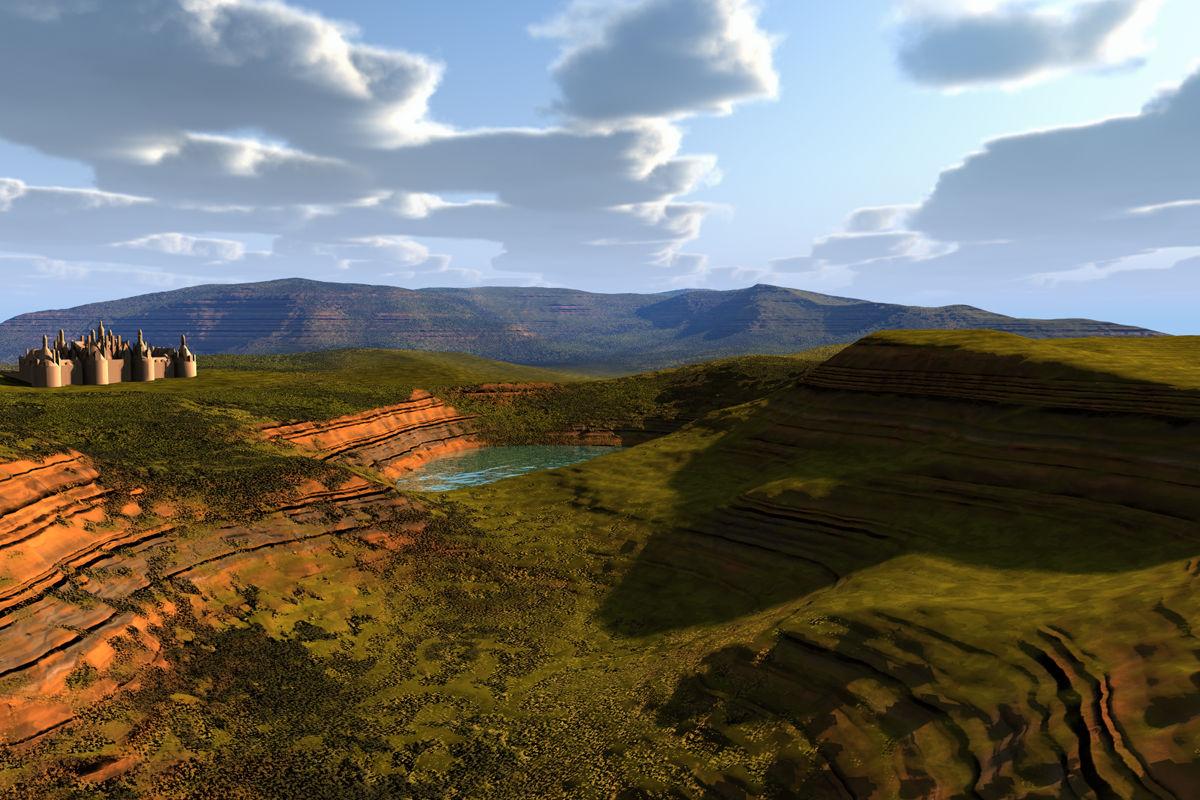
Show Us Your Bryce Renders Part 13The terrain was self made and given a material from Gritstone Hills and High Resolution Terrains 2. The castle is the Château de Chambord from SketchUp and the lake a 2D-Disk with my water material. The clouds from the CloudSphere1 and the ambient light by the belonging SkySC1 HDRI from the Sky Toolbox and the key light by the sun.
 Star Wars Renders 2013 +
tkdrobert said:
Rogue7 said:
Awesome pics tkdrobert where did you find the ship?
Sketchup.
Great job
Star Wars Renders 2013 +Rogue7 said:
Awesome pics tkdrobert where did you find the ship?
Sketchup.
Help with creating clothes, a house and other stuffthis might suit you then too
I haven't used it but for houses it's popular
are tutorials on Youtube
https://youtube.com/playlist?list=PLtu3HarR0EUZwMcTm1JzTmo4yCfNuUtCg&si=tVUFcF7QxWmkjz_U
looking it's as easy as Sketchup or Architools in Carrara
 Help with creating clothes, a house and other stuff
well I started in 2009 using Google Sketchup which was free with no computer experience whatsoever let alone 3D modeling
sadly Trimble bought it and it's ridiculously expensive now
I moved from there to Carrara, back then using iClone and Poser
clothing wasn't something I really did, just props but now that's fairly easy too in D|S4 with Genesis# figures and Dforce, you can literally even drape simple shapes and have them look good
Closets, drawers and vanity mirrorI made a closet set with drawers and a vanity mirror in Sketchup, imported into Daz as FBX. I replaced bulbs around the mirror with a single LED strip to be a little more modern (modify the emissive on the mirror object to change the lighting). The individual drawers can be "opened" by selecting a drawer and changing the Z coordinate. The cupboard doors can be opened and closed by using the rotator nulls for each door (rotating on Y). Drawers are instances, so modifying the parent instance materials will modify all of them. The closets are duplicates, to enable the null rotation for opening them (the simplest of rigging). The materials themselves are basic Daz Uber variations.
Zip is a Scene Subset, so just unzip, copy/paste into library somewhere and merge into a scene. Note, the padded blocks sofas in the scene render are another of my freebies, here.

 Converting matching objects to instances?
Anything happen with this? My idea is you select the first item, then select a bunch of other items and it replaces the other items with instances of the first, retaining the position and orientation of the other item. That would be easier than trying to do a match on all properties.
e.g. use case right now I imported a wardrobe with about 20 drawers I made in Sketchup - each drawer has a handle. I imported fbx so I basically got one mesh per drawer. The drawers are identical (except position). It would be nice to select them all and "convert to instances", or something.
Daz 3D is part of

Connect
DAZ Productions, Inc.
7533 S Center View Ct #4664
West Jordan, UT 84084Licensing Agreement | Terms of Service | Privacy Policy | EULA
© 2026 Daz Productions Inc. All Rights Reserved.