-
Let's talk about Holden
3DIO said:
Still not a fan of OmniShader, although I suppose it could be my lagging old system taking the joy out of using it.
There are many different unrelated shaders beginning with the prefix Omni, so I would advise to avoid saying "OmniShader" because it is not clear which one you are referring to, especially when we are already discussing two in this conversation (OmniSkin and OmniHair which are essentially unrelated).
I will remark that I only deployed the OCN OmniSkin because I believe it is better but longer render time is a known drawback, especially notable for those with non Nvidia card or slower machine. There are other issues with the shader, which \we have been discussing at length in the OmniSurfaceBase thread on this forum.
When I was preparing the materials for PBRSkin, I tried to ensure that it was close enough to the OCN Omniskin, so I would suggest just using the PBRSkin material. Because its not like I made one good material and then phoned in the other. I also made that one look appropriate...
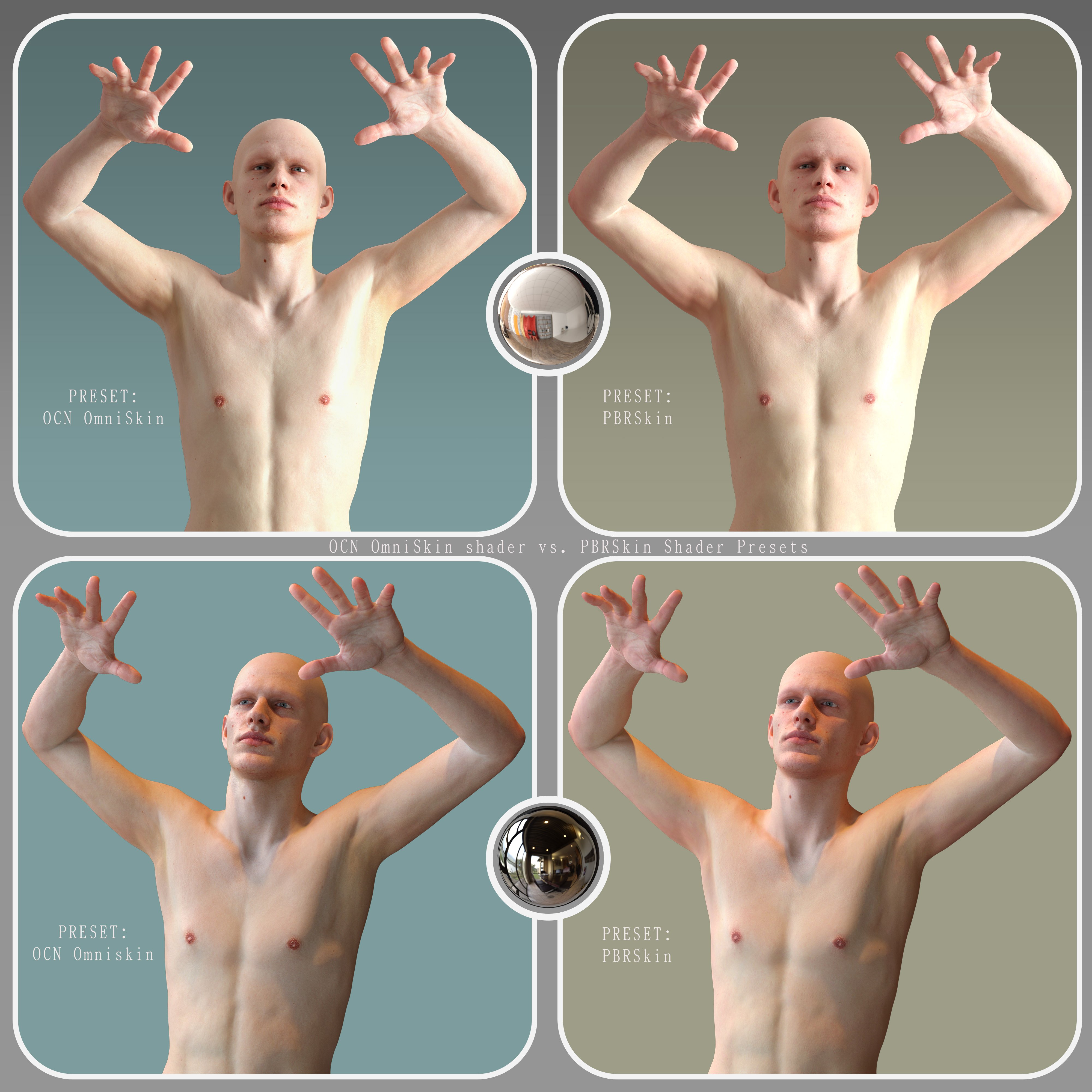
It is possible to get PBRSkin looking close to OmniSkin with much effort (see attached). The problem when setting up materials with PBRSkin (and Iray Uber had the same exact problem) is that PBRSkin is highly dependent on the Translucency Color map, where even minor changes in color values will lead to drastic changes in the skin appearance. This makes fine tuning the skin on PBRSkin and Iray Uber infuriating. The Translucency Color map used for those two shaders is also necessarily lacking in detail because it has to be washed out/blown out vs the main color map, and this means that the final skin lacks a certain level of detail. For OmniSkin you can keep all the important detail in the color map because it doesnt use a "Translucency Color" map at all let alone a washed out one, and the maintained detail is borne out in the final result.
Too late to salvage the current render, but I'll have a try tomorrow in post (it's currently around 2:30am here).
Nice to see a masculine-looking male, by the way. It's annoying the amount of effeminate-looking males on the store, so it's good to see a character like Holden!
6 forum references but only 1 is usefulWhen I encounter similar results, I ask DAZ AI. It's a huge help for finding products and even better for searching the forum than the forum search.
6 forum references but only 1 is usefulhttps://www.daz3d.com/forums/discussion/comment/9343261/#Comment_9343261
Interested in Dynamic Wind Rigs for dForce Cloth Dynamic Wind Rigs for dForce Cloth | Daz 3D so I go and check forum references. Looks great! there are six, a whole discussion. The first post just mentions that 2 products are on doorbusters. ALL of the following posts are about the other product. No one even mentions the product I am thinking of buying. Somedoys the internet conspires against me.
Daz Studio | M1 Mac System Running Windows Through Parallels Desktop | AppStartup Consistent CrashesM1 mac is going to require a lot of overhead to get windows 11 running, it's emulating and converting code. Intel Macs had the advantage of running windows variants natively with x64 cpus. ARM processers are different. Even if you're not using your mac, it's using resources to keep the vm software running and maintaining a lot of heavy lifting to do minor things. It's possible the anti-virus API built into mac; Xprotect is picking up something it doesn't like, or Xprotect is fighting against Windows Defender; two AV's running at the same time, sandboxed or not can cause incompatibility. you can disable xprotect (and defender) but I do not recommend it and you will need to do your own research, I won't assist anyone to try and work around that compromise security. You can also look at apple gatekeeper as a culprit. I wrote an user article on the mac user support site on that thing, damned if I can find it. Having an Intel Mac, and M1 mac and a Windows build I will always default to the windows before I vm or bootcamp on a mac, and I only bootcamp for lab tests. This is probably not what you want to hear but this is my $0.02 on working with Macs and Windows and virtualizing. ARM is really good for virtualizing Linux distros built for ARM, but Apples switch to ARM really handicapped windows flexibility.
windows error logs are in the event viewer (Start search box, start typing "event viewer"), the Mac its in Applications/Utilities/Crash Reporter or something like that. I'm on my PC, procrastinating mowing my lawn in a heatwave.
EZFinder - Advanced Content Manager for Daz Studio [Commercial]mindsong said:
great news, all - thanks for the responses and your consideration of my/our inputs.
coming late to this party, i have some suggestions and feedback based on the current version, but I'd like to base any forward thoughts off of your latest version, so I'll happily wait. You've likely fixed or updated many of the suggestions I've got.
(and Mosk, your suggestion about duplicates is great. Given the possible side-effects for the variety of our use-cases, it was worth the mention to Rex.)
looking forward to the new version!
best,
--ms
I added a global Dedupe Folders button, and you can also right-click on a folder and remove duplicates that way.
The leak was plugged that caused duplicates and you now also have a global Dead Content button for those who have content with broken links.
You can also right-click on a folder and search for dead content and remove it that way.
These features must be used with caution. Make sure you save all tabs first before ever using these buttons just incase the result is not as expected.
 Get all new feature requests in before this update is placed. It may be a while before the next update comes around.New Year, New Sales Thread: Report Issues Here 4 "Reporting Only"
I see the sale now, but STORE WIDE should mean as it means at the other store that shall remain nameless, STOREWIDE.
Does not say excludes new releases. I'm dying to buy the high leg cut leotard from a few ds ago , was hoping for a wishlist sale for new releases.
Wrong thread but how do I set my signature picture? googled and search the forums - nothing. I see it in the settings window for signature, it's not too big or anything, just refuses to be seen at the forums.
Edit, for some reason this artw worked better as a signature, the other was not too big either but refused to load. Sorry to take up space for this in the report thread. Delete this post if it's not allowed.
Would love a tutorial on how to set the image though.
[SOLVED] Thumbnail Mysteryjecswp said:
I have a couple hundres files that don't have thumbnails. I'll fix them as they pop up in a search and catch my attention. I use the following instructions and it always works perfectly -
1. Select the product, right click and select "Browse to folder location"
2. Drill down to Runtime/Support and select, copy and paste into the folder the icon .jpg file
3. Rename the copied file to 1_.jpg The SKU is already in the name so just add the 1_ in front of the SKU and delete everything else.
4. Move the file to ...My Daz Connect Library\data\cloud\meta I have a shortcut to the meta folder setup and just move the file to the shortcut'ed folder.Until today . . .
I performed the procedure on this product dForce FE Straight Bangs Long Strand-Based Hair for Genesis 9, 8 and 8.1 and the thumbnail refuses to show. It shouldn't bother me so much, but it really does. Any guidance in regards to what files/settings to look at to fix this would be greatly appreciated.
I use a similar process to add thumbnails to 3rd party products that I install manually – mostly from Renderosity or RenderHub. Once I copy the files to my Daz Studio the files stall the files, I then Create a Product from the Content Library files. I make sure that a copy of the desired jpg file has exactly the same name as the dsx file that is created and I place that jpg file in Runtime/Support. My thumbnails are significantly bigger than the too tiny thumbnails that are created from DAZ3D zip files.
On occasion, I have had the issue of a thumbnail not appearing in Smart Content once I’ve created it and placed it in Runtime/Support. I have found in almost every case that the jpg file had an opacity setting. If I reopen the problematic jpg file in Microsoft Paint and then use Save As (not Save) to save it again as a jpg file, I usually get a popup window warning me that if I continue, the opacity setting will be lost. Once I complete the Save As and place the newly saved jpg file in Runtime/Support, the thumbnail appears in Smart Content.
Content Library v4.24 and v2026Ah, I didn't pay attention to what forum section it was in. Since the user had so few posts, I assumed it was a new user kind of question.[Coming Soon] Content Catalog - Windows/macOS (Commercial)Umi no Senshi no Ishi said:
Is the search path for the zip files editable?
I move my downloaded zips from DIM to a NAS as a backup and to not takeup space on my Daz hard drive.
Would I be able to set this up to look at my NAS for the content to catalog?
I realize this would probably reduce perfomance.Yes, one can add multiple paths.
[Coming Soon] Content Catalog - Windows/macOS (Commercial)Is the search path for the zip files editable?
I move my downloaded zips from DIM to a NAS as a backup and to not takeup space on my Daz hard drive.
Would I be able to set this up to look at my NAS for the content to catalog?
I realize this would probably reduce perfomance.Content Library v4.24 and v2026I think he wants to know how to do it for use within a script. This is the script developer forum.
[Coming Soon] Content Catalog - Windows/macOS (Commercial)crosswind said:
I can't believe DS still packs 114x148 product thumbnail images into IM packages nowadays ~
Does the app have the features, like:
1) Filter by Stores ?
2) Jump to DS to open the Product folder in Smart Content or Content Lib ?
3) After Editing tags, the data will be posted to cms ?
4) The performance of rescan ? How long does it take to scan the libraries with 40K+ products? Or, it uses delta scan ?Thank you !
I can only add to the excellent answer provided by barbult.
1. It depends on how the prefix of the DIM packages from other stores are named. Mine are e.g. Rendo, RenderH and one can do a search for that.
[Coming Soon] Content Catalog - Windows/macOS (Commercial)One of the things I found useful, is the ability to select a product and click Open Containing Folder. That opens my DIM Downloads folder with the selected product Zip file already selected. Searching my DIM downloads folder with Windows 11 search is impossibly slow. Content Catalog is lightning fast to find that file. This is real useful for backing up a particular product Zip file before updating the product in DIM. There have been too many instances lately of DS6 updates breaking DS4 functionality of the same product. (I do keep a daily complete computer backup on NAS, but just making a copy of a single Zip file is quicker and easier than recovering that file later from the NAS if it gets overwritten by a bad DIM download.)
[SOLVED] Thumbnail MysteryI have a couple hundres files that don't have thumbnails. I'll fix them as they pop up in a search and catch my attention. I use the following instructions and it always works perfectly -
1. Select the product, right click and select "Browse to folder location"
2. Drill down to Runtime/Support and select, copy and paste into the folder the icon .jpg file
3. Rename the copied file to 1_.jpg The SKU is already in the name so just add the 1_ in front of the SKU and delete everything else.
4. Move the file to ...My Daz Connect Library\data\cloud\meta I have a shortcut to the meta folder setup and just move the file to the shortcut'ed folder.Until today . . .
I performed the procedure on this product dForce FE Straight Bangs Long Strand-Based Hair for Genesis 9, 8 and 8.1 and the thumbnail refuses to show. It shouldn't bother me so much, but it really does. Any guidance in regards to what files/settings to look at to fix this would be greatly appreciated.
[Coming Soon] Content Catalog - Windows/macOS (Commercial)barbult said:
I had the chance to test this and provide feedback during development. I found this to be really useful. I can find things so much faster than trying to search the Product Library or guess what to enter in a Smart Content or Content Library search.
For example, I want to see what Alessandro_AM products I own.
- Maybe I don't remember exactly how to spell his name. I type Al into the Creator entry box. Immediately Content Catalog starts to show me the names of creators that start with Al. I see his name in the list and click on it. Instantly, I see all the thumbnails for every Alessandro_AM product I own (79 of them, it turns out!).
- But I only care about products for Daz Studio right now. I can go to the Formats drop down box and select Daz Studio, instead of the default of All Formats. Now it shows me the 59 Daz Studio Alessandro_AM products. Gee, I see a bunch I don't even remember I had.
- There is Koala by AM. I left click on the Koala thumbnail and Content Catalog shows me the details panel about the Koala product. I see that the tags include the word Iray. I wonder whether Koala uses LAMH, LAMH Catalyzer, or dForce hair.
- So, now I double click on the Koala thumbnail, and Content Catalog opens the Koala product online readme file in my default browser. I don't have to go searching for the readme; there it is for me right away. I look through the readme file and see that it has LAMH and LAMH Catalyzer hair, no dForce hair. So now I know.
- I didn't have to boot up Daz Studio at all to do any of this. I didn't need to dredge through my online Product Library. The only reason I even had to be connected to the Internet was to access the online Daz readme file.
- So now that I know the product uses LAMH and LAMH Catalyzer, I think I add a note about that in Content Catalog. Since I have the readme open, I just select and copy that comment from the readme file and paste it into the Notes section of the Koala product details and click Save Notes. If I ever wonder about this again, I have the note right there.
- I can even search for LAMH or Catalyzer in the future and Content Catalog will find my added comment in my notes and show me the Koala product thumbnail, as well as the thumbnail for the Catalyzer plugin and the Catalyzer User Guide.
- While looking at the Koala thumbnail, I see that it is a little blurry (low resolution). So I click on Fetch Thumbnail from DAZ in the Content Catalog details and it fetches a clearer thumbnail for me. Content Catalog will use that better thumbnail from now on. I could even choose to Replace Thumbnail with any image I choose. Some products, especially old Poser products have crummy thumbnails that don't really show what the whole product is, so I can replace it with something else. I can even set it back to the original thumbnail with a single click on Reset Thumbnail to Auto, if I decide my fetched or replaced thumbnail is not a good choice.
This is all much easier than it seems, with all my verbose explanation here. The PDF manual is very helpful to discover all that this product can do.There is a lot more that Content Catalog can do, than this one example.
I had my thumbnails sorted by Download date, recent first. There are many other choices, alphabetical, SKU, etc.
I see it works with other stores too. But what if I have content from stores that are no longer in service like sharecg, hivewire? I've created a bunch of custom DIMs for those store products, i probably have hundreds of products from sharecg, hivewire installed via DIM. Will this work with all of those too? I ask because I see @barbult mention the need to be connected to the internet to access the "read me files" for the Daz store products. So I am wondering if this app needs access to other stores databases for info as well. Can it show me the read me files from Renderosity for example? I'd really like more info on how it works with those 3rd party stores, both offline and online stores.
[Coming Soon] Content Catalog - Windows/macOS (Commercial)I had the chance to test this and provide feedback during development. I found this to be really useful. I can find things so much faster than trying to search the Product Library or guess what to enter in a Smart Content or Content Library search.
For example, I want to see what Alessandro_AM products I own.
- Maybe I don't remember exactly how to spell his name. I type Al into the Creator entry box. Immediately Content Catalog starts to show me the names of creators that start with Al. I see his name in the list and click on it. Instantly, I see all the thumbnails for every Alessandro_AM product I own (79 of them, it turns out!).
- But I only care about products for Daz Studio right now. I can go to the Formats drop down box and select Daz Studio, instead of the default of All Formats. Now it shows me the 59 Daz Studio Alessandro_AM products. Gee, I see a bunch I don't even remember I had.
- There is Koala by AM. I left click on the Koala thumbnail and Content Catalog shows me the details panel about the Koala product. I see that the tags include the word Iray. I wonder whether Koala uses LAMH, LAMH Catalyzer, or dForce hair.
- So, now I double click on the Koala thumbnail, and Content Catalog opens the Koala product online readme file in my default browser. I don't have to go searching for the readme; there it is for me right away. I look through the readme file and see that it has LAMH and LAMH Catalyzer hair, no dForce hair. So now I know.
- I didn't have to boot up Daz Studio at all to do any of this. I didn't need to dredge through my online Product Library. The only reason I even had to be connected to the Internet was to access the online Daz readme file.
- So now that I know the product uses LAMH and LAMH Catalyzer, I think I add a note about that in Content Catalog. Since I have the readme open, I just select and copy that comment from the readme file and paste it into the Notes section of the Koala product details and click Save Notes. If I ever wonder about this again, I have the note right there.
- I can even search for LAMH or Catalyzer in the future and Content Catalog will find my added comment in my notes and show me the Koala product thumbnail, as well as the thumbnail for the Catalyzer plugin and the Catalyzer User Guide.
- While looking at the Koala thumbnail, I see that it is a little blurry (low resolution). So I click on Fetch Thumbnail from DAZ in the Content Catalog details and it fetches a clearer thumbnail for me. Content Catalog will use that better thumbnail from now on. I could even choose to Replace Thumbnail with any image I choose. Some products, especially old Poser products have crummy thumbnails that don't really show what the whole product is, so I can replace it with something else. I can even set it back to the original thumbnail with a single click on Reset Thumbnail to Auto, if I decide my fetched or replaced thumbnail is not a good choice.
This is all much easier than it seems, with all my verbose explanation here. The PDF manual is very helpful to discover all that this product can do.There is a lot more that Content Catalog can do, than this one example.
I had my thumbnails sorted by Download date, recent first. There are many other choices, alphabetical, SKU, etc.
[SOLVED] Dicktator doesn't workI would also suggest you post the issues on renderotica forum > meipe product support. There're lots of folks having the related domain knowledge.
[SOLVED] Dicktator doesn't workI would suggest to post in their forum. Meipe has a support thread.
Content Library Search EngineRichard Haseltine said:
matt.fiorese said:
Richard Haseltine said:
matt.fiorese said:
Richard Haseltine said:
matt.fiorese said:
jmucchiello said:
matt.fiorese said:
Hello Richard, and thank you for your reply.
So I guess I have no other choice than either reverting to version 4 (uninstalling the current one, cleaning up, reinstalling a fresh version) or retrying with version 6 (with the same passages as for version 4).Or run them both together. I have both DS 4.24 and DS 6 running simultaneously on my workstation most of the time. The only trouble this brings is if you are doing renders in both. (Even if it isn't at the same time.) I can't imagine running DS6 exclusively with all the plugins still in need of updates.
OMG, then I guess my original sin is to have ditched DS4.24 and kept only DS6, I'll try to re-install it and see. Thank you for the suggestion.
Just checked: DS4.24 content search engine works just fine. I guess DS6's needs a few tweaks but...It seems to be an oddity, search works (apparently) normally for me in DS 6, so it would seem that soemthing is interfering with it on your system (database issue, though I would expect that to affect DS 4 too, or some particular add-on, setting, or even piece of content (perhaps one that is visible to one version and not the other).
I agree on the oddity, yet I ran several searches through DS4.24 and don't know why, but it works.
Are the content directories the same?
Yes, they are the same, or at least it's what I can see. Both programs access the very same content directories. Do you believe there might be something interfering at this stage?
It seems likely, I am certainly getting the same results in DS 4 and DS 6 on quick tests.
Hello Richard. The funny thing is that this mess started after I uninstalled DS4 and went on to use only DS6, then upon suggestion from another user in this conversation I did reinstall DS4.24 and the search function in it worked just fine. Ah, the oddities of computer programs.
How did you discover Daz/Poser?Somehow I got Poser 1 in 1995 as a free product. I wasn't interested in graphics at the time, so my reaction was "that's interesting" and I put it aside. In 2003 or 2004 I got into a software-oriented forum; there was a graphics sub-forum I started following. In September of 2005 (I think) someone posted two items - Poser 6 was out, with a significant discount if upgrading from Poser 4, and Amazon had Poser 4 for sale at a discount that made it viable to buy Poser 4 and upgrade to 6. Someone else pointed out that DAZ was offering Michael 3 and Victoria 3 base for free.
Two weeks later I was blundering around in Poser with V3 and M3. Never did get the hang of Poser even with the Doctor Geep tutorials. DAZ came out with Studio version 0.9 (I think) - I fired it up and the whole UI made much more sense, and I dropped Poser like a hot rock.
Daz 3D is part of

Connect
DAZ Productions, Inc.
7533 S Center View Ct #4664
West Jordan, UT 84084Licensing Agreement | Terms of Service | Privacy Policy | EULA
© 2026 Daz Productions Inc. All Rights Reserved.