-
-
-
-
$99.99
Optional License Add-Ons:
$1.99*Unless otherwise specified, no discounts or offers will apply to License Add‑Ons.
Optional License Add-Ons:
$1.99*Unless otherwise specified, no discounts or offers will apply to License Add‑Ons.
-
Details
Blender T.V. Studio (DAZ to Blender Edition) is a massive Blender production system with 1,000+ new buttons designed to make Blender faster, easier, and more enjoyable across every major part of production.
Formerly known as FAST Animation Studio Tools, Blender T.V. Studio has been rebranded into a cleaner DAZ Studio-focused edition with a much better price. This is not just one add-on. It brings together major Blender production workflows, including DAZ Studio, Mixamo, AWS parallel rendering, Seedance, Google Veo, Kling, Runway, and OpenAI scripting and assistant tools. Beyond those major systems, Blender T.V. Studio adds 800 more buttons and workflow optimizations that improve literally everything in Blender.
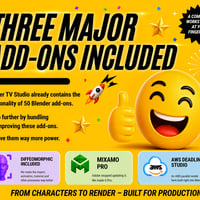
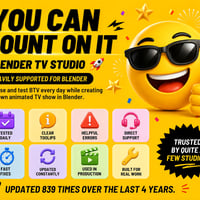
We have been building this system for over 3 years, and we use Blender every day. Every time something in Blender felt slow, repetitive, confusing, or harder than it needed to be, we wrote code to make it better. These are the tools we always wished Blender had, built to improve every major Blender workflow. We like to describe Blender T.V. Studio as 50 Blender add-ons in 1. Since the original DAZ Store release of FAST Animation Studio Tools, we have added over 70,000 additional lines of code, and the current installed add-on is over 3 GB in size.
Blender T.V. Studio bundles the Diffeomorphic add-on and greatly improves its DAZ Studio import and production systems. Import Genesis 3, Genesis 8, Genesis 8.1, and Genesis 9 characters, props, environments, materials, morphs, and animations into Blender, then add Mixamo body animation, lip sync such as Mimic or Azure, pose-preset animation, or any combination of face and body animation sources during import.
Blender T.V. Studio also includes Mixamo Pro, our enhanced Mixamo workflow for Blender. We keep Mixamo Pro updated for newer Blender versions and make it more professional for real production use. You can add Mixamo animations to the same action or different actions, add animation at the playhead or a specific frame, apply Mixamo animations pose by pose for faster manual animating, mirror hand animations, download all Mixamo animations in one click, and bulk import Mixamo FBX files.
For rendering, Blender T.V. Studio includes our AWS Deadline Studio Parallel Rendering workflow. Using multiple parallel computers at once, you can render an eight-second Cycles animation in about 20 minutes, turning a long render into a much faster distributed render job. (Depending on the scene and setup.)
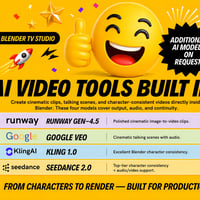
Blender T.V. Studio also includes built-in AI image and video generation tools for using Blender renders, DAZ Studio iRay renders, character images, green-screen footage, or finished video renders in AI-enhanced production workflows. Supported workflows include Seedance, Google Veo, Kling, Runway, and the Nano Banana Image Editor for cinematic video, image-to-video, video-to-video, character consistency, green-screen workflows, image editing, upscaling, and short TV-style scene generation.
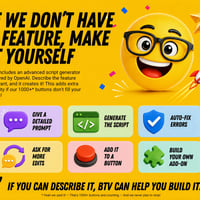
The add-on also includes OpenAI-powered scripting tools, agent-style automation, multi-line tooltips, and a built-in AI documentation system, so you can generate Blender Python tools, fix errors, assign scripts to panel buttons, and ask questions about Blender or our add-on anytime you want.
Blender T.V. Studio is built for DAZ Studio artists, Blender creators, animators, AI filmmakers, and anyone who wants to import faster, animate faster, render faster, generate faster, and create better video content with less friction.
Import faster. Animate faster. Render faster. Generate faster. Create better videos.
What's Included and Features
-
Bundled Diffeomorphic Add-on
- Official DAZ to Blender Bridge
- Includes 300+ Powerful DAZ Tools
- Top Add-on for DAZ Studio Assets
-
Bundled Mixamo Pro Add-on
- Mixamo Pro Updated for Blender 5.1+
- Download All Mixamo Anim in 1-Click
- No Mesh Distortion on Re-Applying Anim
- Better Apply Animation to Control Rig
- Append and Animate
- Append and Transfer
- Append and Pose
- Mirror Hand Poses Left to Right
- Mirror Hand Poses Right to Left
- Add Animation to Same Action
- Add Animation to Different Action
- Add Animation at Playhead
- Add Animation at Specific Frames
-
Bundled AWS Deadline Studios
- Render Fast Using AWS
- Submit Parallel Renders Using AWS
- Use AWS Render Farm from BTV
- Perfect for Heavy Cycles Renders
-
DAZ Studio to Blender Import
- (Imports Genesis 3, 8, 8.1, and 9)
- (Imports Environments & Props)
- Import Character with Pose Preset
- Import Character with Azure Lip Sync
- Import Character with Mixamo
- Import Character with Pose Preset + Azure
- Import Character with Pose Preset + Mixamo
- Import Character with Azure + Mixamo
- Fine-Tune Auto Lip Sync for Better Imports
- Auto Backups for Imported Characters
- Reimport Backups Anytime
- Open|Close DAZ Studio Buttons
- Open Assets in DAZ Studio from Blender
- Mixamo → DAZ Studio Retargeting
-
Create Your Own Blender Features
- Use AI to Generate Scripts in 1 Click
- Detect and Fix Errors Automatically
- Save Scripts as Permanent Buttons
- Auto Fixes Scripts in the Text Editor
- Ask Blender Questions Using AI
- Ask Addon Questions Using AI
-
Better Lighting Tools
- Edit Multiple Lights with Nudge
- Edit Individual Lights with Nudge
- Add Multi-Light Setup
- Add Three-Point Setup
- Parents Three-Point Setup to Object
- Add Ambient HDRI in One Click
-
Better Camera Tools
- Transform Cameras with Nudge
- Turn-Off Overlays During Transform
- Cycle Cameras Forward
- Cycle Cameras Backward
- Add Camera Centered to View
- Move Current Camera to View
- Move Current Camera to View and Keyframe
- Add or Move Cameras Aimed at Faces
- Auto-Resize Camera to View
- Easier Camera Selection
- Easier Camera Deletion
- Easier Camera Binding
-
Better Transform Tools
- Transform with Mouse Wheel Nudge
- Turn-Off Overlays During Transform
- Pose Mode Bone Nudging
- Camera Position Nudging
- Vertex, Face, and Edge Nudging
- All Transform Tools on Context Menu
- All Transform Tools on Panel
-
Better Animation Tools
- Better Animation Editing
- Fast Mocap Performance Editing
- Save and Reimport Animations
- Save Selected Action
- Walk-Cycle Extender
- Manual Animation is Way Easier
- Quick Set Start and End Frame
- Quick Jump Start and End Frame
- Jump Forward|Backward by 1–5 Frames
- Duplicate Keyframe to Start/End
- Duplicate Keyframe to Playhead
- Duplicate and Replace Nearest Keyframe
- Turn-Off Overlays During Playback
- One-Click Editor Switching
- Auto Keyframe Timer
- Add Audio and Video Button
- Pack Sounds Fast
- Unpack Sounds Faster
- Pitch Shift Audio Strip
- Remove Silence from Audio Clips
-
Bettter Green Screen Keying
- Key Green Screen in 1-Click
- Video Appears on a Mesh Plane
- Plane Video Syncs to Audio Clip
- Edit Plane + Clip as a Single Unit
-
Better Edit Mode Tools
- Work in Edit Mode with More Precision
- Nudge Transform Vertices
- Nudge Transform Edges
- Nudge Transform Faces
- Turn-Off Overlays During Transform
- One-Click See-Through Objects
- Designed to Edit Assets Fast
- Access Edit Mode Features Fast
-
Auto Lip Sync Like Mimic
- Lip Sync from Audio File
- Uses Text Files Like Mimic
- Create Text Files in 1-Click
- Lip Sync DAZ Studio Morphs
- Lip Sync Blender Shape Keys
- Lip Sync Blender Grease Pencil
- Fast Lip Sync Animation Editing
- Uses Microsoft Azure for High-Accuracy
- Settings to Improve Lip Sync Quality
-
Collection System
- [Animation Organizer]
- Move Animations by Collection
- Move Collection Audio in 1-Click
- Collections Marked for Easy Timeline ID
- Collection Visibility Auto-Keyframed
- Trim Collection Animations in 1-Click
-
Add Speech Bubbles
- Add Speech Bubbles in 1-Click
- Add Speech Bubble Text with Voice
- Text Auto-Centers in Speech Bubble
- Speech Bubbles use Geo-Nodes
- They're Morphable & Animatable
-
Multi-Level Context Menu
- 250+ Items on the Menu
- 220 Are BTV Enhanced
- 12 Multi-Level Submenus
- 172 Submenu Items
- Menu Is Customizable
- Menu Color Is Customizable
- Rarely Need the Keyboard
- ===============
- Base Menu Items:
- ===============
- BTV / Blender Menu Toggle
- Show Console
- Open Quick Favorites
- Full Screen Toggle
- Send Feedback
- Restart Blender
- Restart Without Saving
- Save Startup File
- Tooltips Toggle
- Wireframe Toggle
- ===============
-
Add Extra Context-Menu Items
- 1) Show All Move|Rotate|Scale
- 2) Show Camera Controls
- 3) Show View Switchers
- 4) Show Edit Mode Tools
- 5) Show Select-And Tools
- 6) Show Grab Clone
- 7) Show DAZ+Diffeomorphic Links
- ===============
-
Multi-Level Menus Include
- Animation Menu|Animation Tools
- Cursor Menu|Cursor Tools
- Edit Menu|Edit Mode Tools
- Extras Menu|BTV and Blender Tools
- File Menu|File Tools
- Object Menu|Object Tools
- Outliner Menu|Outliner Tools
- Parent Menu|Parenting Tools
- Startup Menu|Startup File Tools
- Transform Menu|Nudge Transform Tools
- View Menu|View Switching Tools
- Xpand Menu|Expandable Menu Packs
- ====================
-
Handy Header Buttons
- Save File
- Open Blender Splash Screen
- Open Preferences Panel
- Open Quick Favorites
- Delete Active Camera
- Set Active Camera
- Set Active Camera + Keyframe
- Add Camera from Viewport
- Cycle Cameras Backward
- Cycle Cameras Forward
- Center Current Camera
- View Selected Object
- Save and Enter Material Preview
- Save and Enter Rendered View
- Advanced Local Mode
- Ask A.I. Blender Questions
- Ask A.I. BTV Questions
- Create Your Own Features.
- Toggle N-Panel
- See Through Objects
-
More Features #1
- Add Laugh Tracks
- Advanced Local Mode
- Append Everything into New File
- Append Sounds and Markers into New File
- Auto Enables Blender Add-ons
- Auto Error Reporting
- Auto Keyframe with Timer
- Auto Set Blender Prefs
- Batch Import FBX
- Best Auto Save System
- Best Customer Support
- Better Render Panel
- Clean Unused Materials
- Create 3D Text from Voice
- Custom Splash Screen Creator
- Delete + Backup Startup File
- Delete All Actions But Current
-
More Features #2
- Delete Mesh Parts Fast
- Delete User Prefs + Restart
- Disable High-Poly Objects
- Expand|Collapse Button
- Fast Windows Search Feature
- Fastest Blender Theme Editor
- Focus Objects Buttons
- Force Simplify Mode Crash Recovery
- Force Solid Mode Crash Recovery
- GLTF File Cleaner (Remove Empties)
- Keyframes Coll Visibilty Buttons
- Move Disabled Objects to Collection
- Move to Collection Button
- Open NormalMap Online Site
- Print Bone List from Selected Rig
- Print Total Scene Poly Count
- Prompt Pose Mode When Select a Rig
-
More Features #3
- Prompts Restart On Add-on Install
- Reduce Scene Lag Button
- Remove Unused Materials Button
- Rename Button
- Render Tips Button
- Save + Backup Startup File
- Search Operators with Voice
- Send Feedback Button
- Separate and Disable
- Separate Mesh Parts Fast
- Smart Delete Button
- Smart Select Button
- Solid Mode Viewport Sky
- Switch to UV Editor Fast
- Toggle N-Panel Button
- YouTube Downloader
-
Specifications:
- Supported OS: Windows 11
- macOS Beta Available on Request
- Supported DAZ Studio Versions: 4.20+
- Supported Blender Versions: 5.1+
- Supported Render Engines: Eevee + Cycles
- We Support Genesis 3, 8, 8.1 + 9
- Genesis 1 + 2 Available on Request
-
Discounts on 2 Major Add-ons!!
- Extreme PBR — 40% Off
- Biggest Blender Material Add-on
- HDRI Maker — 40% Off
- Create Full Worlds w/ Morphable HDRI
- [See em' on superhive.com]
-
Bundled Diffeomorphic Add-on


Daz 3D is part of 
Connect
DAZ Productions, Inc.
7533 S Center View Ct #4664
West Jordan, UT 84084
Licensing Agreement | Terms of Service | Privacy Policy | EULA
© 2026 Daz Productions Inc. All Rights Reserved.