-
Xin's HD Morph Add-on 2.0.0 Error
I have not found any other way to use HD shapekeys in Blender other than Xin's add-on. What you are doing with the HD Mesh generation is exactly my workflow, only I stop at 2 subdivisions instead of 3. It can be done with displacement maps and drivers but I definitely prefer generating the HD shapekeys on an HD mesh.
And I agree with Padone that the addon has not been updated. However, you can import your character into Blender 4.2, use Xin's addon, then open the file in 5.2. The character will still work with Diffeomorphic and the HD shapekeys will still work also. I've done it dozens of times.
What is the best way to import Daz characters into unreal 5.7/5.8What is the best way for beginners to import Daz characters (particularly genesis 9) into unreal engine for use with unreal engine native animations. I use unreal engine 5.7 and 5.8 only currently. Keep in mind I don't know how to do rigging from scratch nor do i know how to use blender
Mixamo Animations ImportHas anyone used the free Genesis 9 Mixamo animation import tool? I have followed the instructions to the letter and I cannot seem to import any animations into DAZ Studio 6! In the instructions it says it is supposed to work with both DAZ Studion 6 and 4.24! Cheers
Xin's HD Morph Add-on 2.0.0 Errorp.s. If you only need to export the HD shape then you don't need the Xin addon, as Diffeomorphic can import HD shapes just fine. The Xin addon is only needed to convert HD morphs to displacement maps.
Correct me if I'm wrong. Isn't the HD mesh exported from Daz via the Export DBZ script, with Export HD checked, just an approximation with a generic multires modifier automatically applied in Blender? It shouldn't be a true representation of the native HD feature we see in Daz, correct?
DAZ Studio: Best Bender (for figures)?Im not actually sure why a professional would prefer the ready-made corrective morphs in daz over the tools cc5 gives especially its Import/Export and Livelink to most other programs that is superior to what Daz gives. This isnt just for videogames either but also for very high fidelity animations.[Released] Content Wizard [Commercial]Elor said:
SonixUK said:
I don't know if this is a CW issue or a Smart Content issue - The files don't have thumbnails in Smart Content and no longer work as links. Attempting to use them results in an error (Error loading content in log file).
.djl files are not supposed to be visible in Smart Content: when I'm using them and use the default UI to create metadata for a product, they are not added to the files requiring metadata. Instead, I just set both G8 and G9 version of the hair / clothes / etc as the Compatibilities for the .duf files and it'll work flawlessly.
If you have any recent product by Strangefate, you can check how Daz made the metadata for them (it's how I learned about .djl files).
Here's an example of metadata I made for Aeon Soul's last freebie (see here, it's a top for G8F and G9). By default, each version has its own set of material presets, but during the process of making them, I replaced all material presets from the Genesis 9 folder by .djl pointing to G8 mat. presets:
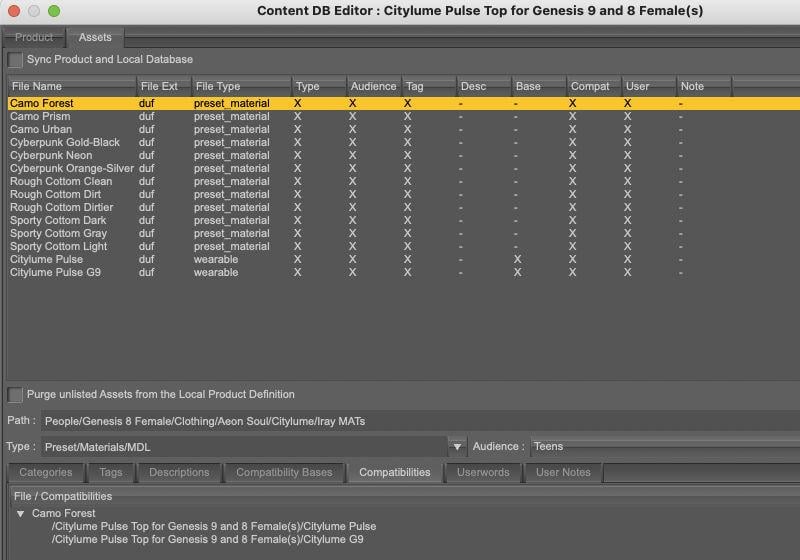
Once done, it's like that in Smart Content:
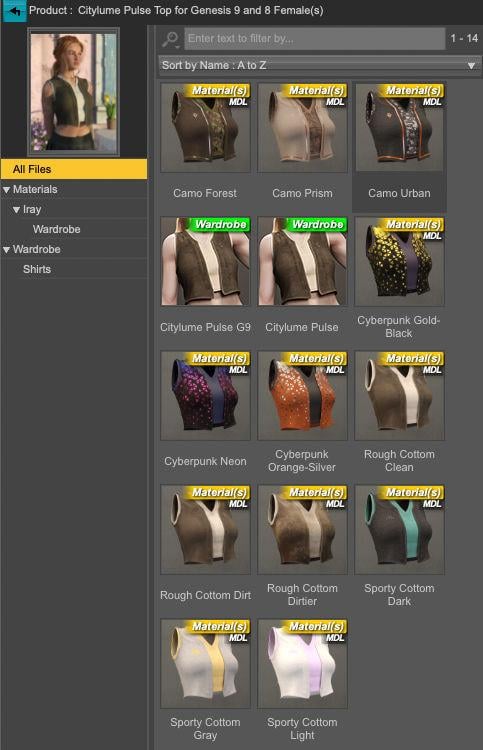
and like that in Content Library:
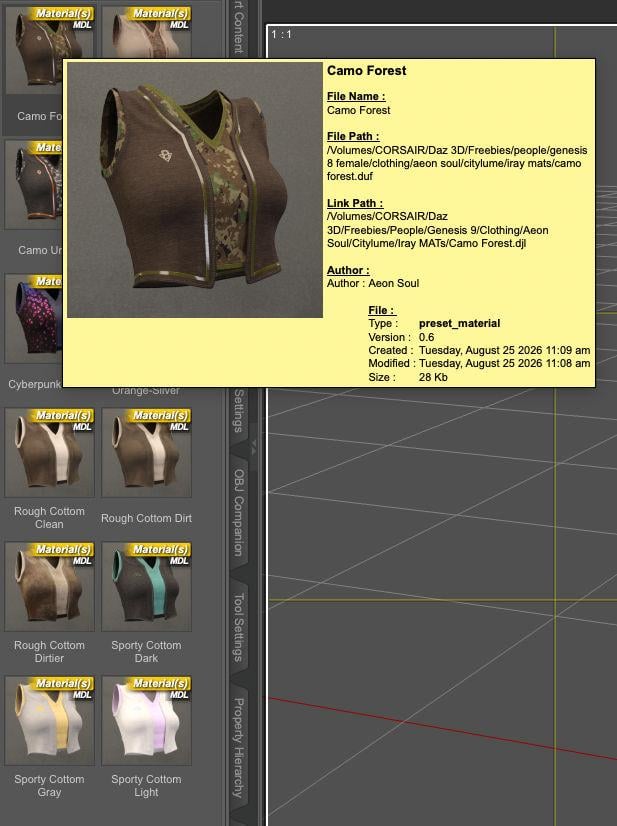
I didn't think about making a screenshot with the G9 version selected and Filter by context active, but it's working.
Overall, I think it's the better way to do it: there is not difference in the way the Content Library is working while in Smart Content but you only have one set of material presets instead of two.
When I start the update or upgrade for CW, I will have to investigate how it does links.
[Diffeomorphic] Workflow?
Can you clarify how you transfer the JCM and custom morphs?bilyatboring said:
In my workflow I just save the base figure in blender with just jcms and facs. Then every charcter I create in daz I save as dbz file. Import the dbz morph in morph panel, make sure to switch the ERC method to translation custon (this makes sure the rig scales with the mesh) in global setttings.
For clothes I just import them using File>Import>Daz(1st option) and locate them in my daz library and the set the mesh fitting to Unmorphed shared or unique. Then parent the cloth rig to genesis figure and then merge the two rigs in the corrections tab(I use the option tie rig instead). After that selecting the cloth and genesis mesh, transfer the jcms and custom morphs to cloth mesh. If there are any clothing morphs you can import them using import custom morphs.
Xin's HD Morph Add-on 2.0.0 ErrorAlways blender 3 and 4. There's no version supporting blender 5 as far as I now. But you better contact Xin for a direct answer on his addon.
p.s. If you only need to export the HD shape then you don't need the Xin addon, as Diffeomorphic can import HD shapes just fine. The Xin addon is only needed to convert HD morphs to displacement maps.
p.s. You can also convert a HD shape to a displacement map by hand with Diffeomorphic, but the process is limited to a single HD shape, and it requires to import the HD shape first. The Xin addon works directly on the HD files and can handle multiple morphs.
https://github.com/Diffeomorphic/import_daz/wiki/HD_Tools_Bake_Maps
Diffeomorphic UDIM ArtefactBlender 5.2.0
Diffeomorphic 5.2.0.3018
G8F material: FW Rebekah HD for Victoria 8
Steps:
- Import a G8F via Diffeomorphic's manual import
- Merge Rigs
- Import standard morphs, including Head, Expression, FACS, Body, JCMs, Flexions
- Import Daz Favorites, including Zev's Breast Control, Bend Control, Tongue Control, Expression Smoother
- Save Local Textures with All Mesh checked
- Merge Materials with every setting unchecked, including Ignore Bump Strength
- Switch to Edit Material tab, set Face as Active Material, press Make UDIM Textures, change Image Size to 4096, check Combine Texture Types and all material zones, and press OK
- Set Face as Active Material, press Overwrite Materials, check only Torso, Lips, Legs, Fingernails, Toenails, Face, EyeSocket, Arms, and press OK
- Switch to Cycles GPU, and the following artefact occurs on the whole G8F mesh.
Xin's HD Morph Add-on 2.0.0 ErrorBlender 5.2.0
Diffeomorphic 5.2.0.3018
Xin's HD Morph 2.0.0
Steps:
- Import a G8F via Diffeomorphic's manual import
- Merge Rigs
- Import standard morphs, including Head, Expression, FACS, Body, JCMs, Flexions
- Import Daz Favorites, including Zev's Breast Control, Bend Control, Tongue Control, Expression Smoother
- Specify the working directory for Xin's add-on
- Specify the base mesh as the G8F mesh
- Switch to HD mesh generation tab, specify Generate Rigged HD, set HD subdivision to 3, check Import base morphs and Copy other meshes, press Generate HD mesh, and the errors shown in the screenshot occur.
Is there a way to add/edit Smart Content categories?NorthOf45 said:
The Default categories (where the included metadata places the assets) can be deleted, but not renamed or moved (i.e., Read-Only). You can add new sub-categories directly in the Default tree, and they will have full access (Read-Write).
Great, how do I do that? Is it something I can do in the app, or do I have to fiddle with config files?
For example, you can re-categorize assets into different Default categories, like those in "Anatomy/Extenal", presumably into "Anatomy/External", then delete the offending category. If there is an error in the metadta file itself, stray categories will return if you re-install the faulty product. A help ticket is the only way to get it changed officially. Nothing stopping you from doing it yourself while you wait for some kind of response.
Oh, I moved the item long ago. I can't even remember which one it was. I just still have that zombie category sitting around.
Dual v4_v6 Script Example: Inheritance, ModulesSummary:
The Main script file together with its associated modules demonstrates one way to implement Inheritance and Modules in DAZ Script so that the same files can be used in both v4 and v6.
It demonstrates a simple Personnel App with an Inheritance hierarchy like this:
BaseObject : Provides className() and inherits() functions (like a QObject)
Person : A BaseObject with FirstName, LastName properties
Employee : A Person with ID property
Manager : An Employee with Department property
This mechanism is intended only for non-trivial applications that would be simplified by using inheritance and/or modules - i.e. it would be overkill for many simple utilities.Files (attached to this post):
Test_v4_v6_Main.dsa : Top-level script, containing the Main Routine of the Application:
Open it in the Script IDE Pane and Execute it from there.
zzzOBJ_lib.dsa : Module: App-generic BASE Object class
zzzUTY_lib.dsa : Module: App-generic Library of Utility facilities
zzzPER_lib.dsa : Module: App-specific: Simple Personnel facilitiesInheritance:
Inheritance between Object Classes is implemented via the ECMAScript 'Object.create( <prototypeObj> )'
mechanism, and involves no version-specific code: https://docs.daz3d.com/public/software/dazstudio/4/referenceguide/scripting/api_reference/object_index/object
Note that v4 does not recognize v6 stuff like: class, extends, constructor(), super()Modules:
In v4: Modules are simply external script files 'included' into the Main script in its Global scope, i.e. before any anonymous function that serves as the Main Routine.
The 'include()' commands execute only within v4-specific code that is activated by testing: if( (App.versionString < '6.') ) { ...v4-specific code.
All facilities in the Global scopes of the Main script, and of all modules already 'included', automatically become visible to the code in the 'included' module.
All facilities in the Global scope of a module automatically becomes visible to all code following the 'include()' command that loaded that module.In v6: Modules are implemented via the CommonJS facilities provided by DSv6, i.e:
Modules Export their facilities by adding them as properties to their 'module.exports' Object provided by the v6 script context.
Scripts Import facilities from a module via the 'require(<module>)' function provided by the v6 script context, which returns the 'module.exports' Object from the <module>.
The 'module.exports' and 'require()' commands execute only within v6-specific code that is activated by testing: if( (App.versionString >= '6.') ) { ...v6-specific code.
NO facilities in the Global scopes of the Main script, or of any modules already 'required', automatically become visible to the code in the 'required' module.
BUT: You can 'inject' visibility of any existing facilities into any module:
Immediately after the 'require()' call,
by passing the relevant context data to an Exported function of the module,
which saves references to that context into its local scope,
all of which must occur before the module refers to such Context in its body.
In this demo that is done by passing Object g_zzzAPP_Context to a LoadAppContext() function that is provided by each relevant module.
ONLY facilities explicitly Exported by the 'module.exports' command are visible outside the module.I found it simplest to develop the code in v4, which automatically excludes any v6-specific commands, and only once that is working add the version-specific IMPORTS and EXPORTS sections to handle the differences in module scope.
I am NOT expert in any of DAZScript, QtScript, ECMAScript, or JavaScript. If you can suggest better ways to do this, please post them to this forum topic.
Hope you find this useful.
P
[Diffeomorphic] Workflow?In my workflow I just save the base figure in blender with just jcms and facs. Then every charcter I create in daz I save as dbz file. Import the dbz morph in morph panel, make sure to switch the ERC method to translation custon (this makes sure the rig scales with the mesh) in global setttings.
For clothes I just import them using File>Import>Daz(1st option) and locate them in my daz library and the set the mesh fitting to Unmorphed shared or unique. Then parent the cloth rig to genesis figure and then merge the two rigs in the corrections tab(I use the option tie rig instead). After that selecting the cloth and genesis mesh, transfer the jcms and custom morphs to cloth mesh. If there are any clothing morphs you can import them using import custom morphs.
UV texture templates?felis said:
Philippi_Child said:
felis said:
I tried some random newer products, and those didn't have templates.
You can kind of getting it by setting viewport to UV-view and take a screenshot, but it is unprecise. Potentially you can use existing textures as reference, but that is also unprecise.
Personally I take the products into blender when needed and get my UV templates from there.
How do you do this? Thanks!
If asking about blender.
Export object from Daz Studio as obj (personally I prefer in base resolution)
Import in blender (there is a scale difference of 100 (DS unit 1 cm, blender unit 1 m) but that doesn't matter for UV)
For a normal UV (with no overlap) go into UV Editting, press 'A' (all) an export in desired size.
For an UV with overlap, go to Modelling, select wanted surfaces, and then go to UV Editing and export at desidered size. Repeat for other surfaces.
thank you!
UV texture templates?Philippi_Child said:
felis said:
I tried some random newer products, and those didn't have templates.
You can kind of getting it by setting viewport to UV-view and take a screenshot, but it is unprecise. Potentially you can use existing textures as reference, but that is also unprecise.
Personally I take the products into blender when needed and get my UV templates from there.
How do you do this? Thanks!
If asking about blender.
Export object from Daz Studio as obj (personally I prefer in base resolution)
Import in blender (there is a scale difference of 100 (DS unit 1 cm, blender unit 1 m) but that doesn't matter for UV)
For a normal UV (with no overlap) go into UV Editting, press 'A' (all) an export in desired size.
For an UV with overlap, go to Modelling, select wanted surfaces, and then go to UV Editing and export at desidered size. Repeat for other surfaces.
Creating templates for Daz products in Blender.Ok so for "template" I guess you mean the uv map. For this it's enough to export as obj in daz studio.
steps:
- in daz studio export as obj
- import in blender
- edit mode: uv editor > uv > export uv layout
p.s. Or in DS4 you can see the uv map in the viewport panel, selecting the "uv view", but it will be displayed at the viewport resolution. Then you can print the screen and manipulate with a paint program, eventually. The blender way is more precise as it allows to export the uv map at the desired resolution.
p.s. In blender you can also paint directly over the 3d model, that's often easier because you don't care of the uv seams.
 Is there a way to add/edit Smart Content categories?
The Default categories (where the included metadata places the assets) can be deleted, but not renamed or moved (i.e., Read-Only). You can add new sub-categories directly in the Default tree, and they will have full access (Read-Write). For example, you can re-categorize assets into different Default categories, like those in "Anatomy/Extenal", presumably into "Anatomy/External", then delete the offending category. If there is an error in the metadta file itself, stray categories will return if you re-install the faulty product. A help ticket is the only way to get it changed officially. Nothing stopping you from doing it yourself while you wait for some kind of response.
You could make Custom Categories, but that will create a new tree, separate from Default. Some users like to have all Categories in one place.
Has Anyone here experimented with Gaussian Splatting?These are all great insights but I have to ask about the biggest showstopper I've run into...
How can I get Twinmotion to import animated morphs from FBX?
I tried looking this up but the article from 2024 I found made it sound like there used to be a lot more import options in Twinmotion when right now there seems to just be three checkboxes and 1 numeral field.
I also reimported my fbx back into daz studio and imported it into blender and can confirm that the fbx absolutely has the animated morph data in it, for whatever reason twinmotion 2026.1 just isn't bringing it in. Have you had this issue? The epic games launcher appears like it will allows me to painlessly choose an earlier version of Twinmotion that goes all the way back to 2023. Which version are you currently using?[Released] RSSY Clothing Converter from Genesis 9 to Genesis 8 [Commercial]Richard Haseltine said:
arielgagnon said:
The RSSY Clothing Converter G9 to G8F script fails immediately on launch, before any dialog appears.
Log:
Script Error: Line 89 — TypeError: Result of expression 'pDirectory' [null] is not an object.Setup: Daz Studio 4.24, Windows. Scene contains only a default Genesis 8 Basic Female, at origin, default pose, selected.
Content directories:
C:/Users/ariel/Documents/DAZ 3D/Studio/My Library(first) andC:/Users/Public/Documents/My DAZ 3D Library. Both writable, both with a Runtime/Support folder. I recently moved all libraries out of OneDrive. Conformers are present indata/sickleyield2023/rssyg9ftog8fconverter/conformers. Reinstalled the product, same error.The G8M version fails the same way, and the Install Custom Actions script fails at line 37 with the same error.
How did you instal? What is the full path to the script, starting from the drive le
Installed via DIM. Full path:
C:\Users\Public\Documents\My DAZ 3D Library\Scripts\RiverSoft Art\Clothing Converter\RSSY Clothing Converter G9 to G8F.dseI have since done a completely clean reinstall: uninstalled in DIM, manually deleted every remaining file (scripts,
RSG9G8CCConstants.dsa,RSG9ToG8ClothingConversionFunctions.dse, thedata\sickleyield2023conformers, the XML and the Runtime/Support metadata), then reinstalled. All 336 conformers and both Common files are present. Daz Studio was restarted. Same error, unchanged.My content directories are
C:\Users\ariel\Documents\DAZ 3D\Studio\My Library(first) andC:\Users\Public\Documents\My DAZ 3D Library(second). Both writable, both with aRuntime\Supportfolder. Nothing is on OneDrive or a network drive.The "The Weather Changes More Often than the Thread Title" Complaint Threadbutterflyfish said:
Alas, Google tells me you can't get that here. There's a Belgian Chocolate Cappuccino flavor of that brand on Amazon (only 7 left!) but otherwise you'd have to import it. And I don't like coffee enough to bother with that.
I live in Massachusetts so you're never far from Dunkins. There are four in my very small city, plus multiple others in the surrounding towns.
Sorry to hear that. I'm surprised though since I always thought of Mokate as being a global brand.
Daz 3D is part of

Connect
DAZ Productions, Inc.
7533 S Center View Ct #4664
West Jordan, UT 84084Licensing Agreement | Terms of Service | Privacy Policy | EULA
© 2026 Daz Productions Inc. All Rights Reserved.