Iray Pink Render Problem (Solved)
 BlueIrene
Posts: 1,318
BlueIrene
Posts: 1,318
Everything I attempt to render with Iray this morning is turning out shocking pink. 3DL renders seem fine, but I am pretty much Iray only now so that's not much good to me. Drivers are all up to date. Does anyone have any ideas what might be going on here? Thanks.
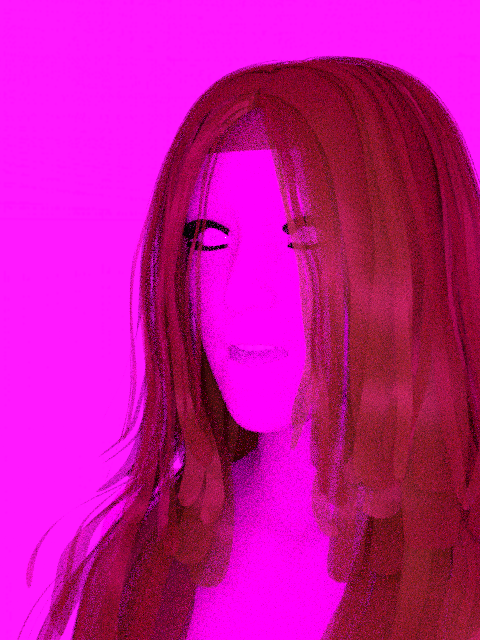

Pink.png
480 x 640 - 509K
Post edited by BlueIrene on

Daz 3D is part of 
Connect
DAZ Productions, Inc.
7533 S Center View Ct #4664
West Jordan, UT 84084
Licensing Agreement | Terms of Service | Privacy Policy | EULA
© 2026 Daz Productions Inc. All Rights Reserved.
Comments
Hi. I've got the exact same problem. Someone knows what to do about it?
Pink renders are mentioned in this thread so it might be worth reading & seeing if its related
http://www.daz3d.com/forums/discussion/98576/virus-detected#latest
Thanks, Tottallou - you were spot on! I should've guessed that if I looked towards Kaspersky I'd find it staring back at me with a guilty expression :) I can remember it asking me yesterday if I wanted it to delete a dodgy file it had found and just letting it get on with it because I was busy elsewhere, so I manually reinstalled DS, overwriting the current version as the thread suggested so that I'd keep all my settings etc. The minute this was done, Kaspersky started complaining about 'freeimage.dll' so I added it to the exclusion list and Iray is once more rendering as it should.
Thanks again for digging that thread up - it's appreciated :)
Thanks! It worked!
If you lost the freeimage.dll file, it is attached here as a .png from v4.9 64bit. Rename it from freeimage.png to freeimage.dll and copy it to
DAZ 3D>DAZStudio64>libs>iray
This dll was pulled from the DAZ3d zip file. Hope this helps someone save some time.
Please don't post parts of the Daz studio application, or executable code in any form, to the forum. The correct way to recover the .dll would be to rescue it from the anti-virus' valut/quarantine area (I'm not sure how Kaspersky handles that) or to unisntall and reinstall DS.
Aside from other concerns, there can be version matching issues using 'random' dlls.
I am still having this issue. I have followed the instrucrions for freeimage and that hasnt helped. I have reinstalled STUDIO that hasnt helped. My antivirus isnt catching anything from DAZ. It doesn't happen on everything.
any help would be apperciated.
Without more information, preferrably to your original thread rather than starting another hare running, there's not much anyone can offer.
Surface tab—Select the image of the surface—Layered image editor—Just click OK. This will copy the texture to the local Daz Temp folder, and the texture will be fine.