Changing where Connect installs to...
 jakiblue
Posts: 7,281
jakiblue
Posts: 7,281
I think I've broken something LOL
When installing a product via Connect, it installs to my internal C drive. All my content is actually on an external drive, as I don't want content on my internal drive.
I want my Connect installed products to install to the external drive, NOT the internal drive. This is possible?
I went to Edit -> Preferences, and then the Content Library tab. Then the Content Directory Manager. Under "DAZ Connect Data" it says: C:/Users/Jaki/Documents/DAZ 3D/Studio/My DAZ Connect Library. I DON'T want it to go to C: drive, I want it to go to F: drive which is my external drive.
If I change that to F:My Library, I get a message: (see image)
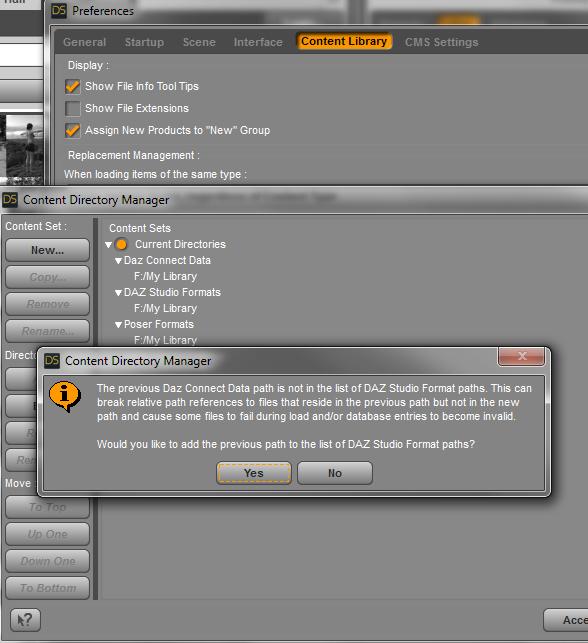
I'm not too sure what this means.
If I click "yes", the C: path adds itself to the "DAZ Studio Formats" under F:My Library. What does that mean?
If I click "no", all my Smart Content icons turn into grey default icons, like they can't be found.
So I don't know what I do here. I really really don't want anything installed to my C drive at all.


Daz 3D is part of 
Connect
DAZ Productions, Inc.
7533 S Center View Ct #4664
West Jordan, UT 84084
Licensing Agreement | Terms of Service | Privacy Policy | EULA
© 2026 Daz Productions Inc. All Rights Reserved.
Comments
It means that unless you also move the files on disk (keeping the relative folder/file structure of the mapped folder), in addition to changing the mapped path where new Daz Connect folders/files will be created/maintained, that anything that was installed to the previous path will stop working. It is offering to keep things working for you, in the event you choose not to move those folders/files to the newly chosen location, by mapping the old Daz Connect Data path as a DAZ Studio Formats path.
If you intend on moving the contents of the previously mapped path to the new path, you can safely answer "No." If you do not intend to move the contents of the previous path, but want that content to remain working whilst also changing where new Daz Connect Data gets installed, you should answer "Yes."
-Rob