uh60-blackhawk-helicopter has a Bug
 Ivy
Posts: 7,165
Ivy
Posts: 7,165
I bought a uh60-blackhawk-helicopter today http://www.daz3d.com/uh60-blackhawk-helicopter
and the front doors the mesh is welded and makes the doors look funky anyway to fix this issue? i tooks a screen shot of it
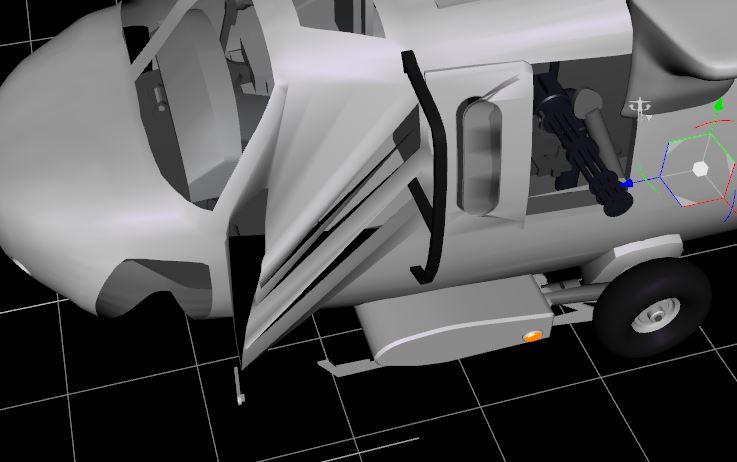
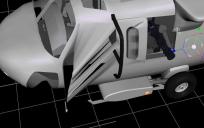
Capture.2.JPG
737 x 462 - 45K
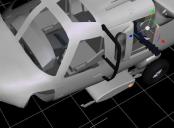
Capture.JPG
639 x 471 - 42K
Post edited by Ivy on
This discussion has been closed.

Daz 3D is part of 
Connect
DAZ Productions, Inc.
7533 S Center View Ct #4664
West Jordan, UT 84084
Licensing Agreement | Terms of Service | Privacy Policy | EULA
© 2026 Daz Productions Inc. All Rights Reserved.
Comments
Under what circumstances are you seeing the problem? I see your second screenshot shows it ok, so presumably it doesn't happen all the time. I tried loading my copy in DAZ Studio and it seems to be loading fine here for me at least.
Hi Sriesch It happens when you try to open the doors, it give this weird mesh weld thingy where the texture is still attached to the helicopter but the door opens so you get this blurry mess. the second screen shot was with the door close that is why is appears not to be doing it. but when you open either right or left front door it does what I showed in the screen shot It does not do it in daz 3 but it does do it in daz 4.8. everything else works fine the roters turn great the side doors open with out this issue as well but the front doors appear to have this bug
Yep, confirmed here too. Go ahead and report it as a content issue, give them some nice clear steps to reproduce, and hopefully they can get it fixed. (Let me know if you need instructions on how to report a bug.)
There's a fairly simple way to fix it...but it was in a thread not long before the forum change and I can't even remember the title or anything, other than RichardH was one of the suppliers of fix info.
http://www.daz3d.com/forums/discussion/39893/more-problems-with-models
thanks for the help guys .sriesch thanks for the link . but I could not capture the door with hexigon or blender.
I tired wieght mapping the door and export it as a obj & that didn;t work, I looked to see if the doors were a seperate .obj.in the Geometries folder but they are not . I tried fixing it in my student version of 3ds but the doors are part of the helicopter and i was not able to capture the door as a obj. with my student version of 3ds
so I guess i'll need to make a support ticket.
It works in DS3?
Export the obj from there...
Hi Mj
I tried that . i can't extract the door obj in daz 3 even though it works the way its suppose too but the doors are part of the helicopter and I can only save or export/import with the door open and then i its welded with no rigging or any means to rig it
i posted a capture of it working in daz 3. but it not moveable in daz 4.8 once you import it
It's a cr2, right?
Well after you export it, give the obj a new name...like chopperfixed.obj Then make a copy of the cr2 and edit it to use the new name for the geometry reference. That should preserve/restore the rigging.
Well, if you submit a bug report, would you mind adding a request to seperate both side miniguns? Right now, they're linked and share the same axis.
Hi Mj I must not being doing something right because no matterr what i have tried it still does not work :( so i made a support ticket and see what they say .. thank you for all the help
Umm, we are talking about a model that was released in about 2004. That's 11 years ago now. This would have been a Poser model.
That is just...odd.
It was worth a shot...sometimes it is easy and works. Other times...well, this is one of those. I've done the 'export from working program', create new geometry/cr2 pair before and it had a fair amount of success, but not 100%.
Umm, we are talking about a model that was released in about 2004. That's 11 years ago now. This would have been a Poser model.
No we are talking about a model which is still being sold today and which lists Daz Studio as supported software.
Yea it works great in Daz 3 and poser . But i was hoping there was a fix or work around for daz 4.8 that what i asked tech support anyways :)
I know what you mean sometimes i can fix rigging problems by wieght mapping and exprot the wieght map as a obj. but this time when i tired it it gave the whole panel of the hlicopter .. sigh! well its still a nice model.
heres a cut of a render i usng it in some story art. I'll post later on
click for best viewed full size 1080 hd
The issue is the mesh, not the rigging. The door panels ned to be unwleded, then the existing rigging will/should work correctly.
And exporting the obj from DS3 could work...sometimes does, sometimes doesn't. I could probably do it in Blender, if things are grouped right, in a few seconds...a few minutes if it needs to be done by selecting polys by hand. There's a bunch of other tools that should be able to do it, too, with little/no problem, but...
Hi Richard, Yea! that is what we have been discussing about it being welded, do you know away I can unweld it?, I tried about everything i know. usually when i have issues like this with car models. I paint the part with wight map brush tool then copy the wight map portions and export it as a obj. and then reimport is as a separate door obj. I was not able to do that with model. because for some reason it would always included the front panel. I just bought it . so i was looking for a quick fix ..
The rigging seems very odd - the doors, and some other parts, belong to the figure node rather than to a bone and the bones/groups are not helpfully labelled. I did have a quick look in modo last night but I don't think it is going to be simple to update for DS4. Sorry.
Thanks richard , I did put a support ticket in so i guess i have to wait to see what they say, everything else works great execpt the front doors . and still a cool model :)
6 months later & I'm still waitng on this ticket, Seriously 6 months and not a words.. Really? Sigh!
Just tried it myself and see the problems you mention. I just bought this less than 2 weeks ago. I also notice the deployed ropes don't match with the rope hoists but you can fix it by moving the rope yourself. I likely won't be opening the front doors in renders but it's an obvious flaw when you try. Side doors and windows seem to work OK but they are either all the way open or all the way closed (no action as you move the parameter slide until you reach the far end, then the doors pop open).
I'm not sure that side door behavior is quite right, either...
The doors open in carrara.
There may be a weld tolerance threshold in DS that needs tweaking.