GEN X2 Help
 unknownmystery445
Posts: 414
unknownmystery445
Posts: 414
in The Commons
Why is this happening? When I turn the V4 Morph to 100%? I've followed the instructions on youtube but this still happened. Looks like I have to make a refund.
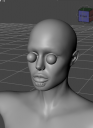
Daz Capture.PNG
357 x 494 - 84K

Daz 3D is part of 
Connect
DAZ Productions, Inc.
7533 S Center View Ct #4664
West Jordan, UT 84084
Licensing Agreement | Terms of Service | Privacy Policy | EULA
© 2026 Daz Productions Inc. All Rights Reserved.
Comments
What was the morph you were trying to move over. Some of Thorne's morphs distort the eyes, although not as extreme as you are showing. Try using the product with some different morphs as well.
Angel for V4. I have the starter for victoria 4.2 I don't know what's wrong because I followed the video tutorials on youtube. This product is such a disapointment. I hope you can help me
Are you adding the Morphs++ into Gen X2 for this character? Since they have to be dragged and dropped into Gen X2 manually..
Also some character morphs that just refuse to work no matter what.. Although I have converted many of my stock of V4 characters with little hassle, there has been the occasional one that has not worked.. I had one where when I dialed in the morph G2 exploded..
One last thing is this for Genesis, Genesis 2 or Genesis 3?
Occasionally, V4 morphs just don't transfer well. This is because of the morphs themselves and not a problem with GenX. For issues like this, provided you've added in all of the required morphs, you may need to dial out they eyes and play with the mouth morphs and see what might be causing that issue. Some morphs just take a little extra care. I have PDF tutorial I did on transferring an M4 character to G3M that had eye issues, Daemones GenX Tutorial. It might help.
I do have Angel for V4. I'm headed out for the day, but if you can wait, I'd be happy to test it out when I get back tonight and see if I have the same issues with that character and, if not, give you step by steps on getting her transferred. If I have the same issues, I'll see if I can figure which morphs are giving the problem and see if there is a solution so that she still looks the same. Which figure are you trying to upgrade her to? G2F or G3F?
I do not have Angel for V4, but I have successfully transferred over V4 characters onto Genesis 1-3. You have to load the V4 CR2 as the source, ideally a V4 CR2 file that you had injected V4++ morphs into. Then follow these steps:
1) Click "Apply Pose" and browse to the pz2 file for the shape of Angel for V4.
2) In the morph tree list, right click and select: All->Transfer On for non-zero values.
3) In Mode select "Create single morph"
4) In target, select Genesis 3 Female (or Genesis 2 Female)
5) Press Transfer.
In the popup box type what you want to call the morph (eg Angel). If there are no errors, then load a new version of G3F, and dial the Angel morph, and V4 to 100%.
If I remember right (I have Angel for V4) It does enlarge the eyes, yes.
I was thinking of buying GenX2 as my next product purchase and it seems to say you can transfer like Poser characters to Genesis! eg, the original Sadie & Sam to Genesis. Is that true?
Not the original Sam and Sadie. There is a product that gives you the shape of Sam and Sadie on Genesis (which you can then transfer to Genesis 2 or 3), and also a clothing clone for Sam and Sadie, however there is no GenX plugin for the original Sam and Sadie figures, should you wish to transfer a character for them over to Genesis 1-3.
OK, thanks. I didn't think it was the case that you could, just a bit of ambiguity in the product description so I thought I'd ask.
Yes I've added the morphs ++ manually like dragged and dropped it but I haven't seen it in the shapings tab when I selected the Genesis figure. Maybe that's what's wrong but I don't know why I there's no Victoria 4.2 in the actions tab when I select the Genesis but there's the v4 character morph.
Actually I think the reason why this is happening is because I haven't morphed the character to Victoria 4.2 yet but I can't find the Victoria 4.2 in the shaping tab when I select Genesis so I don't know what I'm doing wrong considering I dragged and dropped the morph ++ and the Victoria 4.2
Look Under Parameters->Actor->Generation X->***People*** and you should see the V4 shape there.
I don't see it, I've looked everywhere I really don't know why it doesn't show up the only morph that shows up is the angel for v4 not the Victoria 4.2. I don't even have the **people** in the tabs.
do you have a Generation X entry under Actor?
This is what shows up when I apply the base Victoria 4.2 morph and its injections. Seems like nothing is being transferred because from what I've read the "T" in the apply pose indicates the number of morphs to be converted and in my case it's 0.
Make sure that at least one morph in the tree list has a non-zero and is selected, that way it will transfer that morph, and the victoria 4 shape.
Also ensure that the selected library where the morph will be placed is on your list of DAZ Studio libraries (look in Content Library). Otherwise when you load a fresh Genesis figure, the morph will not be found.
I was able to create an Angel 4 full body morph (head and body) for Genesis.
In GenX2 tab:
1. Load Source: V4.2.cr2
2. Click Apply Pose, load: Pose>DAZ's Victoria 4>Morph Injections>INJ Morphs++ V4.pz2
3. Click Apply Pose, load: Pose>Angel V4>!+Angel Face INJ.pz2 and !+Angel Face INJ.pz2
4. Mode: Create single Morph
5. Mode: Select > Transfer: On for all Non-Zero values
6. Shape: Victoria 4
7. Target: Genesis
8. Output folder: set to <your path>/data/DAZ 3D/Genesis/Base/Morphs/D3D Gen X/
9. Press Transfer, Give it a name: ie: Angel V4 click Accept.
To Test:
1. Load fresh Genesis
2. Dial in full body Morphs: Angel V4 and Victoria 4 (see pic attached)
The problem is that I do not see the Victoria morph after everything is done I only see the Angel morph when I select the Genesis. I already tried uninstalling both the Victoria 4 and Gen x but I still don't have the **people** and the base Victoria 4 morph when I select the Genesis.
I think for Genesis no Victoria 4 morph is created, since Genesis already has one. Only for G2F and G3F would a V4 morph be created.
For Genesis you should see Victoria 4 under Actor/Female/Real World or if you can not find there, change to "Show Hidden Properties", and then look under
Hidden/Clones
I think to see the one in Actor/Female/Real World you need to own http://www.daz3d.com/v4-and-m4-shapes-for-genesis, but I am not certain.
I remember in the older version of Generation X, http://www.daz3d.com/v4-and-m4-shapes-for-genesis was a required product, but I did not think that was true for Gen X2.
Oh alright I'm going to try it later, if I were to convert it to Genesis 3 though do I still need to download anything else? Also how do you show hidden properties? Also do you know the file name of the Victoria 4 clone morph? Dimension3d told me that it has to have that clone, I'm going to look for it maybe he Victoria 4 clone is just being put in a different folder.
To show hidden properties, select the "Properties" tab, then click on the small icon with the four horizontal bars at the corner, and click on "Show Hidden Properties" on the pop up box. Alternatively right click on the title bar of the "Properties" tab, this brings up the same pop-up box.
The Genesis V4 morph is here: /data/DAZ 3D/Genesis/Base/Morphs/DAZ 3D/base/CloneVictoria4.dsf
This is the clone used by autofit to get V4's clothing onto Genesis.
Try moving the Angel Morph to Genesis 2, just to see if you can get it working. If so, then you can go back to trying to get it working on Genesis.
I haven't bought the add ons yet. By the way I was already able to make the Victoria morph someone helped me a while ago although even if I've already dialed in the base Victoria morph whenever I dial the Angel for v4 morph I still get the bulging eyes and teeth. Do you know how to solve it?
update: By the way I've tried a different v4 character and to my surprise it worked, no issues whatsoever so maybe it's just the Angel for v4 I'll try to reinstall the Angel for v4 and also try some other v4 characters but yeah if you can still give solutions please do :)
No idea sorry, I have not had that issue with other characters before. Do you suffer the same problem with other V4 morphs. Have you tried posting to this thread
http://www.daz3d.com/forums/discussion/94881/genx2-update-genesis-3-add-on-commercial
The developer listens to this thread. He might have an idea what is causing your problems.
I've tried it with another v4 character and I was surprised that it works without any issues so maybe it's just the Angel for v4, I'll try to uninstall the Angel for v4 and try other characters to see if it works :) but please do tell me if you have solutions :)
By the way how do you transfer skin textures from v4 to G3?
If you look at this vendor, http://www.daz3d.com/cayman-studios, he has a number of products for showing older generation skins on G3F. However for V4 you need his product sold over at Renderosity. Just search over there, the vendor name is the same as here.
By the way Angel for V4 worked now! Just reinstalled the Angel for v4 :) alright so you need that product to be able to use v4 skin textures on Genesis 3? :)
Glad to hear you finally got it working :-)
Yes get that product, there is another way using a skin converter by a company called Blacksmith, or you can do it for free via Blender, but the product by Caymen Studio's is by far the easiest way IMHO.
Can you kindly tell me the process? I don't want it to not work again lol :) the legacy uv form Cayman? :)
Yes. It is easier to use than Generation X. You use a script to apply geografts to G3F, then another one to set the UV to V4. You can then apply any V4 skin you own (you need to save it as duf first), it works very well. In the image below all 20 figures are G3F, but I used Caymen's product to put generation 3 skins (V3, M3 etc) onto the characters. Note that all the characters are G3F, included the male ones, I used Gen X2 to move the male morphs to G3F.