-
-
-
-
$41.95
Artist:Compatible Figures:Michael 2 & 1, Michael 3, Stephanie 3, Victoria 4, Aiko 4, Michael 4, The Freak 3, The Girl, The Girl 4, Victoria 2 & 1, Victoria 3, Aiko 3, Hiro 3, Hiro 4Install Types:Manual InstallSKU:9309Optional License Add-Ons:
$50.00$1.99*Unless otherwise specified, no discounts or offers will apply to License Add‑Ons.
Artist: MarkcusDCompatible Figures: Aiko 3, Hiro 3, Hiro 4, Michael 2 & 1, Michael 3, Stephanie 3, Victoria 4, Aiko 4, Michael 4, The Freak 3, The Girl, The Girl 4, Victoria 2 & 1, Victoria 3Install Types: Manual InstallSKU:9309Optional License Add-Ons:
$50.00$1.99*Unless otherwise specified, no discounts or offers will apply to License Add‑Ons.
-
Details
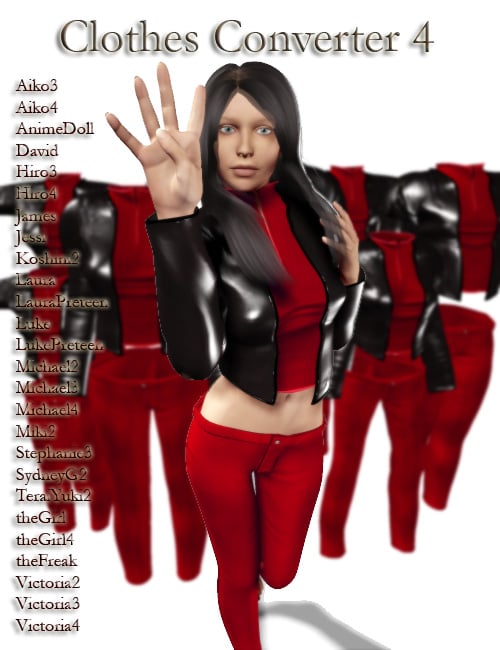
Clothes Converter is the easiest, most efficient way to convert clothing from one Poser model to another! With experience it will enable you to convert clothing from almost any model to another. It also can automatically convert clothing between Unimesh figures (a complete list of figures is listed below).
Please note: This is a Windows only application.
What's Included and Features
- New for version 4.0:
-
- Support for all generation 4 figures (Victoria 4, Michael 4, the Girl 4, Hiro 4, Aiko 4)
- An easy to use clothes conversion wizard.
- Support for additional third-party figures.
- Shrink edit command
- Expand edit command
- Smart regrouping (when using the conversion wizard). Modifies grouping when needed.
- 26 Supported Figures:
-
- Aiko3
- Aiko4
- AnimeDoll
- David
- Hiro3
- Hiro4
- James
- Jessi
- Koshini2
- Laura
- LauraPreteen
- Luke
- LukePreteen
- Michael2
- Michael3
- Michael4
- Miki2
- Stephanie3
- SydneyG2
- TeraiYuki2
- theGirl
- theGirl4
- theFreak
- Victoria2
- Victoria3
- Victoria4
- Updated video tutorials
- Magnet Improvements
- From version 3.0:
- Victoria 4 support -- automatically convert your clothes from Victoria 3 (and others) to Victoria 4
- Miki support -- automatically convert your clothes from Victoria 3 (and others) to Miki.
- 2X speed increase for auto convert on multi-core or multiprocessor systems (AMD Athlon X2, Intel Pentium D, Intel Core Duo, Intel Core Duo 2).
- Multi-runtime support -- choose files from any runtime directory.
- Compressed file support.
- Improved cr2 parser -- creates cleaner cr2 files.
- Favorite files and directories system -- makes it easier to navigate your system across multiple runtimes.
- Recent files.
- Recent projects.
- Keyboard shortcuts for move speed ( [ - decrease, ] – increase or q - decrease, w – increase)
- Remove button on batch window.
- From version 2.1
- Auto Convert - Automatic conversion of clothing between unimesh figures (Ex V3 to A3) and from base characters to morph characters (ex. V3 to a morphed V3).
- Support for non-unimesh figures is being researched.
- Batch Conversion – convert multiple clothing items from one source figure to several destination figures using Auto Convert (unimesh only).
- Load morphs into destination figure using values in the CR2
- Load morphs into destination figure using most injection morph pose files (they must be in the format that we recognize).
- Smooth command
- New shortcuts for hiding and showing destination figure groups.
- Hide Backfaces
- Fixed problem with move > normal.
- Fixed problem with auto shape.
- Improved destination figure morph loading speed.
- New video tutorial for Auto Convert and Batch.
- New (clears the current project)
- From version 2.0:
- Improved symmetry with soft-selection
- 3D Manipulator – transform geometry faster
- Project file (.cvt) - allows you to save the current state of your work to a file for later editing.
- Improved copy morphs - does a better job of retaining morphs
- Viewport memory slots
- Auto weld on load
- Falloff adjust
- Alt selection mode-clear selection instead of adding (option)
- Auto backup on save project
- Change working color
- Hide pts and manipulator when moving
- Smooth shade the destination figure option
- Pivot pt stays on top for improved visibility
- Updated video tutorial – shows you haw to get the most out of the program.
- Work directly with cr2 files.
- Auto-scale and auto position clothing for new figure.
- Soft-selection (magnet) tools for easy editing with visual feedback.
- Multi-level undo.
- Save obj directly for quick object edits.
- Rectangle selection
- Polygon lasso selection
- Paint selection
- Work in Polygon or vertex mode.
- Rename groups as needed.
- Hide/display groups.
- Selectable donor for joint parameters.
- Symmetrical editing allows you to cut your work in half (depends on object symmetry).
- Mesh editing across groups: move, rotate, scale, tweak
- detailed video tutorials to show you how to use Clothes Converter.
- Direct support from the application’s author.
- Easy viewport navigation with support for a 3 button mouse and scroll wheel.



Daz 3D is part of 
Connect
DAZ Productions, Inc.
7533 S Center View Ct #4664
West Jordan, UT 84084
Licensing Agreement | Terms of Service | Privacy Policy | EULA
© 2026 Daz Productions Inc. All Rights Reserved.