-
Daz Studio 5 development update
leemoon_c43b45a114 said:
I'm disappointed that DS5 has not arrived yet.
I understand that migrating both versions (Mac and PC) to a more modern version of the Qt cross-platform development environment is challenging. DAZ Studio is essentailly (mostly?) a framework of plug-ins. The newer Qt breaks compatiblity with the older version, so (almost?) every plug-in needs a rewrite. That seems daunting from a developer standpoint and I'm sure takes a lot of time for coding and testing. There may be plug-ins that are more challenging to update. Even the database software needs to be stable with Qt and the latest operating systems across both platforms.
The DAZ Studio developer(s) have their hands full supporting DS4 while chipping away at DS5. We've been told that DS4 has been getting some benefits from DS5 development, and that's nice.
From a Mac user perspective, it's been years without having a version of DS capable of running natively on Apple Silicon systems. With Apple's assistance, the DAZ developers did get DS4 running under emulation on modern Macs. I'm grateful for that as it allowed me to continue enjoying my passion for 3D rendering.
As others have asked for, I'd also like to see some progress/status reporting from DAZ regarding DS5 development. I keep waiting for DS5 to arrive before picking up a new Mac. I'm also just putting items in my wishlist and shopping cart without buying anything, no matter how nice the items are. So my spending has dropped to zero over the last month or so.
The last time I stopped spending here was in 2022 due to product and site quality issues. I used the money I had set aside for technology and graphics (DAZ purchases) and bought a 2022 Chevy Bolt EV. This time around, I repeated the process and bought a 2024 Tesla Model Y from that same account and have been enjoying the new car for the past 4 weeks. I still run DS4 on my Macs (and sometimes my HP Omen 40L PC), but really, really, really would like to have a modern, quick, and stable DS5 on the Mac. With more feature alignment with the PC version.
Pull back the cloak of secrecy a tiny bit and let us know what's going on with DS5. Give us estimate on when we'll see it, expected enhancements (Filament on Mac, native Apple Silicon version, rendering performance improvements, etc.)
I'm waiting to upgrade my current Mac(s), but if development drags out much longer, my interest in DAZ will diminish and I'll find other alternatives. I dropped Poser after faithfully using it since the first version when I moved to DS. I can do the same with DAZ, especially since we're seeing more AI based tools out there. Do I prefer using DS over AI? Yes, absolutely, as I want as much control over what I'm rendering as possible.
Anyway, that's just a few of my personal thoughts today. Others would and should have different takes on DS5. I'm just getting impatient. LOL!
Lee
+1 I really feel the same way. I too have stopped purchasing and have added things to my wishlist without buying, no matter how nice they seemed. I also have started experimenting with AI, both here and on another site.
[Fisio SB addOn released] Fisio: Physics Simulatortylerreinelt said:
Alberto said:
CyperImer said:
Have you found a solution to this? I am also having the same problem as described above and have went through the different steps as well.
Also, I've manually installed the api-ms-win-crt dlls such that there's no missing dependencies but the simulations are still failing in the same way as before unfortunately.
If I try to "Run Simulation" again after the error message, then daz studio crashes. A crash report snippet is attached.
Not yet, but your CFF report could help.
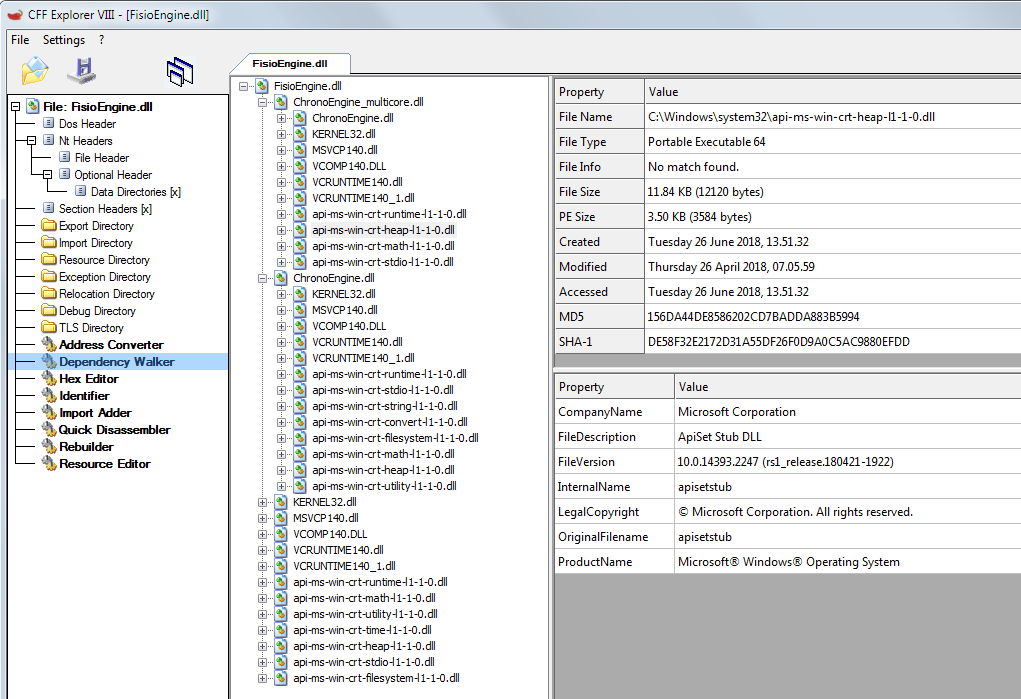
The "api-ms-win-crt-heap-l1-1-0.dll" in your computer is for a 32-bit machine (it says Portable Executable 32), but the requirement is a Portable Executable 64. So this file is not compatible. Could you install the 64-bit version?
See the following image from my computer:
I just purchased this and have the same issue, Filament works perfectly. but the moment i run simulation i get an error and the second time it just crashes daz for me all together.
Try the following. After each step, check if the plugin is working.
- Update Windows.
- Install the Visual C++ Redistributable (https://www.microsoft.com/en-in/download/details.aspx?id=48145 )
- Repair installed Visual C++ 2015 Redistributable package: (https://answers.microsoft.com/en-us/windows/forum/all/how-to-fix-api-ms-win-crt-runtime-l1-1-0dll-is/5c50232f-5af7-4f09-bf06-63718bb17e22)
See this also: https://helpdeskgeek.com/help-desk/how-to-fix-program-cant-start-because-api-ms-win-crt-runtime-l1-1-0-dll-is-missing/
Let me know if the problem persists.
Daz Studio 5 development updateI'm disappointed that DS5 has not arrived yet.
I understand that migrating both versions (Mac and PC) to a more modern version of the Qt cross-platform development environment is challenging. DAZ Studio is essentailly (mostly?) a framework of plug-ins. The newer Qt breaks compatiblity with the older version, so (almost?) every plug-in needs a rewrite. That seems daunting from a developer standpoint and I'm sure takes a lot of time for coding and testing. There may be plug-ins that are more challenging to update. Even the database software needs to be stable with Qt and the latest operating systems across both platforms.
The DAZ Studio developer(s) have their hands full supporting DS4 while chipping away at DS5. We've been told that DS4 has been getting some benefits from DS5 development, and that's nice.
From a Mac user perspective, it's been years without having a version of DS capable of running natively on Apple Silicon systems. With Apple's assistance, the DAZ developers did get DS4 running under emulation on modern Macs. I'm grateful for that as it allowed me to continue enjoying my passion for 3D rendering.
As others have asked for, I'd also like to see some progress/status reporting from DAZ regarding DS5 development. I keep waiting for DS5 to arrive before picking up a new Mac. I'm also just putting items in my wishlist and shopping cart without buying anything, no matter how nice the items are. So my spending has dropped to zero over the last month or so.
The last time I stopped spending here was in 2022 due to product and site quality issues. I used the money I had set aside for technology and graphics (DAZ purchases) and bought a 2022 Chevy Bolt EV. This time around, I repeated the process and bought a 2024 Tesla Model Y from that same account and have been enjoying the new car for the past 4 weeks. I still run DS4 on my Macs (and sometimes my HP Omen 40L PC), but really, really, really would like to have a modern, quick, and stable DS5 on the Mac. With more feature alignment with the PC version.
Pull back the cloak of secrecy a tiny bit and let us know what's going on with DS5. Give us estimate on when we'll see it, expected enhancements (Filament on Mac, native Apple Silicon version, rendering performance improvements, etc.)
I'm waiting to upgrade my current Mac(s), but if development drags out much longer, my interest in DAZ will diminish and I'll find other alternatives. I dropped Poser after faithfully using it since the first version when I moved to DS. I can do the same with DAZ, especially since we're seeing more AI based tools out there. Do I prefer using DS over AI? Yes, absolutely, as I want as much control over what I'm rendering as possible.
Anyway, that's just a few of my personal thoughts today. Others would and should have different takes on DS5. I'm just getting impatient. LOL!
Lee
Daz Studio 5 development updatewsterdan said:
wsterdan said:
Richard Haseltine said:
While posting might take minutes, deciding what to post would take considerably longer I would think - and would still be offering hostages to fortune, as this thread shows. And of course there would then be requests for updates on that, which again would require a lot of careful thought and consideration - by definition, from people who already have a lot on their plates managing the actual development.
I agree it would take longer than "minutes" to compose a message, but again, it's been 28 months, though... that's a lot of minutes.
I agree as well that making any type of commitment at all has the consequence of being held hostages to fortune, but with all due respect, choosing to make no commitment is, in itself, a commitment and has its own consequences. I know I'm probably the odd man out, but after spending tens of thousands of dollars here (60+) one consequence of not being able to plan my future projects with DAZ without knowing what will work next year or the year after that has been that I've stopped spending.
Yes, posting status updates would have us expecting more updates somewhere down the line, no argument there. As much as I'd love a status update, I'm not expecxting one, so not posting status updates has worked in that regard.
Hopefully, having saved all that time they would have wasted by posting annual or semi-annual status updates will mean they'll be releasing DAZ Studio 5 that much sooner.

Hopefully 2024 will be the year!

Happy Anniversary!
Man, the year zipped by, didn't it?
Unless I've missed it, still no estimate for DAZ Studio 5; lots of updates to Version 4.x.x, which, to be honest, I'm not sure gets us closer to Version 5 or farther away. A pre-Beta version was working three years ago (one that had Filament working for the Mac); if they'd released an actual features-light version of DAZ Studio 5 in January, 2022 they'd have had 30 months to add all the features into DAZ Studio 5 that we have now and testing them on an actual version of DAZ Studio 5. Hopefullly when they do release DAZ Studio 5, all of the features they've been adding to version 4 will still work.
At any rate, fingers crossed for DAZ Studio 5 some time this year, or at least a status update.Happy anniversary Walt ... I'll check the thread in 12 months time again to see if there is any change...
in the meantime.... back to the cubes
 Daz Studio 5 development update
wsterdan said:
Richard Haseltine said:
While posting might take minutes, deciding what to post would take considerably longer I would think - and would still be offering hostages to fortune, as this thread shows. And of course there would then be requests for updates on that, which again would require a lot of careful thought and consideration - by definition, from people who already have a lot on their plates managing the actual development.
I agree it would take longer than "minutes" to compose a message, but again, it's been 28 months, though... that's a lot of minutes.
I agree as well that making any type of commitment at all has the consequence of being held hostages to fortune, but with all due respect, choosing to make no commitment is, in itself, a commitment and has its own consequences. I know I'm probably the odd man out, but after spending tens of thousands of dollars here (60+) one consequence of not being able to plan my future projects with DAZ without knowing what will work next year or the year after that has been that I've stopped spending.
Yes, posting status updates would have us expecting more updates somewhere down the line, no argument there. As much as I'd love a status update, I'm not expecxting one, so not posting status updates has worked in that regard.
Hopefully, having saved all that time they would have wasted by posting annual or semi-annual status updates will mean they'll be releasing DAZ Studio 5 that much sooner.
Hopefully 2024 will be the year!
Happy Anniversary!
Man, the year zipped by, didn't it?
Unless I've missed it, still no estimate for DAZ Studio 5; lots of updates to Version 4.x.x, which, to be honest, I'm not sure gets us closer to Version 5 or farther away. A pre-Beta version was working three years ago (one that had Filament working for the Mac); if they'd released an actual features-light version of DAZ Studio 5 in January, 2022 they'd have had 30 months to add all the features into DAZ Studio 5 that we have now and testing them on an actual version of DAZ Studio 5. Hopefullly when they do release DAZ Studio 5, all of the features they've been adding to version 4 will still work.
At any rate, fingers crossed for DAZ Studio 5 some time this year, or at least a status update.How do you fine-tune your expressions? Problem with Iray loading times.Hello,
This might be a question which is hard to understand when you are on an RTX 4090 GPU, but I think many out there are not. I have a decent PC with an RTX 3060. As a beginner (4 weeks) I hope somebody shows me the magic button:
When fine-tuning character expressions it is crucial to move expression sliders and mix and try and mix and try. However, evaluation of what happens takes at least 15 seconds in Iray preview mode.
Filament view is faster to work with, but for subtle expressions I need Iray mode to see the result. Sometimes I spend hours just testing, this is really frustrating.Are there any settings which I do not know or is a bigger GPU my last ressort?
Thanks for any input and I hope other 3060 Dazzies don't have the same problem :-)[Fisio SB addOn released] Fisio: Physics SimulatorAlberto said:
CyperImer said:
Have you found a solution to this? I am also having the same problem as described above and have went through the different steps as well.
Also, I've manually installed the api-ms-win-crt dlls such that there's no missing dependencies but the simulations are still failing in the same way as before unfortunately.
If I try to "Run Simulation" again after the error message, then daz studio crashes. A crash report snippet is attached.
Not yet, but your CFF report could help.
The "api-ms-win-crt-heap-l1-1-0.dll" in your computer is for a 32-bit machine (it says Portable Executable 32), but the requirement is a Portable Executable 64. So this file is not compatible. Could you install the 64-bit version?
See the following image from my computer:
I just purchased this and have the same issue, Filament works perfectly. but the moment i run simulation i get an error and the second time it just crashes daz for me all together.
Can Daz Studio use an eGPU?Padone said:
filament does work with amd, iray is limited to nvidia, 3delight is cpu only
Does DS's implementation of Filament also work with AMD?
Can Daz Studio use an eGPU?filament does work with amd, iray is limited to nvidia, 3delight is cpu only
Can Daz Studio use an eGPU?I don't know if it would help with openGL rendering, but 3Delight is CPU-only (as is Filament, as far as I know), Iray can only be accelerated by an NVidia GPU, Octane requires an NVidia GPU to even function...the only render engine DS supports that MIGHT be accelerated by an AMD GPU is LuxCore/Reality, and I'm not even sure what the current state of those are.
"free gift, just for you, no purchase necessary"I chose Jewel hair by SWAM. I like SWAM's hairs and they usually work well in Filament. But this one didn't. So far I can't think of anything to fix it. The main issue is the same problem many hairs have ; there's only 2 surfaces, a scullcap and all the rest, that usually creates the most opacity culling. I bought it partly because I liked how solid the bangs looked. In Filament they look all separated, when In Iray, they look very solid.
 Maybe if I add extra surfaces in the geometry editor, hey, why didn't I think of that before? Thanks for helping me think out loud /
 / peaceStop with the geoshell and strand based hair obsession PLEASE
My hair needs are; hair that looks good in Filament on an animated figure in motion. The lastest hair developments look great in the ads but are of no use with my MO. After much experimenting, it seems clear that it's possible for a PA to layer hair in a way that removes at least most of the opacity culling, I do it myself after the fact. Of course, why not update Filament with a fix for this problem so one could use any hair? That's my 2 zillionths of a bitcoin's worth.
/ peace"free gift, just for you, no purchase necessary"One way I respond to free stuff is to take a chance and choose an item that, like any purchase, you don't know if you'll like it, and of course, it's older stuff. But I use a lot of legacy hair and went with that this time cause of trying to make hair look good in animated realtime Filament view - trying to guess if the hair opacity culling won't be too bad. And it's interesting to see so many items I've already paid for, mostly legacy hair, then realising that even with my memory, I recognise every last item in the offer! I think I've spent too much time pouring through the Daz catalog
Anyway, thanks Daz! I appreciate it. / peace► ►► What Fabric / texture Shaders presets are we missing?? What are your dream shader presets ♦ ♦ ♦Gordig said:
barbult said:
What you make are shader presets, not shaders.Your pedantry did make me think about what a dedicated cloth shader would look like. Selectable weave patterns, procedurally-generated normals and displacement, thread thickness and material, separate warp and weft coloring...
Here's some things I've poked around with in ShaderMixer (mostly in 3Delight):
- use PNG alpha-channels for transparency from the Diffuse map.
- tile and rotate texture maps (for bias-cut cloth, or when the UVs don't follow the seamstress' lines).
And what I haven't accomplished but would love to see (3Delight, Iray, Filament...):
- procedural denim/twill weaves
- a "plaid machine" loom shader (requires the above twill weave) that can input up to, say 30 threads in six colors and lay them into the warp and woof for the above.
- or a "plaid machine" that tiles a color-striped image into the warp (UV map) and woof (swap U and V) according to the above twill weave.
Keyboard shortcut for Filament drawstyle is not workingKeyboard shortcut for Filament drawstyle is not working
Shortcuts for other drawstyles are working right.
The Mac FAQHi all, I am currently run Daz Studio 442.0.16 on a Mac OS is Sonoma 14.5.
Getting Daz to run without it being unstable came down to NEVER using short cut keys,
Always being careful not to ponder over File, Scripts, Edit tabs with the mouse for too long either.
I NEVER short cut key a Save, as to do so actually deleted the previous save file .DUF. It had completely vanished.
As a result I realised to initially save a scene, while only working with the character assets.
Not loading any environment in, as this is a burden for the CPU and sits pointlessly in your RAM.
I also never use hair until I am happy with posing.
Then I save this multiple times as Name001/002 etc.
Then add hair,apply any Dforce and then environments, then select Render.
Since doing this Daz has not failed on me in months and it's also created a better sense of workflow, where you remove yourself from creating situations and instead focus more on the intricacies of character pose/interaction.
Working with a MAC does throw issues such as CPU rendering instead of GPU. But I also have a Windows PC with an old ASUS 8Gb GPU. The problem is, I'm hooked on MAC now, I can't go back to windows. So the option
for me is construction of scenes via MAC then use the PC I have to Render everything. Even though it's an old PC it allows me to delegate renders to a device I hate using for construction scenes.
Not having Filament Mode on a MAC upset me a bit but then I kind of fell in love with the speed of smooth shaded. Using wire or texture just to check before the final pre- render to see for any errors with poke thru, floating feet etc.
I've been using Daz for a few months and it's been totally stabke since I stopped using shortcut keys. I encourage other MAC users to try this as well.
What is FilamentI don't believe Filament is intended, even by Google, to be quite that feature-rich.
Daz Studio too brightYou can add the Filament Draw Options (or have it added automatically on every scene) and you can configure the ISO scale or Environment Intensity Scale to be lower.
What is FilamentFilament is currently in active development and hopefully they will make it more usable in a future release.
I always imagined it as comparable to Eevee in Blender, just a faster and better looking preview than OpenGL. Basically like a game render engine with all the bells and whistles. Unfortunately DAZ released it kinda broken, most notably the most important thing, broken transparency. Along with no soft shadows, some lights don't work right nor do shadows, reflections, etc...
I am a major user of this renderer and use it for paid commissions as I do animations (yes, I understand DAZ is not great for it but it actually is a pretty good (and quicker) animation tool for certain situations). While somewhat useless for actual single frame renders - for animation, it is a major boon. It sure beats having to migrate over to UE or Blender to render out an animation.
Not everyone has a bleeding edge video card and not everyone wants to always make photorealistic renders, DAZ may be slowly coming around that there is a whole other market out there that they've left untapped.
A set of Glass Kitchen Mixing BowlsJust a little set of three freebies based on a set my MIL gave to my wife & I in the early 1990's. I think the bowls date back to the late 1950's (they have that slight post-austerity feel), but I could be wrong.
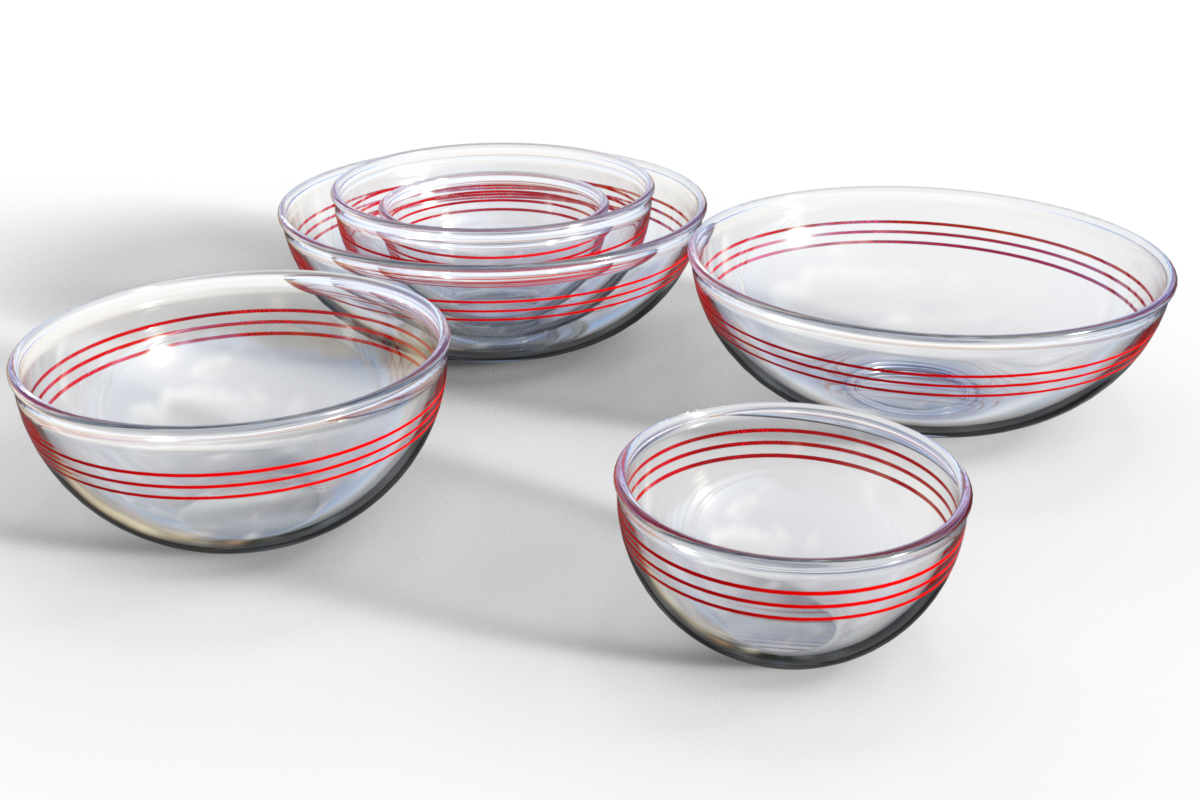
They are practically impossible to see in Filament preview mode.
Anyway, three very simple models and a scene subset of them stacked. I hope they might be useful.
Regards,
Richard
Daz 3D is part of

Connect
DAZ Productions, Inc.
7533 S Center View Ct #4664
West Jordan, UT 84084Licensing Agreement | Terms of Service | Privacy Policy | EULA
© 2026 Daz Productions Inc. All Rights Reserved.