-
Looking for ... 1930's art deco building
...yeah, and as I understand you now need the pay version of Sketchup to get access as well as have decent modelling skill to fix all the errors like backfacing polygons, ngons, & such.
Speaking of the building form US3, having a little fun with it (WIP). The building photo I posted (Wisconsin Gas Main Offices) has a light on top shaped like a flame that lights up at night.
Beautiful stuff. Anything you can share? :)
CAD plugin for StudioConsider the number of people who will seem utterly unwillingto use existing features like morph sliders to create a fat girl , but instead post endless requests for a "Bethany" preset for G8.
Now try to imagine the number of people who will actually use CAD mechanical modeling tools, inside Daz studio, to build a proportionally correct office credenza.
Google sketchup would be a better choice.
If we are just arguing the number of people who are unwilling to use the features included in Daz Studio, we might as well limit the discussion of new products to the next incarnation of Aiko or Victoria. There are many plugin tools for various uses within Daz that require some user interaction and knowledge to make them work. Should we skip those, because some people don't have any interest in anything other than putting a premade character into a premade setting?
CAR AND BIKE LOVERS THREAD - MARK IVActually the General Lee is 69 Charger
Here are some links
https://3dwarehouse.sketchup.com/search/?backendClass=entity&q=1969 Dodge Charger
http://animium.com/2008/08/dodge-charger-r-t
https://www.3dcadbrowser.com/3dmodels.aspx?download=dodge
http://www.dmi-3d.net/dodge2.html#
Don't know what quality they are but they're free
Also some over at the R place
Looking for ... 1930's art deco building...yeah, and as I understand you now need the pay version of Sketchup to get access as well as have decent modelling skill to fix all the errors like backfacing polygons, ngons, & such.
Speaking of the building form US3, having a little fun with it (WIP). The building photo I posted (Wisconsin Gas Main Offices) has a light on top shaped like a flame that lights up at night.
Looking for ... 1930's art deco buildingThere are tons of freebie 3d models available in: https://3dwarehouse.sketchup.com/?hl=en
The only problem is to get them nicely transferred to Daz Studio.
Below is an example Daz Studio iray render of three buildings:
Guardian Building by wyliepoon, Art Deco skyscraper by sketchy and Penobscot Building by wyliepoon
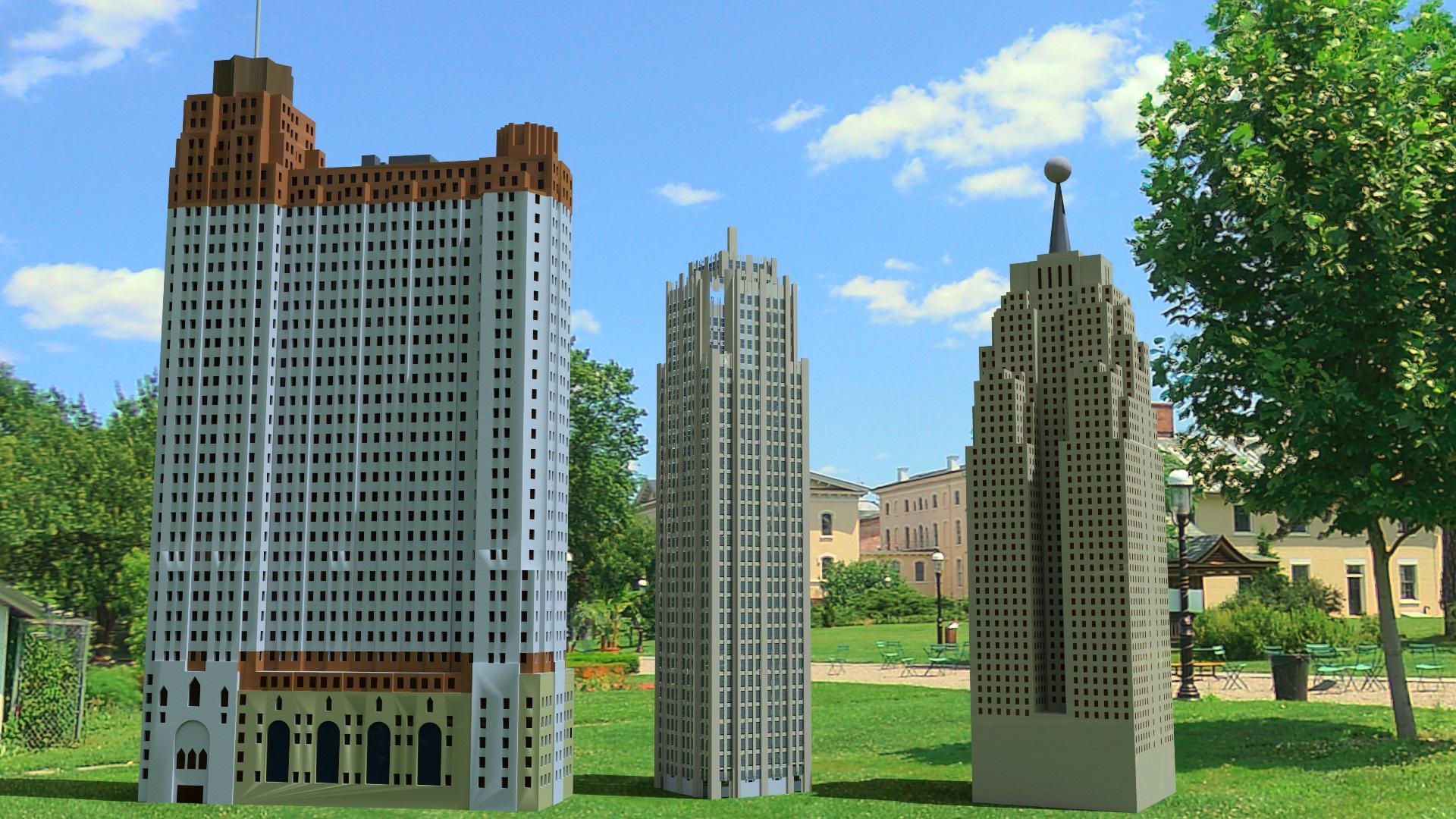 Sakura 8Chuckles. For some reason I had a feeling that was a sketchup model. What I use myself for modeling.Sakura 8
Thanks a lot, Capsces. I really enjoy your set.
Green bug is a freebie from:
https://3dwarehouse.sketchup.com/model/69761b713e1df1ca6ff13dae82425d94/Starbug-1-Part-1-of-2
CAD plugin for Studio'you don't want it becoming too much like Carrara, Lightwave, C4D, Max, Maya etc after all "
Actually No, the freeware, loss leader business model of DS
is to provide a free platform for content already created
and sold mostly here.
Daz studio supports nearly all of the industry standard mesh formats for import of static 3D models.Consider the number of people who will seem utterly unwilling
to use existing features like morph sliders to create a fat girl , but instead post endless requests for a "Bethany" preset for G8.Now try to imagine the number of people who will actually use CAD mechanical modeling tools, inside Daz studio, to build a proportionally correct office credenza.
Google sketchup would be a better choice.
IRAY or DAZ-MATERIAL glitch... Metal flakes repeating patterns not seamless.It is just the primitive shape, but it happens on all surfaces.
I just select the material, then apply the Uber shader to it. (I don't remember where that exact shader comes from. I just remember someone saying it was part of the update, when they switched to IRAY, to be used as a generic auto-convertion of the old and default daz shaders, to the new shaders.) It is the only way I know of, to get access to the IRAY properties, since there isn't just a simple "select shader properties", to turn things on and off.
The properties in the Surfaces pane are determined by the shader - there'd be no point in having a way to turn properties on if the sahder couldn't use them.
Adjusting the tiles has no impact on the display, at all.
No.
I did try adjusting the tiles, but it is not tile-based, it is only orientation/normal based, it doesn't even read the material UV mapping. Seems like it is projection-based, treating the surfaces as one whole surface. Primitives, like unpainted surfaces in sketchup, have no actual UV-mapping, that I know of. I know the metal shader is just a "trick", like "noise"... A formulated stream that is applied to a surface.
No, the Daz Uber Base shader does use UVs and the primtives are UV mapped, if you mean the oens created from the Create menu in DS.
For the moment, I am just using a custom made normal-map, which is actually just random noise. It is giving me more realistic and better results, faster... Unfortunately, that IS tied to the UV mapping, which makes the use of the primitives almost useless to me now. (Not like they had much function before.) This isn't happening ONLY on primitives though.
IRAY or DAZ-MATERIAL glitch... Metal flakes repeating patterns not seamless.It is just the primitive shape, but it happens on all surfaces.
I just select the material, then apply the Uber shader to it. (I don't remember where that exact shader comes from. I just remember someone saying it was part of the update, when they switched to IRAY, to be used as a generic auto-convertion of the old and default daz shaders, to the new shaders.) It is the only way I know of, to get access to the IRAY properties, since there isn't just a simple "select shader properties", to turn things on and off.
Adjusting the tiles has no impact on the display, at all.
I did try adjusting the tiles, but it is not tile-based, it is only orientation/normal based, it doesn't even read the material UV mapping. Seems like it is projection-based, treating the surfaces as one whole surface. Primitives, like unpainted surfaces in sketchup, have no actual UV-mapping, that I know of. I know the metal shader is just a "trick", like "noise"... A formulated stream that is applied to a surface.
For the moment, I am just using a custom made normal-map, which is actually just random noise. It is giving me more realistic and better results, faster... Unfortunately, that IS tied to the UV mapping, which makes the use of the primitives almost useless to me now. (Not like they had much function before.) This isn't happening ONLY on primitives though.
Any steam trains out there to go with Dogz fantastic Railway sets?There are a lot of freebie trains available in https://3dwarehouse.sketchup.com/
The only problem is the conversion of the file format, if you will not be using them in Sketchup.
Below are the render from iClone 7 of some trains available there, converted with 3DXchange 7.
 Is it possible to add multiple colors to an Elefont symbol?
@Slepalex - thank you to offer to help me. But I want this for all the dingbat fonts to use in future to recolor them, or now use them as reference.
Last evening I started something else but was feeling ill due to backpain and stopped the process for a while. I started to use the same 'pipes' I got from Sketchup Warehouse I have used for the icecream neon sign. I use the hamburger font as reference at the back and build pieces thereover in Bryce.
Attached some previews.
You can and using the S-ray method, too. The second version of this method:
Make the property of your hamburger positive, and the cube intersect. Close your cube with the part you want to separate, group and convert into a mesh. And so 4 times.
Essential addition: in order for the object to have full properties after the conversion, export it to disk as OBJ (or 3ds), and then import it into Bryce again. You will see how the object's bounding container changes.Is it possible to add multiple colors to an Elefont symbol?@Slepalex - thank you to offer to help me. But I want this for all the dingbat fonts to use in future to recolor them, or now use them as reference.
Last evening I started something else but was feeling ill due to backpain and stopped the process for a while. I started to use the same 'pipes' I got from Sketchup Warehouse I have used for the icecream neon sign. I use the hamburger font as reference at the back and build pieces thereover in Bryce.
Attached some previews.
Is there a method to zoom faster (farther)?I am working with some sketchup models and it takes forever to zoom in. Any help would be appreciated!
Using a Space Mouse allows you to zoom, pan, etc. extremely fast in Daz, (Similiar to the controls in a first person video game). You will need to install the Space Mouse Software and adjust the settings, because the default are way too fast.
Is there a method to zoom faster (farther)?Although I've not used Sketchup, a workaround for zooming in DAZ Studio is to create a few hidden objects (like a plane) of varying size, say 10 meters, 100 meters, 1000 meters, then you can frame one of them to zoom in/out by that much.
Is there a method to zoom faster (farther)?I am working with some sketchup models and it takes forever to zoom in. Any help would be appreciated!
Attempt to make kind of neon in Bryce (now need help with animation)Metaballs are fun to work with. I made a fairy light from metaballs once
That is quite impressive Chohole!
 I should use the various features of Bryce more.
Here I have used my first neon model ever made in Bryce or any program that is! This is only test renders. I will use the model later on in a proper town scene. The building is an ice-cream shop I got at Sketchup Warehouse which was uploaded earlier this year. It has 2 stories but I removed the top floor to add neon roof sign the way I planned it.
It took some time to assemble the neon sign (I am not really a modeller) but with trial and error I will give more neon signs a go. This way I will gain more experience with modelling, Bryce program features, etc.
The neon model is currently better for front view purposes as there are still parts from side view not lining up/joining very well and I do struggle with movements to specific points. I need to play more with the moving of the various parts for perfection.

PS: Is it possible to give some animation to the neon sign within Bryce? On/Off type of ani? I have only a bit experience with postwork animation, i.e. Animation Shop for Paint Shop Pro. But I want to try using as little postwork as possible on 3D renders. This is why I have decided to build a neon sign rather than use Photoshop 2D neons, etc.
Laura
New cloth physics solution: Sketchup Cloth Works.Nice. Thanks for sharing the link. This will be fun to try the next time I dabble with Sketchup.
New cloth physics solution: Sketchup Cloth Works.https://sketchucation.com/plugin/2053-clothworks
PDF Manual:
https://drive.google.com/file/d/1P8YjzyX3W9CPRJ6v-yi3Nlg1_r4Xfy7M/view
ClothWorks also comes with a feature to record
simulation and then export frames into a set of images, OBJ files, and many other desired formats.still no signs of dazstudio 5 & animation?Here's a list of what Daz Studio 5 could have:
- Bullet Physics
- Particle System
- Built-in Sculpting
- Improved D-former (think FFD plugin in Sketchup)
- Mocap
As I said, all of these things could be done with the existing SDK version; a new major version of the SDK and accompanying software is not needed.
Exactly. The v5 sdk will require a recompile of all plugins... that can be done in the current version; no one is going to trade in those features for the loss of GenX2
Daz 3D is part of

Connect
DAZ Productions, Inc.
7533 S Center View Ct #4664
West Jordan, UT 84084Licensing Agreement | Terms of Service | Privacy Policy | EULA
© 2026 Daz Productions Inc. All Rights Reserved.