-
Diffeomorphic - When to Transfer Shape Keys onto Clothes?
I've been spending the last few days familiarizing myself with/setting up a workflow from Daz to Blender using Diffeomorphic and was wondering: When should I - if ever, transfer shape keys onto clothes? Does transferring shape keys onto clothing do anything? Regardless of whether or not I transfer shape keys, clothes clip through the character. Does anyone have a solution to this?
Also, partially related, but if I have multiple characters with the same body but different clothes, can I link their shape keys to save on file size?
Batch Processing paths in Parameters Tab?Right-click in Parameters pane to turn on Edit Mode, Ctrl + Select (or Shift +Click select..) multiple morph properties, right-click menu : Set > Property Group...
Batch Processing paths in Parameters Tab?So, some vendors, particularly 3rd party vendors, are rather sloppy in how they place their morphs in the Parameters tab. Now, I know how to move them where they should be (for my organization at least) by editing the path in the Parameters Settings, under the gear icon, and then saving asa a modified asset. My question is, how can I do this path edit on multiple morphs at once?
For example, if a vendor called VendorX has put 25 elf ear morphs under Morph Loader/VendorX/Elf Parts, and I want to move them to Actor/Head/Ears/Fantasy, is there a way to do all 25 as a batch? I can't find where I can edit the path for the subdirectory Morph Loader/VendorX/Elf Parts directly, and move all the morphs filed under that at once.
What hair is this?Looks close, hard to say. I'm guessing the promo images for the Eden character have a morph applied to the back of the hair to make it super short and that shaved look is then visible underneath, but I can't tell if Prae's hair does that or not.
Questions about ND Daemonium HornsHi,
Little horns are a custom morph for G9, so you can select Genesis 9 and apply. I must to go away for next year and i will make a little tutorial with screenshots.Clothescrosswind said:
Well, firstly learn what is Auto Fit https://youtu.be/0D8TZw4MrWg?si=v-R0hKGPXlgHBQo_
With Marvelous Designer, you better make garment on Genesis Base figure, then when you rig it with default settings in Transfer Utility, the garment won't "float".
thank you so much ! I watched it so I'm' going to try with the M4 clothes .. can you just tell me how i sent the clothes to Photoshop ? I want to add a logo I made on it but I can't find how to send the jersey .. i looked at many videos on YouTube but can't find how to do that ! It's frustrating
Projection MorphsStarLabz said:
Figured it out.... When you go and create the EMPTY Morph, you fill this out when you ERC it, BUTTTTT , once you create the empty morph, DAZ DELETES everything you typed into the field. THEY NEED TO FIX THIS ISSUE. I had to go and edit it to reflect the Auto Follow and Shape Morph, in which it DELETES when creating the morph even though, i filled out the fields. Really dumb.
https://www.daz3d.com/forums/discussion/comment/9030011/#Comment_9030011
Mesh Grabber: Saved Morphs - Transfer or Delete?JP said:
crosswind said:
Right-click in Parameters pane to turn on Edit Mode (ss1). Right-click on the saved MG morph to Delete Selected Property (ss2)
There's no way to "Copy" that morph from G8 to clothing items. I've alread told you how to make it by using Auto Follow.. as above.
Thanks! Sorry - I missed your post about the Auto Follow setting.
No problem !
Projection MorphsFigured it out.... When you go and create the EMPTY Morph, you fill this out when you ERC it, BUTTTTT , once you create the empty morph, DAZ DELETES everything you typed into the field. THEY NEED TO FIX THIS ISSUE. I had to go and edit it to reflect the Auto Follow and Shape Morph, in which it DELETES when creating the morph even though, i filled out the fields. Really dumb.
Character used in Princess Petra productsI was gonna say Magic Brush as well - certainly giving me those vibes. Maybe it started as an MB model (at least for the Head morph) but was morphed a bit from there.
Mesh Grabber: Saved Morphs - Transfer or Delete?crosswind said:
Right-click in Parameters pane to turn on Edit Mode (ss1). Right-click on the saved MG morph to Delete Selected Property (ss2)
There's no way to "Copy" that morph from G8 to clothing items. I've alread told you how to make it by using Auto Follow.. as above.
Thanks! Sorry - I missed your post about the Auto Follow setting.
ClothesWell, firstly learn what is Auto Fit https://youtu.be/0D8TZw4MrWg?si=v-R0hKGPXlgHBQo_
With Marvelous Designer, you better make garment on Genesis Base figure, then when you rig it with default settings in Transfer Utility, the garment won't "float".
Mesh Grabber: Saved Morphs - Transfer or Delete?Right-click in Parameters pane to turn on Edit Mode (ss1). Right-click on the saved MG morph to Delete Selected Property (ss2)
There's no way to "Copy" that morph from G8 to clothing items. I've alread told you how to make it by using Auto Follow.. as above.
Wanting to create a morph slider just for the headI created a character for G9 in DAZ using many different morphs. I don't like the body, so I wanted to make a morph slider just for the head, this way I can load G9, and apply my character to the head only. I tried looking it up, but I couldn't find a way. I also tried asking two AIs, and one said to go to Edit, choose Morph> Create morph, but I don't see Morphs under Edit! Can I do this?
Mesh Grabber: Saved Morphs - Transfer or Delete?crosswind said:
JP said:
Hi,
I purchased the Mesh Grabber Bundle. I have modified the mesh of a G8 Figure and created a morph so I can animate the setting. I am finding that a clothing item does not follow the morph because the Mesh Grabber morph that was saved with the G8 figure is missing on the clothing item - I checked for hidden parameters. Adding the clothing item after the mesh grabber morph has been applied to the G8 figure also does not add the morph. Even if I save the scene, close Daz and reload the saved scene.
Is there a way to copy the Mesh Grabber morph over to the clothing item so it matches the G8 figure, including when the morph is animated? I tried to transfer the morph via the Transfer Utility. It did not work.
No, there isn't because G8 and the clothing are different figures with different geometry. You want to make that partial body morph Auto Follow: in Parameter Settings of the saved morph made with MG on G8 figure, check Auto Follow. Save it as Morph Asset (Modifier Asset in DS 4.23+). Reload your scene.
Is it possible to delete a Mesh Grabber morph from the figure in case I decide to get rid of it and start over with a new morph? I know I can zero out the morph, but I would like to have a clean figure without orphaned Mesh Grabber morphs.
Yes, certainly. But if you ever saved it as a Morph / Modifier Asset, you also have to delete its DSF file in data folder.
I did not save the morph as an asset. It's just live in the scene where I applied the Mesh Grabber morph. How do I delete the morph from the figure completely? And is there a way to copy that morph to a clothing item?
Mesh Grabber: Saved Morphs - Transfer or Delete?JP said:
Hi,
I purchased the Mesh Grabber Bundle. I have modified the mesh of a G8 Figure and created a morph so I can animate the setting. I am finding that a clothing item does not follow the morph because the Mesh Grabber morph that was saved with the G8 figure is missing on the clothing item - I checked for hidden parameters. Adding the clothing item after the mesh grabber morph has been applied to the G8 figure also does not add the morph. Even if I save the scene, close Daz and reload the saved scene.
Is there a way to copy the Mesh Grabber morph over to the clothing item so it matches the G8 figure, including when the morph is animated? I tried to transfer the morph via the Transfer Utility. It did not work.
No, there isn't because G8 and the clothing are different figures with different geometry. You want to make that partial body morph Auto Follow: in Parameter Settings of the saved morph made with MG on G8 figure, check Auto Follow. Save it as Morph Asset (Modifier Asset in DS 4.23+). Reload your scene.
Is it possible to delete a Mesh Grabber morph from the figure in case I decide to get rid of it and start over with a new morph? I know I can zero out the morph, but I would like to have a clean figure without orphaned Mesh Grabber morphs.
Yes, certainly. But if you ever saved it as a Morph / Modifier Asset, you also have to delete its DSF file in data folder.
Render your buys! Use buys from the current month and the previous month of sales"Evening Rendezvous"
Had a little time this holiday weekend to test some new stuff. I might have gone with a smidge less over-the-top presentation of the dress, but it appears the poses with this set pose the figure and the garment, and aside from deleting and re-loading the dress (which I'd already textured with Lully's Colors - definitely becoming a go-to favorite) it wasn't obvious to me how to un-pose the dress.
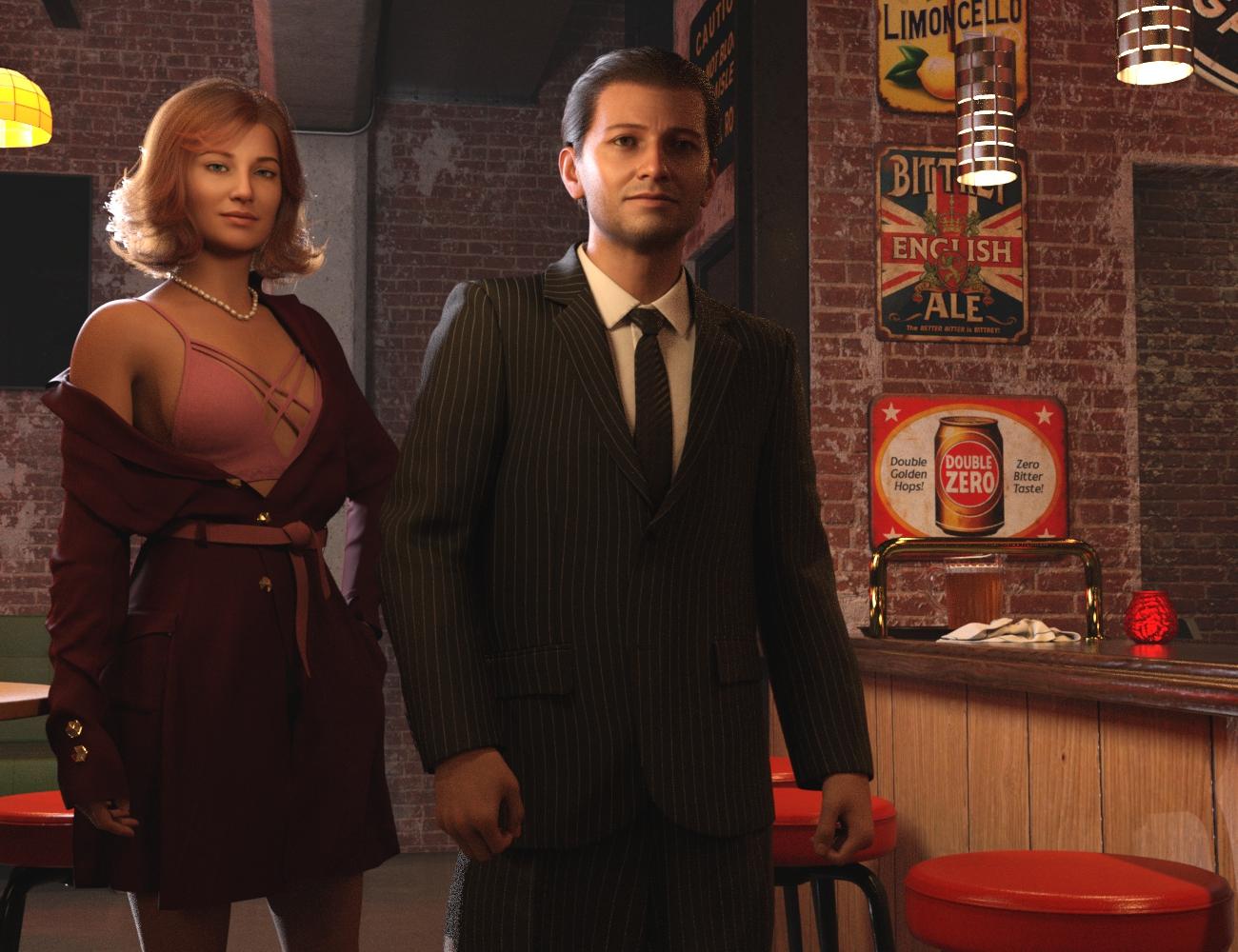
https://www.daz3d.com/murts-place
https://www.daz3d.com/ak-mature-hair-for-genesis-9
https://www.daz3d.com/dforce-hnc24-basic-suit-outfits-for-genesis-9
https://www.daz3d.com/dforce-fe-strand-based-short-curly-hair-for-genesis-9
https://www.daz3d.com/dforce-brz-belted-dress-and-poses-for-genesis-9
https://www.daz3d.com/alo-kymatia-hair-for-genesis-9-8-and-81-female
(the necklace)
https://www.daz3d.com/mdd-madelyn-for-genesis-9
(for skin, underlying the Face Transfer 2-derived textures)Lully's Colors ... again. Freebie, no longer available. Also used the earrings from the FK dfForce Charmed Soul set, but in this last version, I switched to a hair that covers her ears.
Mesh Grabber: Saved Morphs - Transfer or Delete?Hi,
I purchased the Mesh Grabber Bundle. I have modified the mesh of a G8 Figure and created a morph so I can animate the setting. I am finding that a clothing item does not follow the morph because the Mesh Grabber morph that was saved with the G8 figure is missing on the clothing item - I checked for hidden parameters. Adding the clothing item after the mesh grabber morph has been applied to the G8 figure also does not add the morph. Even if I save the scene, close Daz and reload the saved scene.
Is there a way to copy the Mesh Grabber morph over to the clothing item so it matches the G8 figure, including when the morph is animated? I tried to transfer the morph via the Transfer Utility. It did not work.
Is it possible to delete a Mesh Grabber morph from the figure in case I decide to get rid of it and start over with a new morph? I know I can zero out the morph, but I would like to have a clean figure without orphaned Mesh Grabber morphs.
Quads vs Triangles (or other n-gons)Mada said:
1. You get better subdivision results with quad mesh. Triangles can cause irregularities, pinching, or distortion when subdivided, leading to artifacts in the mesh.
2. Quads deform more predictably when rigged and animated.
3. Quads provide a clearer, more logical flow of edge loops - essential for modeling and making adjustments to the mesh.
So the question would be - are you planning to morph the item or create JCMs? Use subdivision on it? If not - triangles should work fine
Thanks, that helps. The item works as is, but I want to add some geometry to cover specific areas of my character. I'll play around on my day off and see what happens.
help wantedbluto said:
yes we have but there is something funky that happent to the underarm and crotch areas something to do with joint motion controls we cant figure out
You may be running into the fact that because the base poses are different, G3 and G8 don't have the same corrective morphs for these areas.
Even though the base shape and the figure's posing range are similar, the different starting pose means the JCMs are named differently (G3's arm only bends up 35 degrees from its base pose to its upper limit, so has pJCMShldrUp_35_L, whereas G8's arm has to bend up 90 degrees and its equivalent but non-identical JCM is pJCMShldrUp_90_L) and G3 JCMs therefore aren't automatically driven by G8's JCM controllers, as it doesn't see them as the same morph.
So if you need JCMs for these areas (and you generally do), then they'll need replacing.
Daz 3D is part of

Connect
DAZ Productions, Inc.
7533 S Center View Ct #4664
West Jordan, UT 84084Licensing Agreement | Terms of Service | Privacy Policy | EULA
© 2026 Daz Productions Inc. All Rights Reserved.